Best Selling Products

Adobe Premiere Pro Account
99 USD

Freepik Premium Account
59 USD

Upgrade Duolingo Super
29 USD

Plugin Retouch4me
69 USD

Upgrade Genuine Office 365
49 USD

Genuine Cheap Canva Pro
39 USD

Capcut Pro 1 Year
39 USD

Upgrade genuine Capture One account
120 USD

Autodesk All App Account Copyright
120 USD

Windows 10 & 11 Pro Key
36 USD

Genuine Adobe Illustrator account
99 USD

Copyright Adobe Lightroom Account
59 USD

Adobe Photoshop Copyright - Full App
120 USD

ChatGPT Plus Account (GPT-4)
16 USD

MidJourney Account
29 USD
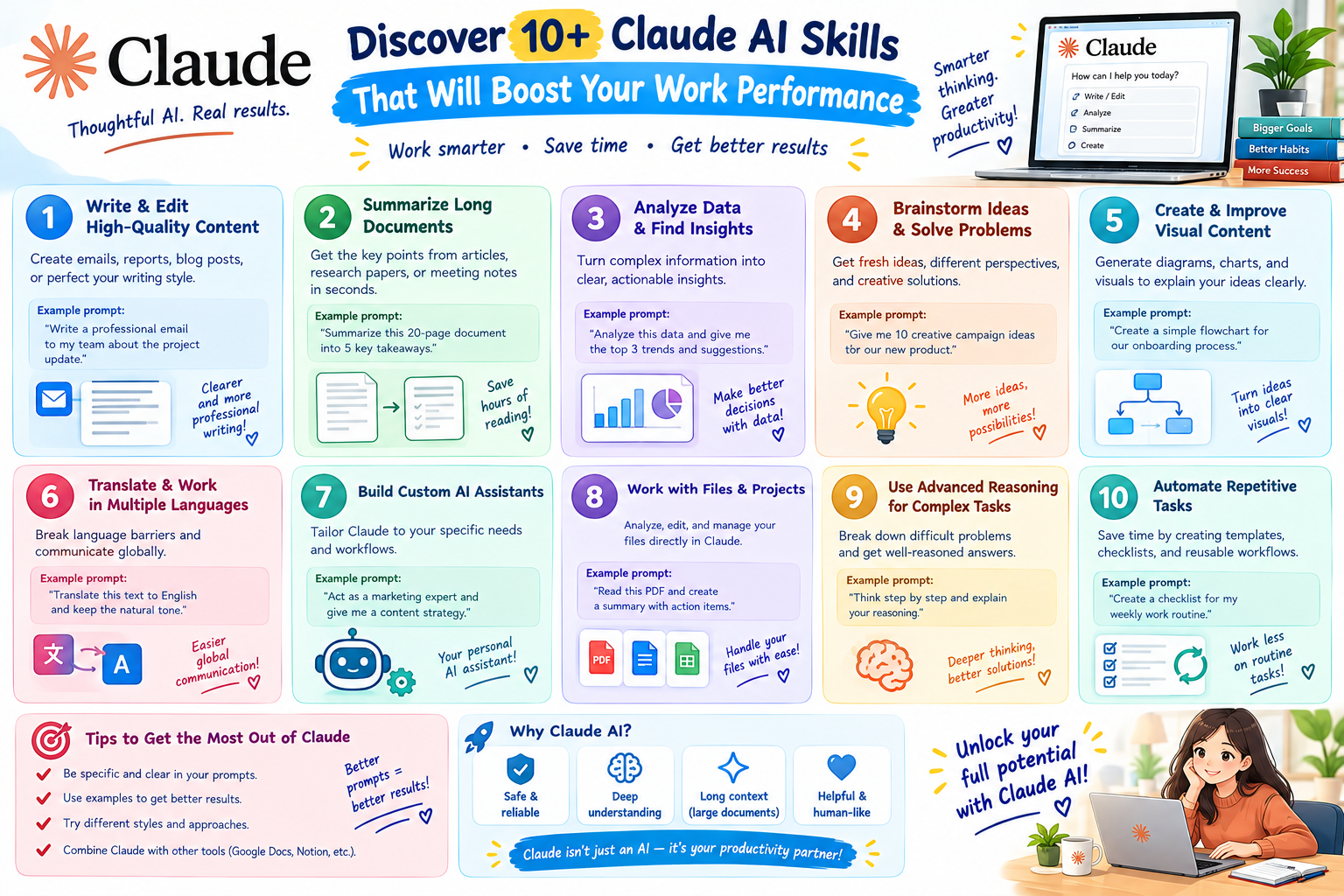
Discover 10+ Claude AI skills that will boost your work performance.
Nội dung
- 1. What skills does Claude need?
- 2. 10+ skills for Claude to improve performance
- 2.1. In-depth Frontend Design
- 2.2. Automated Code Review and Optimization
- 2.3. Browser interaction as if a real user
- 2.4. Connecting and processing specialized data
- 2.5. Intelligent Database Management
- 2.6. Automated Security Testing
- 2.7. Systematizing knowledge using visual diagrams
- 3. Claude's skills for marketing and office workers
- 4. Why should we develop specific skills for Claude?
- 5. Guide to setting up skills for Claude
- 5.1. Installing Claude Desktop
- 5.2. Create separate projects for each work group.
- 6. Tips for effectively building Claude's skills
- 7. Notes on using Claude AI skills
- 8. Conclusion
Claude AI is gradually becoming a familiar assistant in many tasks, from programming and interface design to marketing, content writing, and data processing. However, to effectively utilize the power of this tool, using the right skills for Claude is crucial. When properly configured, Claude can assist in handling complex tasks with a clear process, significantly reducing manual operation time. Join Sadesign in exploring over 10 useful skills below to turn Claude into a powerful assistant for your daily work.
1. What skills does Claude need?
Skills for Claude can be simply understood as the abilities or established processes that enable Claude to perform a specific set of tasks consistently. Instead of having to describe the entire requirement every time a task is performed, you can build pre-defined instructions so Claude understands how to handle it, format the results, and adhere to certain standards. This allows Claude to not only answer common questions but also participate more deeply in the workflow. From code testing and data analysis to building branded content, each skill can help reduce repetitive tasks and increase the speed of task completion.
-
Process automation: Transforming repetitive tasks into faster, more efficient workflows.
-
Output standardization: This helps ensure consistency in structure, tone, and presentation of the generated results.
-
Save time: Avoid having to re-enter the same request group multiple times.
-
Expanding Claude's capabilities: Enabling AI to provide deeper support for specific tasks.

2. 10+ skills for Claude to improve performance
Not every job requires using Claude in the same way. By building skills tailored to specific needs, you can turn Claude into a personal assistant for programming, marketing, design, or data management. Below are some prominent skills with high applicability.
2.1. In-depth Frontend Design
For projects requiring website interface development, Claude can help translate design ideas or descriptions into a clear frontend structure. Users simply provide requirements for layout, interface elements, and desired style, and the AI can suggest suitable implementation methods.
-
Convert the interface description into HTML, CSS, and JavaScript .
-
Suggested component structure based on different parts of the interface.
-
Supports deployment with popular frontend frameworks.
-
Suggest ways to build a responsive interface that works across multiple screen sizes.
-
Refine the code for readability and ease of maintenance.
2.2. Automated Code Review and Optimization
The larger the code, the more time-consuming manual review becomes. Claude's code review skills can help programmers find illogical code snippets, logical errors, or suboptimal implementations.
-
Analyze the code to find logical errors and redundant code.
-
Check for common security issues.
-
Suggest ways to write code that is more concise and easier to understand.
-
Suggestions for improving performance.
-
It helps standardize the way code is written in the project.
-
Explain the cause of the error so that programmers can easily fix it.
The useful aspect is that Claude can provide both the reason and the solution , instead of just pointing out that the code has a problem. This makes the review process more intuitive, especially for projects with multiple team members.
2.3. Browser interaction as if a real user
Another highly applicable skill Claude possesses is supporting the simulation of common browser actions. Actions such as clicking, entering data, scrolling, or switching to a different page can be incorporated into the testing process.
-
Test the login and logout workflow.
-
Testing the information entry form.
-
Check the page turning operation.
-
Simulate the user journey on a website.
-
Identify inconsistencies in the UI/UX experience.
-
Assists in testing multi-step processes.
This skill is particularly useful for websites with many consecutive operations. Instead of having to repeat each step manually, the testing process can be more clearly organized to make it easier to detect errors.
2.4. Connecting and processing specialized data
When a project has to work with multiple data sources, managing information between systems can easily become complicated. Claude can help build the logic for processing data between APIs, databases, and external services.
-
Analyze the API structure and request/response.
-
Check the data format before processing.
-
Suggestions on how to handle API errors.
-
Supports the organization of data across multiple sources.
-
Propose a suitable caching mechanism.
-
Optimize the API call process to minimize unnecessary steps.
As a result, the data connection process can be organized more coherently. This is also an important foundation when the system needs to expand and integrate more services in the future.
2.5. Intelligent Database Management
As databases grow, optimizing queries and table structures becomes increasingly important. Claude can assist in analyzing statements, identifying inconsistencies, and suggesting more efficient ways to organize data.
-
Analyze and optimize SQL statements.
-
Detect queries that may be slow to process.
-
Suggest a suitable table structure.
-
Examine the relationships between the data tables.
-
It helps detect errors during data manipulation.
-
Suggestions for scaling up as the amount of data increases.
When Claude is combined with a suitable governance process, users can reduce manual audit time and easily identify areas for improvement in the system.

2.6. Automated Security Testing
Security is an indispensable part of software development. Claude's skills in security testing can help him identify common issues in source code and data handling.
-
Examine how the system processes input data.
-
Review the authentication and authorization mechanisms.
-
Several configurations have been detected that pose a security risk.
-
Check for code snippets that show signs of potential risks.
-
Suggest solutions for each problem.
-
Assist in building a security checklist before deployment.
Claude should be considered a tool to assist in the review process, not a complete replacement for professional security testing. For critical systems, AI results still need to be verified by professionals.
2.7. Systematizing knowledge using visual diagrams
When a project has too many modules, data flows, and relationships between components, reading text-based documentation can sometimes be quite difficult to visualize. Claude can help translate complex information into a more easily understandable diagrammatic structure.
-
Overall architectural sketch of the project.
-
Describe the data flow between the components.
-
Divide the system into modules.
-
Illustrate the relationship between the functions.
-
Summarize the process into a diagram for easier communication within the team.
-
Supports updating documents when the system changes.
This is one of the useful skills when working in a team because everyone can quickly grasp the overall picture without having to read the entire technical document.
3. Claude's skills for marketing and office workers
Claude isn't just for programmers. With its ability to process text, analyze information, and build content on demand, Claude is also suitable for marketing, content creation, design, and office work that involves handling a large number of documents daily.
-
Create slides according to your brand identity: Provide your brand guideline, colors, fonts, logo, and main content so Claude can help build a consistent slide structure.
-
Organizing content into infographics: Claude can read long texts, select key points, and arrange them into a visual layout that designers can easily implement.
-
Blogging according to brand SOP: When provided with specific guidelines, Claude can help maintain a consistent tone, structure, and word usage across multiple posts.
-
Summarizing a document: Breaking down a long report into key points helps readers quickly grasp the important information.
-
Content planning: Suggesting topics, keyword groups, article structure, and implementation schedule based on the brief.
-
Analyzing customer feedback: Helps categorize similar opinions to identify common problems.
These skills enable Claude to become a supportive assistant behind the scenes, reducing repetitive tasks so users can focus more on tasks requiring critical thinking and creativity.

4. Why should we develop specific skills for Claude?
Using Claude with individual commands is still effective, but when the work is repetitive, building specialized skills will help make the process more consistent. Instead of starting from scratch every time a task is performed, users can establish the necessary principles beforehand.
-
Reduce prompt entry time: Repetitive requests are standardized beforehand.
-
Maintaining consistent results: Claude has a clear basis for handling the same type of task.
-
Easy to share within a team: Processes can be standardized for use by multiple people.
-
Minimize errors: Important requirements are incorporated into the process instead of relying on user memory.
-
Scalable: As needs change, skills can be updated to suit new processes.
The more specific the skill, the clearer the instructions should be. A clearly described process will help Claude understand exactly what needs to be done and the desired outcome.
5. Guide to setting up skills for Claude
To begin building Claude's skills, you can prepare the work environment beforehand and then create a separate project for each task group. This organizational approach helps to keep documents, instructions, and related information centralized in one space instead of scattered across multiple conversations.
5.1. Installing Claude Desktop
Claude Desktop is suitable for workflows that require frequent work with documents and folders on a computer. After installation, you can log in and start creating your own workspace.
-
Step 1: Access the Claude Desktop download page and select the version compatible with your operating system.
-
Step 2: Install the application on your computer.
-
Step 3: Open Claude Desktop and log in with your account.
-
Step 4: Test the interface and features before creating the project.
5.2. Create separate projects for each work group.
After completing the setup, you should divide your projects according to their intended use. For example, a content project could contain your brand's SOP, while another programming project could contain technical documentation and coding rules.
-
Step 1: Select Project in the Claude interface.
-
Step 2: Click New Project to create a new workspace.
-
Step 3: Name the project according to the task to be performed.
-
Step 4: Click Create Project to complete.
-
Step 5: Add necessary documents, instructions, or information to the Project.
This organizational structure gives Claude more context when handling requests. You should also give your projects easily recognizable names to avoid confusion if you have to work with different content teams.

6. Tips for effectively building Claude's skills
A good skill doesn't necessarily require lengthy instructions. What's more important is that Claude knows exactly what to do, what data to base it on, and how the final result should be presented. Therefore, prioritize specific, structured, and easily verifiable requirements.
-
Clearly state the objective: Specify exactly what task Claude needs to complete.
-
Provide context: Give the AI the necessary information to understand the situation.
-
Output specifications: Specify which table, list, paragraph, or structure you want to receive.
-
For example: A few sample examples help Claude understand the visual requirements better.
-
Identify what to avoid: Clearly state the content, expressions, or actions that should not be used.
-
Break down large tasks into smaller steps: Complex processes should be broken down into smaller, more manageable steps.
-
Review and update: After a period of use, adjust your skills based on actual errors that arise.
7. Notes on using Claude AI skills
Claude can assist with many tasks, but the results still depend on the input data and setup. Especially with code, business data, or critical information, users should not consider the AI's answer as the final result and skip the verification step.
-
Do not provide sensitive data unless absolutely necessary.
-
Review the code before deploying it to a real-world environment.
-
Verify important information before use.
-
Don't rely entirely on AI for high-risk decisions.
-
Regularly update your skills as work processes change.
-
Keep effective versions of the instructions so they can be easily restored when needed.
The effective use of AI isn't about assigning as many tasks as possible, but about dividing responsibilities appropriately. Claude should handle the parts that can be automated, while humans retain the roles of checking, making decisions, and being accountable for the final results.

8. Conclusion
The more than 10 skills for Claude shown above demonstrate how AI can participate in various stages of a workflow. From coding, testing, and data management to building slides, infographics, and marketing content, establishing the right skills helps Claude understand the job more deeply and produce more consistent results. Instead of just viewing Claude as a question-answering tool, you can build it into an assistant that fits your workflow. Start with a frequently performed task, standardize the processing steps, and then expand to other tasks. When the skill system is properly built, the time spent on repetitive tasks will be shortened, and you will have more space to focus on tasks that require critical thinking and creativity.





















VIP Products








Best Selling Products
Adobe Premiere Pro Account
99 USD
Freepik Premium Account
59 USD
Upgrade Duolingo Super
29 USD
Plugin Retouch4me
69 USD
Upgrade Genuine Office 365
49 USD
Genuine Cheap Canva Pro
39 USD
Capcut Pro 1 Year
39 USD
Upgrade genuine Capture One account
120 USD
Autodesk All App Account Copyright
120 USD
Windows 10 & 11 Pro Key
36 USD
Genuine Adobe Illustrator account
99 USD
Copyright Adobe Lightroom Account
59 USD
Adobe Photoshop Copyright - Full App
120 USD
ChatGPT Plus Account (GPT-4)
16 USD
MidJourney Account
29 USD