Best Selling Products
Autodesk All App Account Copyright
120 USD

Genuine Adobe Illustrator account
99 USD

Upgrade Genuine Office 365
49 USD
Copyright Adobe Lightroom Account
59 USD
Upgrade genuine Capture One account
120 USD

Windows 10 & 11 Pro Key
36 USD

Adobe Premiere Pro Account
99 USD

Upgrade Duolingo Super
29 USD

Plugin Retouch4me
69 USD
Adobe Photoshop Copyright - Full App
120 USD

Capcut Pro 1 Year
39 USD
Genuine Cheap Canva Pro
39 USD

ChatGPT Plus Account (GPT-4)
16 USD

MidJourney Account
29 USD

Freepik Premium Account
59 USD
Discover how to create creative and trendy photo concepts for October 20th using AI.
Nội dung
- 1. Why should you use AI to create photo concepts for October 20th?
- 2. Easy-to-use AI tools for creating beautiful photo concepts for October 20th (Vietnamese Women's Day).
- 3. Instructions on how to create a 20/10 photo concept using ChatGPT
- Step 1: Access ChatGPT
- Step 2: Prepare the reference image and enter the prompt.
- Step 3: Create the image and check the results.
- Step 4: Finalize and save the October 20th photo.
- 4. Suggested prompt for creating beautiful, creative, and trendy photo concepts for October 20th.
- Concept 1: A muse surrounded by flowers in Korean style.
- Concept 2: Elegant Rose Portrait
- Concept 3: Vintage muse with daisies
- Concept 4: Magazine fashion photoshoot
- Concept 5: Loving photos for Mom on October 20th.
- 5. Things to note when creating 20/10 photo concepts using AI.
- 6. Conclusion
Vietnamese Women''s Day on October 20th is a wonderful occasion to capture beautiful moments, express love, and create meaningful gifts. Instead of spending time preparing outfits, finding a studio, or choosing a photoshoot location, you can use AI to turn your ideas into impressive photo sets right at home. From gentle, ethereal styles and romantic floral portraits to modern fashion concepts, everything can be created with just a few descriptive sentences. The best part is, you don''t need professional design skills.
1. Why should you use AI to create photo concepts for October 20th?
AI opens up a flexible, time-saving way to create images that suit a variety of needs. You can build a personalized concept yourself without needing many props or hiring a professional photography team. By simply changing the outfit, color, lighting, or background in the prompt, an initial photo can be transformed into many fresh new versions. Some notable advantages of using AI to create photos for October 20th include:
-
Unleash your creativity: Easily experiment with ethereal, vintage, Korean, classic, or magazine-style looks.
-
Saves time: No need to travel to multiple locations or prepare a separate outfit for each concept.
-
Personalize the image: You can use your own photos as a reference to create a version that suits your preferences.
-
Versatile applications: Images can be used as profile pictures, cover photos, greeting cards, Facebook, Instagram, or TikTok posts.
-
Create a meaningful gift: A photo album dedicated to your mother, girlfriend, wife, sister, or friend will make your October 20th wishes even more special.
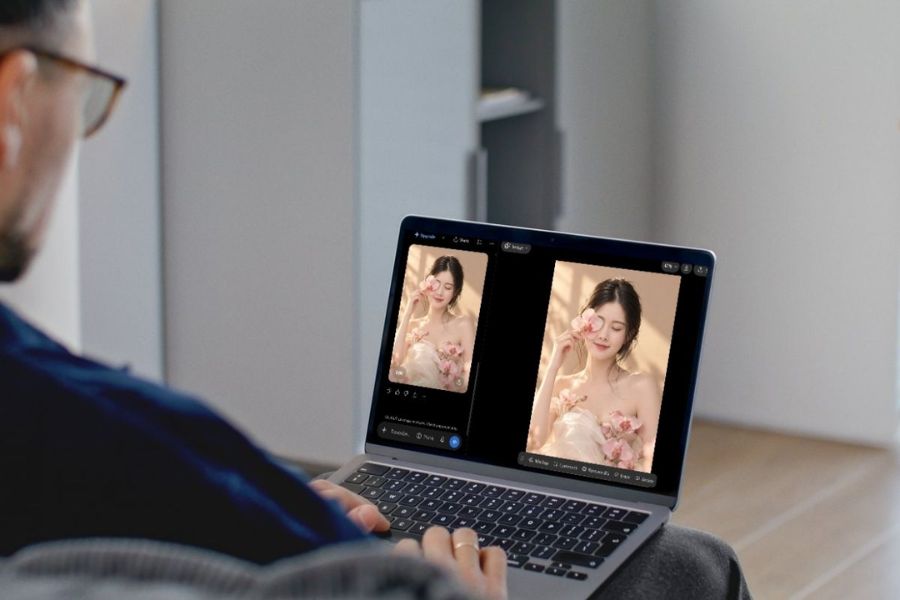
2. Easy-to-use AI tools for creating beautiful photo concepts for October 20th (Vietnamese Women's Day).
Currently, users can choose from a variety of AI tools depending on their creative purposes. Some prominent applications not only support image creation but also help edit and design greeting cards and finalize content for posting on social media.
-
ChatGPT: Suitable for creating images from commands, using reference images, and adjusting results through conversation. This is a worthwhile option if you want to create personal portraits, fashion photos, or concept photos as gifts for loved ones.
-
Canva: Suitable for those who want to combine AI images with text, decorative frames, flowers, and 20/10 greeting card templates. After creating the image, you can continue editing the layout on the same interface.
-
Adobe Firefly: Useful for experimenting with art styles, creating innovative visuals, or integrating with graphic design workflows.
3. Instructions on how to create a 20/10 photo concept using ChatGPT
ChatGPT is a convenient option for transforming ideas into visuals through natural language. You can describe everything from hairstyles and clothing to lighting, colors, and emotions of your characters. If you want your images to have a unique touch, prepare a clear reference photo and choose a suitable concept before you begin.
Step 1: Access ChatGPT
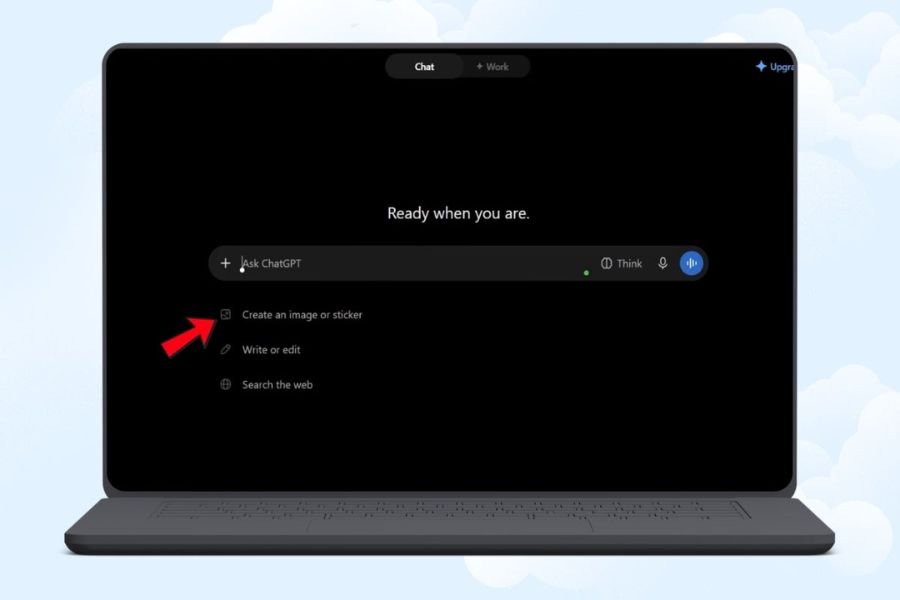
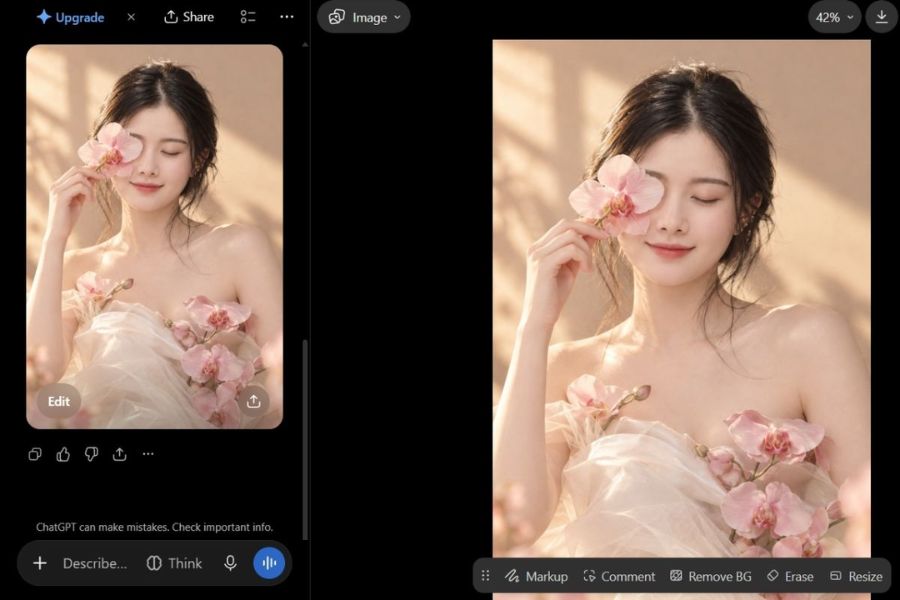
First, open your browser on your computer or phone and access ChatGPT at chatgpt.com. Log in to your account to use the features provided. Depending on the version and type of account, the image creation interface may differ slightly.
After entering the chat interface, check the tools area for the image creation feature or Images if this feature is displayed on your account. If you don't see it, you can try describing your image creation request directly in the chat box or check the available features. Having an idea prepared beforehand will help you work faster and achieve the desired results more easily.

Step 2: Prepare the reference image and enter the prompt.
If you want to create an image based on your face, choose a photo with good lighting, a clear face, and not too much of it obscured. Next, upload the photo to the chat if the interface supports it, then enter a prompt describing the concept. You should clearly specify the subject, clothing, hairstyle, background, lighting, colors, and shooting angle so that the AI understands the request accurately.
You can use an English prompt to describe your photography style in detail, or write in Vietnamese naturally. The important thing isn't how long the prompt is, but whether the details are consistent. For example, if you want to create a muse-like image, combine a white dress, fresh flowers, soft lighting, and a pastel background instead of adding too many contrasting elements.
Step 3: Create the image and check the results.
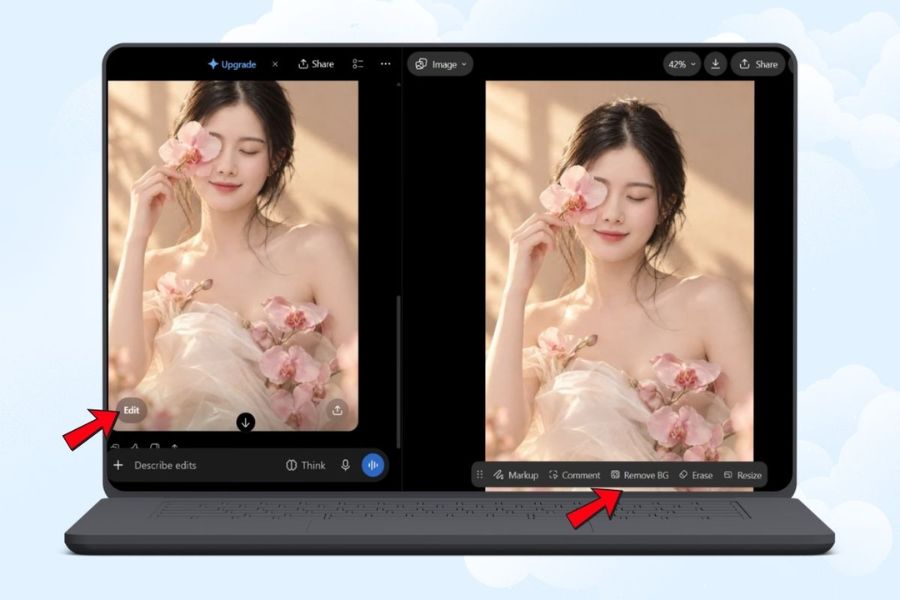
After submitting the prompt, wait for the tool to process and generate the image. When the image appears, check if the character, clothing, background, and colors match the original concept. Don't save immediately if the face is significantly altered, the hands look unnatural, or the flowers and accessories appear in the wrong positions.
If you're still not satisfied, you can continue requesting edits right in the chat. Clearly specify each point that needs changing, such as keeping the face the same as the reference image, changing the background to a cream color, reducing saturation, or softening the lighting. Editing each detail individually will give you better control over the result compared to rewriting the entire prompt after each image creation.
Step 4: Finalize and save the October 20th photo.
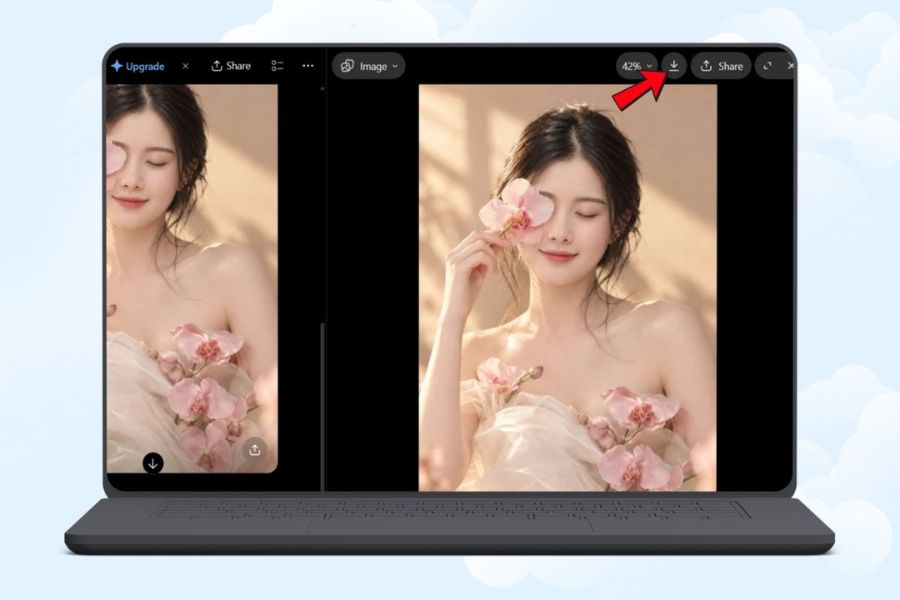
Once you have a suitable image, double-check the overall quality before downloading. Pay attention to the naturalness of the face, hair, hands, clothing, accessories, and details at the edges of the image. If the image is created for social media posting, consider the aspect ratio from the start to minimize the need for cropping later.
Next, use the download button or the save image option provided by the interface. If you want to turn the image into a greeting card, you can import the image into Canva to add a message, recipient's name, or date. It's recommended to add text in the final design step to easily edit fonts, alignment, and colors, and to avoid spelling errors in the AI-generated text.
4. Suggested prompt for creating beautiful, creative, and trendy photo concepts for October 20th.
To make your photos stand out, choose a concept that suits the personality of the person featured. There's no need to chase too many trends at once; a main style and a harmonious color palette are enough to create an attractive photo set. Below are some prompts you can copy, modify details, and use immediately.
Concept 1: A muse surrounded by flowers in Korean style.
This is the perfect choice for those who love a gentle, pure, and romantic look. A white dress, fresh flowers, natural light, and a cream-colored background give the photo a soft, studio-like feel.
Reference prompt:
Create a photorealistic portrait of the woman in the reference photo, preserving her recognizable facial features. She wears an elegant cream-white dress and gently holds a bouquet of pink roses. Soft natural sunlight, warm beige background, delicate makeup, loose wavy hair, romantic Korean editorial photography, pastel pink and ivory color palette, realistic skin texture, half-body composition, shallow depth of field, professional studio quality, no text, vertical 4:5 ratio.
Concept 2: Elegant Rose Portrait
For a more striking photoshoot, try a concept combining red roses, elegant attire, and cinematic lighting. The contrast between the red and the dark background creates a mature, alluring yet sophisticated feel. This style is suitable for profile pictures or fashion photoshoots for October 20th.
Reference prompt:
Create a luxurious editorial portrait of the woman in the reference photo, maintaining her recognizable facial identity. She wears a sophisticated black satin dress and holds a bouquet of deep red roses. Dramatic soft lighting, elegant dark background, subtle highlights on the face, natural makeup, realistic skin texture, high-fashion magazine photography, rich burgundy and black tones, refined composition, photorealistic, no text, vertical portrait.
Concept 3: Vintage muse with daisies
Vintage style evokes a sense of nostalgia, intimacy, and a touch of romance. You can choose a dress with small floral prints, softly curled hair, a bouquet of white daisies, and a sun-drenched backdrop. This idea is suitable for those who love artistic photos with warm, natural colors.
Reference prompt:
Create a nostalgic vintage portrait based on the reference photo, preserving the woman's recognizable facial features. She wears a delicate floral dress and holds white daisies in a sunlit garden. Warm film photography, soft grain, golden afternoon sunlight, muted cream and sage green tones, gentle smile, natural pose, romantic countryside atmosphere, authentic skin texture, artistic composition, no text, vertical 4:5 ratio.
Concept 4: Magazine fashion photoshoot
If you love modern style, you can try a photoshoot concept like a magazine cover model. Blazers, satin dresses, or monochrome outfits combined with a minimalist background will help the subject become the focal point. Prioritize natural poses, deep lighting, and a clean composition for a more professional look.
Reference prompt:
Create a high-end fashion editorial portrait of the woman in the reference photo, preserving her recognizable facial features. She wears a tailored beige blazer with elegant accessories, posing confidently in a minimalist studio. Clean composition, soft directional lighting, natural makeup, realistic skin texture, sophisticated neutral palette, luxury magazine photography, sharp focus on the face, professional styling, no text, vertical 4:5 ratio.
Concept 5: Loving photos for Mom on October 20th.
No need for anything too elaborate; a warm photo with carnations, elegant attire, and a natural smile is enough to convey your love for your mother. You can create a personalized portrait of your mother or build a concept of mother and daughter together. If using a photo of your mother, choose a clear reference image and accurately depict her age, hairstyle, and clothing.
Reference prompt:
Create a warm and heartfelt Mother's Day-style portrait for Vietnamese Women's Day on October 20, based on the provided reference photo. Preserve the recognizable facial features of the woman. She wears an elegant pastel pink blouse and holds a bouquet of pink carnations. Cozy sunlit room, warm cream background, gentle smile, soft natural lighting, authentic skin texture, graceful and timeless portrait photography, delicate pink and ivory palette, no text, vertical 4:5 ratio.
You can add the phrase "preserve the recognizable facial features" to emphasize your desire to retain the character's identifying characteristics. However, AI doesn't guarantee absolute facial resemblance in all cases. Carefully check the results and adjust if the image doesn't match the reference image.
5. Things to note when creating 20/10 photo concepts using AI.
To create beautiful and user-friendly images, you should check several factors right from the conceptual stage. Small details such as image proportions, faces, hands, or text placement can significantly affect the final product quality.
-
Choose the right aspect ratio: 4:5 is suitable for many social media photo posts, 9:16 for Stories or phone wallpapers, and square images are ideal for profile pictures.
-
Authenticity check: Carefully observe the face, fingers, hair, jewelry, and details on the clothing. If you find any errors, ask the AI to correct each part.
-
Avoid requesting too much detail: A prompt containing too many contrasting styles, colors, and contexts can lead to inconsistent results.
-
Add text after creating the image: If you want to write a greeting like "Happy Vietnamese Women's Day 20/10", create the image without text first, then add the content using the design tool for easier control.
-
Respect privacy: Only use other people's photos with appropriate consent, especially if the images are to be posted publicly.
-
Check usage rights: If you plan to use the images for advertising or commercial purposes, review the AI tool's terms and conditions and ensure that the use of images, trademarks, or related assets is appropriate.
6. Conclusion
Creating 20/10 (Vietnamese Women's Day) photo concepts using AI is a fun way to refresh your personal images, keep up with creative trends, and preserve memorable moments. With just a reference photo, a clear idea, and a suitable prompt, you can experiment with many styles, from gentle and poetic, nostalgic vintage to modern magazine fashion. Start with a favorite concept, create the image on ChatGPT, and then refine every detail until you achieve the desired result. You can also combine it with Canva to add greetings and turn the image into a personalized card for your mother, girlfriend, or friends. Sometimes, the most meaningful gift isn't about the elaborate design, but about the time you spend creating a unique image for the women you love.















VIP Products




Best Selling Products
Autodesk All App Account Copyright
120 USD
Genuine Adobe Illustrator account
99 USD
Upgrade Genuine Office 365
49 USD
Copyright Adobe Lightroom Account
59 USD
Upgrade genuine Capture One account
120 USD
Windows 10 & 11 Pro Key
36 USD
Adobe Premiere Pro Account
99 USD
Upgrade Duolingo Super
29 USD
Plugin Retouch4me
69 USD
Adobe Photoshop Copyright - Full App
120 USD
Capcut Pro 1 Year
39 USD
Genuine Cheap Canva Pro
39 USD
ChatGPT Plus Account (GPT-4)
16 USD
MidJourney Account
29 USD
Freepik Premium Account
59 USD