
Best Selling Products
Genuine Adobe Illustrator account
99 USD

ChatGPT Plus Account (GPT-4)
16 USD

Adobe Premiere Pro Account
99 USD

MidJourney Account
29 USD
Copyright Adobe Lightroom Account
59 USD
Genuine Cheap Canva Pro
39 USD
Upgrade Duolingo Super
29 USD
Upgrade genuine Capture One account
120 USD
Adobe Photoshop Copyright - Full App
120 USD

Capcut Pro 1 Year
39 USD
Plugin Retouch4me
69 USD

Freepik Premium Account
59 USD
Upgrade Genuine Office 365
49 USD
Autodesk All App Account Copyright
120 USD
Windows 10 & 11 Pro Key
36 USD
Instructions on how to create beautiful and unique personalized greeting cards using Gemini for October 20th.
Nội dung
- 1. How to create personalized greeting cards using Gemini: A detailed guide from A to Z.
- Step 1: Access Gemini and select the Create Image tool.
- Step 2: Enter the prompt to create a personalized October 20th greeting card.
- Step 3: Review, edit, and download the card to your device.
- 2. Tips for creating beautiful and impressive 20/10 greeting cards using AI.
- 2.1. Detailed description in the prompt
- 2.2. Choose soft, gentle colors that suit the recipient.
- 2.3. Personalize the card with your name and a personal message.
- 2.4. Keep the layout simple and highlight the message.
- 2.5. Edit each detail to finalize the card design.
- 3. Conclusion
Vietnamese Women''s Day on October 20th is a special occasion to send loving messages to mothers, girlfriends, sisters, teachers, and other important women in life. Besides fresh flowers or meaningful gifts, a custom-designed card with a sincere message is enough to make the recipient feel happy and appreciated. If you want to create a beautiful card without knowing how to use design software, you can try Gemini. With its ability to create images from text descriptions, Gemini helps you transform simple ideas into personalized card designs. You can customize the colors, patterns, layout, and message content to suit each recipient. Just prepare a clear prompt, and the process of designing a 20/10 card will become faster and more enjoyable. In this article, let''s explore with Sadesign how to create personalized cards using Gemini step-by-step, along with useful tips for writing prompts to create beautiful, sophisticated, and emotionally rich cards.

1. How to create personalized greeting cards using Gemini: A detailed guide from A to Z.
No need to install complicated software or spend hours editing; you can still create 20/10 greeting cards using Gemini right on your phone or computer. Follow these three steps to get the perfect result.
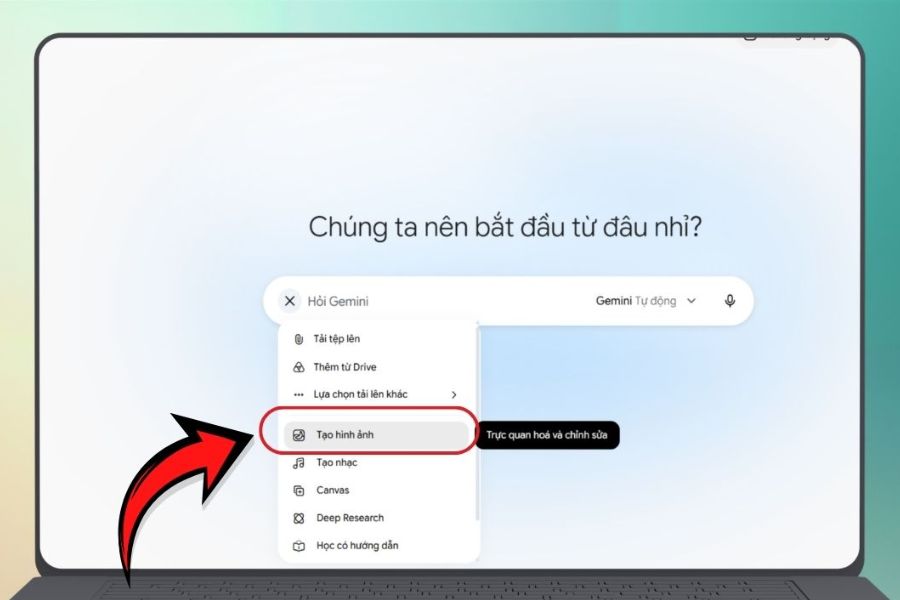
Step 1: Access Gemini and select the Create Image tool.
First, go to https://gemini.google.com/ and log in with your personal Google account. After successfully logging in, the Gemini chat interface will appear. Here, find the Tools section below the content input box, then select Create Image to start designing your card. The name and location of the option may vary depending on the interface version or account usage.
After selecting your tool, you should first determine the style of card you want to create to make the prompt input process smoother. For example, if you're making a card for your mother, you can choose a gentle style with roses and cream tones; if it's for a best friend, bright colors and cute patterns would be more suitable. Clearly defining your idea from the beginning helps you describe your requirements specifically, minimizes the need for revisions, and makes it easier to create a card with your own unique touch.
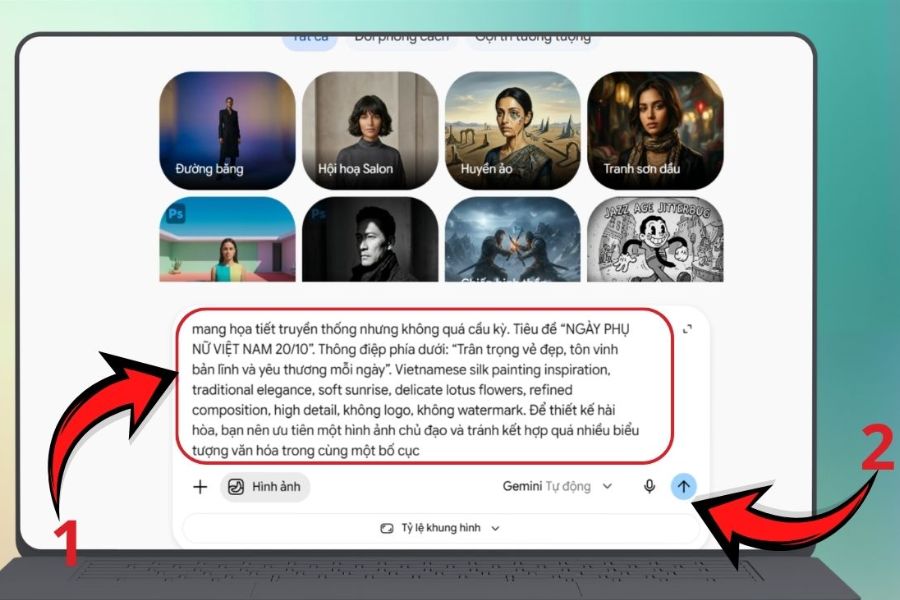
Step 2: Enter the prompt to create a personalized October 20th greeting card.
After opening the Image Creator tool, enter the prompt into the chat box so Gemini understands the card design you want. An effective prompt should include elements such as the October 20th theme, recipient, main colors, design style, illustrations, layout, and greeting. Instead of just asking for a beautiful card, describe it as specifically as possible to ensure the result is closer to your original idea. For example, you can use the following command to create a card for your mother:
Sample prompt:
“Create a greeting card for Vietnamese Women's Day (October 20th) for your mother. The style should be elegant, romantic, and warm, using pastel pink and cream white tones. Decorate with roses, hydrangeas, and small leaves, with soft lighting and a balanced, delicate composition. In the center of the card is the message 'Wishing Mom a very happy, healthy, and joyful October 20th.' The design is beautiful, the images are sharp, the text is easy to read, and it's suitable for sending via phone. Avoid using too many patterns.”
After completing the prompt, you press the submit button and wait for Gemini to generate the image. If you want to create a card for your lover, teacher, or colleague, you simply change the recipient, message, and design style accordingly. This is the fun part of creating cards with AI: you can try many different ideas without having to start from scratch or need in-depth design knowledge.
Step 3: Review, edit, and download the card to your device.
Once Gemini finishes creating the image, the greeting card template will appear on the screen for you to preview. Check the colors, layout, patterns, and especially the message. If the image looks good but isn't quite right, you can continue to submit editing requests directly in the chat. For example, you can request to change the background to peach pink, add sunflowers, reduce decorative details, or adjust the layout so that the message stands out more.
After you're satisfied with the result, tap the Download icon on the image to save the card to your device, depending on the interface you're using. Then, you can send the card via Zalo, Messenger, email, or post it on Facebook to share your October 20th wishes. If you plan to print the card as a gift, check the size and resolution of the image before printing. In case the text generated by AI has incorrect punctuation or is inaccurate, you should edit it using image design tools to ensure the final product is neat and easy to read.
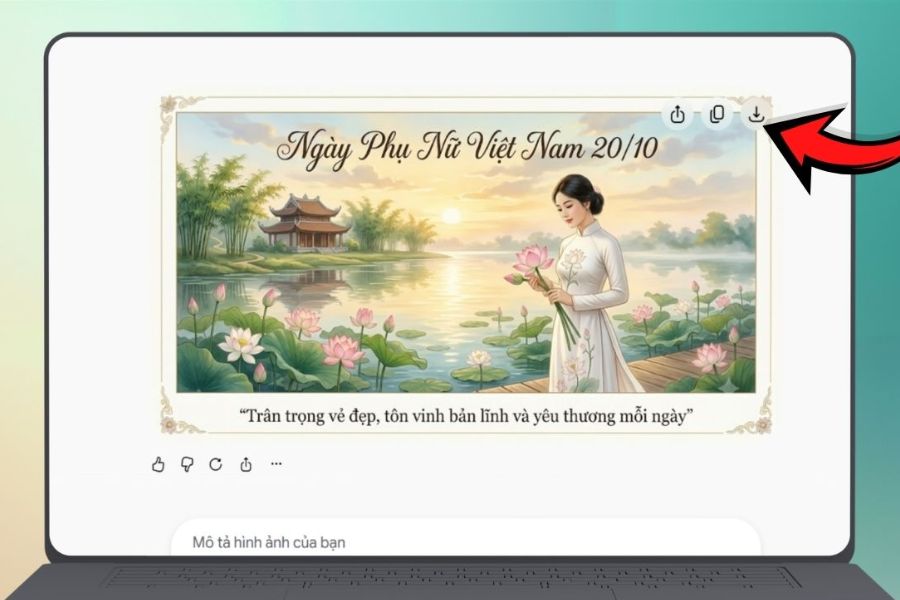
2. Tips for creating beautiful and impressive 20/10 greeting cards using AI.
To ensure your greeting card is not only beautiful but also conveys your feelings for the recipient, pay attention to the prompt you write and the selection of design elements. The tips below will help you use Gemini more effectively, even if you're using the AI image creation tool for the first time.
2.1. Detailed description in the prompt
The more specific the prompt, the more information Gemini has to guide the image according to your wishes. When writing the command, clearly define the theme, style, colors, patterns, layout, and emotions you want to express. For example, instead of writing "Create a romantic October 20th card," you could request a card template with a cream background, pastel roses in the two corners, soft lighting, and a center for the message.
Additionally, you can use keywords like romantic , elegant , soft light, minimalist , or watercolor style to guide the design. Prioritize clear descriptions and avoid including too many unrelated requirements in a single prompt. If the result isn't as desired, you can add details so Gemini can make more precise adjustments.
2.2. Choose soft, gentle colors that suit the recipient.
Color is a crucial element in creating the emotion of a greeting card. For October 20th, shades like pastel pink, cream white, beige, light yellow, or lavender purple often evoke a gentle and elegant feeling. You can combine two to three main colors to create harmony, avoiding using too many colors that can make the overall design look cluttered.
If you're making a card for your mother, try combining cream with peach and hydrangeas for a warm feeling. For your teacher, white combined with light yellow and sunflowers can express appreciation and gratitude. Meanwhile, a card for a best friend could use bright pink, purple, or fun patterns. Choose a color palette based on the recipient's preferences to make the card more personal and meaningful.

2.3. Personalize the card with your name and a personal message.
A greeting card becomes even more special when it carries a message tailored specifically to the recipient. Instead of using generic greetings, ask Gemini to design a card for a specific person, including their name, address, or details that hint at the relationship between the two of you. These elements make the card feel more intimate and sincere compared to generic designs.
For example, for your mother, you could choose a simple message like "Wishing you peace, good health, and lots of joy." For your teacher, prioritize a message expressing gratitude; and for your lover, you can choose a romantic and sweet message. However, be sure to double-check the name and text after Gemini creates the image, as the AI can sometimes display Vietnamese characters or diacritics incorrectly.
2.4. Keep the layout simple and highlight the message.
A beautiful design doesn't necessarily need excessive ornamentation. In fact, a clean layout with a few subtle accents often makes the card look more elegant and visually appealing. You should ask Gemini to place your message prominently, incorporate floral motifs in moderation, and maintain appropriate spacing between elements.
To achieve this effect, you can add phrases like "minimalist layout," "use only one cluster of flowers as a focal point," "clean, uncluttered background," or "leave space in the center for the message." If you want to share the card on social media, consider the appropriate aspect ratio. For printed cards, you should also check the image quality to avoid blurring or pixelation during printing.
2.5. Edit each detail to finalize the card design.
Don't discard a card design just because the first result isn't perfect. You can continue to ask Gemini to edit the image with specific instructions, such as changing the background color, adding flowers, reducing the amount of text, or highlighting the text. This step-by-step editing process gives you better control over the design and allows you to retain the details you're already happy with.
If the image is beautiful but the greeting has incorrect punctuation, you can save the image and use another design tool to add the correct text. This is also a suitable method when you want to add the recipient's name, date, or personal signature. Before sending the card, review all the images to ensure the content is clear, the colors are harmonious, and the message is conveyed completely.

3. Conclusion
With Gemini, creating personalized greeting cards for October 20th is no longer a time-consuming task or a requirement for professional design skills. In just three steps – selecting the Create Image tool, entering the prompt, and downloading the finished product – you can create unique card designs to your liking. To make the card even more impressive, pay attention to the colors, layout, message, and personalized details for the recipient. An AI-generated card combined with a heartfelt message will become a meaningful gift, helping you express your love to your mother, teacher, friends, and other important women on October 20th.












VIP Products



Best Selling Products
Genuine Adobe Illustrator account
99 USD
ChatGPT Plus Account (GPT-4)
16 USD
Adobe Premiere Pro Account
99 USD
MidJourney Account
29 USD
Copyright Adobe Lightroom Account
59 USD
Genuine Cheap Canva Pro
39 USD
Upgrade Duolingo Super
29 USD
Upgrade genuine Capture One account
120 USD
Adobe Photoshop Copyright - Full App
120 USD
Capcut Pro 1 Year
39 USD
Plugin Retouch4me
69 USD
Freepik Premium Account
59 USD
Upgrade Genuine Office 365
49 USD
Autodesk All App Account Copyright
120 USD
Windows 10 & 11 Pro Key
36 USD