Best Selling Products
Genuine Cheap Canva Pro
39 USD

Upgrade Genuine Office 365
49 USD

Windows 10 & 11 Pro Key
36 USD

Capcut Pro 1 Year
39 USD
Plugin Retouch4me
69 USD
Adobe Photoshop Copyright - Full App
120 USD
Copyright Adobe Lightroom Account
59 USD

Freepik Premium Account
59 USD

ChatGPT Plus Account (GPT-4)
16 USD

Genuine Adobe Illustrator account
99 USD

Upgrade Duolingo Super
29 USD
Autodesk All App Account Copyright
120 USD

Adobe Premiere Pro Account
99 USD
Upgrade genuine Capture One account
120 USD

MidJourney Account
29 USD
Guide to creating beautiful 20/10 photos using Gemini with prompts for beginners.
Nội dung
- 1. How do I create a 20/10 (Vietnamese Women's Day) photo using Gemini?
- 2. What do I need to prepare before creating a 20/10 photo using Gemini?
- 3. How to create a 20/10 (Vietnamese Women's Day) photo using Gemini - detailed step-by-step instructions.
- Step 1: Access Gemini
- Step 2: Select the image creation feature.
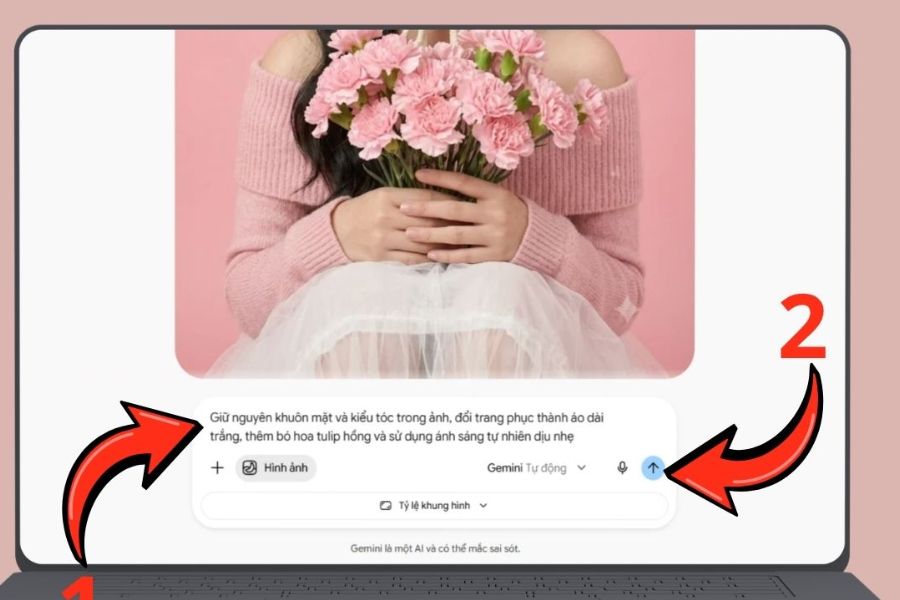
- Step 3: Upload the reference image and enter the prompt.
- Step 4: Wait for Gemini to generate the image.
- Step 5: Review and edit the image
- Step 6: Create an additional version of the October 20th photo.
- Step 7: Save the image to your device.
- 4. Compilation of prompts for creating beautiful and easy-to-use 20/10 (Vietnamese Women's Day) images using Gemini.
- Prompt 1: Create a gentle muse portrait
- Prompt 2: Creating a traditional Vietnamese Ao Dai photo
- Prompt 3: Create an elegant rose greeting card
- Prompt 4: Create a heartfelt photo gift for your mother.
- Prompt 5: Creating a portrait in the style of a young lady.
- Prompt 6: Create artistic photos with sunflowers
- Prompt 7: Create a modern profile picture for October 20th.
- Prompt 8: Create cartoon-style 20/10 greeting images
- 5. Tips for writing better prompts to create 20/10 (Vietnamese Women's Day) images using Gemini.
- 6. Some notes when creating October 20th photos using Gemini
- 7. Conclusion
Vietnamese Women''s Day on October 20th is a special occasion to express affection to mothers, wives, girlfriends, friends, and other beloved women. Besides familiar gifts, a custom-designed photo with subtle colors, vibrant flowers, and meaningful wishes can also be a surprising gift. With Gemini, you can easily transform your ideas into beautiful images with just a few simple commands, even if you have no design experience. In this article, let''s explore with Sadesign how to create a 20/10 photo using Gemini from A to Z, tips for a natural-looking image, and a beautiful prompt that can be copied and used immediately.
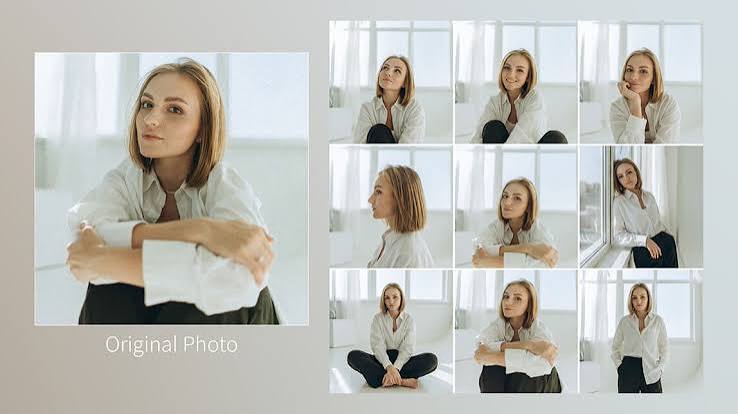
1. How do I create a 20/10 (Vietnamese Women's Day) photo using Gemini?
Creating 20/10 images using Gemini is a way to use Google's artificial intelligence to generate new images or edit existing ones based on text requests. You can describe the subject, clothing, decorations, colors, lighting, and desired style, and the AI will build the image according to your ideas. The interesting thing is that you don't need to be a skilled artist or proficient in graphic design software. With just a sufficiently detailed command, you can create many images suitable for the 20/10 occasion. Some notable advantages of using Gemini include:
-
Creative flexibility: Create portraits, greeting cards, artwork, or illustrations in a variety of styles.
-
Saves time: No need to design every detail from scratch.
-
Image personalization: You can upload reference images for the AI to use as a basis to create new versions, depending on supported features.
-
Versatile applications: Use as a profile picture, for posting on Facebook, TikTok, Zalo, or sending as a gift to loved ones.
-
Easy to edit: Continue chatting with Gemini to change colors, outfits, backgrounds, and any details you're not happy with.
2. What do I need to prepare before creating a 20/10 photo using Gemini?
Before you begin, you should define the image you want to create and prepare the necessary information. This step, although simple, helps to make the commands clearer and reduces the chances of the image not meeting expectations.
-
Google Account: Access Gemini and sign in to use the features offered.
-
Main idea: Determine whether you want to create a portrait, a floral greeting card, a photo in traditional Vietnamese dress (áo dài), or a modern art image.
-
Reference photo: If you want to create a photo based on yourself or a loved one, choose a clear, well-lit photo that is not obscured. Also, ensure you have the right to use the photo and the necessary consent from the person in the photo.
-
Prompt description: Prepare a statement specifying the subject, clothing, background, color, lighting, and aspect ratio of the image.
-
Internet connection: A stable connection allows you to access and submit requests more conveniently.
3. How to create a 20/10 (Vietnamese Women's Day) photo using Gemini - detailed step-by-step instructions.
If this is your first time using an AI image creation tool, you can follow these 7 steps in order. The process is suitable for beginners, whether using a computer or a phone.
Step 1: Access Gemini
Open your browser on your phone or computer and go to https://gemini.google.com/app . Then, log in to your Google account if prompted. Once the chat interface appears, you can start submitting your image creation request.

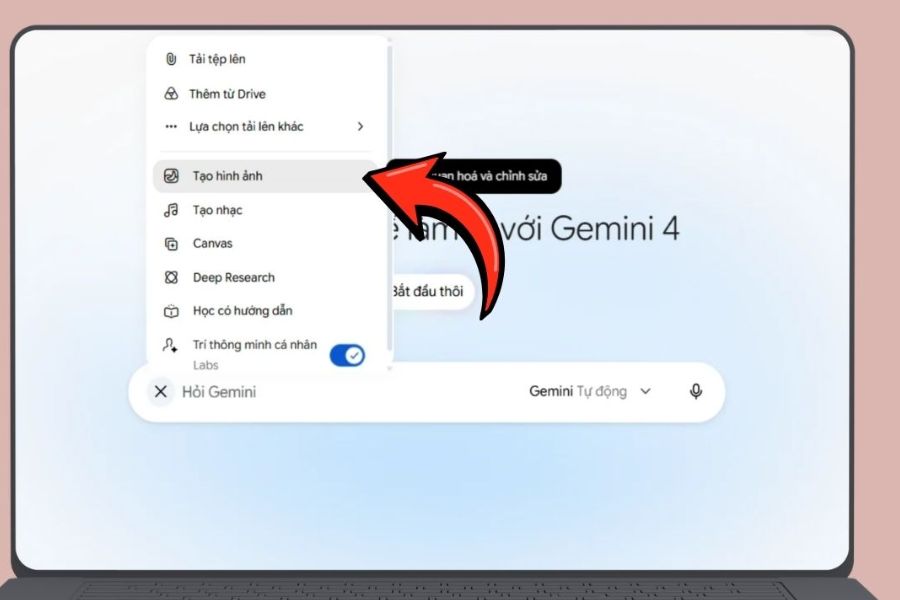
Step 2: Select the image creation feature.
On the Gemini interface, observe the input area and look for the image creation option. Depending on the interface version, you may need to tap the plus sign or open the list of tools to find the corresponding item. If you don't see this option, try directly entering the image creation request into the chat box or check the available features on your account.
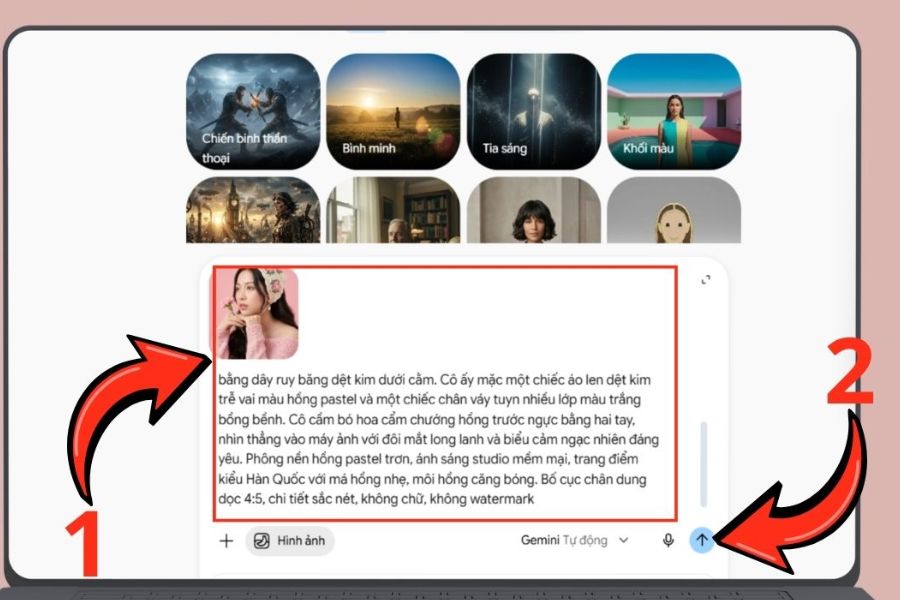
Step 3: Upload the reference image and enter the prompt.
If you want to create an image that includes your face or a loved one's face, upload a reference image using the attach button if the feature is supported. Next, enter a prompt clearly describing which details to keep and which elements you want to change.
You can start with the following command:
“Based on the uploaded reference image, create an artistic portrait for Vietnamese Women's Day on October 20th. Keep facial features and hairstyle close to the original photo, wear a pastel pink sweater, hold a bouquet of pink carnations, use an elegant background, soft natural lighting, clear colors, a vertical portrait composition with a 4:5 aspect ratio, a sharp image, and no added text or watermark.”
After reviewing the content, press the submit button for Gemini to process the request.
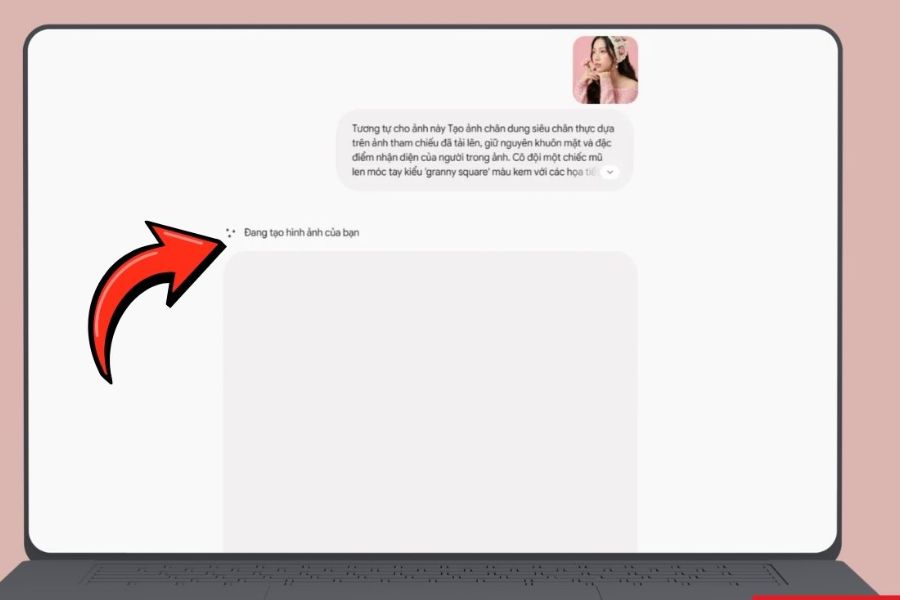
Step 4: Wait for Gemini to generate the image.
Gemini will analyze the command and generate the image according to the description. Processing time may vary depending on the complexity of the request and the service's operational status. While waiting, you should keep the conversation open so you can easily review the results and continue editing.
If the image doesn't appear or the request isn't processed, check your internet connection, try resending the prompt, or adjust the command to be shorter and easier to understand.
Step 5: Review and edit the image
Once the image is created, don't save it immediately; carefully check the important details. Especially for portraits intended as gifts, the face, hands, clothing, and flower arrangement can significantly impact the aesthetic appeal.
If you're still not satisfied, ask Gemini to revise individual details instead of rewriting the entire prompt. For example:
-
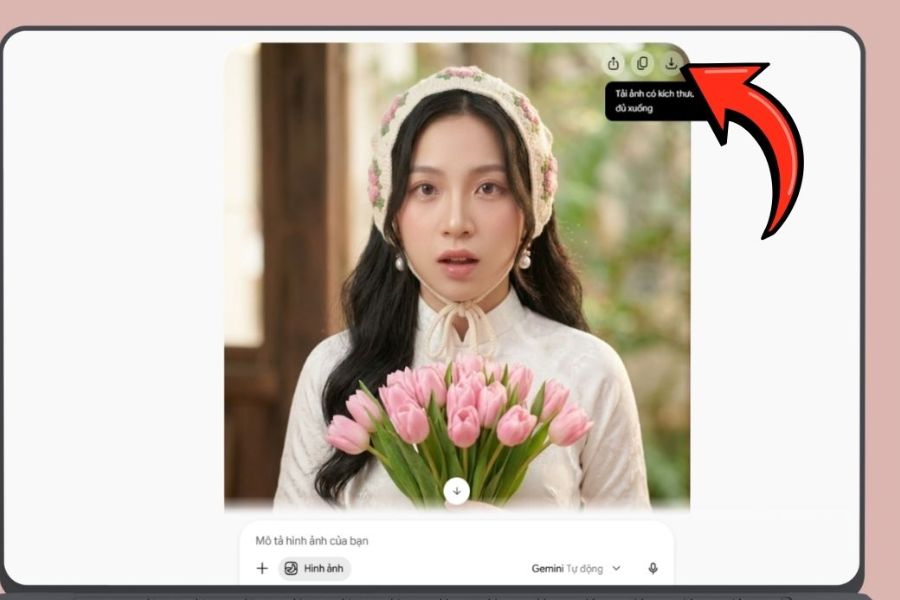
"Keep the face and hairstyle the same, change the bouquet to pink tulips."
-
"Make the background brighter, add some soft yellow light, and keep the overall look natural."
-
"Adjust the outfit to a white ao dai (traditional Vietnamese dress), adding delicate lotus flower motifs."
-
"The composition is more open, the subject is in the center of the image, and there's no added text."
Step 6: Create an additional version of the October 20th photo.
You can continue experimenting with different styles from the same initial idea. For example, keep the subject the same but replace the sweater with a dress, change the roses to sunflowers, or switch the background from a studio to a sun-drenched garden.
This method allows you to compare versions without starting from scratch. If you want to create images for social media, request the appropriate aspect ratio, such as 4:5 for vertical posts or 9:16 for Stories and short videos. Actual results may still vary depending on Gemini's processing capabilities.
Step 7: Save the image to your device.
After selecting a suitable image, tap the download option on the image if the interface supports it. The image will be saved to your device using the standard download method of your browser or app.
You can use the finished product to create e-cards, profile pictures, congratulatory posts, or send them privately to loved ones. If you want to add beautiful Vietnamese greetings, consider inserting the text using a design app after downloading the image, as text generated directly by AI in the image may have incorrect diacritics or inaccurate content.
4. Compilation of prompts for creating beautiful and easy-to-use 20/10 (Vietnamese Women's Day) images using Gemini.
A good prompt doesn't necessarily have to be long, but it should clearly describe the subject, style, color palette, and the emotion you want to convey. Below are some sample prompts you can copy and then modify to suit your audience.
Prompt 1: Create a gentle muse portrait
"Based on the reference photo, create a Korean-style muse portrait for October 20th. Keep facial features close to the original photo, wear an elegant white dress, hold a bouquet of pink roses, hair gently blowing in the wind, soft natural light, a romantic flower garden background, creamy pink tones, a fresh and realistic feel, and a vertical 4:5 composition."
Prompt 2: Creating a traditional Vietnamese Ao Dai photo
"Create an artistic portrait to celebrate Vietnamese Women's Day on October 20th. The subject should be wearing a flowing white ao dai (traditional Vietnamese dress), standing amidst a peaceful lotus garden, holding a pink lotus flower, bathed in gentle morning sunlight, with elegant colors, a professional photography style, maintaining a close resemblance to the reference photo if available, sharp image, and harmonious composition."
Prompt 3: Create an elegant rose greeting card
“Design a greeting card image for October 20th featuring a bouquet of red and pastel pink roses, cream-colored art paper, silk ribbon, warm lighting, and a minimalist yet elegant style. Leave ample space in the middle to add a Vietnamese message after uploading the image. Balanced composition, subtle colors, high image quality, and no watermark.”
Prompt 4: Create a heartfelt photo gift for your mother.
"Create a heartwarming photo for your mother on October 20th. Imagine you and your mother sitting together in a flower-filled garden, exchanging a bouquet of pink carnations, bathed in gentle afternoon sunlight. The photos should feature natural and affectionate expressions, warm colors, a candid, everyday style, and a close-knit family atmosphere. If you have a reference photo, try to preserve the appearance of everyone in it."
Prompt 5: Creating a portrait in the style of a young lady.
"Based on the reference image, create an elegant, ladylike portrait for October 20th. The subject should wear a pale pink satin dress, hold a bouquet of white tulips, have light makeup, and a subtly styled hairstyle. The studio background should be cream-colored with soft lighting, in a fashion magazine style, with natural skin texture. The composition should be vertical (4:5 aspect ratio), and no text should be added."
Prompt 6: Create artistic photos with sunflowers
"Creating an artistic portrait with the theme of October 20th (Vietnamese Women's Day) amidst a field of vibrant yellow sunflowers. The subject wears a light white dress, smiles naturally, the late afternoon sunlight creates a shimmering effect, the colors are bright, the feeling is joyful and full of life, cinematic photography style, realistic image, vertical composition."
Prompt 7: Create a modern profile picture for October 20th.
"Based on the reference image, create a modern and youthful profile picture to celebrate October 20th. Keep the appearance close to the original photo, with elegant white attire, a pastel pink background combined with gently floating flower petals, soft studio lighting, a clear face, and a composition focused on the subject. Suitable for posting on Facebook and Zalo, with no text or watermark."
Prompt 8: Create cartoon-style 20/10 greeting images
"Create a cute 3D animated illustration with the theme of Vietnamese Women's Day on October 20th. A girl in a pink dress holding a large bouquet of flowers, surrounded by carnations, small hearts, and ribbons. Sweet pastel colors, shimmering light, soft lines, lovely composition, leaving space at the top for a greeting."
5. Tips for writing better prompts to create 20/10 (Vietnamese Women's Day) images using Gemini.
To ensure the image closely matches the original concept, pay attention to how you describe and edit the commands. A few small changes can help create a harmonious, natural result that better suits the intended purpose.
-
Provide a detailed description of the subject: Clearly state who the character is, what they are wearing, what kind of flowers they are holding, and where they are.
-
Choose a consistent color palette: Pastel pink and creamy white create a soft feel; red and yellow bring a striking, luxurious look.
-
Specify your preferred image style: You can choose realistic photos, Korean-style photos, illustrations, 3D animation, or magazine-style photos.
-
Fine-tune every detail: When the result isn't what you want, ask for changes to a few elements at a time instead of making too many new requests at once.
-
Limit the need for AI to write text directly: If the card has a long message or important content, it's best to insert the text later using a design tool to control spelling and typography.
-
Check your photos before sharing: Carefully examine the face, hands, accessories, and other details that AI can easily misinterpret.
6. Some notes when creating October 20th photos using Gemini
Gemini makes image creation more convenient, but you still need to keep a few things in mind to have a good experience and use the finished product appropriately.
-
Respect privacy: Only upload other people's photos when you have the necessary permission and consent.
-
AI images are not guaranteed to be a perfect match for real photos: Faces, clothing, and small details may vary even though the prompt has described them in detail.
-
Check the features on your account: The interface, image creation tools, and usage limits may vary depending on the account, region, and time.
-
Choose the right aspect ratio: Vertical images are suitable for social media posts, while horizontal images may be more appropriate for cover photos or illustrations.
-
Proactively check content: If using images in business or promotional activities, review the usage rights, accuracy, and terms and conditions of the service.
7. Conclusion
Creating 20/10 (Vietnamese Women's Day) photos using Gemini is a fun way to turn simple ideas into personalized visual gifts. Just prepare reference photos if needed, write clear prompts, and edit each detail, and you can create greeting cards, artistic portraits, or social media photos without needing advanced design skills. Try the prompts in the article, change the colors, clothing, and background to suit the recipient's preferences to create the most suitable final product. Sometimes, a photo prepared with sincerity and a simple wish is enough to make 20/10 more memorable.















VIP Products




Best Selling Products
Genuine Cheap Canva Pro
39 USD
Upgrade Genuine Office 365
49 USD
Windows 10 & 11 Pro Key
36 USD
Capcut Pro 1 Year
39 USD
Plugin Retouch4me
69 USD
Adobe Photoshop Copyright - Full App
120 USD
Copyright Adobe Lightroom Account
59 USD
Freepik Premium Account
59 USD
ChatGPT Plus Account (GPT-4)
16 USD
Genuine Adobe Illustrator account
99 USD
Upgrade Duolingo Super
29 USD
Autodesk All App Account Copyright
120 USD
Adobe Premiere Pro Account
99 USD
Upgrade genuine Capture One account
120 USD
MidJourney Account
29 USD