Best Selling Products

Adobe Premiere Pro Account
99 USD

ChatGPT Plus Account (GPT-4)
16 USD

MidJourney Account
29 USD

Genuine Cheap Canva Pro
39 USD

Freepik Premium Account
59 USD

Upgrade genuine Capture One account
120 USD

Capcut Pro 1 Year
39 USD

Genuine Adobe Illustrator account
99 USD

Plugin Retouch4me
69 USD

Upgrade Genuine Office 365
49 USD

Windows 10 & 11 Pro Key
36 USD

Upgrade Duolingo Super
29 USD

Copyright Adobe Lightroom Account
59 USD

Adobe Photoshop Copyright - Full App
120 USD

Autodesk All App Account Copyright
120 USD
Dropbox integrated into ChatGPT: Work smarter with AI.
Nội dung
- 1. Dropbox and ChatGPT
- 2. Dropbox App in ChatGPT
- 2.1. Access and preview Dropbox files directly.
- 2.2. Save the AI-generated content back to Dropbox.
- 2.3. Quickly share documents
- 2.4. AI references data in Dropbox to create content.
- 2.5. Security remains guaranteed.
- 2.6. Global Support
- 3. Dropbox Dash App trong ChatGPT
- 3.1. Searching for information from multiple applications simultaneously
- 3.2. AI understands the context of the user and the work group.
- 3.3. Enhancing Collaboration Effectiveness
- 3.4. Access rights are always respected.
- 3.5. Release Date
- 4. Reclaim AI Calendar App trong ChatGPT
- 4.1. Scheduling using natural language
- 4.2. Reduce manual sorting operations.
- 4.3. Work Productivity Analysis
- 4.4. Search for contacts and view schedule overview
- 4.5. Supports Google Calendar and Microsoft Outlook
- 5. Benefits of the Dropbox ecosystem in ChatGPT
- 6. Conclusion
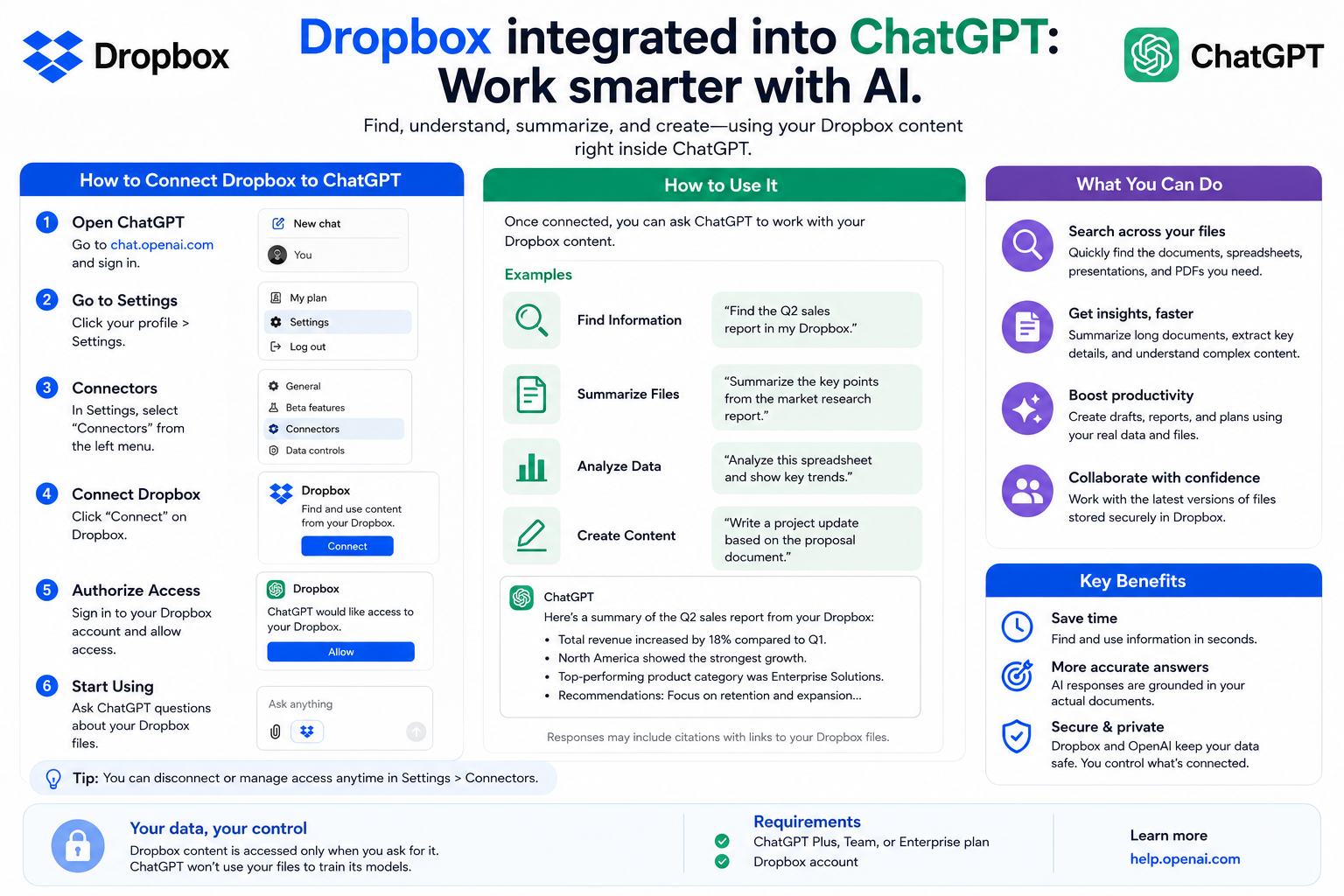
Dropbox has expanded its integration with ChatGPT, delivering a more seamless workflow experience.
1. Dropbox and ChatGPT
Instead of having to download files from Dropbox and then upload them to ChatGPT or vice versa, users can access data, process documents, and save results directly within the conversation with the AI.
More than just connecting two platforms, Dropbox has built a complete AI ecosystem within ChatGPT, including the Dropbox App, Dropbox Dash App, and Reclaim AI Calendar App. Each application plays a different role but all aim for the common goal of reducing manual operations, speeding up workflows, and allowing users to focus on higher-value tasks.
For businesses, this is a significant step forward in the journey of applying AI to the modern workplace, where data, knowledge, and schedules can all be accessed directly within a conversation with ChatGPT.

2. Dropbox App in ChatGPT
The Dropbox app within ChatGPT is a feature that allows users to connect their Dropbox account to ChatGPT to access, preview, save, and share documents directly during conversations with the AI.
2.1. Access and preview Dropbox files directly.
After connecting the account, ChatGPT can access files that the user is allowed to use in Dropbox. Users can preview the contents of documents without opening any additional windows or applications.
This direct access significantly saves time, especially for businesses that frequently work with large volumes of documents, reports, or projects.
2.2. Save the AI-generated content back to Dropbox.
One of the notable benefits is the ability to directly save AI-generated results to Dropbox.
Once ChatGPT completes a new report, plan, email, or document, users don't need to copy and paste it into another application. The content can be saved directly to Dropbox for further editing or sharing with colleagues.

This helps to streamline the workflow while reducing the risk of data loss during migration between multiple platforms.
2.3. Quickly share documents
The Dropbox app also supports creating direct sharing links from ChatGPT.
Instead of opening Dropbox to get the sharing link, users can do so directly within the chat. This is especially useful when needing to send documents to clients, partners, or team members in just seconds.
2.4. AI references data in Dropbox to create content.
One of its most notable features is that ChatGPT can use documents saved in Dropbox as context when answering questions or creating content.
For example, if a business has stored product manuals, business reports, or training materials in Dropbox, ChatGPT can access these resources to:
-
Draft a new document.
-
Answer the question within the correct business context.
-
Summary of the report.
-
Support for research.
-
Combine multiple documents into a single complete version.
As a result, AI relies not only on general knowledge but also leverages the company's internal data to provide more relevant answers.
2.5. Security remains guaranteed.
One of the factors that Dropbox places particular emphasis on is data security.
Even when documents are accessed via ChatGPT, all sharing and access permissions remain tied to existing Dropbox settings. Users can only work with files they are granted permission to access.
This gives businesses peace of mind when integrating AI into their workflows while maintaining internal data governance policies.
2.6. Global Support
The Dropbox app in ChatGPT is now available globally and can be used by Dropbox customers on all plans. This makes it easy for both individuals and businesses to access AI features without changing their existing storage systems.
3. Dropbox Dash App trong ChatGPT
While the Dropbox App focuses on files stored within Dropbox, Dropbox Dash expands the search scope to encompass the entire ecosystem of enterprise work applications.
Dropbox Dash is an enterprise knowledge-based platform that connects over 30 different work applications in one place. When integrated with ChatGPT, Dash helps AI better understand each user's data, content, and work context.
3.1. Searching for information from multiple applications simultaneously
In a modern business, data is often scattered across multiple platforms such as storage systems, collaborative documents, project management software, and internal communication applications.
Dropbox Dash helps consolidate these data sources so users don't need to search each one individually. When asking a question in ChatGPT, Dash will help retrieve relevant information from connected applications, providing a more complete and accurate answer.
3.2. AI understands the context of the user and the work group.
A key feature of Dropbox Dash is its ability to provide rich context for ChatGPT.
Dash not only understands the content of documents but also the relationships between users, work teams, and ongoing projects. This allows the AI to provide more personalized responses instead of simply responding based on general data.
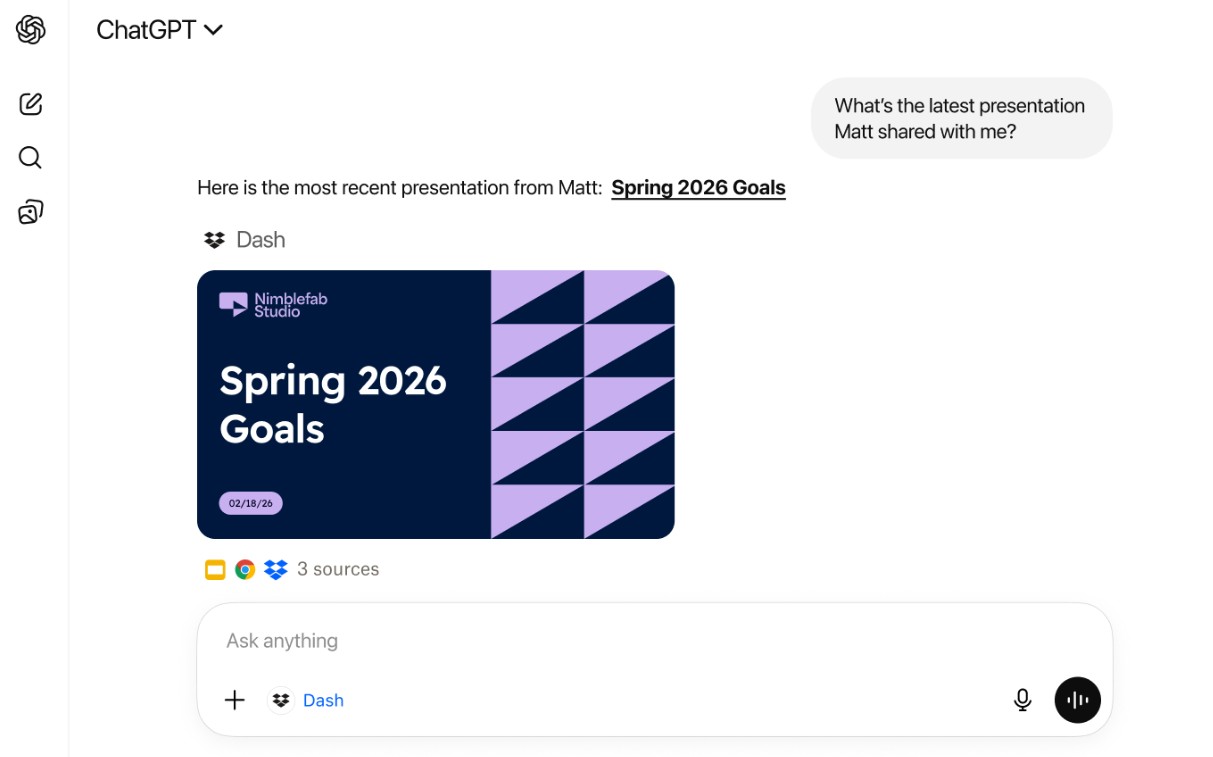
For example, when asking about the progress of a project or requesting documents related to a client, ChatGPT can leverage context from Dash to provide answers tailored to each user's role and access rights.
3.3. Enhancing Collaboration Effectiveness
Bringing business knowledge directly into conversations helps work teams save time on research and reduce information dispersion.
Instead of having to switch between multiple applications to collect data, users can receive helpful, relevant, and actionable answers right within ChatGPT.
3.4. Access rights are always respected.
Similar to Dropbox, Dash fully complies with existing access permissions and sharing policies. The AI can only access content that users are authorized to view, helping to protect business data throughout its use.
3.5. Release Date
The Dropbox Dash App in ChatGPT will be rolled out to existing Dash customers. New users can also experience it through a 30-day free trial before deciding to deploy it to their business.
4. Reclaim AI Calendar App trong ChatGPT
The work schedule is central to all business operations. However, scheduling meetings, adjusting schedules, and resolving time conflicts often consumes a great deal of effort. The Reclaim AI Calendar App in ChatGPT was developed to automate this entire process.
4.1. Scheduling using natural language
Instead of opening Google Calendar or Microsoft Outlook to manually create events, users can simply chat with ChatGPT.
For example, you could ask the AI to schedule a team meeting for next week, find a suitable time slot, or add a new event to the calendar. The AI will process the request and update it directly on the connected calendar system.
4.2. Reduce manual sorting operations.
Reclaim AI helps find optimal meeting times, handle scheduling conflicts, and adjust plans when changes occur. This significantly reduces the time spent on administrative tasks, especially for managers or work teams with busy meeting schedules.
4.3. Work Productivity Analysis
In addition to managing schedules, Reclaim AI can also analyze how users allocate their time throughout the day. The AI can help identify periods of focus, meeting time, or gaps in their workflow to organize tasks more effectively.
This allows users to make informed adjustments to balance professional work, meetings, and focused study time.
4.4. Search for contacts and view schedule overview
Within the ChatGPT conversation, users can search for contact information, check upcoming meetings, or ask the AI to summarize their daily schedule.
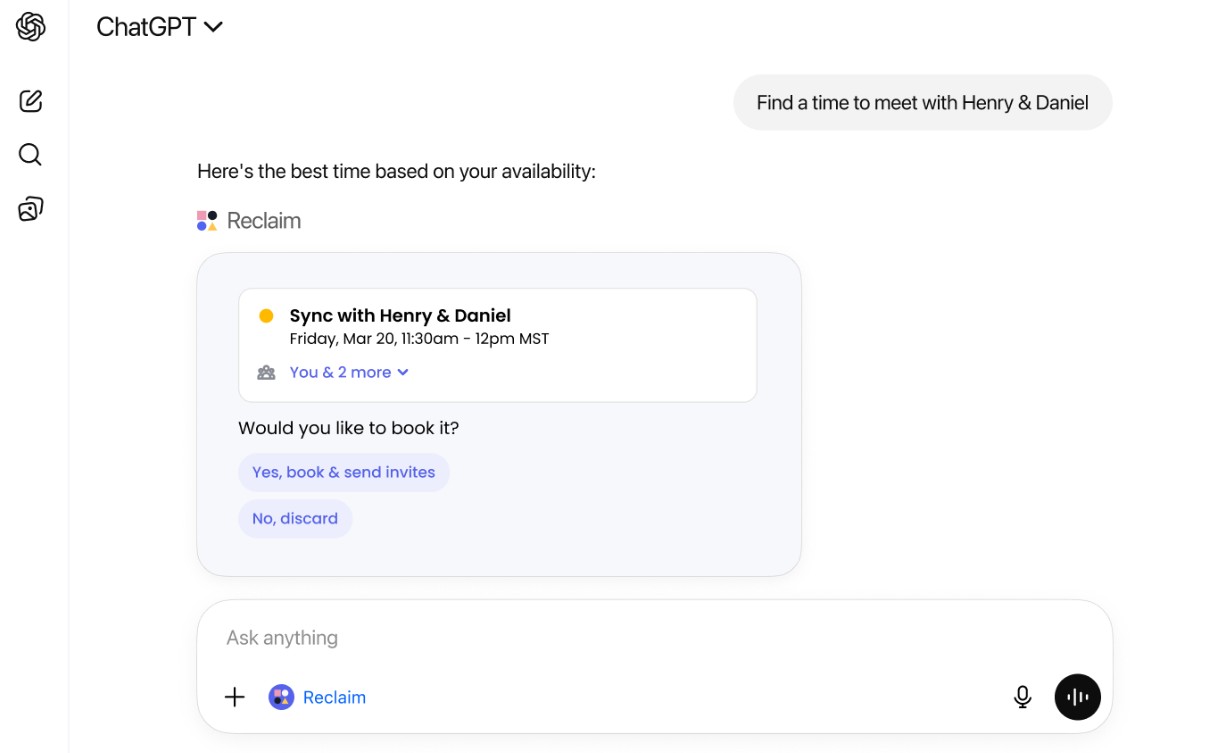
This helps reduce the need to constantly open multiple different applications to check information, thereby improving work efficiency.
4.5. Supports Google Calendar and Microsoft Outlook
The Reclaim AI Calendar App works with both Google Calendar and Microsoft Outlook, the two most popular calendar management platforms today. The app is currently available globally in English for customers using the latest version of the Reclaim AI system.
5. Benefits of the Dropbox ecosystem in ChatGPT
Integrating Dropbox, Dropbox Dash, and Reclaim AI into ChatGPT creates a unified work environment where data, knowledge, and schedules are tightly connected. Users no longer have to constantly switch between multiple applications to find documents, manage tasks, or schedule meetings.
This ecosystem significantly reduces manual tasks such as uploading, downloading, copying content, or switching work windows. At the same time, AI can leverage context from business data to generate more accurate, relevant, and actionable responses.
In addition to improving productivity, Dropbox maintains strict security standards. Data access and sharing permissions remain consistent with the company's settings, ensuring users can only view and manipulate content they have been granted access to.
6. Conclusion
In a context where businesses increasingly prioritize digital transformation and AI applications, combining Dropbox's reliable cloud storage platform with ChatGPT's natural language processing capabilities not only saves time but also creates a modern, secure, and seamless workspace. This platform allows users to focus on high-value tasks instead of spending time on repetitive manual operations.





















VIP Products








Best Selling Products
Adobe Premiere Pro Account
99 USD
ChatGPT Plus Account (GPT-4)
16 USD
MidJourney Account
29 USD
Genuine Cheap Canva Pro
39 USD
Freepik Premium Account
59 USD
Upgrade genuine Capture One account
120 USD
Capcut Pro 1 Year
39 USD
Genuine Adobe Illustrator account
99 USD
Plugin Retouch4me
69 USD
Upgrade Genuine Office 365
49 USD
Windows 10 & 11 Pro Key
36 USD
Upgrade Duolingo Super
29 USD
Copyright Adobe Lightroom Account
59 USD
Adobe Photoshop Copyright - Full App
120 USD
Autodesk All App Account Copyright
120 USD