Best Selling Products

Windows 10 & 11 Pro Key
36 USD

Plugin Retouch4me
69 USD

Upgrade genuine Capture One account
120 USD

Genuine Cheap Canva Pro
39 USD

Adobe Photoshop Copyright - Full App
120 USD

ChatGPT Plus Account (GPT-4)
16 USD

Copyright Adobe Lightroom Account
59 USD

Upgrade Genuine Office 365
49 USD

Adobe Premiere Pro Account
99 USD

Genuine Adobe Illustrator account
99 USD

Autodesk All App Account Copyright
120 USD

Upgrade Duolingo Super
29 USD

Freepik Premium Account
59 USD

MidJourney Account
29 USD

Capcut Pro 1 Year
39 USD
Guide to Checking Microsoft Office License and Identifying Cracked Office
Nội dung
- 1. Dangerous Consequences of Intentionally Using Cracked Microsoft Office
- 1.1. Opening the Door to Malware and Cyberattacks
- 1.2. Lack of Features and Unstable Operation
- 1.3. Not Receiving Security Updates
- 1.4. Risks of Software Copyright Infringement
- 2. The Most Accurate Method for Checking Microsoft Office Copyright
- 2.1. Direct Testing in Office Applications
- 2.2. Checking Office License Using Command Prompt
- 2.3. Checking the COA Certification Stamp
- 2.4. Check in the About Window
- 2.5. Using Microsoft's Genuine Product Verification Tool
- 3. Procedure for Removing Pirated Versions and Installing Genuine Microsoft Office
- 3.1. Completely Remove Cracked Versions of Office
- 3.2. Download and Activate Genuine Microsoft Office
- 4. Benefits of Using a Licensed Version of Microsoft Office
Are you using Microsoft Office but unsure if it''s a genuine licensed version or a cracked one? This detailed guide shows you how to check your Office activation status using several accurate methods.
1. Dangerous Consequences of Intentionally Using Cracked Microsoft Office
Many people believe that using cracked Office simply saves them the cost of buying a license. In reality, the price they pay is sometimes many times greater than the cost of investing in genuine software.
1.1. Opening the Door to Malware and Cyberattacks
Most current tools for activating pirated Office require users to disable Windows security features such as Windows Defender or antivirus software.
This is the most dangerous time.
When defenses are disabled, malicious programs can easily infiltrate a computer without the user's knowledge. Common types of malware found in cracked Office suites include:
-
Trojan horses steal data.
-
Keyloggers record keyboard input.
-
Spyware tracks user activity.
-
Ransomware encrypts data and demands a ransom.
-
Malware steals bank accounts.
For businesses, the risk is even more serious as customer data, business contracts, accounting records, or internal documents can be stolen or leaked externally.
Many cyberattacks today stem from employees inadvertently installing cracked software on their work computers, creating entry points for hackers to penetrate the entire company's system.
1.2. Lack of Features and Unstable Operation
Cracked versions of Office often involve direct interference with the license activation system.
During that editing process, many components of the program may be changed or disabled, causing the software to malfunction.
Users may encounter situations such as:
-
Excel freezes when processing large amounts of data.
-
The complex calculation function is malfunctioning.
-
PowerPoint suddenly closed during a presentation.
-
Word failed to save the document.
-
Outlook lost connection with the email server.
These incidents not only disrupt work but also seriously damage the professional image of individuals and businesses when working with clients or partners.
1.3. Not Receiving Security Updates
Microsoft regularly releases patches and security updates to fix newly discovered vulnerabilities.
When using a licensed version of Office, your computer will automatically receive these updates through Microsoft Update.
Conversely, cracked Office versions are often blocked from connecting to Microsoft's activation system to avoid detection of invalid licenses.
The consequence is:
-
I did not receive the security patch.
-
No new features have been added.
-
Increased risk of cyberattacks.
-
Performance decreases over time.
-
Numerous compatibility issues have arisen with the new Windows version.
Maintaining outdated software for an extended period is like leaving your front door open without a lock.
1.4. Risks of Software Copyright Infringement
For businesses, using software without a valid license can lead to legal risks.
During software license audits, businesses may be required to prove their legitimate right to use Microsoft products they are deploying.
If a business fails to provide a valid license, it may face:
-
Copyright infringement compensation.
-
The cost of acquiring a valid license.
-
Impact on brand reputation.
-
Loss of trust from customers and partners.
Therefore, checking the validity of Microsoft Office is a task that should be performed periodically on all computers.

2. The Most Accurate Method for Checking Microsoft Office Copyright
There are several ways to verify the activation status of Microsoft Office. Below are some of the most commonly used and accurate methods.
2.1. Direct Testing in Office Applications
This is the simplest method and suitable for all users.
Step 1: Open an Office Application
Launch any Office programs that are installed on your computer.
You can use:
-
Microsoft Word
-
Microsoft Excel
-
Microsoft PowerPoint
-
Microsoft Outlook
Word or Excel are usually the most convenient options.
Step 2: Access the Account section
After the program successfully launched:
-
Click on File in the upper left corner.
-
Find the Account section in the left-hand navigation bar.
-
Click to open the account information interface.
Here, Microsoft will display all the product license information.
Step 3: Check Product Information
Observe the Product Information area .
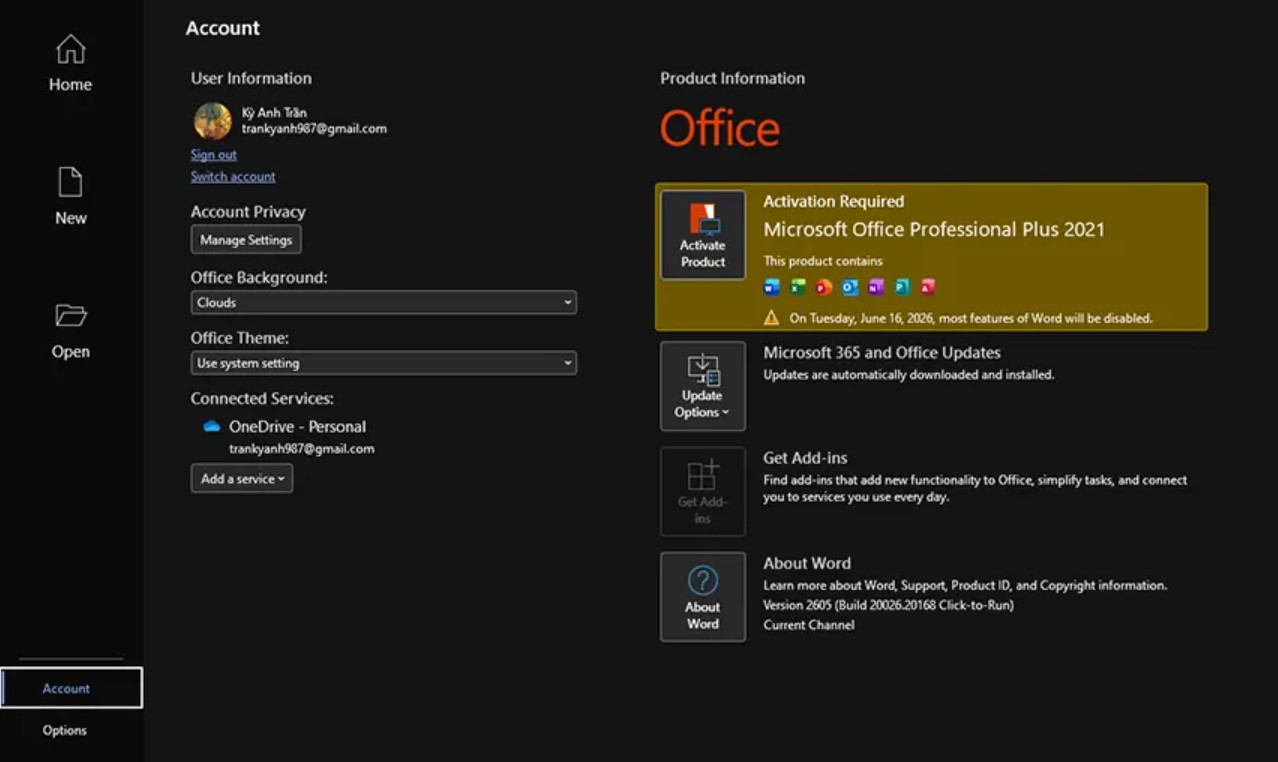
If your Office license is valid, the following screen will appear:
"Product Activated"
Include the specific version name, such as:
-
Microsoft 365
-
Office Home & Student
-
Office Home & Business
-
Office Professional Plus
This indicates that Office has been successfully activated.
If the following message appears:
"Activation Required"
This indicates that the software has not been activated or is using a trial version.
If activation error warnings appear, the license is most likely invalid or has expired.
2.2. Checking Office License Using Command Prompt
This is a more reliable method because it can detect illegal activation patterns that are not displayed in the standard interface.
Step 1: Open Command Prompt with Administrator privileges
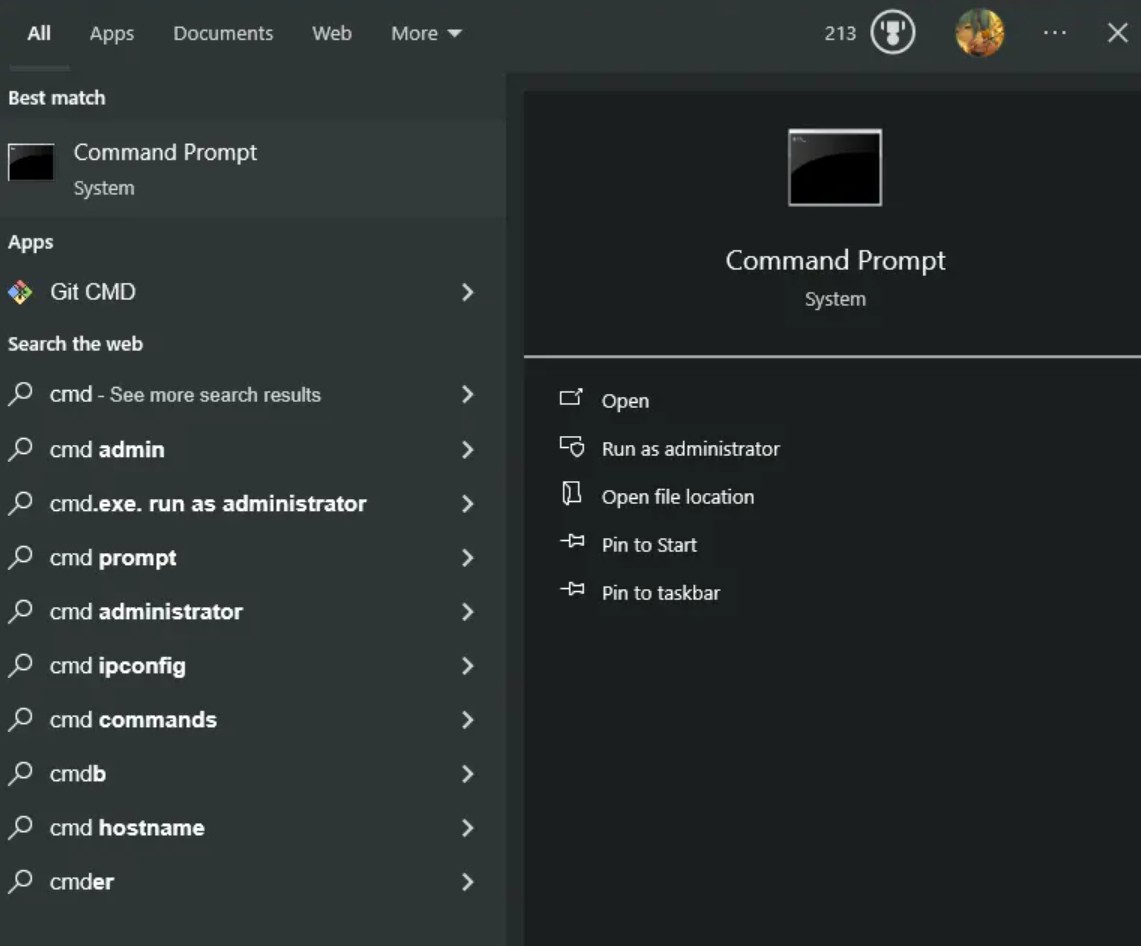
Press the Start button.
In the search box, enter:
cmd
When the Command Prompt icon appears:
-
Right-click.
-
Select Run as Administrator.
A black background window will appear on the screen.
Step 2: Enter the Copyright Check Command
Copy the following command exactly:
cscript.exe "%ProgramFiles%\\Microsoft Office\\Office16\\ospp.vbs" /dstatus
Then press Enter .
Note:
The Office16 folder typically applies to Office 2016, Office 2019, Office 2021, and Microsoft 365.
In some cases, Office can be installed at:
cscript.exe "%ProgramFiles(x86)%\\Microsoft Office\\Office16\\ospp.vbs" /dstatus
If the first command gives an error that the file was not found, try the second path.
Step 3: Analyze the Return Results
After a few seconds, the system will display the license information.
Find the line:
LICENSE STATUS
If displayed:
LICENSED
This indicates that Office is properly activated.
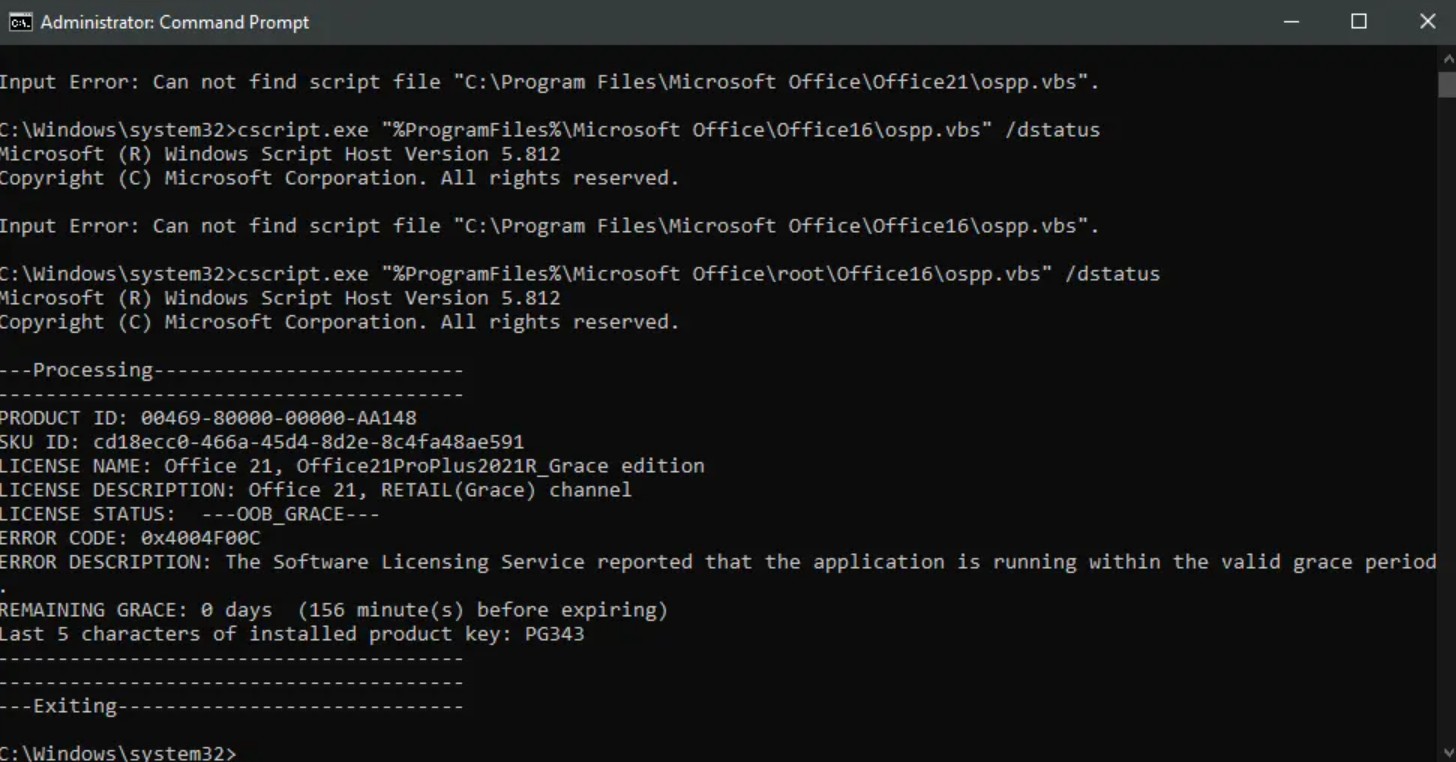
If content such as: appears
-
KMS_Client channel
-
Grace Period
-
Notification Mode
-
Remaining Grace
Office might be using a KMS activation method or an unlicensed trial version.
This is a method widely used by IT administrators to verify the authenticity of Office licenses in a business environment.
2.3. Checking the COA Certification Stamp
For Office suites purchased in physical boxes, Microsoft provides a certificate of authenticity called a COA (Certificate of Authenticity).
The COA sticker is usually affixed to:
-
Product box.
-
Software packaging.
-
The accompanying documentation is included.
When conducting the inspection, please note:
Hologram stamps must be able to change color when viewed from different angles.
The details printed on the stamp must be sharp.
There are no signs of peeling or tampering.
The Product Key string must match the license provided.
If the label shows signs of counterfeiting or poor printing quality, users should contact the supplier to verify the product's origin.
2.4. Check in the About Window
Microsoft has added an area to display detailed information about product licenses.
Step 1: Access the File
Open Word or Excel.
Click File.
Step 2: Select Account
Continue by selecting Account.
Step 3: Open About
In the Product Information area .
Press the button:
About Word hoặc About Excel
A new dialog box will appear.
Step 4: Compare Information
Here users can view:
-
Office version.
-
Number of builds.
-
Product ID.
-
License information.
This information may be used when contacting Microsoft support to verify your license status.
2.5. Using Microsoft's Genuine Product Verification Tool
For large businesses or organizations, Microsoft offers a variety of tools to support license management.
Step 1: Access the Official Microsoft Website
Users should download software verification tools directly from Microsoft to avoid the risk of downloading counterfeit software.
Step 2: Download and Install the Tool
After downloading:
-
Save the installation file to your computer.
-
Perform the installation.
-
Grant administrator privileges when requested.
Step 3: Start the Scanning Process
Open the test program.
The system will automatically analyze:
-
Type of license.
-
Activated state.
-
Source of the license.
-
The validity level of the Product Key.
Step 4: View the Results Report
Once completed, the software will provide a detailed report that helps businesses quickly identify devices using invalid licenses.
This method is suitable when you need to test a large number of computers on a local network.
3. Procedure for Removing Pirated Versions and Installing Genuine Microsoft Office
If users discover that the Office they are using is invalid, they should replace it with a genuine version as soon as possible.
3.1. Completely Remove Cracked Versions of Office
A thorough uninstallation helps avoid conflicts between the old components and the new installation.
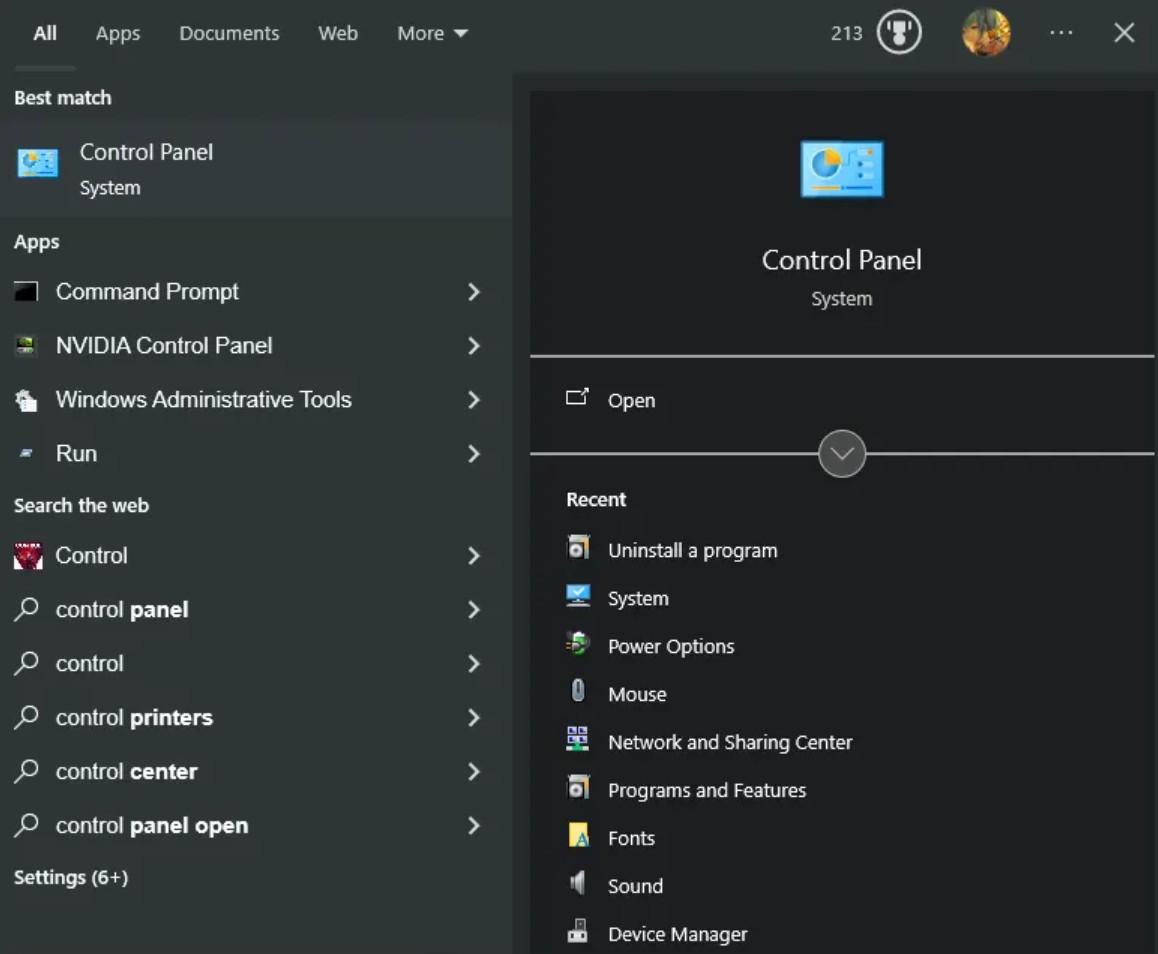
Step 1: Open Control Panel
Press Start.
Enter: Control Panel
Then open the program.
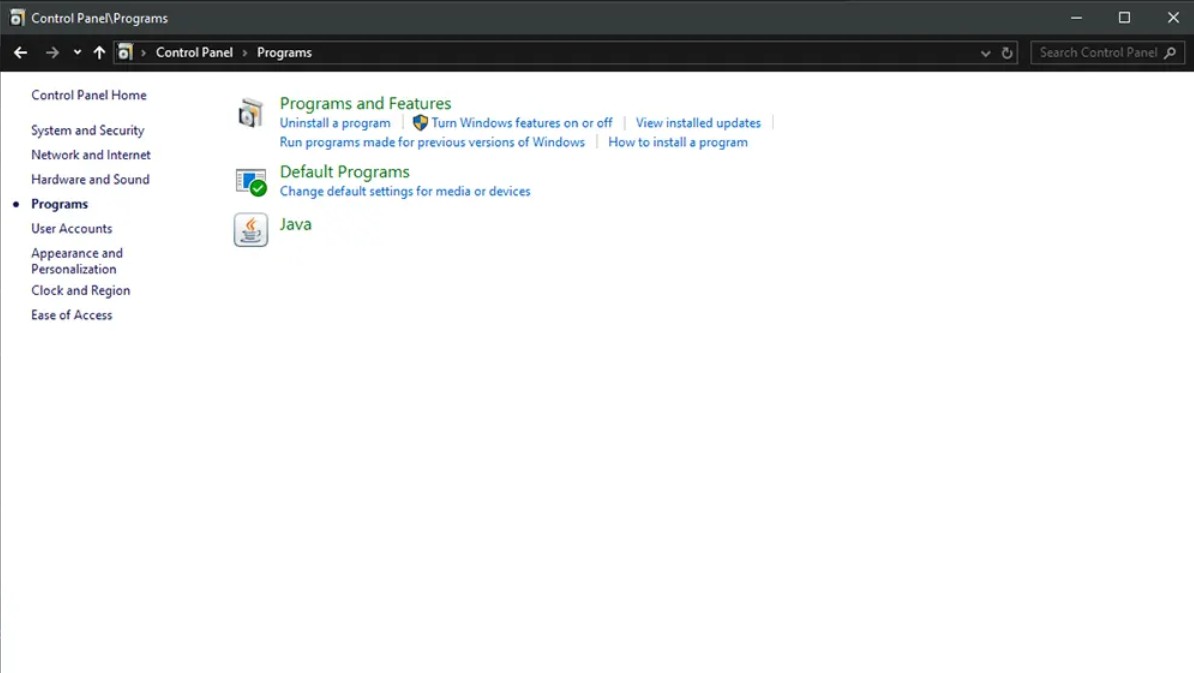
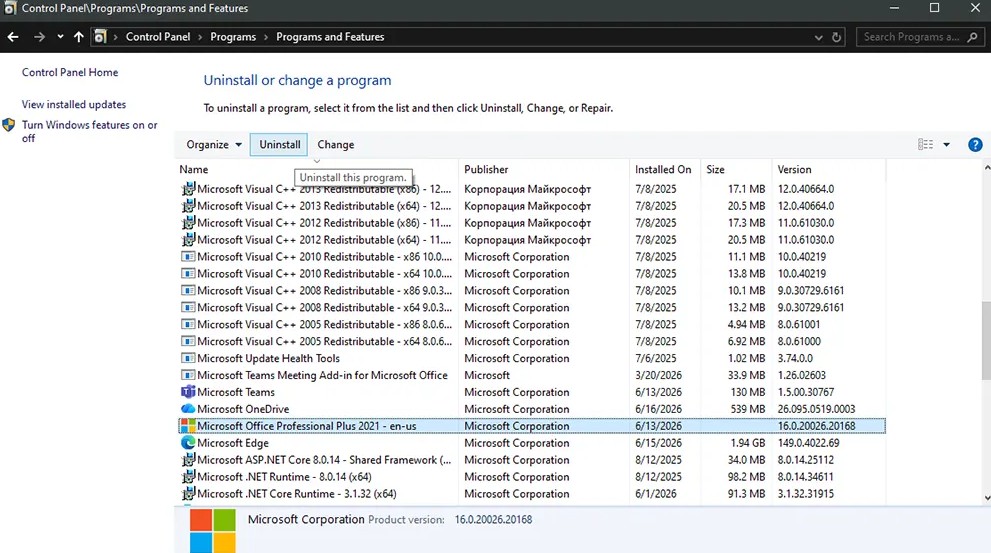
Step 2: Access the Software List
In the Control Panel, select Programs .
Continue by selecting: Programs and Features
Then click: Uninstall a Program
A list of software currently being installed will appear.
Step 3: Uninstall the Old Office
Find the version of Microsoft Office you are using.
Right-click.
Select: Uninstall
Follow the on-screen instructions until the uninstallation process is complete.
Step 4: Restart Your Computer
After a successful uninstallation, it's recommended to restart the system to completely remove any remaining processes.
3.2. Download and Activate Genuine Microsoft Office
After cleaning the system, proceed with installing the legitimate version.
Step 1: Access the Official Download Page
Open your web browser.
Access Microsoft's official download portal.
Only download Office from official sources to ensure the safety and integrity of the installation package.
Step 2: Log In to Your Microsoft Account
Enter your registered Microsoft account.
This account will be used to manage licenses in the future.
When changing computers or reinstalling the operating system, users can still restore their license through this account.
Step 3: Enter the Product Key
Enter the 25-character activation code provided when you purchase the license.
The system will verify the validity of the license.
If the code is valid, the license will be linked to your Microsoft account.
Step 4: Download the Installer
Choose your desired version:
-
Microsoft 365
-
Office Home & Student
-
Office Home & Business
-
Office Professional
Click Download.
Wait for the download to complete.
Step 5: Install Office
Open the downloaded installation file.
Follow the on-screen instructions.
This process usually happens automatically and takes from a few minutes to several tens of minutes, depending on the computer's configuration.
Step 6: Activate the License
After the installation is complete:
-
Open Word or Excel.
-
Log in to your Microsoft account.
-
Or enter the Product Key if prompted.
The system will automatically connect to the Microsoft server to verify the license.
When the "Product Activated" message appears, it means Office has been successfully activated.
4. Benefits of Using a Licensed Version of Microsoft Office
Using genuine Office software not only complies with copyright regulations but also provides many practical benefits.
Users have full access to the latest features from Microsoft.
Security updates are installed automatically, helping to minimize the risk of cyberattacks.
Data is securely synchronized via OneDrive.
Performance is more stable when handling large files.
Businesses can have peace of mind when conducting software audits or IT compliance assessments.
In particular, users also have access to official Microsoft technical support when problems arise.





















VIP Products








Best Selling Products
Windows 10 & 11 Pro Key
36 USD
Plugin Retouch4me
69 USD
Upgrade genuine Capture One account
120 USD
Genuine Cheap Canva Pro
39 USD
Adobe Photoshop Copyright - Full App
120 USD
ChatGPT Plus Account (GPT-4)
16 USD
Copyright Adobe Lightroom Account
59 USD
Upgrade Genuine Office 365
49 USD
Adobe Premiere Pro Account
99 USD
Genuine Adobe Illustrator account
99 USD
Autodesk All App Account Copyright
120 USD
Upgrade Duolingo Super
29 USD
Freepik Premium Account
59 USD
MidJourney Account
29 USD
Capcut Pro 1 Year
39 USD