Best Selling Products
Genuine Cheap Canva Pro
39 USD
Plugin Retouch4me
69 USD
Adobe Photoshop Copyright - Full App
120 USD

Freepik Premium Account
59 USD

MidJourney Account
29 USD
Copyright Adobe Lightroom Account
59 USD
Upgrade Duolingo Super
29 USD
Autodesk All App Account Copyright
120 USD
Upgrade Genuine Office 365
49 USD
Genuine Adobe Illustrator account
99 USD
Capcut Pro 1 Year
39 USD

ChatGPT Plus Account (GPT-4)
16 USD
Windows 10 & 11 Pro Key
36 USD
Adobe Premiere Pro Account
99 USD
Upgrade genuine Capture One account
120 USD
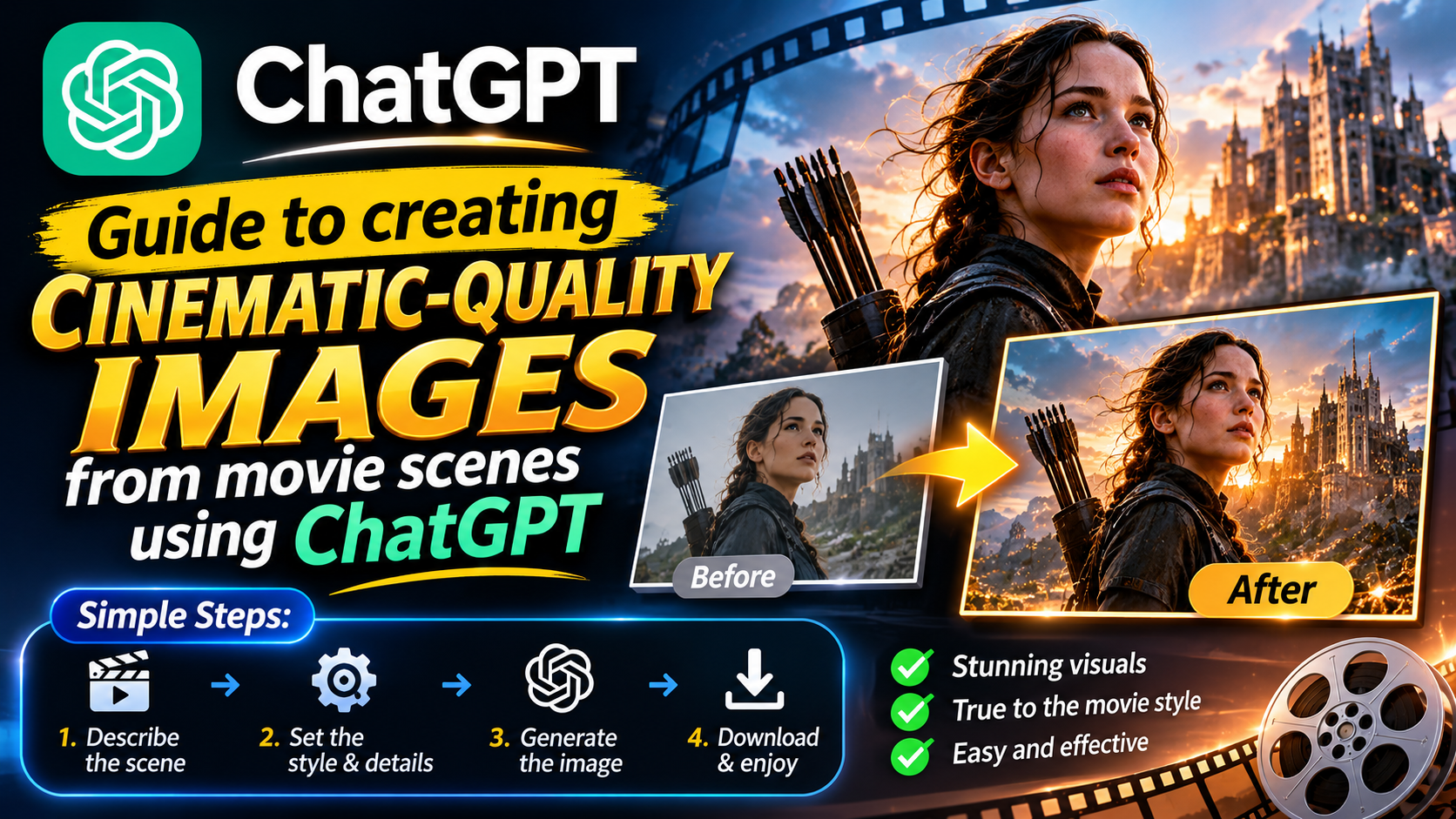
Guide to creating cinematic-quality images from movie scenes using ChatGPT
Nội dung
- 1. What is the trend of creating images from movie scenes using AI?
- 2. Instructions on how to create images from video footage using ChatGPT
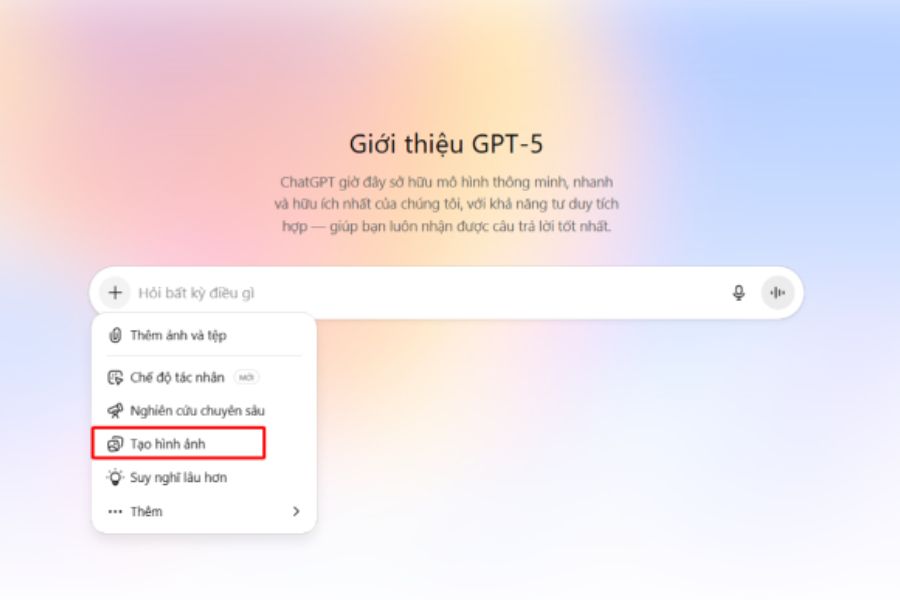
- Step 1: Open ChatGPT, which supports image creation.
- Step 2: Prepare images of the movie scene you want to recreate.
- Step 3: Upload the image and write a prompt to create a realistic image.
- Step 4: Adjust the background, lighting, and color.
- Step 5: Submit the request and check the AI-generated images.
- 3. A template for creating stunning, cinematic-quality images from movie scenes.
- Prompt transforms anime characters into real people.
- Prompt creates a mysterious cinematic scene.
- Prompt recreates a romantic movie scene.
- 4. Secrets to creating more beautiful and realistic images from movie scenes using ChatGPT
- 5. Conclusion
Have you ever watched a favorite movie and wished those stunning scenes could appear in real life? With ChatGPT, this idea is entirely possible. From familiar cartoon scenes and famous anime characters to emotionally charged cinematic sequences, you can transform the original images into realistic works of art with cinematic lighting, colors, and backgrounds. You don''t need to be a professional designer or photo editor to keep up with the AI-powered image creation trend that''s widely shared on social media. Let''s explore how to create images from movie scenes using ChatGPT with Sadesign''s detailed guide below!
1. What is the trend of creating images from movie scenes using AI?
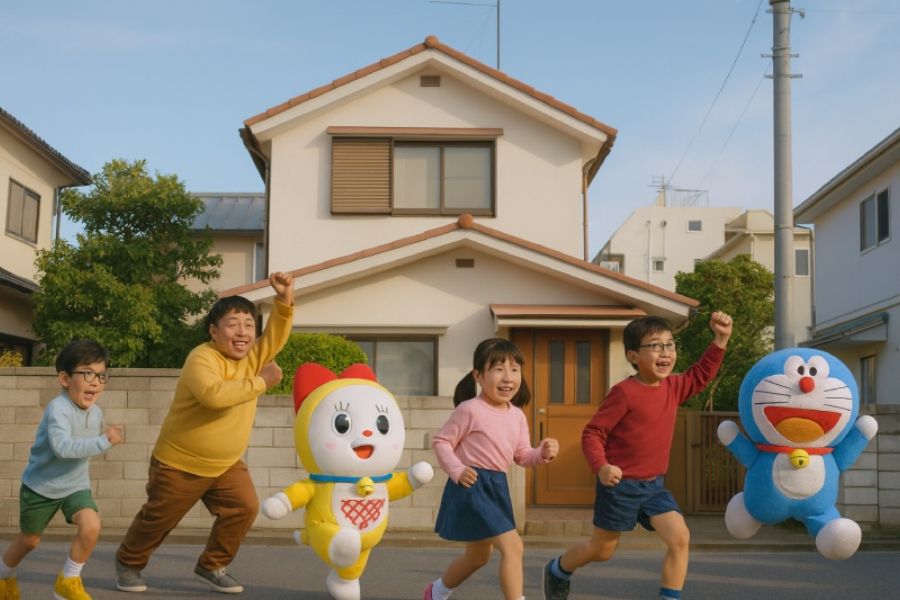
The trend of creating images from movie scenes using AI is a movement that utilizes artificial intelligence to recreate familiar scenes in a realistic style. Instead of maintaining the original animation style or images from the film, users can transform the characters, space, and lighting to create the feeling of a scene filmed in real life. The resulting images are often highly detailed, with harmonious colors and framing reminiscent of professional cinematic shots. The appeal of this trend lies in its ability to transform seemingly imaginary ideas into visual images. An anime character can have a lifelike appearance, an animated street can become a realistic urban setting, or a tranquil moment can be recreated with artistic lighting. The reasons why the trend of creating images from movie scenes is so popular include:
-
High level of creativity: Users are free to change the background, weather, clothing, and image style according to their preferences.
-
Emotionally rich imagery: Lighting, camera angles, and colors help create a romantic, mysterious, or dramatic atmosphere in the photograph.
-
Easy to do: You can start with a reference image and a few lines of description instead of having to create the image from scratch.
-
Suitable for social media: The finished product can be used as a profile picture, wallpaper, or shared content on TikTok, Facebook, and Instagram.
2. Instructions on how to create images from video footage using ChatGPT
To create an image from a movie scene using ChatGPT, you need to prepare a reference image and determine the desired style. Then, clearly describe the important details so the AI understands the composition, characters, and atmosphere of the scene. Follow these steps in order to get a more beautiful and natural-looking image.
Step 1: Open ChatGPT, which supports image creation.
First, access ChatGPT on your browser or app and log in to your account. Depending on the interface, you can use the image creation feature directly in the chat or send a text request for the system to process. Check if your account supports image creation.
When starting out, you should determine your desired visual style, such as candid photography, Hollywood cinema, live-action anime adaptations, or vintage-inspired frames. Choosing a style from the beginning will help you write a specific prompt and minimize the need for extensive revisions.
Step 2: Prepare images of the movie scene you want to recreate.
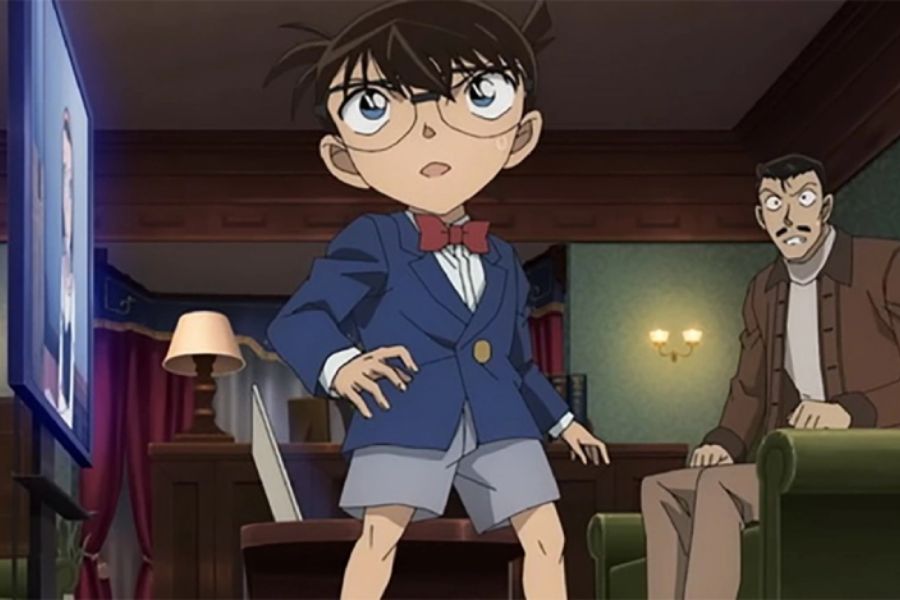
Next, choose a clear image from your favorite movie, anime, or cartoon. Prioritize images that fully showcase the characters, costumes, poses, and background so ChatGPT has more information to refer to.
A good source image will help the AI easily capture the distinctive elements of the scene. If the frame contains multiple characters, pay attention to the position of each person and their relationship to each other for a more accurate depiction.
Here are some ideas you could try:
-
A scene of an anime character standing in the rain in the middle of a street at night.
-
The frame shows two characters conversing in an old café.
-
A mystical forest scene with sunlight filtering through the canopy.
-
The moment the character stands under the yellow streetlights on a small street.
-
The scene is romantic, with a sunset, gentle breeze, and soft lighting.
Step 3: Upload the image and write a prompt to create a realistic image.
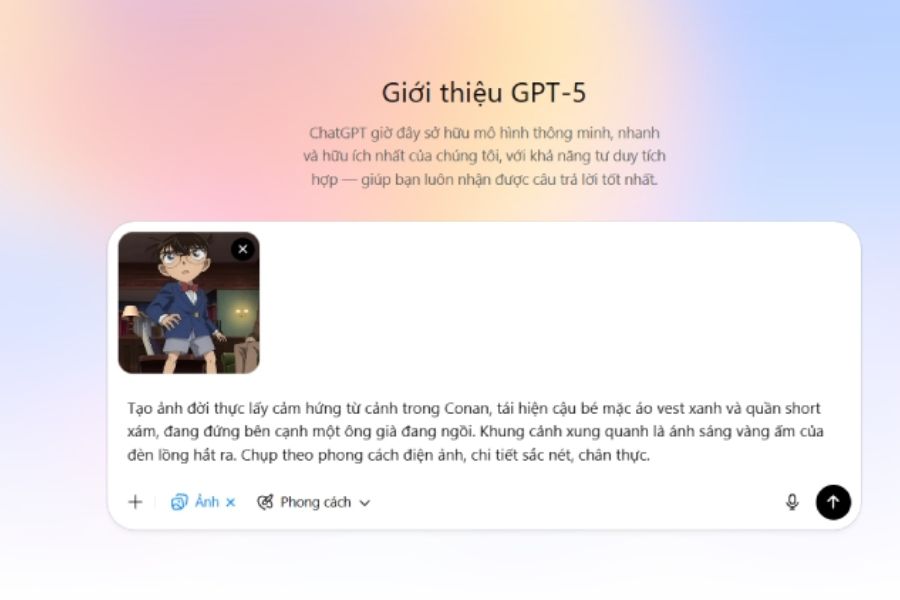
After preparing the image, upload it to the ChatGPT conversation if the interface supports image attachments. Next, write a prompt describing how you want to transform the original frame. Instead of simply asking to “create a real-life image,” provide information about the character, clothing, background, lighting, and image quality.
You can refer to the following prompt:
Based on the reference image, recreate the scene in a realistic photographic style, preserving the main composition, character poses, costumes, and characteristic background. Transform the animated characters into real-life versions with natural body proportions, realistic facial features, and vivid expressions. Utilize cinematic lighting, natural depth of field, harmonious colors, sharp textures, and subtle lighting effects. The image should feel like a frame extracted from a professional film, with high detail and without distorting faces, hands, or other important details.
You should view this prompt as a starting point. Once you're comfortable with the description style, add your own details to give the image personality and make it closer to your initial idea.
Step 4: Adjust the background, lighting, and color.
To create a cinematic photograph, you shouldn't just focus on the subject. The background and lighting also significantly influence the image's mood. For example, cool blue light can create a mysterious atmosphere, while soft yellow light is suitable for nostalgic or romantic film scenes.
You can ask ChatGPT to change each element to experiment with different styles:
-
Setting: A Japanese street at night, a misty forest, a classic room, or a beach at sunset.
-
Lighting: Sunlight streaming through the window, streetlights reflecting on the water, or backlighting creating outlines around the characters.
-
Color palette: Classic film tones, mysterious cool blues, warm orange-yellows, or strong contrasting colors.
-
Camera angles: Close-up of the face, eye-level angle, wide-angle shot showing the entire space, or low angle to create a sense of grandeur.
It's crucial to choose elements that are appropriate for the scene's content. Including too many irrelevant effects in a single prompt can make the image cluttered and detract from the original frame's essence.
Step 5: Submit the request and check the AI-generated images.
Once the prompt is complete, submit the request and wait for ChatGPT to generate the image. Processing time may vary depending on features, complexity, and system status. After receiving the results, compare the new image with the reference frame to check for important details.
You should pay attention to the faces, clothing, poses, number of characters, and background arrangement. If the image isn't as good as you'd like, don't rush to rewrite the entire prompt. Ask for corrections to address any missing or inaccurate parts.
For example, you can use statements like:
-
Maintain the current composition, but adjust the character's face to look more natural.
-
It softens the lighting, adds depth to the background, and preserves true-to-life colors.
-
Transform the images into a cinematic style, using muted tones and subtle contrasting lighting.
-
Keep the characters' costumes, poses, and positions the same, only change the setting to a street at night.
Editing each section individually gives you better control over the result and makes it easier to find the right style.
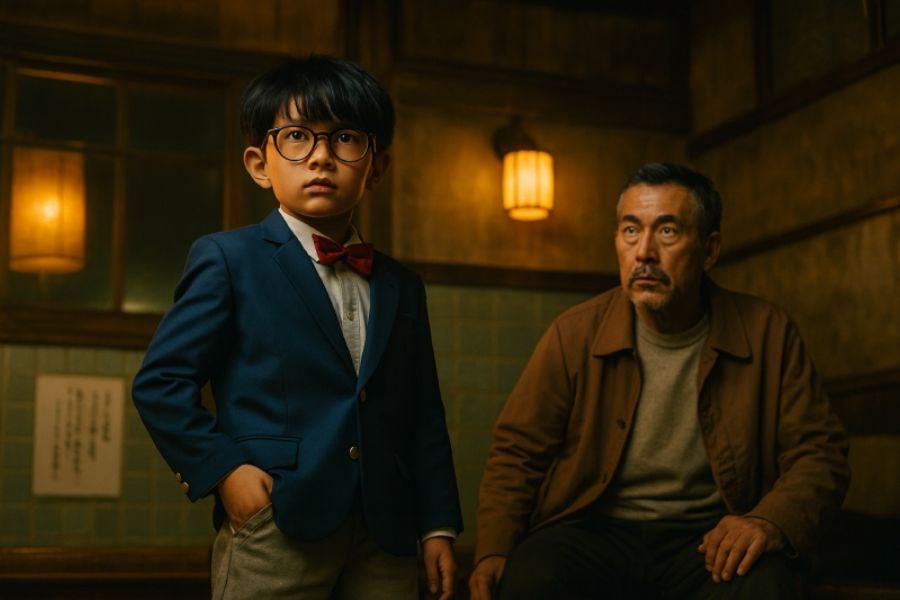
3. A template for creating stunning, cinematic-quality images from movie scenes.
If you're unsure where to start, you can refer to some of the prompt templates below. Each template focuses on a different style, from realistic images to artistic scenes.
Prompt transforms anime characters into real people.
Based on the reference anime image, transform the character into a real-life version with natural facial features, expressive eyes, and realistic hair. Maintain the clothing style, posture, expressions, and key identifying features. The setting should resemble a real-life cinematic scene, using natural lighting, subtle colors, realistic skin texture, and a harmonious depth of field. Avoid overly perfect faces or cartoonish effects.
Prompt creates a mysterious cinematic scene.
Recreating the reference imagery in the style of a mystery film. Keeping the main characters and composition, the setting is transformed into a dark, mist-shrouded forest with faint rays of light filtering through the canopy. Using cool blue tones combined with contrasting lighting, the background has depth and an air of mystery. The image is as realistic as a frame from a fantasy film, with sharp details but without losing its natural feel.
Prompt recreates a romantic movie scene.
Based on the original image, recreate the scene in a romantic cinematic style. Maintain the characters' poses, costumes, and composition, but add soft, warm orange-yellow sunset light, a natural breeze, and a gentle background. Use warm colors, realistic lighting, subtle depth of field, and expressive character portrayals. The result should resemble a high-quality photograph from a romantic film.
You can change the details in each template to suit your favorite movie. In particular, if you want to retain the distinctive features of the original scene, emphasize the requirement to preserve the composition, pose, and costumes rather than just describing the visual style.
4. Secrets to creating more beautiful and realistic images from movie scenes using ChatGPT
To achieve high-quality images, you need to combine clear prompts with a proper testing and editing process. AI can produce impressive results, but sometimes it misinterprets details or alters certain characteristics of the original image. The following tips will help you minimize this.
-
Be specific instead of using general terms: Instead of requesting "beautiful, realistic photos," specify the desired lighting, colors, camera angle, and materials.
-
Prioritize important details: If you want to maintain the spirit of the scene, emphasize the face, clothing, posture, and composition.
-
Avoid including too many styles in one prompt: Combining horror, romance, and animation styles in the same request can lead to inconsistent results.
-
Edit step by step: Change the lighting first, then the background or expression to better control the result.
-
Try different ways of expressing it: If the image is not satisfactory, describe the details that are incorrect using a concise and easy-to-understand statement.
5. Conclusion
Creating images from movie scenes using ChatGPT is a fun way to transform familiar frames into authentic cinematic works. With just a reference image, a clear prompt, and a few edits, you can experiment with many different styles without needing advanced design skills. Start with your favorite movie, pay attention to the composition, lighting, and character emotions, then adjust each detail to find the best result. Who knows, your creative ideas might lead to a unique and eye-catching photo series that will attract attention on social media.







VIP Products

Best Selling Products
Genuine Cheap Canva Pro
39 USD
Plugin Retouch4me
69 USD
Adobe Photoshop Copyright - Full App
120 USD
Freepik Premium Account
59 USD
MidJourney Account
29 USD
Copyright Adobe Lightroom Account
59 USD
Upgrade Duolingo Super
29 USD
Autodesk All App Account Copyright
120 USD
Upgrade Genuine Office 365
49 USD
Genuine Adobe Illustrator account
99 USD
Capcut Pro 1 Year
39 USD
ChatGPT Plus Account (GPT-4)
16 USD
Windows 10 & 11 Pro Key
36 USD
Adobe Premiere Pro Account
99 USD
Upgrade genuine Capture One account
120 USD