Best Selling Products

Freepik Premium Account
59 USD

ChatGPT Plus Account (GPT-4)
16 USD

Windows 10 & 11 Pro Key
36 USD

Upgrade Genuine Office 365
49 USD

Adobe Premiere Pro Account
99 USD

Upgrade Duolingo Super
29 USD

Plugin Retouch4me
69 USD

Adobe Photoshop Copyright - Full App
120 USD

Genuine Adobe Illustrator account
99 USD

Capcut Pro 1 Year
39 USD

Genuine Cheap Canva Pro
39 USD

Autodesk All App Account Copyright
120 USD

Upgrade genuine Capture One account
120 USD

MidJourney Account
29 USD

Copyright Adobe Lightroom Account
59 USD
Guide to Using Deepmotion AI to Create Engaging 3D Scenes
Nội dung
- 2. Pros and Cons of Deepmotion AI
- 3. Deepmotion AI's Standout Features
- 3.1 Smoothly Converting Video Into 3D Motion
- 3.2 Fully Automating the Animation Creation Process
- 3.3 Highly Accurate Motion Simulation
- 3.4 Easy Integration With Popular Graphics Software
- 3.5 Flexible 3D Character Customization to Match Your Creative Idea
- 3.6 No Expensive Equipment Needed, Expanding Accessibility
- 3.7 A Friendly Interface That's Easy for Everyone to Use
- 4. How to Use Deepmotion AI to Create 3D Animation
- 4.1 Creating a 3D Scene From a Text Description With Saymotion
- 4.2 Creating 3D Motion From Real Video With Animate 3D
- 5. Conclusion
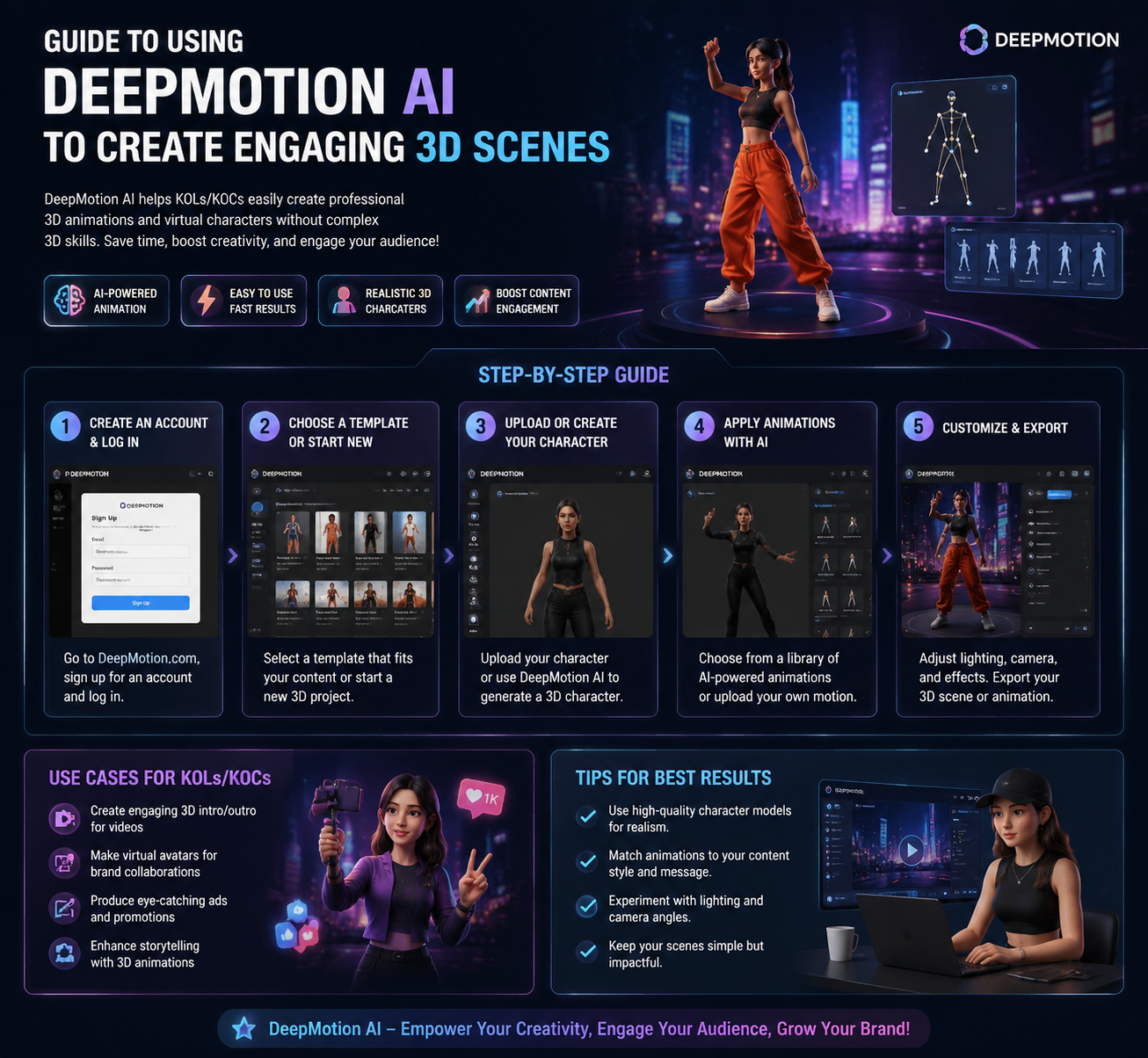
In this era of exploding digital technology, creating vivid 3D scenes is no longer the exclusive privilege of large studios or specialized technical teams. With support from Deepmotion AI — a modern artificial intelligence tool — content creators can easily turn real human movement into smooth 3D animation in just a few minutes.
1. What Is Deepmotion AI?
In the field of digital content creation technology, Deepmotion AI has emerged as a breakthrough solution for filmmakers, game designers, and 3D animation artists. It's an artificial intelligence platform designed to convert human movement — captured through video or a webcam — into realistic, natural 3D animation. What's special is that users don't need a complex dedicated motion-capture system, something that used to appear only in large studios. With just a few simple steps, anyone can turn real-life movement into digital data and apply it to a 3D character model.
Deepmotion AI uses advanced machine learning technology to analyze each frame in the input video, then automatically reconstructs body movement as a digital simulation. Thanks to a smart algorithm, this tool not only recreates basic movement but also handles complex motion well, such as turning the body, jumping, or actions involving physical interaction. This makes 3D characters vivid, full of life, and easy to blend into film scenes or virtual game environments.
No technical team needed, no expensive equipment needed — Deepmotion AI puts creative power in everyone's hands, from professional designers to freelance content creators. With a sufficiently powerful computer and a few original video clips, you can fully create unique, highly personal animated products. The simplicity of the process combined with the surprisingly high output quality is exactly why this platform is becoming increasingly popular within the global 3D creator community.
.png)
2. Pros and Cons of Deepmotion AI
It's no accident that Deepmotion AI has quickly been rated as one of the most notable 3D motion AI tools today. With its ability to save time, simplify workflows, and expand creative opportunity, this platform has won over both beginners and industry experts. However, to make the most of Deepmotion AI's potential, users need to clearly understand both its strengths and the limitations this tool brings.
In terms of strengths, Deepmotion AI allows for creating 3D character motion automatically, quickly, and accurately in just a few minutes. This significantly shortens production time compared to traditional methods, which are costly in both effort and expense. In addition, thanks to seamless integration with popular rendering software like Unity, Blender, or Unreal Engine, users can easily bring motion data into large projects without manual processing. Notably, not needing motion-capture equipment also lowers the technical barrier, opening up creative opportunities for the freelancer community, independent filmmakers, and animation teachers.
However, Deepmotion AI still has certain drawbacks. Animation quality depends heavily on the input video — if the lighting is weak, the frame is blurry, or movement is obscured, the simulation result will lack accuracy. In addition, the platform's free version has many limitations, such as short video length, missing advanced features, and a mandatory watermark when exporting data. Another issue is that the tool sometimes struggles to recreate movement that is too fast or has a high degree of interaction between body parts, which can affect realism if used in shots requiring high precision.
3. Deepmotion AI's Standout Features
3.1 Smoothly Converting Video Into 3D Motion
One of Deepmotion AI's most groundbreaking features is its ability to turn real human video into 3D character motion in a short amount of time. Instead of having to set up expensive motion-capture equipment, users just need to provide a simple video clip shot with a phone or webcam. Deepmotion's AI system will automatically analyze every gesture, every moving frame in the video, to generate accurate animation data and apply it immediately to a pre-built 3D character model.
This not only shortens technical processing time but also delivers absolute flexibility for creators. Whether you want to make an animated video, build a game character, or test out a film idea, Deepmotion AI supports you in bringing any movement to life with high speed and accuracy — all with just a few clicks.
3.2 Fully Automating the Animation Creation Process
Deepmotion AI is the ideal tool for anyone who wants to simplify the process of making 3D animated films. No longer having to spend hours manually adjusting each frame's movement or laboring over a complex sensor setup, this platform delivers comprehensive automation: from motion analysis and data processing to integrating the animation into a 3D model.
Automation not only saves time but also reduces errors caused by manual operation. As a result, users can focus more on the creative element instead of getting caught up in technical work. With Deepmotion AI, the scene-building process becomes tidier, faster, and more effective than ever.
3.3 Highly Accurate Motion Simulation
The core of Deepmotion AI's power lies in its ability to analyze and recreate body movement with extreme accuracy. Thanks to applying an advanced deep learning algorithm, this platform can recognize even the smallest movements, such as head tilt, wrist motion, an uneven left/right stride, or a shift in body center of gravity. The result is that 3D characters not only move correctly but also express a natural "presence," just like a real person.
This is especially important in filmmaking, game design, or educational content creation, where the realism of movement directly affects the viewer's experience. Accurate simulation makes content vivid, trustworthy, and gives the entire output product a professional feel.
3.4 Easy Integration With Popular Graphics Software
Not only strong in motion-processing features, Deepmotion AI also scores points for its outstanding compatibility with 3D rendering platforms like Unity, Unreal Engine, or Blender. Users can easily export motion files in popular formats such as FBX or BVH, then import them directly into graphics software to continue editing, adding effects, or building background scenes.
This feature opens up great opportunities for game developers, graphics technicians, and animated filmmakers — people who need a smooth, efficient workflow. Not having to deal with complex format conversion or rewriting compatibility code saves a great deal of time and effort, especially on projects with tight deadlines.
.png)
3.5 Flexible 3D Character Customization to Match Your Creative Idea
Another major plus for Deepmotion AI is its ability to customize motion according to the user's specific needs. You can fully adjust the walking posture, step speed, facial expression, or the intensity of each action of the 3D character to match the context and content you want to convey. This creates wonderful flexibility for the creative process.
Instead of only producing "cookie-cutter" animation that copies the original video, users can fine-tune each motion detail to express emotion, character personality, or build a unique body language. Thanks to this ability, Deepmotion AI isn't just a technical support tool — it's also a powerful companion for the process of storytelling through digital imagery.
3.6 No Expensive Equipment Needed, Expanding Accessibility
In the past, to achieve realistic movement in 3D animation, creators had to invest in a motion-capture system costing tens of thousands of dollars and requiring a dedicated installation space. Deepmotion AI completely removes this barrier, since all you need is a webcam or a smartphone to generate high-quality motion data.
This feature is especially useful for individual content creators, design students, or independent film teams with a limited budget. Thanks to its simplicity and high effectiveness, Deepmotion AI expands access to 3D technology for a large number of users — turning creative ideas into real products easily and affordably.
3.7 A Friendly Interface That's Easy for Everyone to Use
Despite having powerful AI technology, Deepmotion AI is still designed with friendliness and accessibility as a priority. The user interface is simple and intuitive, helping beginners easily operate it from their very first use. From uploading a video, choosing a character, to exporting the animation file, everything happens in one seamless process, requiring no complex technical knowledge.
As a result, Deepmotion AI isn't just suited for experts — it's also a great choice for teachers, students, marketing content creators, or social media creators. Anyone can quickly access and apply this tool to create captivating 3D animation with a clear personal touch.
4. How to Use Deepmotion AI to Create 3D Animation
After clearly understanding Deepmotion AI's strengths and standout features, the next step is learning how to apply this tool in practice. The good news is that the process of creating 3D animation with Deepmotion is very simple — you don't need programming knowledge, nor do you need to invest in specialized equipment. Just a video clip or a motion description (prompt), a computer connected to the internet, and a few basic steps are enough to create a lifelike 3D character. Below are the two most common methods: creating motion from text with Saymotion, and building animation from video with Animate 3D.
4.1 Creating a 3D Scene From a Text Description With Saymotion
Step 1: Sign up or log in to the Deepmotion AI platform and access Saymotion
.png)
First, you need to visit Deepmotion's official site and create a free account (or log in if you already have one). Once done, go to the Saymotion section — this is the area dedicated to creating animation from a text description (prompt). This is a brand-new feature that lets you create an animated film quickly without any input video.
Step 2: Enter your movement description into the "Animations" box
.png)
On the main interface, you'll see a field for entering the animation content. This is where you use an English-language command to describe the desired movement in detail — for example: "A character jumps and waves happily." The AI will read and understand the prompt and accurately recreate the 3D character's movement based on the description. The more detail you write, the more vivid and true to your idea the resulting animation will be.
Step 3: Customize the animation to your personal needs
.png)
After the animation is automatically generated, you can fine-tune elements such as movement speed, camera angle, facial expression, or the smoothness of the action in the Edit section. This is an important step that lets you personalize the output, creating 3D animation with your own distinct mark, serving different creative purposes — from education and media to entertainment.
Step 4: Export the 3D animation file to popular formats
Once you're satisfied with the animation, move to the Export section. Deepmotion AI supports many popular formats such as FBX, GLB, BVH, or MP4, suited for animated filmmaking, integrating into a game engine, or making a marketing video. Just choose the right format and download it to use right away in your project.
4.2 Creating 3D Motion From Real Video With Animate 3D
Step 1: Upload the input video to the Animate 3D platform
The Animate 3D feature lets you create animation from real human video. First, choose a video with a clear shot of a person moving, full body, and unobstructed. Then go to the Animate 3D section on Deepmotion and click "Add Video Clip." Drag and drop the video into the interface, and you're ready for the processing step.
Step 2: Generate the animation with AI using the "Create" button
Once the video has been successfully uploaded, scroll down and select the "Create" button. Deepmotion AI will begin scanning and analyzing the movement in the video, using its artificial intelligence system to reconstruct each footstep, hand gesture, or body-turning motion into the corresponding 3D movement. Depending on the video's length and your network speed, processing usually only takes a few minutes.
Step 3: Preview, edit, and export the 3D animation
Once the animation is generated, you can preview the simulation right on the interface. If needed, you can edit elements such as movement speed, expression, or framing. Finally, click the "Download" button and choose an export format (FBX, BVH, MP4, etc.) suited to your intended use — from filmmaking and integrating into game software to making a short advertising video.
5. Conclusion
Applying Deepmotion AI to the 3D animation creation process not only saves time and cost but also elevates product quality thanks to its ability to capture natural movement, accurate down to every gesture. Whether you're an independent filmmaker, a game programmer, or simply someone who loves creating digital content, Deepmotion AI is a tool you shouldn't overlook. Start exploring and experimenting today to see the clear difference in every 3D frame you create.





















VIP Products








Best Selling Products
Freepik Premium Account
59 USD
ChatGPT Plus Account (GPT-4)
16 USD
Windows 10 & 11 Pro Key
36 USD
Upgrade Genuine Office 365
49 USD
Adobe Premiere Pro Account
99 USD
Upgrade Duolingo Super
29 USD
Plugin Retouch4me
69 USD
Adobe Photoshop Copyright - Full App
120 USD
Genuine Adobe Illustrator account
99 USD
Capcut Pro 1 Year
39 USD
Genuine Cheap Canva Pro
39 USD
Autodesk All App Account Copyright
120 USD
Upgrade genuine Capture One account
120 USD
MidJourney Account
29 USD
Copyright Adobe Lightroom Account
59 USD