Best Selling Products

Genuine Cheap Canva Pro
39 USD

Windows 10 & 11 Pro Key
36 USD

Adobe Photoshop Copyright - Full App
120 USD

Autodesk All App Account Copyright
120 USD

Copyright Adobe Lightroom Account
59 USD

ChatGPT Plus Account (GPT-4)
16 USD

Freepik Premium Account
59 USD

Upgrade Genuine Office 365
49 USD

Genuine Adobe Illustrator account
99 USD

Adobe Premiere Pro Account
99 USD

Capcut Pro 1 Year
39 USD

Upgrade Duolingo Super
29 USD

MidJourney Account
29 USD

Upgrade genuine Capture One account
120 USD

Plugin Retouch4me
69 USD
How to create beautiful, formal, and professional 20/11 speech slides using AI in just a few minutes.
Nội dung
- 1. What are AI-powered slideshows for the November 20th (Teachers' Day) ceremony?
- 2. What preparations are needed before creating a 20/11 speech slideshow using AI?
- 3. How to create a 20/11 speech slideshow using Gamma AI
- 4. Some tips to make your 20/11 speech slides more beautiful and professional.
- 5. Conclusion
Vietnamese Teachers'' Day on November 20th is a special occasion for every student to express their gratitude to the teachers who have dedicated themselves to guiding them on their journey to adulthood. In celebratory ceremonies, besides a meaningful speech, beautifully designed slides also contribute to conveying the message of gratitude vividly and making a strong impression on attendees. However, not everyone has the design skills or the time to create each slide themselves. Instead of struggling with choosing images, adjusting layouts, or coordinating colors, you can use Gamma AI to automatically create presentations from simple commands. This tool supports brainstorming, content arrangement, and slide design quickly, helping you create a polished speech without much effort. Let''s explore how to create a 20/11 speech slideshow using Gamma AI in detail with Sadesign!

1. What are AI-powered slideshows for the November 20th (Teachers' Day) ceremony?
AI-powered 20/11 speech slides are a form of applying artificial intelligence to support content creation and slide design for programs celebrating Vietnamese Teachers' Day. Instead of having to write content, search for images, and adjust each element manually, users only need to input the topic and desired requirements. The AI will analyze the information, suggest an outline, and create a presentation with a relatively complete layout. The interesting aspect of this method is the ability to personalize content and interface according to each purpose. You can request the AI to design slides in a formal or warm style with shades of blue, white, or cream, combined with images of fresh flowers, books, a blackboard, and a classroom. Not only does it assist with the visuals, but the AI can also suggest introductions, messages of gratitude, and meaningful wishes to make the speech more emotional.
Some notable advantages of creating 20/11 speech slides using AI include:
-
Save time: Automatically build outlines and design multiple slides in just minutes.
-
Professional layout: Titles, images, and content are arranged harmoniously, creating consistency across pages.
-
Easily customizable: Colors, fonts, illustrations, and content can be changed to suit your needs.
-
Content creation support: Suggestions for expressions of gratitude, meaningful messages, and how to deliver a coherent speech.
-
Suitable for beginners: You don't need to be proficient in PowerPoint or have in-depth design knowledge to create beautiful slides.
2. What preparations are needed before creating a 20/11 speech slideshow using AI?
Before you begin designing, you should clearly define the content and message you want to convey in your speech. This is a crucial step that helps the AI understand your purpose, thereby building the layout and choosing the appropriate presentation style. For example, if the speaker is a student representative, the content could focus on gratitude, school memories, and a promise to study hard. Meanwhile, a speech by a teacher or principal might aim for appreciation, educational spirit, and memorable achievements. In addition, you should prepare personalized information beforehand to avoid a generic presentation. Realistic images, school name, class name, and memorable stories will give each slide a unique touch. You can refer to the following list to make the process of creating content using AI smoother:
-
Identify the topic: Clarify whether the speech is intended as an expression of gratitude, a sharing of memories, or a summary of educational activities.
-
Prepare an outline: Arrange the sections to include a greeting, the significance of November 20th, the contributions of teachers, words of thanks, and best wishes.
-
Estimated duration: For a 5-minute speech, you can prepare 6 to 8 concise slides.
-
Collecting images: Prioritize photos of teachers, students, extracurricular activities, and memorable moments at school.
-
Style selection: Prioritize formal and elegant designs, using soft colors and imagery appropriate to the atmosphere of the ceremony.
-
Prepare accurate information: Check the school name, teacher's name, class, and achievements you want to mention to avoid mistakes.
3. How to create a 20/11 speech slideshow using Gamma AI
Step 1: Access and log in to Gamma AI
First, open a web browser on your computer and access the Gamma homepage at https://gamma.app/vi . On the main interface, choose to register an account if you haven't used it yet, or click login to access your personal workspace. You can use the login method supported by the platform to save setup time.
After successfully logging in, observe the project management interface and content creation features. If this is your first time using Gamma, you can take some time to familiarize yourself with the basic options to make the design process smoother.

Step 2: Create a new design project
On the management screen, find the option to create new content using AI, usually displayed as Generate. Next, select the Presentation format to begin building your presentation. This is a suitable option if you want to create slides with titles, content, and images arranged in sections.
If you already have a speech, you can use that text as input instead of asking the AI to rewrite the entire thing. Ask Gamma to summarize the content into concise main points for slides, avoiding a situation where each page contains too much text, making it difficult for the audience to follow.

Step 3: Enter the command to create the 20/11 slide.
For Gamma to create the presentation you want, you need to provide specific commands regarding the topic, number of pages, target audience, and design style. In particular, clearly describe the content you want to include in each section so that the AI can build a logical layout and avoid missing any important messages.
You can use the following command to create a slideshow for your thank-you speech to your teachers:
Prompt creates 20/11 speech slides using Gamma AI.
Create an 8-slide presentation in Vietnamese with the theme "A speech of gratitude to teachers on Vietnamese Teachers' Day, November 20th". The speaker should be a student representative from [School Name], and the presentation should last approximately 5 minutes.
The content includes: Slide 1: Cover page with greetings and the theme of November 20th. Slide 2: The significance of Vietnamese Teachers' Day. Slide 3: The contributions and dedication of teachers. Slide 4: Memorable memories at school. Slide 5: Gratitude and respect for teachers. Slide 6: A promise to strive in studies. Slide 7: A message of profound gratitude. Slide 8: Concluding wishes and thanks.
The design should be formal, sophisticated, and warm. Use shades of blue, white, and cream. Incorporate images of fresh flowers, books, a blackboard, a classroom, and educational activities. Each slide should have a prominent title, a maximum of three main points, and concise, easy-to-read content. Use elegant fonts, a balanced layout, and high-quality images. Do not create fictitious names, achievements, or memories.

Step 4: Customize the automatic outline
After you submit the prompt, Gamma will analyze your requirements and suggest an outline for your presentation. You should review the content of each page before proceeding with the design to ensure a logical flow. The introduction should grab attention, the main content should focus on the hard work and contributions of your teachers, and the conclusion should convey a heartfelt message of gratitude.
If you find any content missing or unsuitable, you can directly edit the outline or provide additional requests to the AI. For example, suggest adding a page sharing memorable moments, shortening the introduction, or writing a more emotionally rich conclusion. Once you are satisfied with the structure, press the create button to proceed to the design step.

Step 5: Choose a graphic theme for the slide.
Next, Gamma will provide design templates for you to choose from. For the November 20th theme, prioritize templates with soft colors, spacious layouts, and images that convey gratitude. Shades of blue, white, cream, or burgundy can all create an attractive look if combined appropriately.
After selecting a topic, the system will generate slides based on the approved outline. You can then request changes to the background color, font style, images, or content arrangement. Don't forget to replace any unsuitable illustrations with actual photos of your school, class, or teachers to make your presentation more relatable and meaningful.

Step 6: Edit and finalize the content
Once Gamma has created the slides, open each page one by one to check the presentation. If a page has too much text, ask the AI to condense it into key points. For pages containing important messages such as thank-you notes or greetings, prioritize a striking presentation, incorporating appropriate images to create emphasis.
Additionally, you should carefully check the spelling, school name, teacher's name, and other information mentioned in the speech. In particular, ensure that the stories or memories appearing in the slides are factual, avoiding letting the AI create inaccurate details.
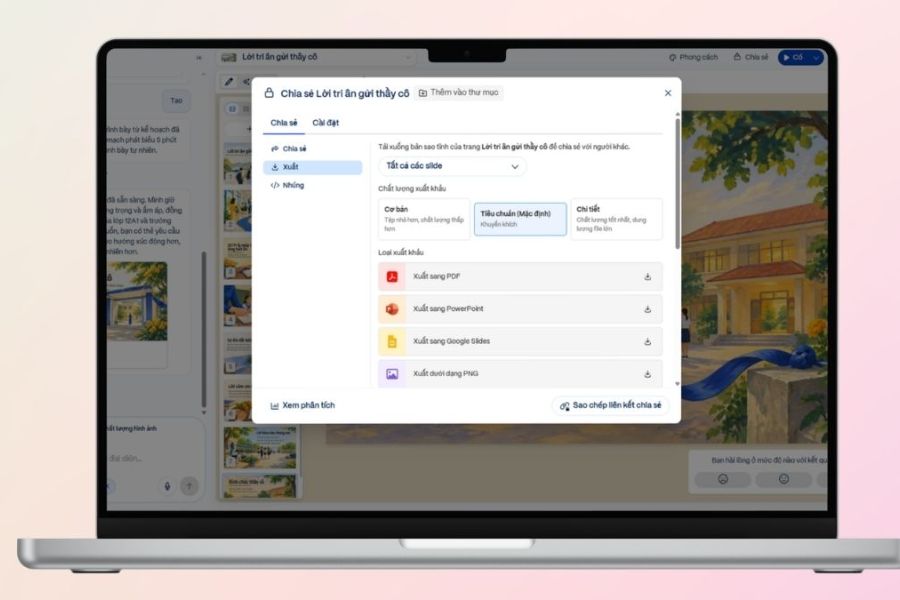
Step 7: Publish and download the presentation
After finalizing your design, switch to presentation mode to review your entire speech. This is a good way to check font size, images, layout, and the alignment of pages. Also, read through the content to adjust the timing of slide changes to better align with your speech.
Finally, access the presentation's options menu or three-dot icon, find the file export function, and select the appropriate format. Gamma supports publishing as PDF or PowerPoint depending on your account's features and access permissions. After downloading, reopen the file on the device you will use during the event to ensure all content is displayed correctly.
4. Some tips to make your 20/11 speech slides more beautiful and professional.
Although Gamma AI can automatically build content and design, you should still take the time to review the slides to ensure they truly suit the program. A beautiful presentation doesn't necessarily need a lot of effects or elaborate images. The important thing is that each page conveys the right message, has a clear layout, and evokes emotion in the audience. Especially with a presentation about showing gratitude to teachers, sincerity should be paramount. Instead of using overly long greetings or formulaic content, you can add heartfelt thank-you messages, realistic images, and memorable anecdotes. The following tips will help make your presentation more complete:
-
Limit the text per slide: Only include essential information, avoiding displaying the entire speech verbatim on the screen.
-
Color consistency: Choose 2 to 3 main colors to create a cohesive and elegant presentation.
-
Use appropriate imagery: Prioritize images of teachers, students, books, and educational activities over irrelevant illustrations.
-
Choose an easy-to-read font: Titles should stand out, and the content should be appropriately sized for easy viewing by attendees.
-
Avoid overusing effects: Use subtle page transitions to maintain focus on the speech content.
-
Verify the information: Cross-check proper names, data, and AI-suggested stories before use.
-
Practice before the ceremony: Read through your speech, adjust the duration, and practice transitioning between slides to match each section of the content.
5. Conclusion
With Gamma AI, creating a 20/11 speech slideshow has become much simpler and faster. Just prepare the content, enter the appropriate commands, and choose a design style, and you can have a beautiful, formal set of slides without spending a lot of time manually. However, don't forget that the greatest value of a speech lies not in eye-catching effects, but in the feelings and gratitude conveyed within. Combine the AI's design capabilities with sincere sharing and real-life commemorative photos to create a meaningful presentation. This will surely be a memorable spiritual gift for your teachers on Vietnamese Teachers' Day, November 20th.





















VIP Products








Best Selling Products
Genuine Cheap Canva Pro
39 USD
Windows 10 & 11 Pro Key
36 USD
Adobe Photoshop Copyright - Full App
120 USD
Autodesk All App Account Copyright
120 USD
Copyright Adobe Lightroom Account
59 USD
ChatGPT Plus Account (GPT-4)
16 USD
Freepik Premium Account
59 USD
Upgrade Genuine Office 365
49 USD
Genuine Adobe Illustrator account
99 USD
Adobe Premiere Pro Account
99 USD
Capcut Pro 1 Year
39 USD
Upgrade Duolingo Super
29 USD
MidJourney Account
29 USD
Upgrade genuine Capture One account
120 USD
Plugin Retouch4me
69 USD