Best Selling Products

Genuine Adobe Illustrator account
99 USD

Plugin Retouch4me
69 USD

Windows 10 & 11 Pro Key
36 USD

Upgrade genuine Capture One account
120 USD

Upgrade Duolingo Super
29 USD

Freepik Premium Account
59 USD

Capcut Pro 1 Year
39 USD

Upgrade Genuine Office 365
49 USD

ChatGPT Plus Account (GPT-4)
16 USD

Copyright Adobe Lightroom Account
59 USD

Adobe Photoshop Copyright - Full App
120 USD

MidJourney Account
29 USD

Genuine Cheap Canva Pro
39 USD

Adobe Premiere Pro Account
99 USD

Autodesk All App Account Copyright
120 USD
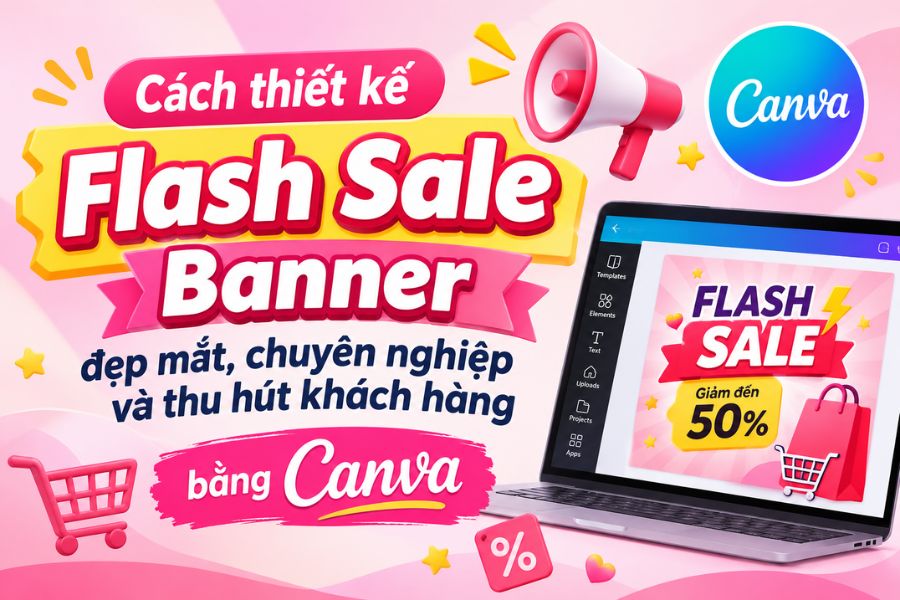
How to design a beautiful, professional, and eye-catching Flash Sale Banner using Canva.
Nội dung
- 1. Popular and attractive Flash Sale Banner templates
- 2. Principles for designing professional and attractive Flash Sale Banners
- 3. Standard Flash Sale Banner Sizes for Shopee, Lazada, and TikTok Shop
- 4. Suggestions for sources of inspiration for beautiful banner designs.
- 5. Guide to designing beautiful, professional Flash Sale Banners on Canva
- 6. Some tips to help Flash Sale Banners be more effective.
- 7. Conclusion
In online business campaigns, flash sale banners are a crucial element in attracting attention and conveying promotional information to customers. A well-designed banner not only highlights the discount but also creates a sense of urgency, stimulating purchasing desire and encouraging viewers to click on the product. Especially in today''s increasingly competitive e-commerce market, an impressive design helps brands create a unique identity and increase their reach to buyers. So how can you design a professional flash sale banner without being proficient in graphic design software? In this article, let''s explore popular banner templates, design principles, appropriate sizes for each platform, and a guide to quickly creating promotional banners using Canva.
1. Popular and attractive Flash Sale Banner templates
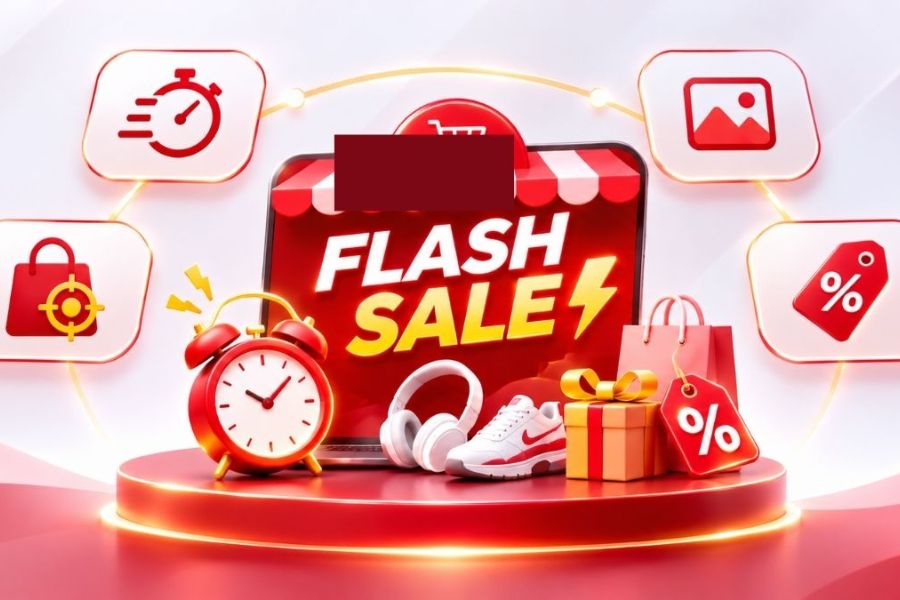
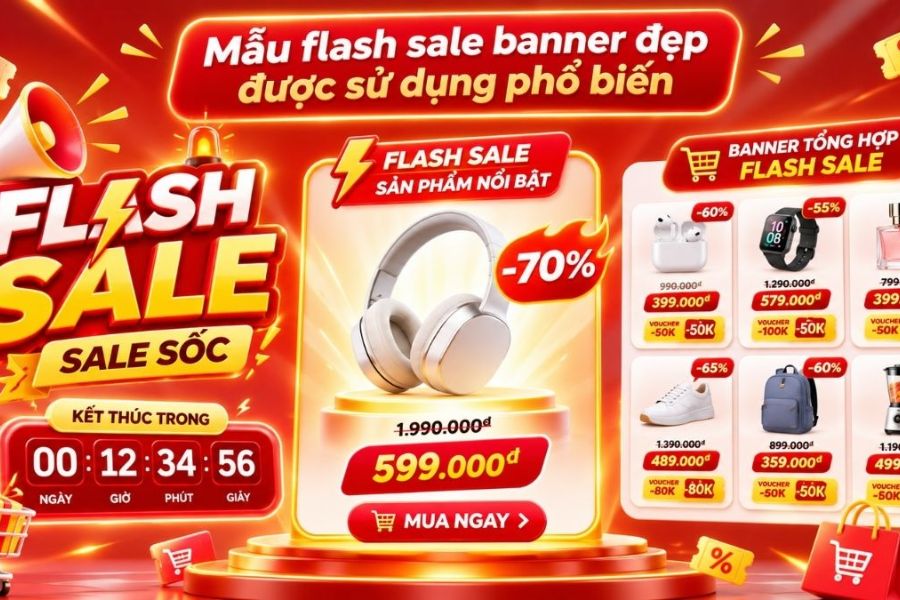
An eye-catching flash sale banner typically shares common features: a clear message, striking colors, and a prominently displayed discount. Depending on your industry, target audience, and advertising goals, you can choose a suitable design style. Instead of using too many decorative details, focus on elements that help viewers quickly identify the promotion. Some popular banner designs currently in use include:
-
Shocking discount banners: Focus on numbers like 30%, 50%, or 70% off to grab attention. This template is suitable for large sales events, clearance sales, or limited-time offers.
-
Countdown clock banner: Uses an image of a clock or remaining time information to create a sense of urgency. This design is often used in limited-time flash sales.
-
Featured product banner: Place a flagship product in the center, combining high-quality images and a special price. This is a suitable option when a store wants to focus its promotion on a specific item.
-
Multi-product banner: Arranges multiple products in a single design, including prices or discount codes. This template gives customers more choices and is suitable for store-wide promotions.
-
Minimalist banners: Use a monochrome background, minimal details, and prominent typography to focus on the main message. This style is suitable for fashion, cosmetics, and technology brands.
2. Principles for designing professional and attractive Flash Sale Banners
A well-designed promotional banner isn't simply about color coordination or image selection; it also depends on its ability to convey information effectively. If the layout is too complex, customers might overlook important offers. Conversely, a design with clear focal points will help viewers quickly understand the program and easily make a purchase decision.
When designing a flash sale banner, you should pay attention to the following principles:
-
Highlight the offer: The discount amount, the selling price after the discount, or any special benefits should be placed in the most visible location. Using a large, bold font can create emphasis.
-
Harmonious color scheme: Red, orange, and yellow are often used in promotional banners because they create a vibrant feel. However, you should combine colors purposefully to avoid a cluttered look.
-
Choose easy-to-read fonts: Prioritize clear fonts that match your brand style. Avoid using too many fonts in a single design.
-
Keep the content simple: Banners should focus on the program name, discount level, validity period, and essential promotional conditions.
-
Use high-quality images: Product images need to be sharp, color-accurate, and not distorted. This makes the design look professional and creates a positive impression on customers.
-
Place prominent CTAs: Phrases like "Buy Now," "Grab the Deal Now," or "Check Out Offers" help viewers identify the action they need to take.
-
Brand identity consistency: The logo, colors, and visual style should align with the store's overall brand identity to enhance memorability.
3. Standard Flash Sale Banner Sizes for Shopee, Lazada, and TikTok Shop
Size is a crucial factor to consider right from the start of banner design. Each platform has different display positions and image aspect ratios. Using the wrong size can result in cropped content, incomplete product images, or illegible text. Therefore, you should determine the platform where you will be posting your banner to choose the appropriate dimensions.
Here are some commonly used banner sizes for reference:
The dimensions above are for reference only and are not mandatory standards for all display locations. Actual specifications may vary depending on the display module, device, and platform updates.
Before exporting the file, you should check the specific requirements in Seller Center to ensure the banner displays correctly. Besides size, pay attention to a few other factors:
-
Choose either PNG or JPG format depending on your needs.
-
Make sure the image file size is within the allowed limit.
-
Place important content within a safe area, avoiding the edges of the image.
-
Check the banner quality on both phones and computers.
4. Suggestions for sources of inspiration for beautiful banner designs.
If you don't have much design experience, referring to ready-made banner templates will help you easily find a suitable style. Graphic design resource platforms often have many ideas on color schemes, product layouts, and promotional information presentation. You can choose from some of the sources below to find inspiration.
-
Canva: Offers a wide variety of flash sale banner templates, e-commerce banners, and advertising design templates. Users can change images, colors, fonts, and content directly within the template.
-
Pinterest: Ideal for finding creative ideas by industry. You can use the keyword "Flash Sale Banner Design" to explore many different styles.
-
Behance: A collection of professional design projects, providing you with inspiration for building layouts, color schemes, and brand imagery.
-
Freepik: Offers a wide variety of editable banner templates, illustrations, and graphic resources. When using them, you should check the copyright conditions and request attribution for each resource.
When referencing existing designs, you should select the details that suit you instead of copying them verbatim. Adjust the colors, images, and messaging to your own style to create a unique identity for your store.
5. Guide to designing beautiful, professional Flash Sale Banners on Canva
Canva is an online design tool suitable for beginners thanks to its intuitive interface and extensive template library. You don't need to be proficient in complex graphic design software to create promotional banners; you can do so with simple drag-and-drop and editing. Instead of starting from a blank page, take advantage of the available templates to save time and easily complete your design.
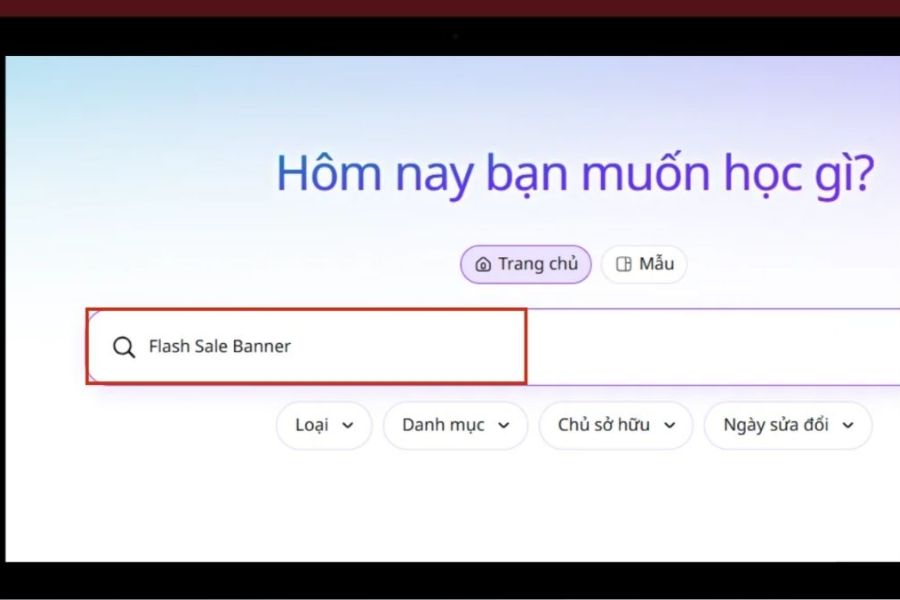
Step 1: Access Canva and search for Flash Sale Banner templates.
First, access the Canva website and log in to your personal account. In the search bar on the main interface, enter the keywords "Flash Sale Banner" or "Sale Promotion Banner". Canva will display many design templates with different styles and sizes. You should choose a template with a layout that suits your industry, brand colors, and the platform you intend to post it on. If you want to design it from scratch, you can choose to create a design and enter custom dimensions according to your needs.
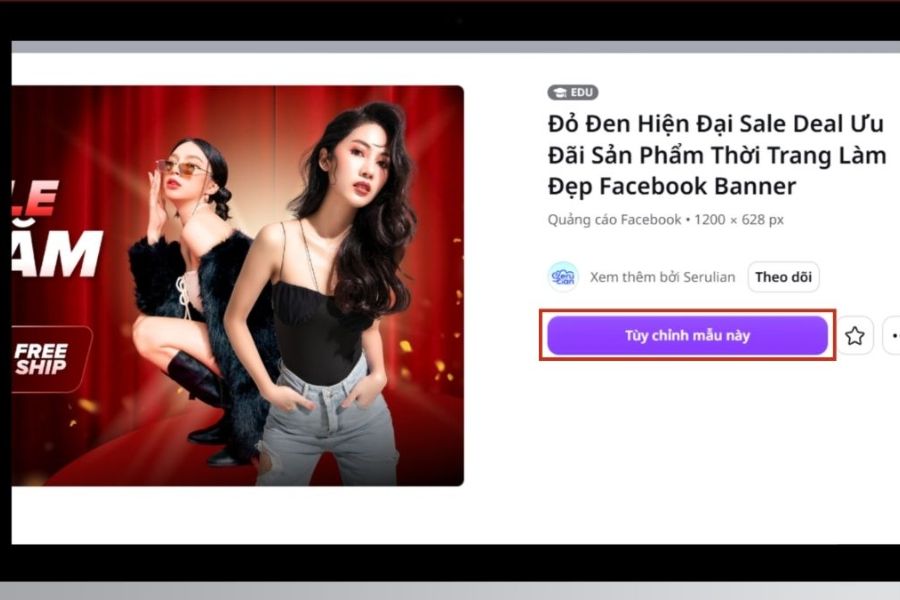
Step 2: Select and customize the design template
After finding a template you like, click on the design and select "Customize" to open the editing interface. Here, you can change the program title, discount level, font, background color, and product images. Prioritize highlighting important information such as 50% off, fixed price, or limited-time offers. You can also change the colors of the elements to make the design more consistent with your brand identity.
Step 3: Add images and finalize the layout.
Next, use the toolbar on the left to add suitable images, icons, illustrations, or decorative details. You can upload product photos from your device to Canva or choose from available resources in the library. Then, adjust the size and position of each element to create a balanced layout. Don't forget to add your store logo, the promotion period, and a call-to-action button such as "Buy Now" or "Grab the Deal Now" to make the banner more complete and professional.
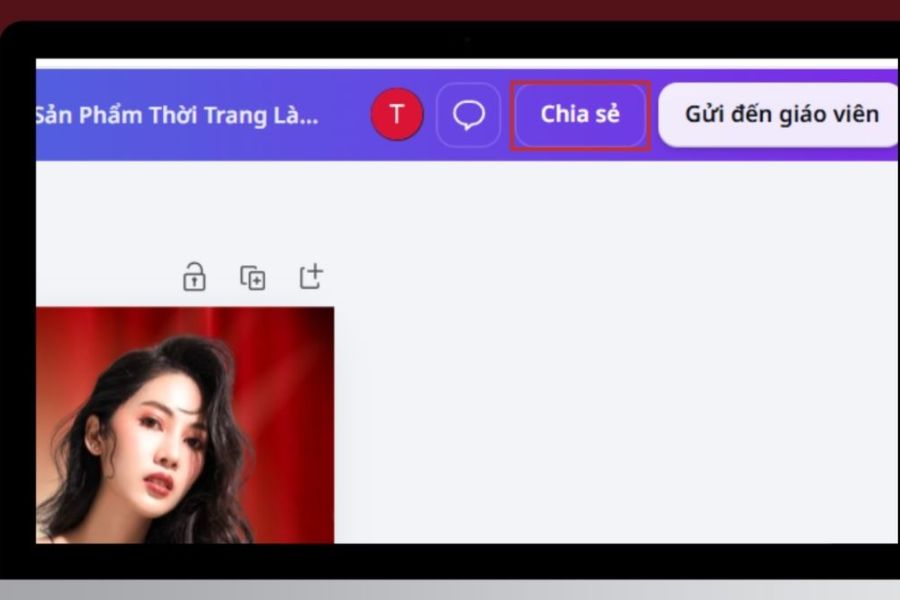
Step 4: Check and download the Flash Sale Banner to your computer.
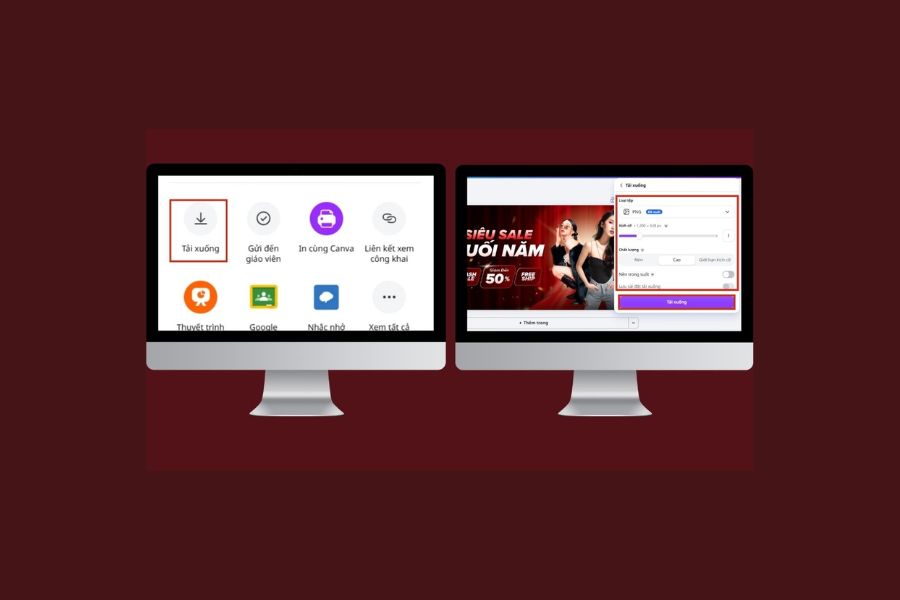
Once you've finished designing, double-check all the content, especially the discount amount, validity period, and program information. You should zoom in on the image to detect spelling errors, misaligned details, or unbalanced elements. Then, tap the Share button in the upper right corner of the screen, select Download, and choose PNG or JPG format depending on your needs. Finally, tap Download to save the banner to your device and use it for your advertising campaign.
6. Some tips to help Flash Sale Banners be more effective.
For banners to be truly effective, you shouldn't just focus on aesthetics but also on the viewer's experience. A design that suits the target audience, conveys the right offer, and has a clear message will make the advertising campaign more appealing. In addition, regularly checking and adjusting the design will help the store improve its communication effectiveness.
Here are some points you should keep in mind:
-
Design according to each shopping occasion: Banners for 11/11 Double Day, Black Friday, Christmas, or Lunar New Year should have colors and messages that match each event.
-
Avoid overusing effects: Too many patterns, images, or color transitions can make the banner look cluttered.
-
Create multiple design versions: Experiment with different color schemes, headlines, and images to find the design that best suits your target audience.
-
Ensure that promotional information is accurate: The selling price, discount amount, duration, and terms and conditions of application must be clearly stated.
-
Monitor post-publication effectiveness: Observe clicks, conversion rates, and sales to evaluate the design and make adjustments for subsequent campaigns.
7. Conclusion
Designing eye-catching and professional flash sale banners is an effective way for stores to attract attention, convey offers, and encourage customers to shop. By mastering the principles of layout, color, images, and size, you can create impressive banners without needing extensive design experience. Canva, in particular, simplifies the creative process with its diverse template library, intuitive editing tools, and numerous readily available graphic resources. Try applying these guidelines to create banners with your own unique style, contributing to the effectiveness of your store's promotional campaigns.





















VIP Products








Best Selling Products
Genuine Adobe Illustrator account
99 USD
Plugin Retouch4me
69 USD
Windows 10 & 11 Pro Key
36 USD
Upgrade genuine Capture One account
120 USD
Upgrade Duolingo Super
29 USD
Freepik Premium Account
59 USD
Capcut Pro 1 Year
39 USD
Upgrade Genuine Office 365
49 USD
ChatGPT Plus Account (GPT-4)
16 USD
Copyright Adobe Lightroom Account
59 USD
Adobe Photoshop Copyright - Full App
120 USD
MidJourney Account
29 USD
Genuine Cheap Canva Pro
39 USD
Adobe Premiere Pro Account
99 USD
Autodesk All App Account Copyright
120 USD