Best Selling Products

MidJourney Account
29 USD

Freepik Premium Account
59 USD

Autodesk All App Account Copyright
120 USD

Genuine Adobe Illustrator account
99 USD

Upgrade Duolingo Super
29 USD

Adobe Photoshop Copyright - Full App
120 USD

Adobe Premiere Pro Account
99 USD

Upgrade genuine Capture One account
120 USD

Windows 10 & 11 Pro Key
36 USD

Plugin Retouch4me
69 USD

ChatGPT Plus Account (GPT-4)
16 USD

Capcut Pro 1 Year
39 USD

Upgrade Genuine Office 365
49 USD

Copyright Adobe Lightroom Account
59 USD

Genuine Cheap Canva Pro
39 USD
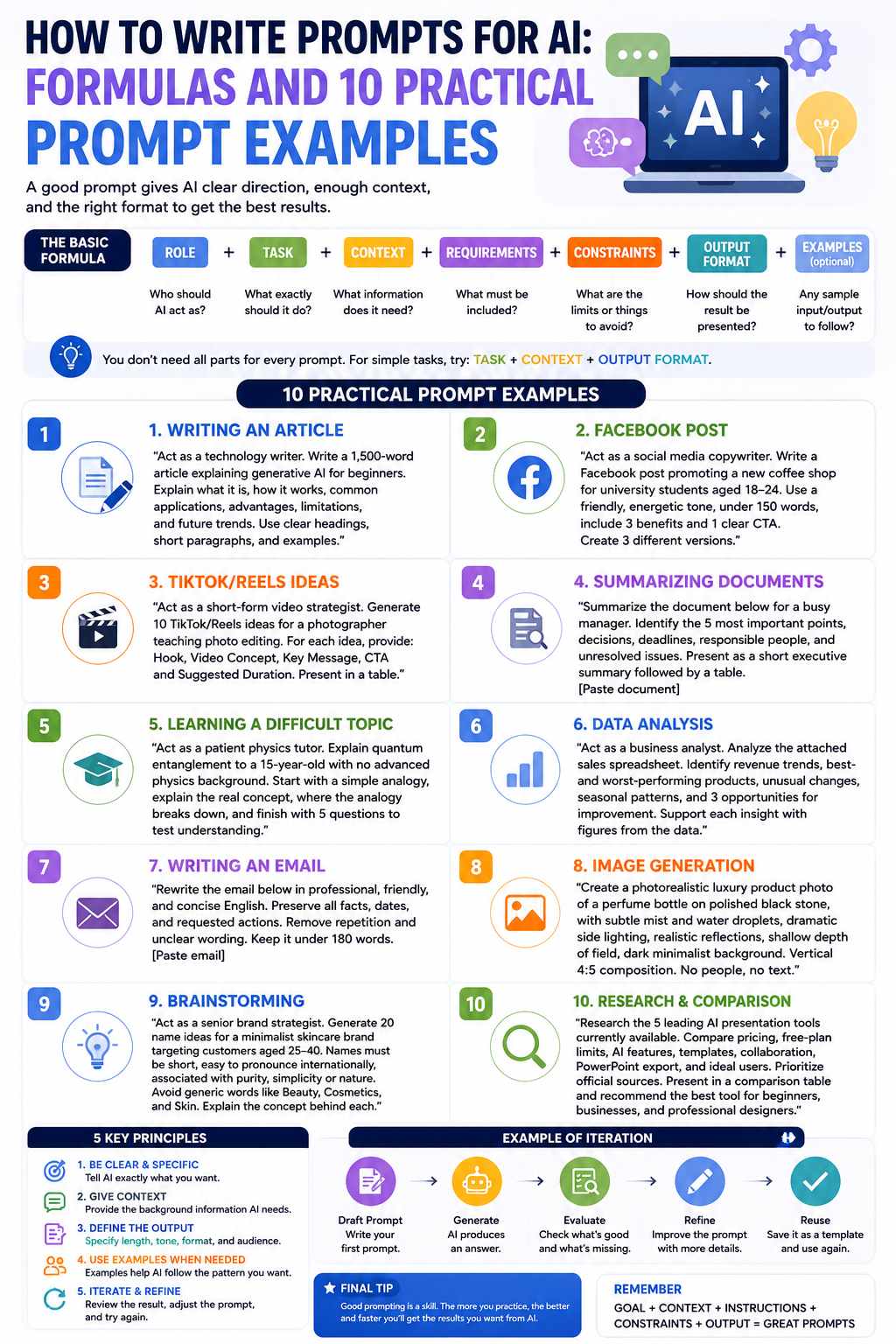
How to write prompts for AI: Formulas and 10 practical prompt examples.
Nội dung
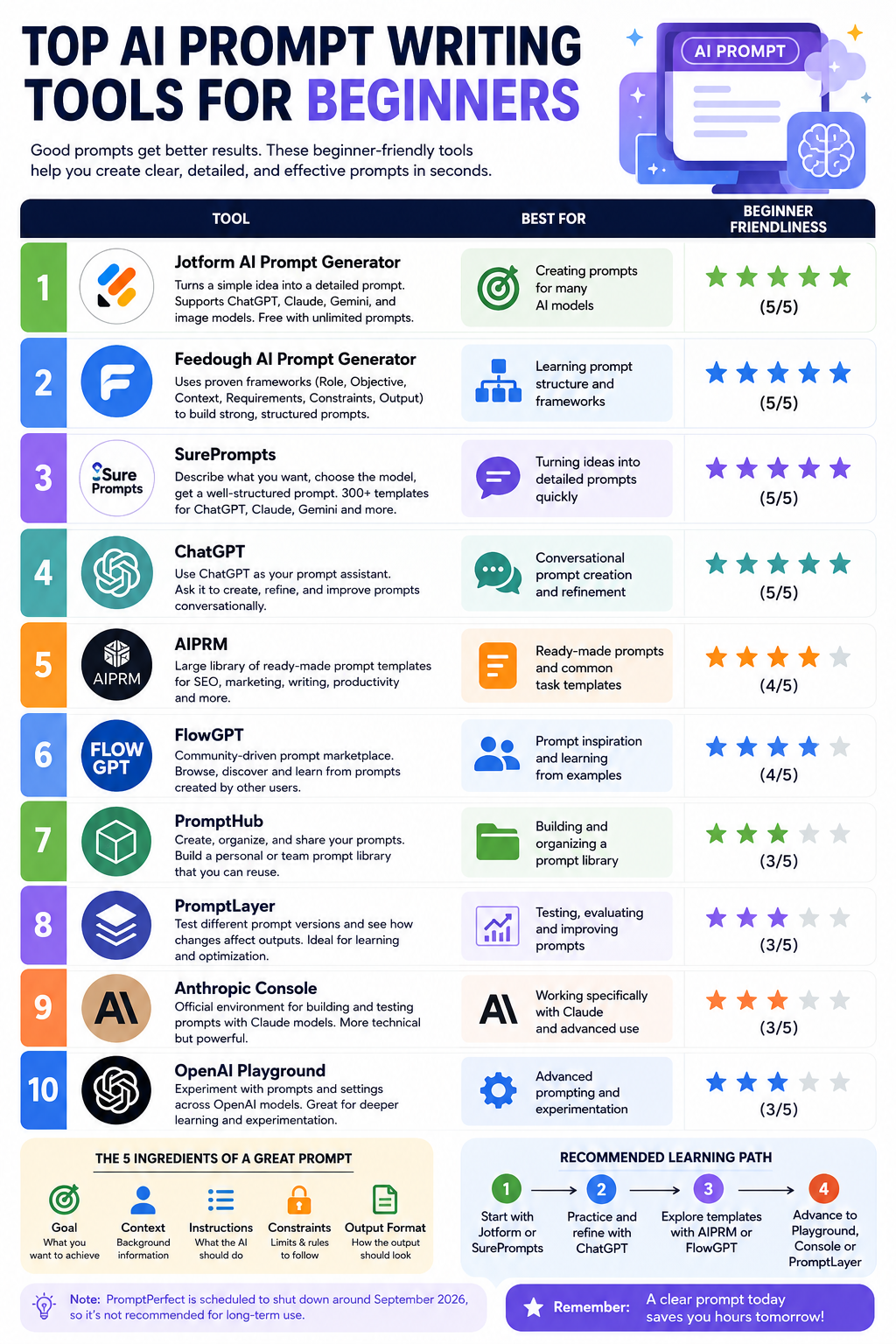
- 1. Understanding Prompts in AI
- 1.1. Defining prompts in AI
- 1.2. Why is a prompt important?
- 2. Use the standard prompt structure of the PERFECT Framework.
- P – Person: Go there
- E – Expectation: Expectations
- R – Requirements: Requirements
- F – Format: Formatting
- E – Examples: Sample examples
- C – Constraints: Limits
- T – Test & Iterate: Try and fine-tune
- 3. Complete PERFECT Template
- 4. Ten practical prompt templates
- 4.1. Office work
- 4.2. Content Creator
- 4.3. Learning
- 4.4. Programming
- 5. Should the prompt be written in Vietnamese or English?
- 6. Common mistakes
- 6.1. Prompt is too short.
- 6.2. The prompt is too long and confusing.
- 6.3. No context provided
- 6.4. Conflicting Requirements
- 7. Iterative Prompting Technique
- 8. Tips for more effective prompts
Writing AI prompts is a crucial skill that will help you make the most of ChatGPT and other current AI tools.
1. Understanding Prompts in AI
1.1. Defining prompts in AI
A prompt is a command, question, or request that you send to an AI to instruct the system to perform a specific task. A prompt can be as simple as a question, but it can also be a lengthy instruction containing multiple requirements, conditions, and examples.
Think of a prompt as ordering food at a restaurant. If you simply say "I'll have pho," the chef will have to decide whether it's beef or chicken pho, whether to have it rare or well-done, with or without vegetables, and to what level of seasoning.
Conversely, if you say, "Give me rare or well-done beef pho, less noodles, more onions, no chili," the request is much more specific. The final result is therefore more likely to match your wishes.
AI operates on a similar principle. The clearer you provide about the goal, context, and output requirements, the better the AI can generate appropriate results.

1.2. Why is a prompt important?
No matter how intelligent AI is, it still needs guidance. A request as vague as "write an article about the iPhone" can produce a wide variety of results. AI could write reviews, comparisons, user guides, or even present the history of the iPhone from 2007 to the present.
The problem isn't that AI can't write. The problem is that users haven't provided enough information for the AI to accurately determine the task.
A good prompt can significantly reduce the number of revisions you need to make. Instead of constantly asking the AI to “rewrite,” “make it shorter,” “add examples,” or “change the tone,” you can specify these requirements right from the start.
According to common experience in the AI community, those proficient in prompt writing typically save significant time compared to beginners. The greatest value of prompt writing skills lies not only in creating a good response, but also in the ability to turn AI into an assistant that can work according to your workflow.
2. Use the standard prompt structure of the PERFECT Framework.
One of the easiest ways to learn how to write AI prompts is to use the PERFECT framework. This is a 7-element structure that helps you build a clear and systematic request.
Not every prompt needs to include all seven elements. For a simple question, you only need to state the task. However, for complex tasks, the more complete the information you provide, the easier it is to control the outcome.

P – Person: Go there
Persona is the role you want the AI to take on. Defining the role helps the AI approach the problem from a specific perspective.
For example: "You are a copywriter specializing in writing content for high-end technology brands."
Instead of asking the AI to write generic content, you provided the specialized context. The AI will tend to choose phrasing, wording, and approaches that are more appropriate for the role of a copywriter.
You can change your Persona according to your role: teacher, SEO specialist, programmer, Project Manager, marketing specialist, or office assistant.
E – Expectation: Expectations
Expectations answer the question: What do you want AI to do?
This is the most important part of the prompt. Describe the task specifically instead of using overly general requirements.
Example: "Write a product description for the landing page."
If you need to be more precise, you can specify the product, target audience, and goals of the landing page.
R – Requirements: Requirements
Requirements are specific criteria that the result must meet.
You can request:
-
Length: 500 words.
-
Writing style: professional yet approachable.
-
Language: Vietnamese.
Instead of saying "write a good piece," make "good" more understandable. For example: "professional writing style, easy to read, suitable for beginners, and doesn't use overly technical jargon."
F – Format: Formatting
The format determines how the AI presents the results.
You can ask the AI to use paragraphs, tables, lists, or heading structures.
Example: "Present the information in bullet points format with 5 main points."
Alternatively: “Present it in a table format with columns: Features, Advantages, Disadvantages, and Suitable Audiences.”
Specifying the format is especially useful when you want to use AI results directly in documents, emails, articles, or work plans.
E – Examples: Sample examples
Examples provide visual representations to help the AI better understand the style or results you desire. This is the foundation of the Few-shot prompting technique.
If you want the AI to write captions in a specific style, provide one or two sample captions. The AI can use the word choice, length, structure, and tone of the examples to generate similar content.
C – Constraints: Limits
Constraints tells the AI what you don't want to appear in the results.
For example: "Avoid using overly technical language, and refrain from using English terms when there are equivalent Vietnamese terms."
This part is very important because sometimes AI can complete the task correctly, but not in the way you expect.
T – Test & Iterate: Try and fine-tune
The first prompt is rarely perfect, especially for complex tasks. Therefore, you need to read the results, identify any inconsistencies, and then adjust the prompt.
This is not an indication that the prompt has failed. This is normal behavior when working with AI.
3. Complete PERFECT Template

You can use the template below as a general framework for many tasks:
[PERSONA] You are [role] with [experience/expertise].
[EXPECTATION] Please [specific task].
[REQUIREMENTS]
- Length: [number of words/paragraphs]
- Tone: [writing style]
- Language: [Vietnamese/English]
[FORMAT] Present in [bullet/table/paragraph] format.
[EXAMPLES] Example: [Give 1-2 examples]
[CONSTRAINTS] No:
- [unwanted thing 1]
- [unwanted thing 2]
The key point is that you shouldn't mechanically copy the entire template for every case. For a simple question, a short prompt can be more effective. The PERFECT framework should be considered a checklist to help you verify if the prompt contains enough information.
4. Ten practical prompt templates

4.1. Office work
Write professional emails
You are a professional office assistant. Write an email requesting 3 days of leave (January 20-22) to your direct supervisor. Reason: Family matters. Tone: Polite, concise, in Vietnamese. A replacement has been arranged.
This prompt clearly defines the role, tasks, time off, recipient, reason, and tone. Therefore, the AI doesn't need to make too many assumptions about the information.
Report Summary
Summarize the following text in 5 bullet points, with each point no more than 20 words. Prioritize key data and the main conclusion:
[Paste text]
Create a project plan
You are the Project Manager. Create a plan for the [project name] project over 4 weeks. Include: milestones, deliverables, and responsible persons (leave blank). Format: table.
4.2. Content Creator
SEO blog post writing
Write an outline for a blog post about [topic]. Main keyword: [keyword].
Requirements: 1 H1, 5-7 H2, each H2 containing 2-3 H3.
There is a 5-question FAQ section. Target: Vietnamese readers, non-specialist.
Short video script
Write a 60-second TikTok video script about [topic].
Hook in the first 3 seconds. 3 main points. Final CTA.
Voice: youthful, mildly humorous, accessible to Gen Z.
Caption social media
Write 3 versions of the Instagram caption for the photo [description].
Each caption: 2-3 lines + 5 Vietnam hashtags.
Tone: [cheerful/professional/emotional].
4.3. Learning
Explaining the concept is difficult.
Explain the concept as if you were speaking to a 10th-grade student.
Use real-world examples from Vietnam. Avoid using technical jargon.
It concludes with three review questions.
This prompt is particularly effective when you encounter a difficult concept. Instead of simply asking for an "explanation," you determine the listener's level, how to explain it, and the structure of the conclusion.
Reviewing knowledge
Create 10 multiple-choice questions on [topic].
Each question has 4 answer options (A, B, C, D). The correct answer is at the end.
Level: [basic/intermediate/advanced].
Language practice
Correct the grammatical errors and suggest a more natural way of writing the following English paragraph.
Explain the reasons for each correction in Vietnamese:
[Paste paragraph]
4.4. Programming
Debug code
The following code contains an error [describe the error]. Find the cause and fix it.
Explain in Vietnamese why the error occurred:
[Paste code]
With programming prompts, providing error messages, programming language, environment version, and relevant code snippets will help AI analyze more accurately.
5. Should the prompt be written in Vietnamese or English?

This is a question many AI users are interested in. The answer is: it depends on the intended use .
You should prioritize Vietnamese when creating emails, articles, internal documents, or content for the Vietnamese market. If your target audience is Vietnamese and the final result needs to be in Vietnamese, using Vietnamese from the start often gives you better control over your writing style.
Conversely, English may be suitable for highly technical topics such as coding, AI, or science, especially when the reference materials and key terminology are primarily in English.
You can use English when you need to refer to English sources or want to create English content to translate and edit later.
Current AI tools support Vietnamese quite well. For common tasks, you don't necessarily need to switch to English just because you think AI will understand English better.
More important than the language itself is the clarity of the prompt .
6. Common mistakes
6.1. Prompt is too short.
"Writing articles about AI" is a prime example.
AI doesn't know who the article is for, what its purpose is, how long it should be, whether it needs SEO, or what tone of voice should be used.
Instead of letting the AI guess, provide context and specific instructions.
6.2. The prompt is too long and confusing.
Detail doesn't mean cramming all the requirements into one long paragraph. If there are too many different tasks, break them down into steps.
For example, instead of asking AI to research, create outlines, write articles, and optimize SEO all in one huge prompt, you can do it step by step.
6.3. No context provided
"Edit this email to make it better" isn't clear enough.
AI needs to know who the email is for, what the purpose is, what role the recipient plays, and whether you want a professional or friendly tone.
6.4. Conflicting Requirements
A common example is: "Write concisely but with full detail."
These two requirements can be contradictory if no specific limits are defined. Instead, ask: “Write in 300 words, focusing on the three most important points, and provide an example for each point.”
Thus, AI has clear criteria for balancing brevity and detail.
7. Iterative Prompting Technique
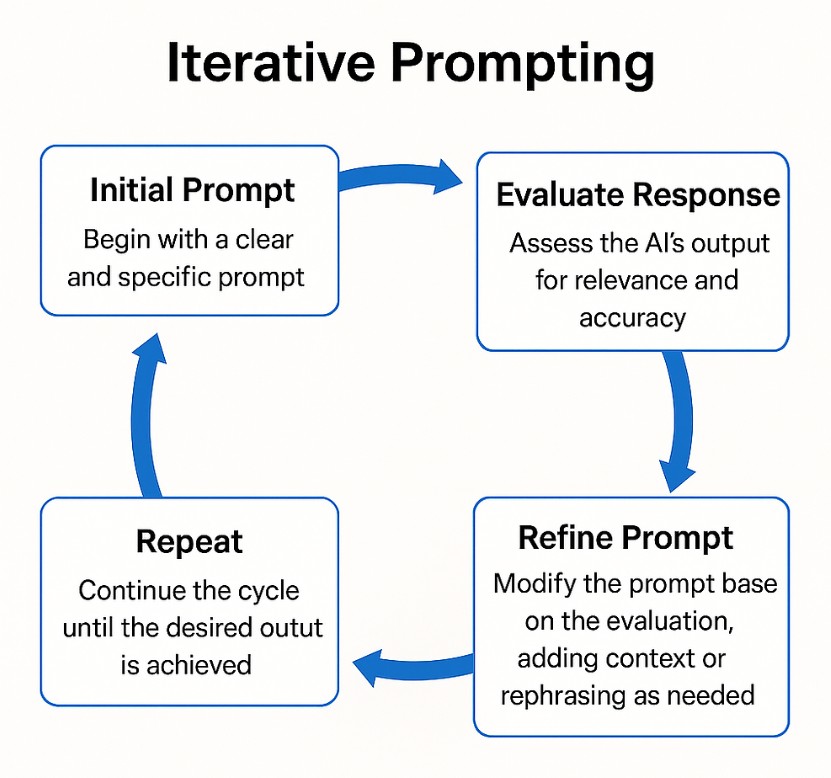
One of the most important skills when working with AI is iterative prompting, which involves continuously experimenting and refining prompts.
You shouldn't expect the first prompt to always produce perfect results. A simple process might consist of four steps:
Step 1 – Ask: Send the initial prompt and ask the AI to perform the task.
Step 2 – Evaluation: Read the results and identify precisely which aspects are unsuitable.
Step 3 – Refine: Add requirements or change parts that are not yet satisfactory.
Step 4 – Ask again: Send new requests until the results meet the objective.
For example, after receiving an article, you could follow up with the request: " The article is good, but a bit long. Could you shorten it to 300 words and add real-world examples from Vietnam?"
This approach is more effective than trying to write a huge prompt from scratch. You can think of the conversation with the AI as a collaborative process: the AI creates a draft, you review it, and then the AI continues to refine it based on feedback.
8. Tips for more effective prompts
A good prompt should answer these fundamental questions: What does the AI need to do? For whom? In what context? What form should the results take? Are there any limitations?
When writing prompts, prioritize clear action verbs such as “write,” “summarize,” “compare,” “analyze,” “plan,” “explain,” “edit,” or “convert.”
If the task is important, add evaluation criteria. For example, instead of "write SEO articles," require articles with a clear heading structure, main keywords, FAQ, and a specific target audience.
Another tip is to ask the AI to repeat the question if important information is missing.
For example: If you lack the necessary information to complete the task, please ask me up to three questions before we begin.
This is especially useful for jobs with many variables.
Start with a simple request, read the results, identify areas for improvement, and continue refining. After some practice, you'll realize that good prompt writing skills not only help you use AI more effectively but also help you think more clearly when defining problems and work goals.





















VIP Products








Best Selling Products
MidJourney Account
29 USD
Freepik Premium Account
59 USD
Autodesk All App Account Copyright
120 USD
Genuine Adobe Illustrator account
99 USD
Upgrade Duolingo Super
29 USD
Adobe Photoshop Copyright - Full App
120 USD
Adobe Premiere Pro Account
99 USD
Upgrade genuine Capture One account
120 USD
Windows 10 & 11 Pro Key
36 USD
Plugin Retouch4me
69 USD
ChatGPT Plus Account (GPT-4)
16 USD
Capcut Pro 1 Year
39 USD
Upgrade Genuine Office 365
49 USD
Copyright Adobe Lightroom Account
59 USD
Genuine Cheap Canva Pro
39 USD