Best Selling Products

Adobe Premiere Pro Account
99 USD

Adobe Photoshop Copyright - Full App
120 USD

Windows 10 & 11 Pro Key
36 USD

Upgrade Duolingo Super
29 USD

Upgrade Genuine Office 365
49 USD

MidJourney Account
29 USD

ChatGPT Plus Account (GPT-4)
16 USD

Capcut Pro 1 Year
39 USD

Freepik Premium Account
59 USD

Copyright Adobe Lightroom Account
59 USD

Plugin Retouch4me
69 USD

Genuine Cheap Canva Pro
39 USD

Upgrade genuine Capture One account
120 USD

Genuine Adobe Illustrator account
99 USD

Autodesk All App Account Copyright
120 USD
Top AI prompt writing tools for beginners
Nội dung
- 1. Prompt writing support tool
- 2. Popular AI chatbots
- 2.1. ChatGPT
- 2.2. Claude
- 2.3. Gemini
- 2.4. Copilot
- 3. Which chatbot should I choose to write prompts for?
- 4. Website for finding sample prompts
- 4.1. PromptHero
- 4.2. FlowGPT
- 4.3. LearnPrompting.org
- 5. How to utilize template prompts
- 6. Security considerations when using AI
- 7. Information that should not be included in the prompt.
- 7.1. Sensitive personal information
- 7.2. Confidential company data
- 7.3. Financial Information
- 8. How to use AI safely
- 8.1. Always check the output.
- 8.2. Don't trust AI 100%
- 8.3. Understanding the Limitations of AI
Not sure where to start writing a prompt? AI tools and template prompt websites can help you build requirements more quickly and efficiently.
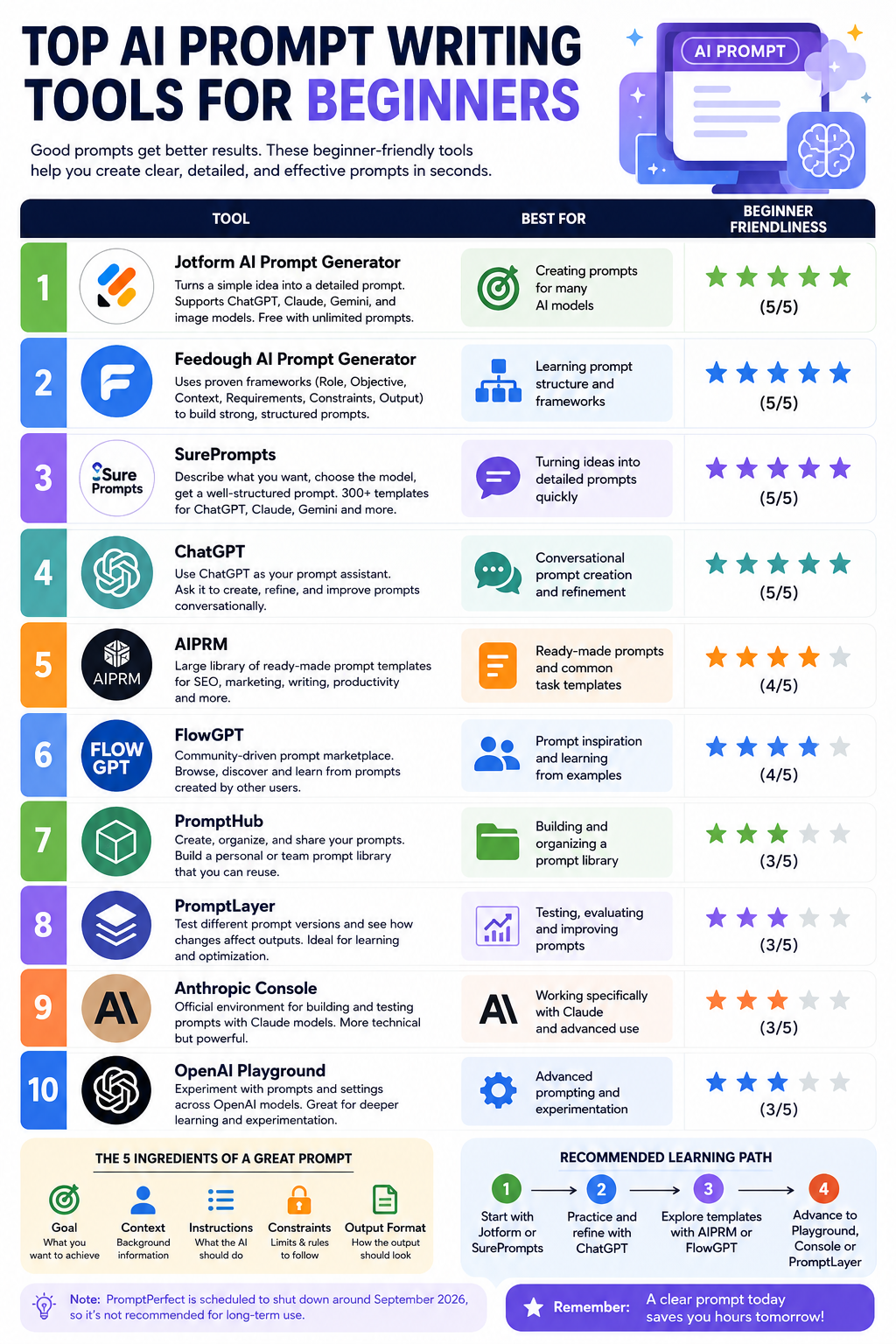
1. Prompt writing support tool
Writing a prompt doesn't necessarily have to start with a perfect statement. In fact, you can use AI chatbots themselves to build, improve, or test prompts before integrating them into another tool.
For example, instead of figuring out how to write a prompt for an SEO blog post yourself, you can ask AI to act as a prompt expert and generate a prompt tailored to your goals.

A simple prompt might be:
You are a Prompt Engineering expert. Please help me write a detailed prompt for AI to generate an SEO blog post outline on [topic]. The target audience is [target audience]. The main keyword is [keyword]. The outline needs to include H1, H2, H3, and an FAQ section.
After receiving the results, you can further request the AI to adjust the prompt to suit your actual work.
This transforms chatbots from a content creation tool into a prompt writing support tool .
2. Popular AI chatbots
Currently, there are many AI chatbots that can assist in writing and optimizing prompts. Four popular names include ChatGPT, Claude, Gemini, and Copilot. Each tool has its own strengths, so it's not advisable to assume that one chatbot is always best for every situation.
2.1. ChatGPT
ChatGPT stands out for its ability to handle a wide range of tasks, from content writing and brainstorming to information analysis and programming.
One major advantage is that users can instruct ChatGPT to play various roles during the prompt building process. For example, you can ask the AI to be an SEO expert, copywriter, teacher, or programmer, and then build the prompt based on that role.
ChatGPT is suitable for general users and those who need a versatile tool for multiple purposes.
According to the information available, the Pro version costs approximately $20 per month , while some advanced features and models may require a paid subscription plan depending on the time of purchase.
2.2. Claude
Claude is highly regarded for his ability to write naturally, analyze lengthy content, and handle broad contexts. He is a worthwhile choice for writers, researchers, and analysts.
One of the strengths mentioned is the ability to handle context with up to 200,000 tokens in versions that support this feature.
Claude is particularly useful when you want to input a large amount of material for AI to analyze and then build prompts or perform tasks based on that content.
The drawback is that its multimedia capabilities and feature ecosystem may not be as diverse as some competitors.
The price for the Pro package is approximately $20 per month .
2.3. Gemini
Gemini has a major advantage for those already using the Google ecosystem. Its integration with Google Workspace makes it suitable for tasks involving documents, email, and other Google services.
Some versions of Gemini are capable of handling very large contexts, with announced levels reaching up to 1 million tokens in supported scenarios.
It's important to note that AI can sometimes generate inaccurate information. Therefore, important content still needs to be double-checked.
Gemini is suitable for those who frequently work within the Google Workspace ecosystem and need to integrate AI into their current workflows.
The approximate price for a paid plan is around $20 per month , depending on the plan and market.
2.4. Copilot
Microsoft Copilot is a suitable choice for users within the Microsoft ecosystem. The tool can support many basic tasks and has the advantage of being integrated with Microsoft products.
One appealing aspect is that Copilot offers a free basic version. However, advanced features may require a paid plan.
According to the information available, the price can range from free to around $20 per month , depending on the version.
If you frequently work with Windows and Microsoft 365, Copilot might be a worthwhile tool to consider when building or using prompts.
3. Which chatbot should I choose to write prompts for?
There's no single answer as to which chatbot is best. The right choice depends on your work and the ecosystem you're using it in.
If you need a versatile tool for writing, brainstorming, coding, and handling various tasks, ChatGPT is a popular choice.
If the job primarily involves writing long texts, researching, or analyzing documents, Claude might be a good fit.
If you use Google Workspace regularly, Gemini offers an advantage in terms of integration capabilities.
Meanwhile, Windows and Microsoft 365 users might consider Copilot.
More importantly, you don't necessarily have to use only one chatbot. You can use one tool to build a prompt, then pass that prompt to another tool to compare the results.
4. Website for finding sample prompts
Instead of just reading the theory of Prompt Engineering, you can look at how others build prompts, then change components like roles, tasks, context, and format to suit your own work.
4.1. PromptHero
PromptHero is a resource with many prompts belonging to different categories, including prompts for AI-powered image creation.
The advantage of such prompt libraries is that you can see how a request is structured to produce a specific result.
If you're looking for ideas for visual prompts, PromptHero can be a relatively convenient starting point.
4.2. FlowGPT
FlowGPT operates on a community-based model, where users can share and review their prompts.
This helps you not only find prompts but also gain perspectives from the community. A well-rated prompt can be a valuable resource for learning how to describe tasks, set context, or specify formatting requirements.
However, you shouldn't copy every prompt mechanically. A prompt that's effective in one situation may not be suitable for your work.
4.3. LearnPrompting.org
LearnPrompting.org focuses more on the instructional and training aspects. The content can help beginners understand everything from basic concepts to advanced prompting techniques.
This is the right approach if you not only want to find available prompts but also want to understand why those prompts work effectively.
5. How to utilize template prompts
The prompt template should be considered a starting point , not a fixed formula.
For example, you find a prompt for writing marketing copy:
You are a marketing expert. Write advertising copy for product [product]. The target audience is [target audience]. The tone is [tone]. The content should focus on [benefits].
Instead of using the original, adjust it:
You are a content marketing expert with 5 years of experience in the technology field. Please write advertising content for [product name].
Target customers: Vietnamese users aged 25-35 who are interested in technology.
Objective: Increase trial sign-ups.
Tone: Professional, modern, yet easy to understand.
Length: 150-200 words.
The content should focus on three main benefits: [benefit 1], [benefit 2], [benefit 3].
Do not use exaggerated statements or unverified information.
The second version has a clearer context and limitations. Therefore, the AI has less room to guess.
6. Security considerations when using AI
Besides prompt writing skills, security is an issue that AI users should not overlook.
A single prompt can contain a lot of information. If you feed verbatim internal documents, customer data, or financial information into a chatbot, you could create unnecessary risks.
Therefore, before sending any data to AI, ask yourself: Is this information really necessary for the AI to complete the task?
If the answer is no, it's best to remove or hide that information.
7. Information that should not be included in the prompt.
7.1. Sensitive personal information
Do not include information such as ID card/citizen identification card numbers, passwords, login information, or bank account numbers in the prompt.
If you need AI to process a document containing personal data, replace it with symbols before sending it.
For example, instead of: Nguyen Van A, ID card number 012345678901, account number 123456789...
It can be converted to: [FULL NAME] , [ID NUMBER] , [ACCOUNT NUMBER]
AI can still perform many tasks such as text editing, summarizing, or structural analysis without knowing the real identity.
7.2. Confidential company data
Contracts, business strategies, internal financial reports, customer information, or unpublished product data all require careful handling.
If you only need AI to check wording, provide the essential content and remove irrelevant confidential information.
7.3. Financial Information
Do not enter card numbers, OTP codes, bank passwords, or sensitive transaction information in the prompt.
AI can assist in explaining financial concepts or analyzing anonymized data, but it shouldn't be the place where you enter your account credentials.

8. How to use AI safely
8.1. Always check the output.
AI can generate misinformation, even when the answers are presented with great confidence.
This is especially important for data, legal information, financial data, medical data, or breaking news.
If the AI provides a number, research name, reference source, or important information, verify it with a reliable source before using it.
8.2. Don't trust AI 100%
AI should be viewed as an assistant , not a source of absolute truth.
You can ask AI to brainstorm ideas, write drafts, summarize documents, or assist with analysis. However, the final decision should still be based on human judgment and reliable sources of information.
For example, when AI provides a piece of content:
Please check the factual information in the answer above. Mark any information that may be inaccurate and indicate which information needs further verification.
This command doesn't guarantee that the AI will automatically verify everything, but it can give you more control over checking the output.
8.3. Understanding the Limitations of AI
One common misconception is that chatbots always know all the latest information.
In reality, the AI's ability to update information depends on the model, training data, and connected features. Some systems can access the web or external data sources, while others lack real-time information access.
Therefore, for questions like "latest news today," "current product prices," or "recent events," you need to check if the tool you're using has access to up-to-date data.
AI can help you work faster, but the ultimate effectiveness still depends on how you use the tool. Think of AI as an intelligent assistant: providing the right information, protecting the right data, and always maintaining control over the final outcome.





















VIP Products








Best Selling Products
Adobe Premiere Pro Account
99 USD
Adobe Photoshop Copyright - Full App
120 USD
Windows 10 & 11 Pro Key
36 USD
Upgrade Duolingo Super
29 USD
Upgrade Genuine Office 365
49 USD
MidJourney Account
29 USD
ChatGPT Plus Account (GPT-4)
16 USD
Capcut Pro 1 Year
39 USD
Freepik Premium Account
59 USD
Copyright Adobe Lightroom Account
59 USD
Plugin Retouch4me
69 USD
Genuine Cheap Canva Pro
39 USD
Upgrade genuine Capture One account
120 USD
Genuine Adobe Illustrator account
99 USD
Autodesk All App Account Copyright
120 USD