Best Selling Products

Autodesk All App Account Copyright
120 USD

Freepik Premium Account
59 USD

Genuine Adobe Illustrator account
99 USD

Upgrade Genuine Office 365
49 USD

Adobe Photoshop Copyright - Full App
120 USD

MidJourney Account
29 USD

Copyright Adobe Lightroom Account
59 USD

Upgrade genuine Capture One account
120 USD

Adobe Premiere Pro Account
99 USD

Capcut Pro 1 Year
39 USD

Plugin Retouch4me
69 USD

ChatGPT Plus Account (GPT-4)
16 USD

Upgrade Duolingo Super
29 USD

Genuine Cheap Canva Pro
39 USD

Windows 10 & 11 Pro Key
36 USD
ON1 NoNoise AI: Effective AI-powered image noise reduction software
Nội dung
- 1. Learn about ON1 NoNoise AI
- 2. Noise reduction using AI
- 3. Enhance detail using AI.
- 3.1. Every detail is clear.
- 3.2. Tack-Sharp AI restores images blurred by motion.
- 4. NoNoise AI handles noise without sacrificing detail.
- 5. See NoNoise AI in action.
- 6. Example from customer ON1
- 7. Who is ON1 NoNoise AI suitable for?
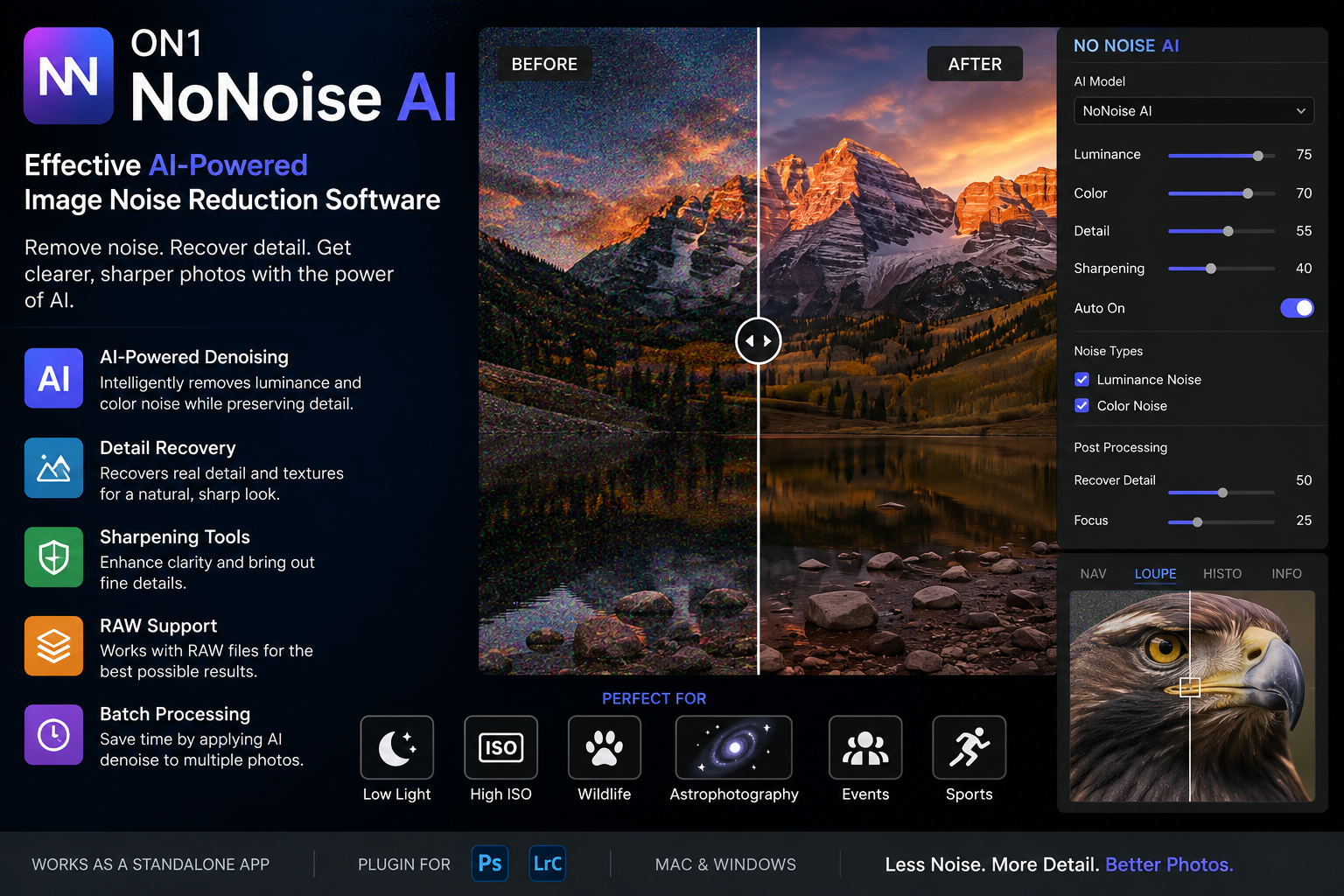
ON1 NoNoise AI is an AI-powered image noise reduction tool that eliminates digital noise while preserving and enhancing important details.
1. Learn about ON1 NoNoise AI
ON1 NoNoise AI is specialized software for reducing noise and improving image detail using AI. The tool is designed to process noisy photos caused by high ISO, low light, or unfavorable shooting conditions.
What sets NoNoise AI apart is how the software combines two tasks: noise removal and detail restoration .
With traditional noise reduction methods, users often have to compromise between a noise-free image and one that retains sharpness. If noise is reduced too little, the image will still be grainy. If it is reduced too much, texture and detail will be softened.
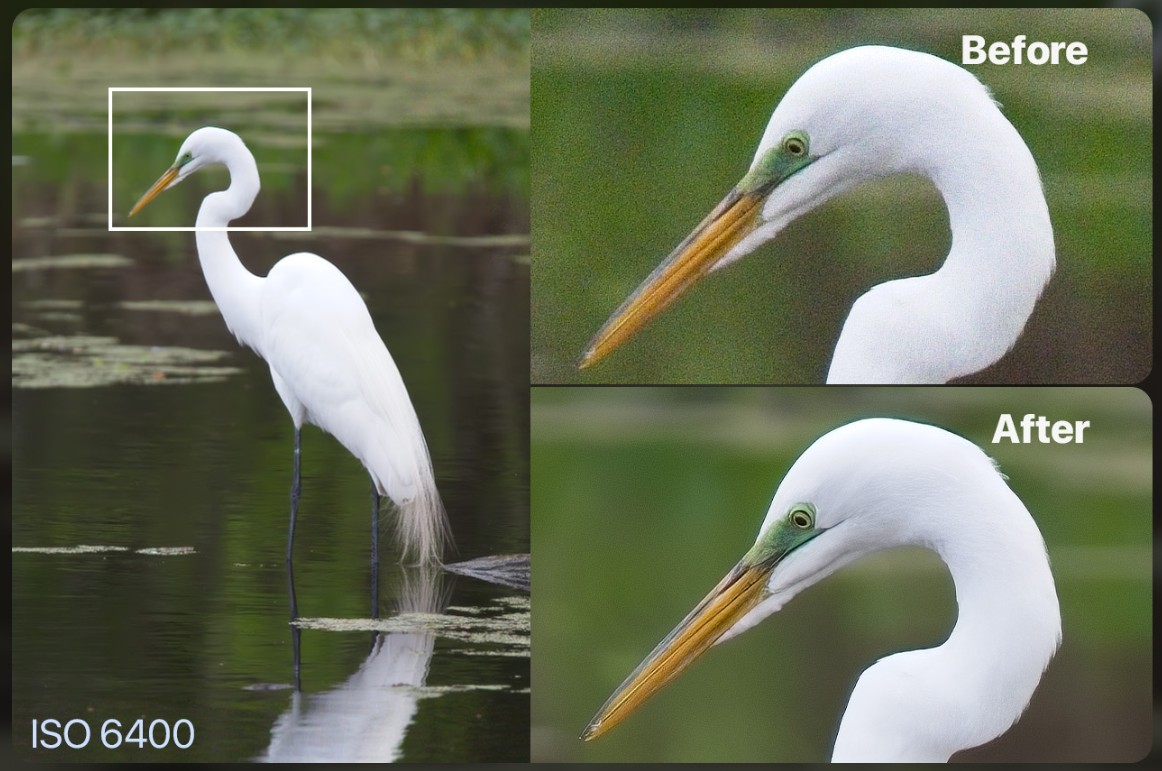
ON1 NoNoise AI aims to reduce this trade-off by using AI algorithms to recognize features in images and process noise more intelligently.
The software can also integrate into the user's existing photo editing workflow thanks to its support for popular photo editors and file formats. Notably, NoNoise AI supports saving images as DNG RAW , which helps maintain the full color and tonal range of the image data.
This is especially useful for photographers who want to continue color grading, exposure balancing, or other post-processing steps after noise reduction.
2. Noise reduction using AI
ON1 NoNoise AI aims for a new standard in image noise processing, focusing simultaneously on image quality and usability .
The tool's goal isn't simply to make images less noisy. The software is designed to eliminate noise while intelligently restoring and enhancing detail.
This is especially important for images with a lot of fine texture. A wildlife photograph, for example, may contain many important details such as eyes, fur, whiskers, or body contours. If noise is reduced using conventional blurring methods, these details can easily disappear.
NoNoise AI attempts to differentiate between noise and real-world image information. This allows the processing to focus on removing noise while retaining the essential elements of the subject.
The software also supports many popular photo editors and formats. This means users don't necessarily have to completely change their current post-processing workflow.
Another advantage is the ability to save DNG RAW files . When working with DNG, users can further exploit a wider range of tonal and color data instead of just processing a raster image file that is limited in information.
3. Enhance detail using AI.
Noise reduction capabilities won't be truly useful if the final result makes the image too soft. Therefore, ON1 NoNoise AI focuses strongly on maintaining and improving detail.
3.1. Every detail is clear.
Situations such as photographing moving wildlife, twilight landscapes, or dense forest scenes often require photographers to work in low-light conditions.
In that case, the photographer may need to increase the ISO, use a slow shutter speed, or shoot in low-light conditions. These factors can all increase the risk of noise and loss of detail.
Traditional noise reduction tools typically address the problem by softening areas with noise. However, ON1 uses AI algorithms to both remove noise and enhance sharpness.
This is especially important for nature photography, where small details create a sense of realism.
For example, in landscape photography, the tool needs to preserve the texture of rocks, the lines of trees, and the layers of detail in the scene. In wildlife photography, tiny hairs and light reflections in the eyes can be key factors determining the quality of the image.
3.2. Tack-Sharp AI restores images blurred by motion.
In addition to NoNoise AI, ON1 also offers Tack-Sharp AI , a tool aimed at restoring photos that have become blurry or lost detail due to motion.
When shooting handheld in low light conditions or photographing fast-moving animals, the image may be blurry. Even with perfect composition and timing, this can still result in a less-than-ideal photograph.
Tack-Sharp AI analyzes images and attempts to restore details lost due to blurring.
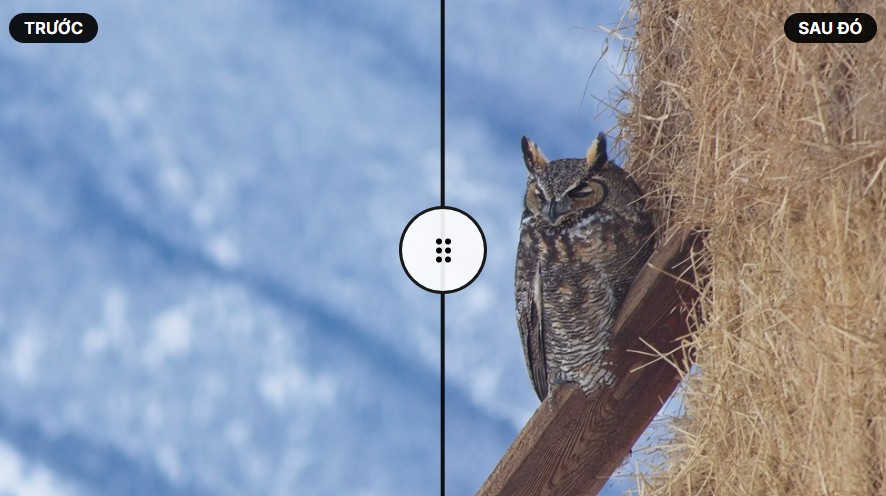
The tool can be used to improve detail in various forms, such as:
Wings in motion: When the subject moves quickly, the wings may appear soft or blurry. Tack-Sharp AI aims to increase clarity while minimizing the creation of artificial details or unnatural fringing.
Rock textures and landscapes: Fine lines on rocks, cliffs, or terrain can become more apparent after processing.
Eyes and fur: These are crucial details in wildlife photography. Properly increasing sharpness can help the subject stand out while preserving its natural texture.
Tack-Sharp AI and NoNoise AI can complement each other in situations where images are both noisy and lacking sharpness. However, users should still control the processing level to avoid creating images that are too sharp or unnatural.
4. NoNoise AI handles noise without sacrificing detail.
High ISO is a crucial element in many genres of photography.
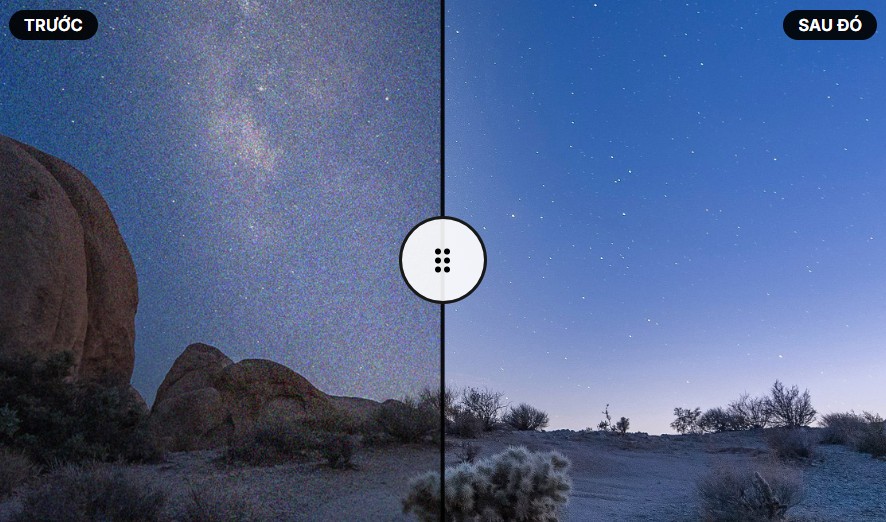
When photographing sunrises or sunsets, the light is often not strong enough to warrant using a low ISO. In astrophotography, increasing the ISO is also often necessary to capture sufficient light from the night sky.
The problem is that the higher the ISO, the greater the risk of digital noise.
NoNoise AI is designed to handle this type of noise while preserving important textures.
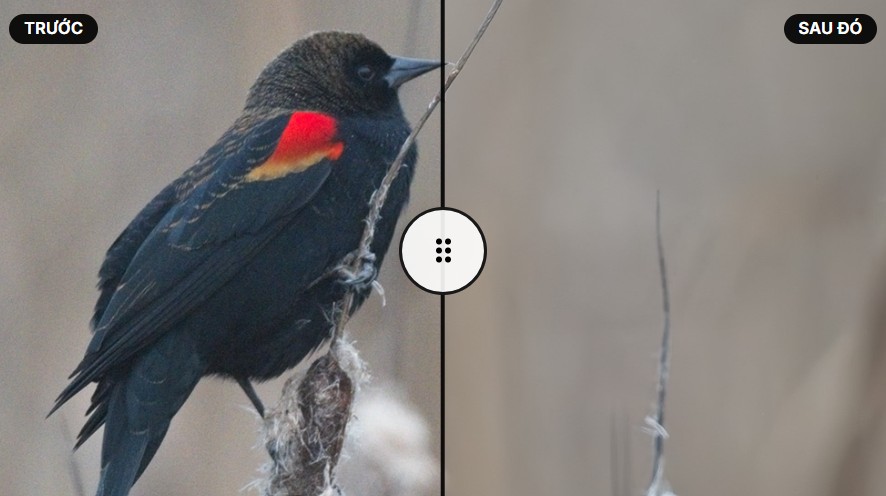
In bird photography, the tool can help preserve subtle feather patterns . With wildlife photography, the goal is to retain fine details in the plumage . For landscape photography, individual blades of grass, tree veins, and bark textures can be preserved better than simply blurring noise.
The key point is that users shouldn't judge results solely based on whether an image is free of noise. A good photograph needs to achieve a balance between clarity, sharpness, and naturalness.
5. See NoNoise AI in action.
To better understand the capabilities of NoNoise AI, users can observe the actual processing process through ON1's illustrative videos.
Demonstration videos typically show the process of feeding a noisy image into the software, applying AI technology, and observing the changes before and after processing.
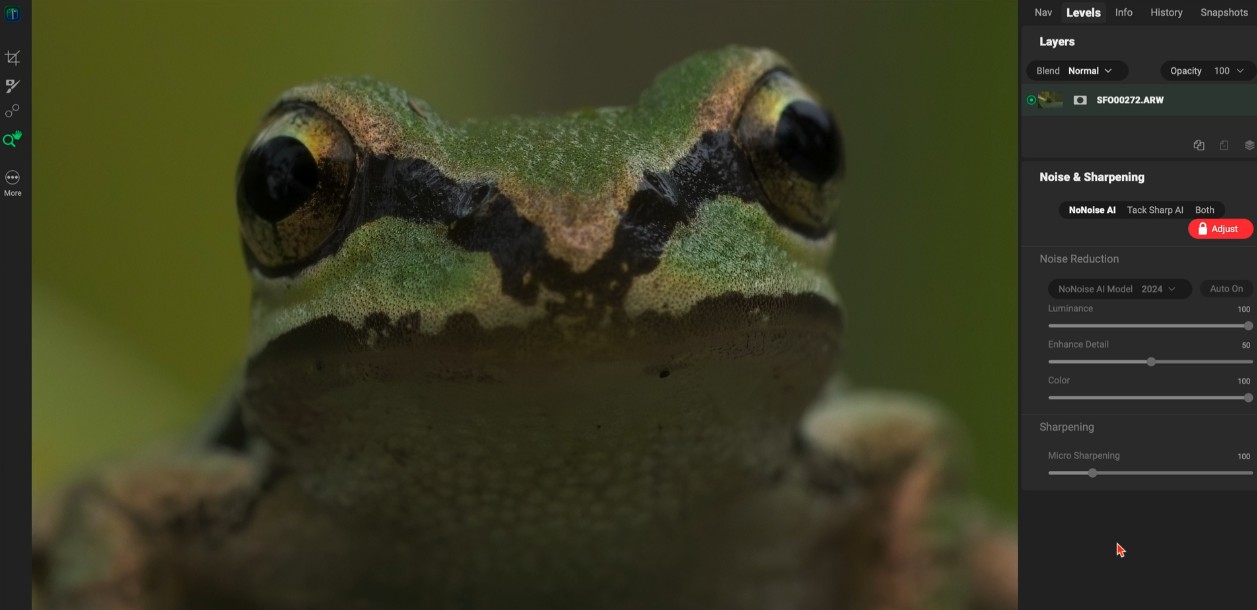
What's noteworthy when viewing these examples is not only the disappearance of noise but also the details retained after processing.
You should focus on observing areas with complex textures such as hair, fur, leaves, grass, rocks, or dark areas. These are the areas that often show the clearest difference between conventional noise reduction and AI-powered methods.
When evaluating a noise reduction tool, it's best to view the image at 100% magnification to check the detail. Then, reduce the image to its normal display size to assess the overall effect.
6. Example from customer ON1
One intuitive way to assess the capabilities of NoNoise AI is to view processed images submitted by users themselves.
ON1 worked with clients to showcase the power of ON1 NoNoise AI 2024.5 through real-world images provided by the clients.
These images were processed using NoNoise AI and demonstrate how the software can transform noisy images into cleaner, clearer images with better detail.
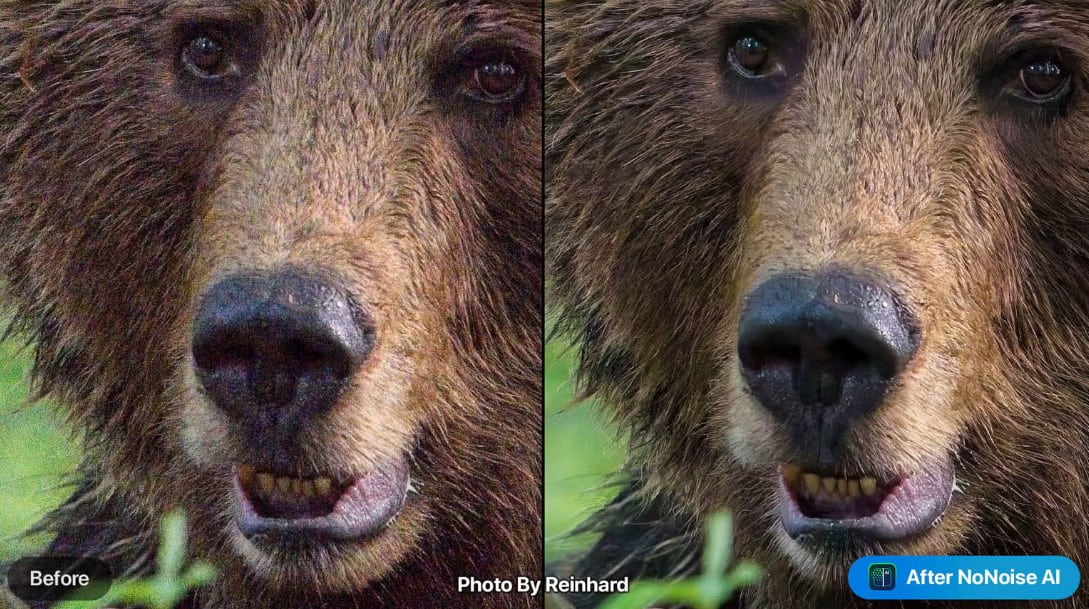
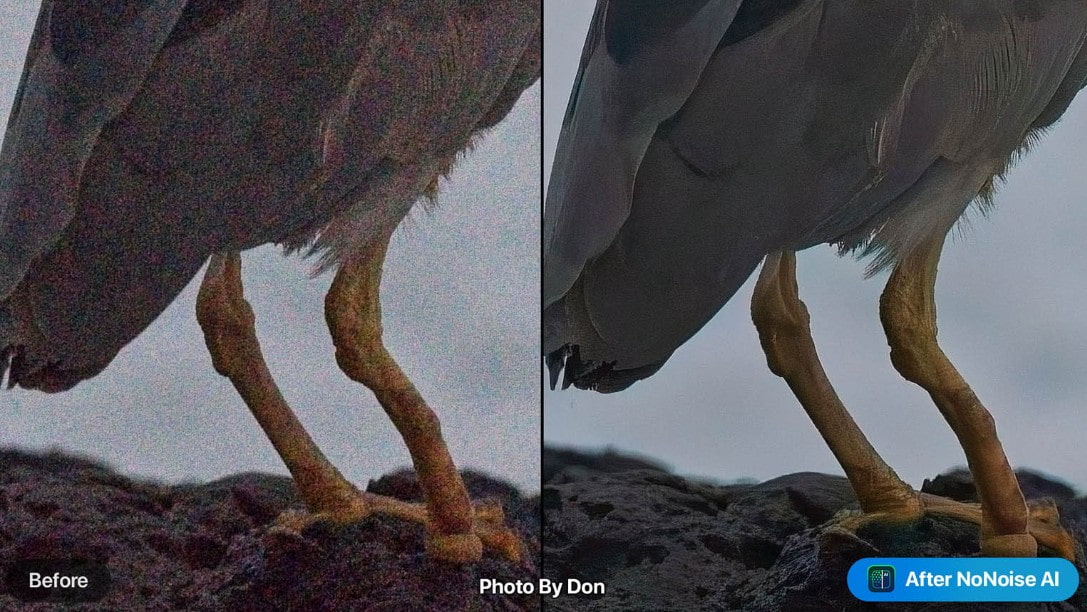
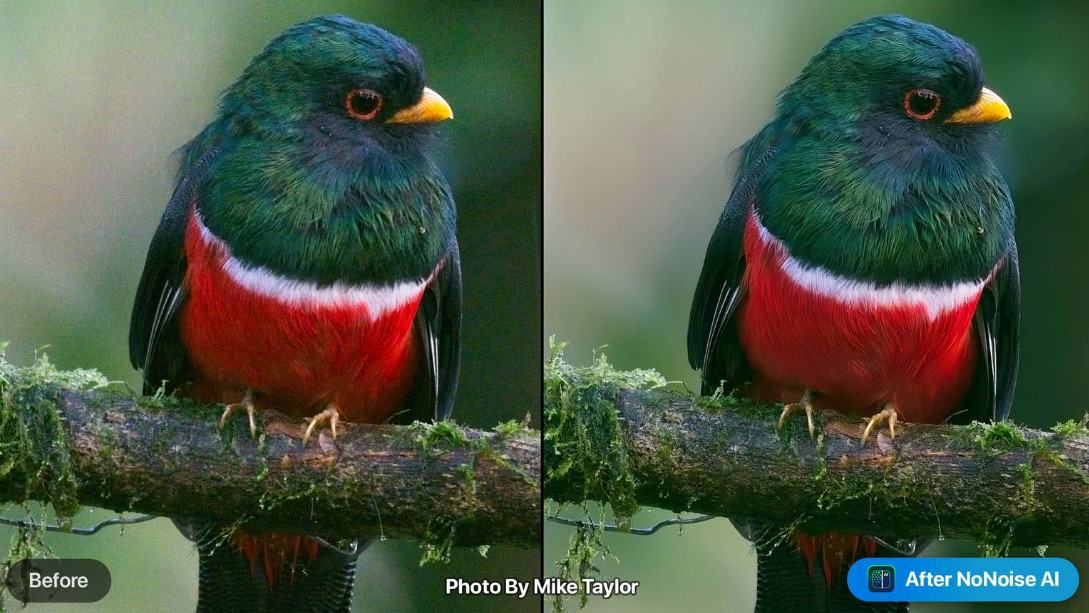
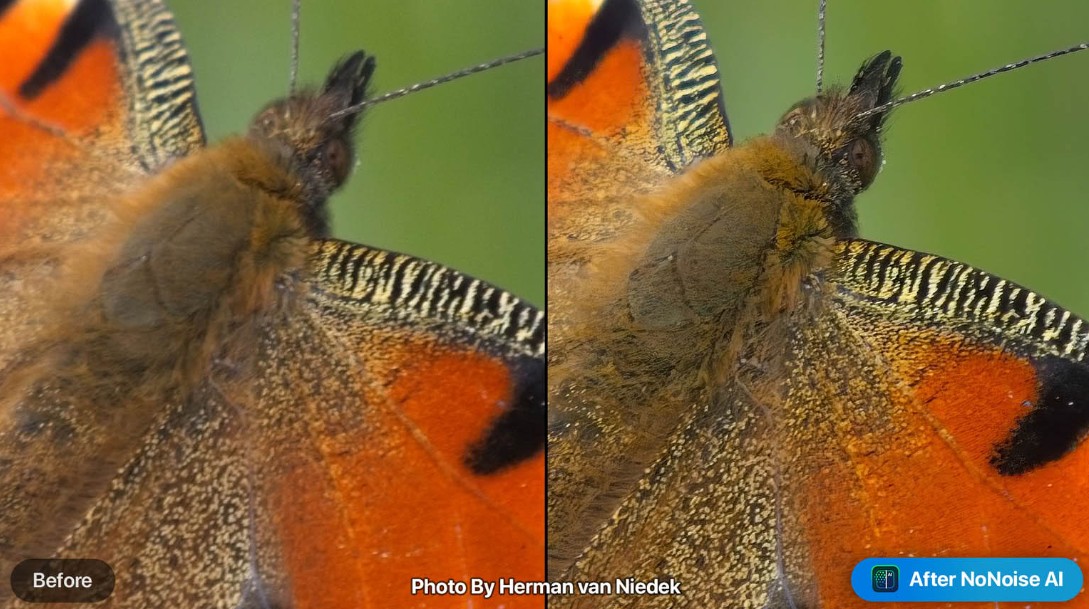
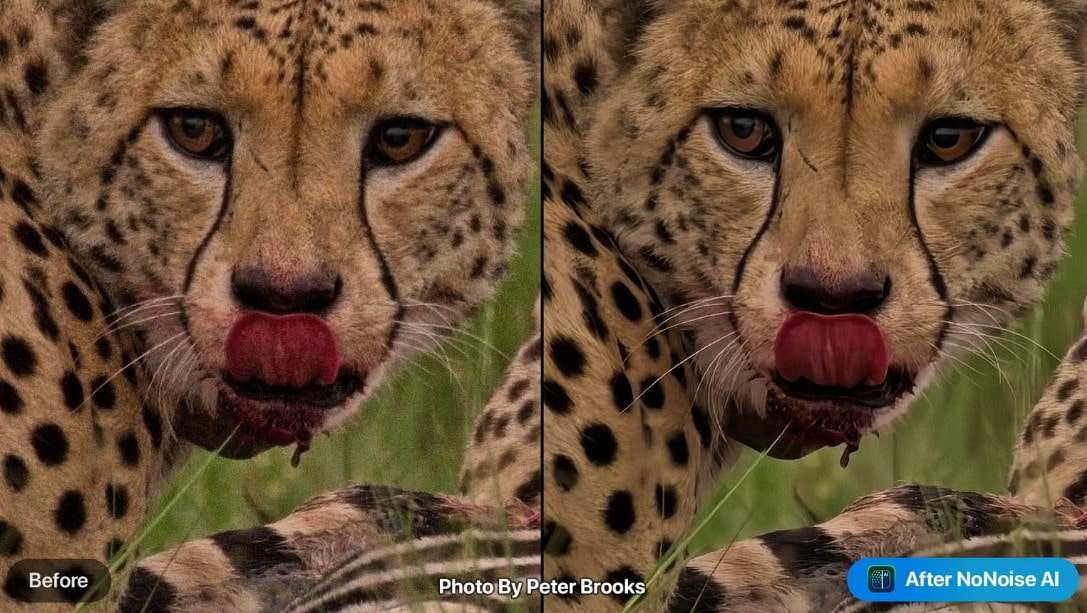
Practical examples are especially helpful because each photograph is taken under different conditions. Some photos are taken in low light, some use high ISO, while others have fine details that need to be preserved.
This allows users to better visualize how the software works in real-world shooting scenarios, rather than relying solely on pre-prepared illustrative images.
7. Who is ON1 NoNoise AI suitable for?
NoNoise AI can be useful for many different user groups.
For nature and wildlife photographers , the ability to reduce noise while retaining detail such as fur, eyes, and subject texture is a significant advantage.
For landscape photographers , the tool can help process photos taken at dawn, dusk, or in low-light conditions, where high ISO can easily introduce noise.
For astrophotographers , noise reduction is a crucial post-processing step because night sky photos often contain many dark areas and are taken at high ISO settings.
Even those who regularly take lifestyle or travel photos can leverage NoNoise AI to salvage beautiful photos that have been marred by unfavorable lighting conditions.
If you frequently encounter situations where your photos are beautiful but affected by digital noise or lack sharpness, ON1 NoNoise AI is a tool worth considering to add to your post-processing workflow. Most importantly, always check your pre- and post-processing images at 100% and adjust the intensity accordingly to achieve a balance between noise reduction, sharpness, and natural detail .





















VIP Products








Best Selling Products
Autodesk All App Account Copyright
120 USD
Freepik Premium Account
59 USD
Genuine Adobe Illustrator account
99 USD
Upgrade Genuine Office 365
49 USD
Adobe Photoshop Copyright - Full App
120 USD
MidJourney Account
29 USD
Copyright Adobe Lightroom Account
59 USD
Upgrade genuine Capture One account
120 USD
Adobe Premiere Pro Account
99 USD
Capcut Pro 1 Year
39 USD
Plugin Retouch4me
69 USD
ChatGPT Plus Account (GPT-4)
16 USD
Upgrade Duolingo Super
29 USD
Genuine Cheap Canva Pro
39 USD
Windows 10 & 11 Pro Key
36 USD