Best Selling Products

MidJourney Account
29 USD

Upgrade Genuine Office 365
49 USD

Copyright Adobe Lightroom Account
59 USD

ChatGPT Plus Account (GPT-4)
16 USD

Plugin Retouch4me
69 USD

Upgrade Duolingo Super
29 USD

Freepik Premium Account
59 USD

Upgrade genuine Capture One account
120 USD

Genuine Adobe Illustrator account
99 USD

Adobe Premiere Pro Account
99 USD

Capcut Pro 1 Year
39 USD

Adobe Photoshop Copyright - Full App
120 USD

Windows 10 & 11 Pro Key
36 USD

Genuine Cheap Canva Pro
39 USD

Autodesk All App Account Copyright
120 USD
Photomator 2026 Review: Is Apple''s photo editor really worth using?
Nội dung
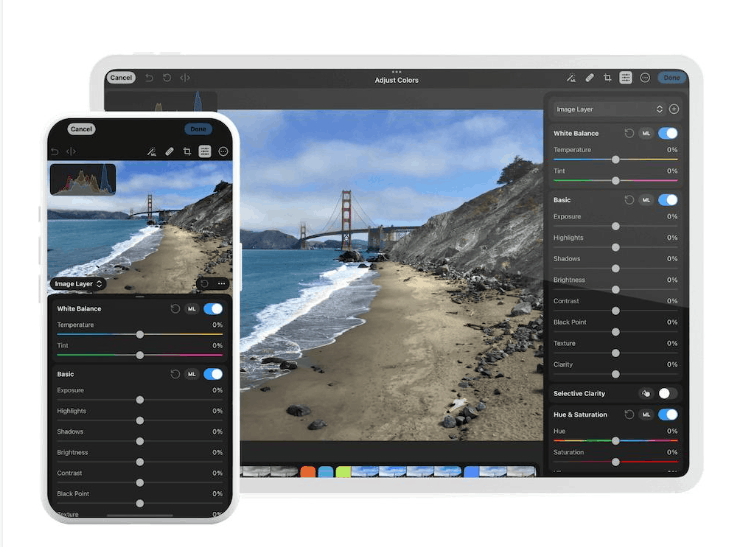
After Apple acquired Pixelmator, Photomator became a much more popular name among photographers. This photo editing app has a familiar interface to Lightroom users, is deeply integrated into the Apple ecosystem, and is priced much more affordably than its major competitors. This article reviews the app based on real-world experience using a MacBook Air M1 that''s been used for about five years, along with RAW files from a Fujifilm camera and photos taken with an iPhone 13. This is a fairly realistic configuration to see how Photomator performs on hardware that''s no longer new.
1. Advantages and disadvantages of Photomator
1.1 Key advantages
The first commendable aspect is the interface. Photomator is designed neatly, with clear terminology, easy-to-find tools, and beginners only need a few minutes to get familiar with it. You can even hide less frequently used tools to keep your workspace streamlined, a small detail that significantly improves the editing process.
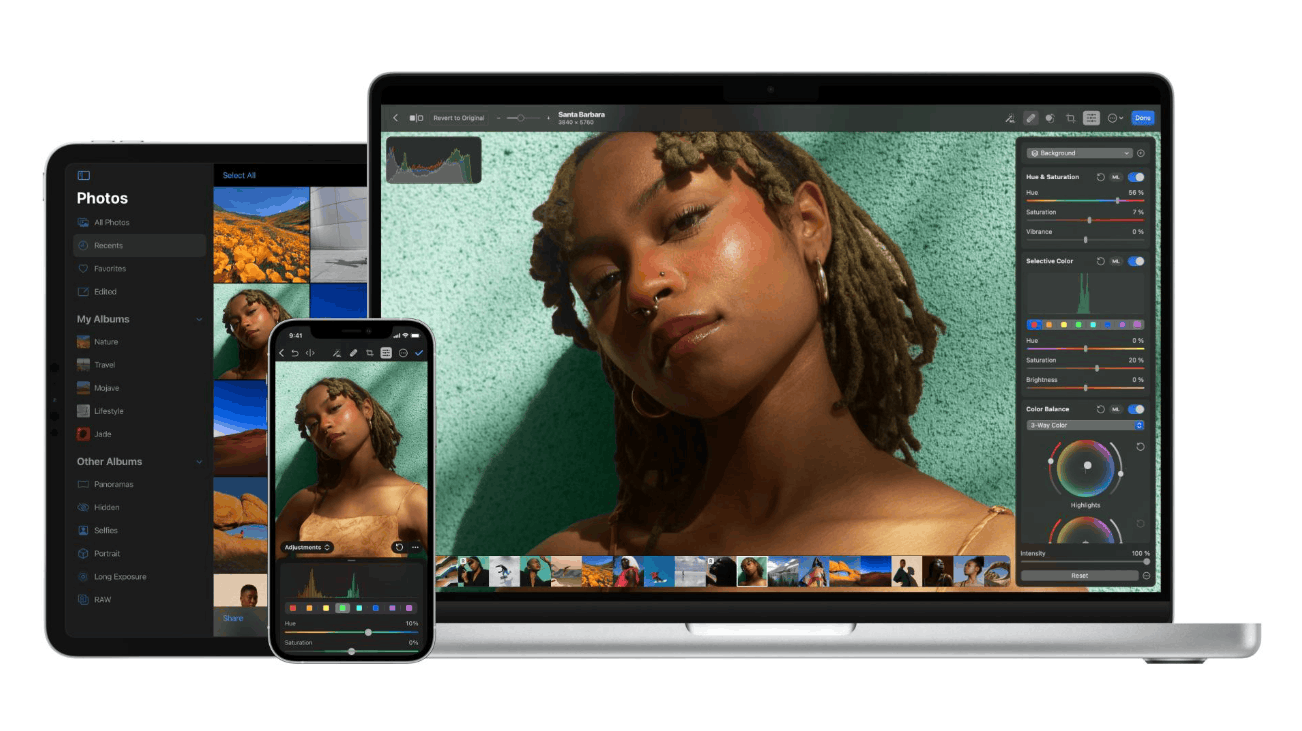
Its RAW processing capabilities are also excellent. Parameters like exposure, contrast, and color respond naturally, without being harsh or stiff like some other software. The application supports over 650 RAW formats, including Apple ProRAW and Fujifilm's compressed RAW, so most users can open files from their cameras.
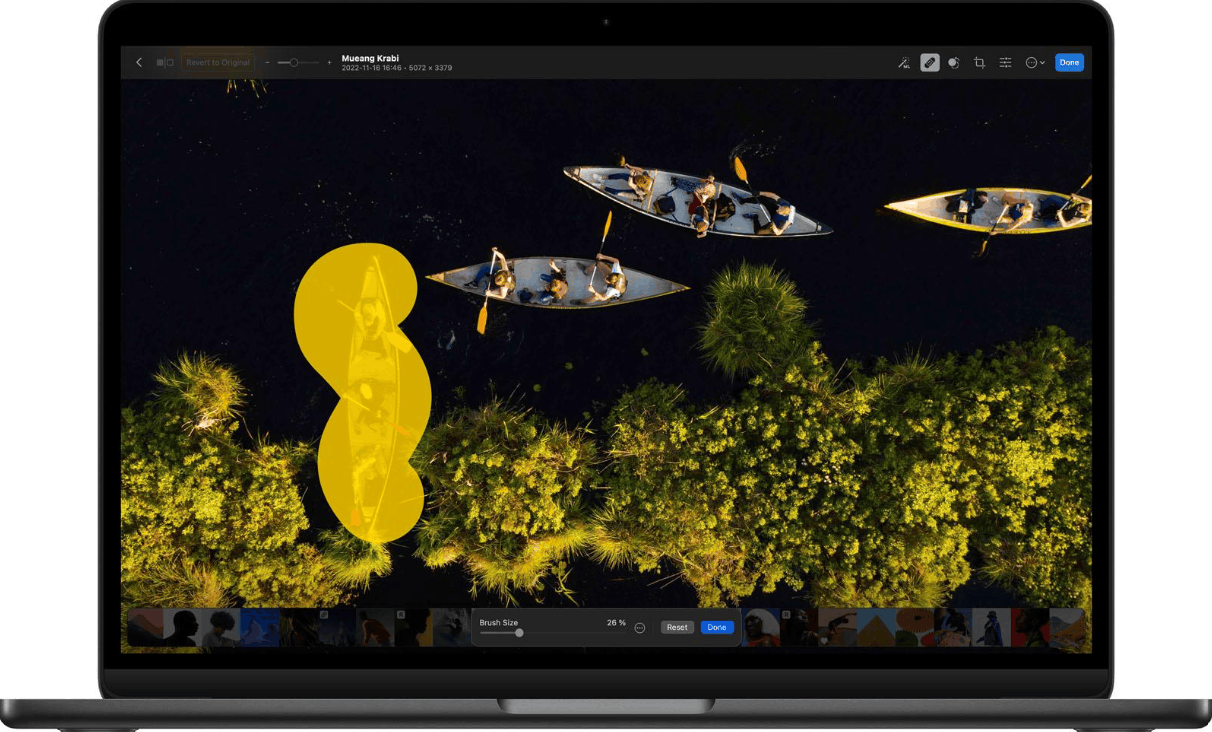
The object removal tool delivers accurate and consistent results. When attempting to remove a person walking across the background, Photomator handled it cleanly while maintaining a natural look for the photo.
Finally, there's the price. The app is cheaper than Lightroom and Capture One, and it also offers a one-time purchase for lifetime use, something Lightroom doesn't offer.
1.2 Disadvantages to consider
The biggest limitation lies in the stability of working with Fujifilm RAW files on older Macs. Occasionally, the application freezes or fails to display the adjustments just applied until a restart.
The second drawback is the limited masking tool. For example, the gradient mask can only be dragged from top to bottom, making it less flexible when handling complex layouts.
Additionally, there are a few other minor details, such as the editing panel on the right sometimes automatically scrolling back to the top of the page while working, and the default image import sending files to the Apple Photos library. These aren't serious issues, but they can be annoying during long editing sessions.
2. Core editing toolset
Photomator far exceeds initial expectations. The app offers full RAW editing support, reliable masking, and a rich library of presets and LUTs, creating a clear gap between it and Apple's default Photos app in terms of both control and output quality.
Color correction is one of its strongest points. You have dedicated tools to fine-tune highlights, neutrals, and shadows, along with Curves and a high-quality HSL palette for deliberate color processing. For those familiar with Lightroom, the layout and workflow will be very familiar, so transition time is almost negligible.
Photomator also has some valuable creative features. You can add film grain and selectively adjust sharpness across different tonal ranges, instead of applying the effect to the entire image. The Color Match tool allows you to upload a reference image so the application can transfer color, tone, and exposure to the image being edited.
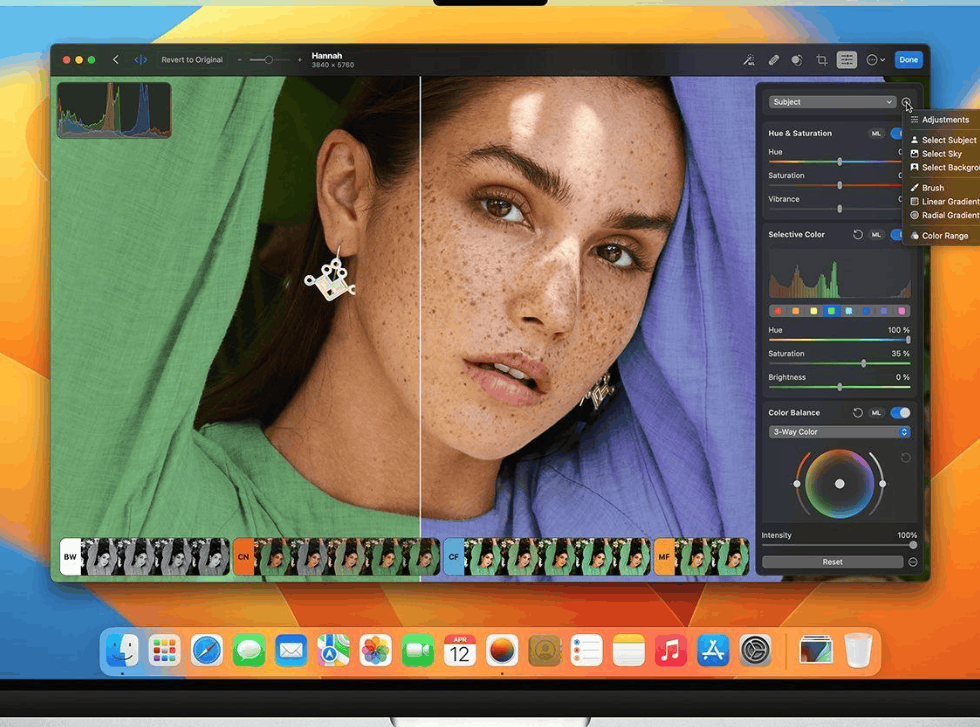
Additionally, there are Repair and Clone tools for cleaning up unwanted detail, intelligent cropping functionality, HDR support, and the ability to copy editing parameters between images for batch processing. The only significant shortcoming compared to higher-end competitors is the lack of a wide range of masking tools, as mentioned above.
3. AI features and smart tools
While many software programs are competing to pack in AI, Photomator chooses a more restrained approach. Its most notable AI tool is object removal, which works by painting over the area to be removed and letting the software process it automatically. In practical use, the results are accurate enough for everyday editing needs, even when the background has a lot of detail.
The Auto Enhance tool analyzes RAW files and applies global adjustments. Experience shows it's best suited as a starting point rather than the final finishing touch, as you'll often still need to fine-tune it to your personal taste. According to the developers, this feature has been trained on tens of millions of professional photos, so the suggested quality is quite reliable.
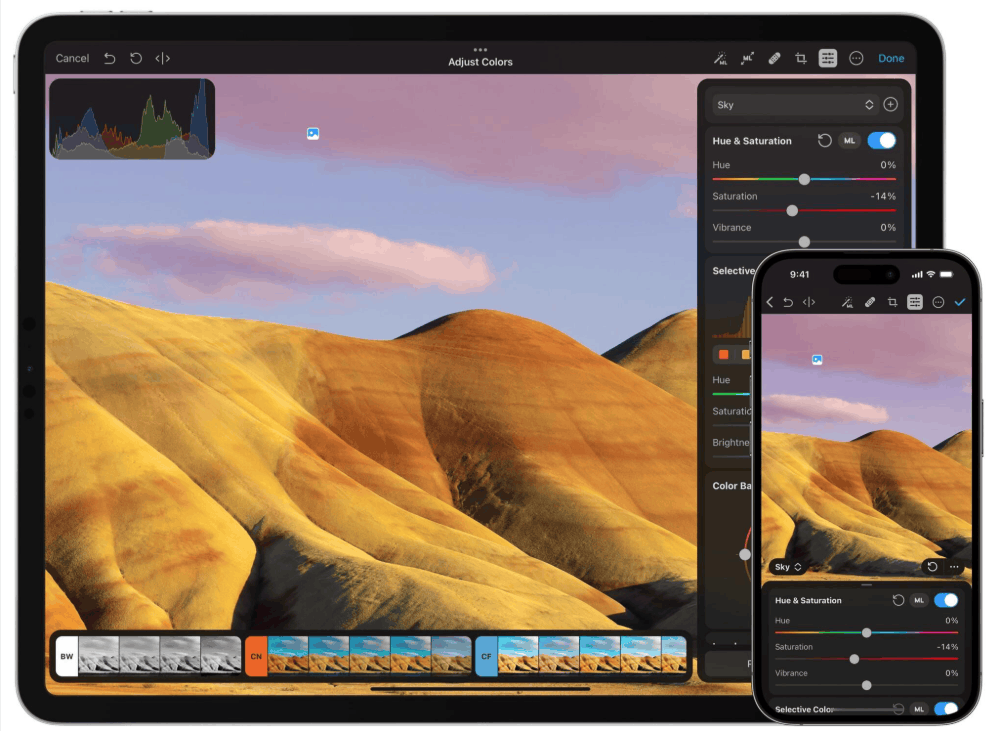
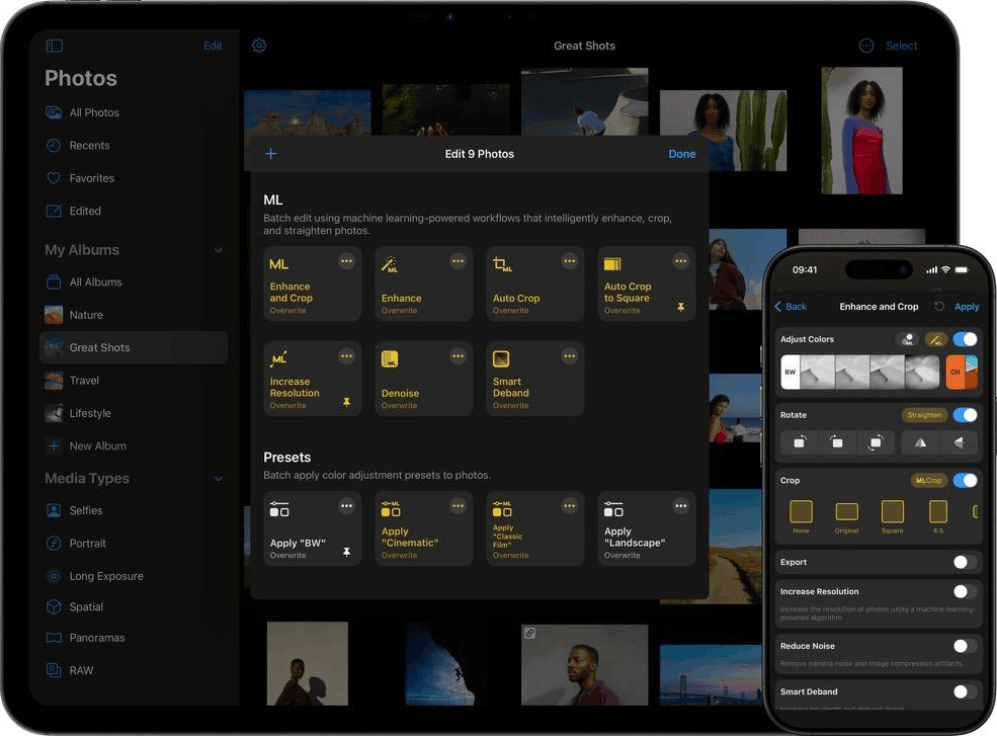
In addition, Photomator also has a trio of very useful machine learning tools. Denoise helps reduce noise and image compression errors, Super Resolution increases resolution while maintaining sharpness and detail, and Deband eliminates color banding to increase color depth. All three are easy to use, requiring only one or two clicks, yet still allow users to fine-tune the level of impact.
However, if you need more advanced AI features such as sky replacement, selective noise reduction by region, generation tools, or automatic image filtering, Photomator doesn't quite meet your needs.
4. Presets, LUTs, and operating speed
Presets are a feature that significantly shortens editing time for Photomator. They are divided into about 10 distinct groups, covering various styles such as black and white, classic, and cinematic. This diversity is large enough that you can frequently find a suitable preset to use as a background, then fine-tune it manually, or export the image immediately when time is tight. Some frames can still produce satisfactory results simply by applying a preset without any further adjustments.
LUTs are less convincing. Aside from the cinematic style group, many LUTs tend to be too heavy-handed, difficult to use as the final look, and not a reliable foundation for further editing. Nevertheless, the LUT library is still quite diverse, and everyone has different aesthetic tastes, so some people can still find options that suit their style.
In terms of overall workflow speed, Photomator allows copying and pasting editing parameters between images, processing hundreds of images in batches, and supporting batch export in various formats. TIFF format is also available for those who need to print. For those who shoot a moderate number of photos, this toolset is sufficient to keep the workflow streamlined.
A note about the photo import process: When importing RAW files from your camera, the app will by default send them to your Apple Photos library and sync them to your iPhone, which might surprise you if you don't notice. You can disable this behavior by switching to file system mode, so that photos are imported as regular files instead of going through the Photos app.
5. Performance and Stability
On a five-year-old MacBook Air M1, Photomator performed quite well. Adjustments were applied in real time, with virtually no noticeable lag. This is impressive considering the test configuration wasn't the latest, and users of newer Apple silicon Macs can expect an even smoother experience. Apple's Metal, Core ML, and Core Image platforms played a major role in this responsiveness.
However, the app isn't perfect. With photos from the iPhone 13, everything runs smoothly and without errors. But with Fujifilm RAW files, the stability drops noticeably. About 5% of the time, the app freezes or doesn't display the adjustments it just applied until it restarts. This rate is higher than what's commonly seen with competing editors on the same device.
An important note here is that this assessment is related to older Mac configurations, so users of newer machines are much less likely to encounter problems. However, for professionals working with large volumes of images and tight deadlines, such a failure rate is still a concern, as each crash disrupts the workflow.
6. Selling price and value received
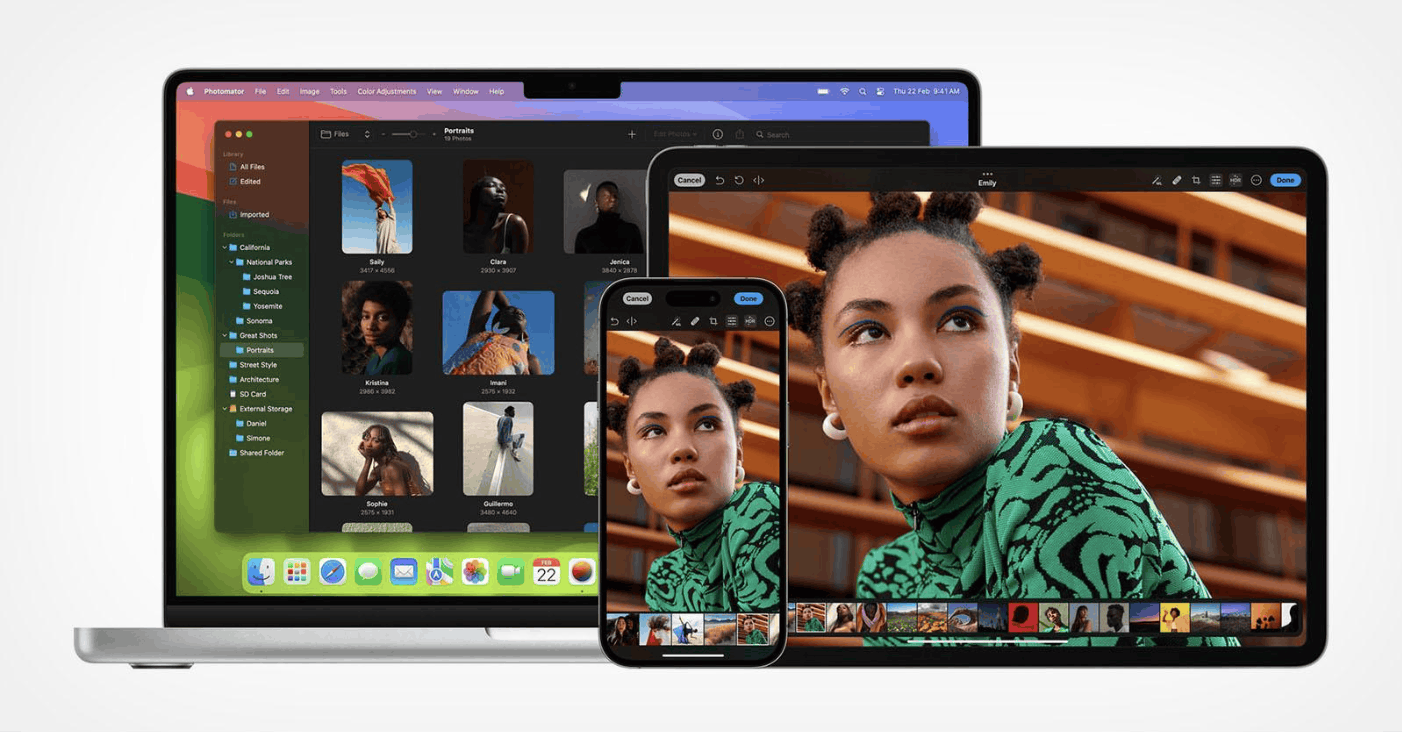
Photomator is distributed through the App Store with three payment options, and a single license is all that's needed to use it on Mac, iPhone, and iPad.
• Monthly plan: $7.99
• Annual plan: $34.99
• Lifetime plan: $119.99
Compared to Lightroom or Capture One, this price is much more accessible. A major plus is the lifetime subscription, allowing you to pay once and own it long-term, which is very attractive for those who are hesitant about recurring subscriptions. The app also offers a 7-day free trial so you can test it out before deciding.
There's a context to consider when making this investment. Starting in January 2026, Apple launched the Apple Creator Studio subscription package for $12.99 per month or $129 per year, which includes Final Cut Pro, Logic Pro, Pixelmator Pro, and several other applications. Photomator is not included in this package, and some critics have questioned the app's long-term future. There's no statement indicating Apple will stop developing it, but this is still a factor to consider if you want to commit long-term. In terms of current value, Photomator remains an economical choice for those needing quality RAW editing tools without spending a lot of money.
7. Who is Photomator best suited for?
Photomator is best suited for photography enthusiasts who want professional-looking results without being overwhelmed by a complex set of tools. The app strikes a good balance between power and simplicity, making it especially suitable for beginners who want to gradually improve their editing skills over time.
This is also a very worthwhile option for those who primarily shoot with their phones and have invested heavily in the Apple ecosystem. Seamless synchronization with the iCloud library and a unified experience across Mac, iPhone, and iPad create an advantage that few other applications can match. If you use a newer Mac and edit RAW files from a professional camera, the chances of encountering errors will also be lower.
Conversely, while professionals might be attracted by its feature set and price, Photomator isn't yet ready to replace Lightroom or Capture One in demanding situations. Limitations in stability and masking tools prevent it from directly competing in this segment.
Overall, Photomator offers almost everything you need to edit photos to near-professional standards, all packaged in a sophisticated and accessible interface. The platform is already in place to compete with the top names; it only needs a few more tweaks to completely replace them. With a 7-day free trial, the best way is still to try it out yourself to see if it fits your workflow.





















VIP Products








Best Selling Products
MidJourney Account
29 USD
Upgrade Genuine Office 365
49 USD
Copyright Adobe Lightroom Account
59 USD
ChatGPT Plus Account (GPT-4)
16 USD
Plugin Retouch4me
69 USD
Upgrade Duolingo Super
29 USD
Freepik Premium Account
59 USD
Upgrade genuine Capture One account
120 USD
Genuine Adobe Illustrator account
99 USD
Adobe Premiere Pro Account
99 USD
Capcut Pro 1 Year
39 USD
Adobe Photoshop Copyright - Full App
120 USD
Windows 10 & 11 Pro Key
36 USD
Genuine Cheap Canva Pro
39 USD
Autodesk All App Account Copyright
120 USD