Best Selling Products

Capcut Pro 1 Year
39 USD

Upgrade genuine Capture One account
120 USD

Plugin Retouch4me
69 USD

Windows 10 & 11 Pro Key
36 USD

Genuine Adobe Illustrator account
99 USD

MidJourney Account
29 USD

Upgrade Genuine Office 365
49 USD

Adobe Photoshop Copyright - Full App
120 USD

Upgrade Duolingo Super
29 USD

Copyright Adobe Lightroom Account
59 USD

Freepik Premium Account
59 USD

Adobe Premiere Pro Account
99 USD

ChatGPT Plus Account (GPT-4)
16 USD

Autodesk All App Account Copyright
120 USD

Genuine Cheap Canva Pro
39 USD
Purchase CapCut Pro License: Detailed Guide and How to Optimize Your Videos (2026)
Nội dung
- 1. The importance of owning a CapCut Pro license in the short video era.
- 2. Breakthrough features exclusive to the CapCut Pro version.
- 2.1. AI-powered video background removal technology with high precision.
- 2.2. Unique effects and transition library
- 2.3. Automatic multilingual subtitle generation feature
- 3. Long-term benefits of investing in genuine licenses
- 3.1. Continuously updating new features
- 3.2. Unlimited cloud storage
- 3.3. Standard 4K video output quality and high frame rate.
- 4. Detailed instructions on how to safely purchase a CapCut Pro license.
- 4.1. Upgrade directly via the mobile app.
- 4.2. Purchase a license package on your computer (PC/Mac)
- 4.3. Use reputable account providers.
- 5. AppVip.ai - A reliable and cost-effective solution for upgrading CapCut Pro.
- 6. Important notes after purchasing the license
- 6.1. Check expiration date and automatic renewal
- 6.2. Personal Account Security
- 6.3. Make the most of filters and copyrighted music.
- 6.4. Data synchronization across cloud space
- 7. Frequently Asked Questions about CapCut Pro
- 7.1. Can a Pro account be used on multiple devices?
- 7.2. If I cancel the Pro package, will my old videos be affected?
- 7.3. Does CapCut Pro offer good support for professional vlogging?
- 8. Conclusion
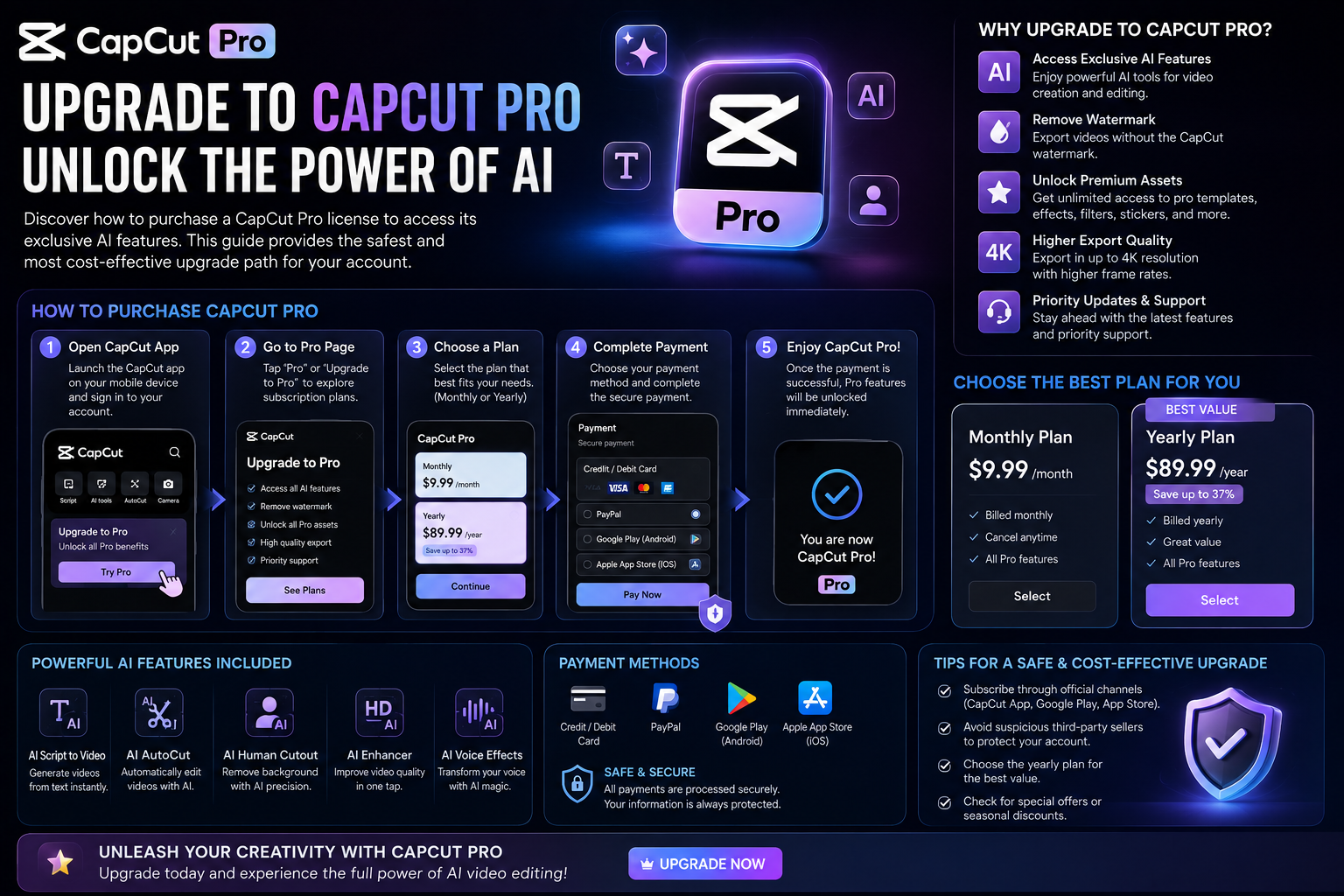
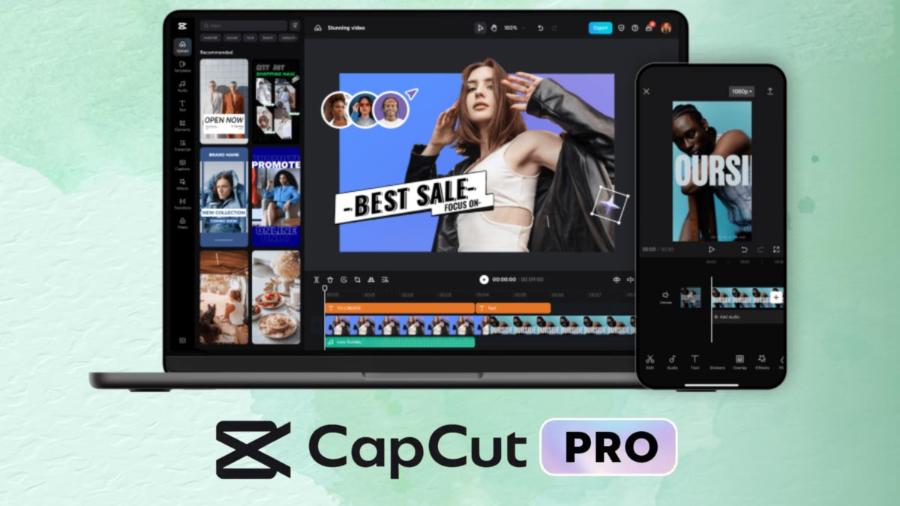
Discover how to purchase a CapCut Pro license to access its exclusive AI features. This article provides the safest and most cost-effective upgrade path for your account.
1. The importance of owning a CapCut Pro license in the short video era.
The explosion of platforms like TikTok, Reels, and YouTube Shorts has made video editing an essential skill. Among the tools available today, CapCut stands out as a powerful tool that helps users transform raw footage into works of art. However, the free version often limits users to basic features. Deciding to upgrade and purchase a licensed version of CapCut Pro is a turning point that helps content creators overcome technical barriers and reach professionalism.
Owning official licenses not only supports the developer but also opens the door to an unlimited resource library. Exclusive effects, the ability to export high-quality videos without watermarks, and AI-powered tools will significantly speed up your production process. This is especially important for marketers, freelancers, or small businesses looking to build their personal brand online.
2. Breakthrough features exclusive to the CapCut Pro version.
The Pro version is not simply about removing ads or logos; it's a complete toolset designed to handle the most demanding requirements of professional video editors.
2.1. AI-powered video background removal technology with high precision.
In the standard version, background removal sometimes leaves jagged edges or display errors if the background is too complex. With CapCut Pro, the significantly upgraded AI algorithm intelligently recognizes the subject, allowing you to change the background in seconds while maintaining the naturalness of individual strands of hair or clothing folds.
2.2. Unique effects and transition library
CapCut Pro's library contains thousands of visual effects (VFX) and audio effects that are updated weekly to reflect global trends. Hollywood-standard cinematic color filters add depth to videos, creating powerful emotions for viewers from the very first seconds.
2.3. Automatic multilingual subtitle generation feature
Manually typing subtitles is a nightmare for every editor. CapCut Pro allows speech recognition and text-to-speech with up to 98% accuracy. In particular, its bilingual translation capability makes your videos easily accessible to international audiences, expanding the reach of your content.
3. Long-term benefits of investing in genuine licenses
Searching for unofficial "cracked" or modified versions often comes with risks to data security and malware. Investing in legitimate licenses provides absolute peace of mind and privileges that pirated versions can never offer.
3.1. Continuously updating new features
Bytedance always prioritizes paying users when launching experimental features. You'll be among the first to experience the latest AI tools, helping your content stay ahead of the curve and avoid becoming outdated compared to the competition.
3.2. Unlimited cloud storage
One of the drawbacks of video editing is the amount of storage space it consumes on your computer or phone. With the Pro plan, you're provided with ample cloud storage. This allows you to start editing videos on your phone and continue refining them on your computer (PC/Mac) seamlessly and smoothly.
3.3. Standard 4K video output quality and high frame rate.
For platforms requiring high image quality, exporting video at 4K resolution and 60fps is essential. CapCut Pro optimizes hardware to speed up video rendering, saving busy users significant time.
4. Detailed instructions on how to safely purchase a CapCut Pro license.
There are many different ways to upgrade to a Pro account, but users need to be discerning in choosing a method that suits their financial situation and usage needs.
4.1. Upgrade directly via the mobile app.
This is the fastest way for individual users. Simply go to "My," select the Pro icon, and proceed with payment via e-wallet or credit card linked to the App Store or Google Play. The advantage of this method is convenience, but the disadvantage is that the cost is often higher due to intermediary fees from the app store.
4.2. Purchase a license package on your computer (PC/Mac)
If you frequently work on a computer, purchasing directly through CapCut's official website may offer you more benefits. Monthly or annual payment plans often have significant discounts during major holidays throughout the year.
4.3. Use reputable account providers.
Many users choose to purchase through software distributors to get better prices. However, make sure you are dealing with vendors who offer warranties and guarantee that the account is legitimate to avoid having your account locked midway through the process.
5. AppVip.ai - A reliable and cost-effective solution for upgrading CapCut Pro.
If you're looking for a reliable source to acquire top-tier AI tools, then appvip.ai is the place to go. Here, purchasing a CapCut Pro license is easier than ever with extremely competitive pricing. Dedicated customer support and a fast activation process ensure you get your tools within minutes of the transaction. This is the leading choice for editors in Vietnam looking to optimize their investment costs.
6. Important notes after purchasing the license
After completing the payment, managing your account is equally important to ensure your benefits are continuously maintained.
6.1. Check expiration date and automatic renewal
Most Pro packages have an automatic renewal option. You should check your settings to decide if you want to continue using the service, avoiding unexpected charges if you don't need it the following month.
6.2. Personal Account Security
You shouldn't share your Pro account with too many users if your subscription plan doesn't allow it. Logging in on too many unfamiliar devices can trigger system violations and permanently lock your account. Use a strong password and two-factor authentication to protect your hard work.
6.3. Make the most of filters and copyrighted music.
Once you have a Pro license, you can fully utilize commercial music libraries without worrying about copyright infringement on social media platforms. This is a huge advantage that helps your videos easily trend without being muted or removed.
6.4. Data synchronization across cloud space
Using the Pro license provides extensive storage privileges on Bytedance's cloud system. Users should take advantage of this feature to upload important projects, helping to avoid the risk of data loss in case of technical problems with their device. The ability to work seamlessly between phone and computer thanks to this synchronization will ensure that the creative flow is never interrupted.
7. Frequently Asked Questions about CapCut Pro
During the consultation process with users, I noticed many recurring questions about using this paid version.
7.1. Can a Pro account be used on multiple devices?
Typically, CapCut allows you to log in on your phone, tablet, and PC. However, the number of devices that can log in simultaneously may be limited depending on the policy at the time of purchase. Data synchronization between devices is one of the most valuable features of this version.
7.2. If I cancel the Pro package, will my old videos be affected?
Videos you've already published and saved on your computer won't be lost. However, ongoing projects using the Pro feature won't be exportable until you renew your subscription or remove those paid elements from your timeline.
7.3. Does CapCut Pro offer good support for professional vlogging?
The answer is absolutely yes. With its advanced color processing capabilities, noise reduction (denomination), and professional templates, CapCut Pro fully meets the needs of vloggers from semi-professional to professional levels.
8. Conclusion
Looking back at all the value the paid version offers, we can confidently say it's a worthwhile investment. Instead of spending hours trying to bypass copyright restrictions or using complex software on your computer, CapCut Pro offers simplicity, sophistication, and incredible efficiency. Choose reputable providers like appvip.ai to begin your journey to conquer new heights in visual storytelling today.





















VIP Products








Best Selling Products
Capcut Pro 1 Year
39 USD
Upgrade genuine Capture One account
120 USD
Plugin Retouch4me
69 USD
Windows 10 & 11 Pro Key
36 USD
Genuine Adobe Illustrator account
99 USD
MidJourney Account
29 USD
Upgrade Genuine Office 365
49 USD
Adobe Photoshop Copyright - Full App
120 USD
Upgrade Duolingo Super
29 USD
Copyright Adobe Lightroom Account
59 USD
Freepik Premium Account
59 USD
Adobe Premiere Pro Account
99 USD
ChatGPT Plus Account (GPT-4)
16 USD
Autodesk All App Account Copyright
120 USD
Genuine Cheap Canva Pro
39 USD