Best Selling Products

Capcut Pro 1 Year
39 USD

Upgrade Genuine Office 365
49 USD

Genuine Adobe Illustrator account
99 USD

Copyright Adobe Lightroom Account
59 USD

MidJourney Account
29 USD

Plugin Retouch4me
69 USD

Autodesk All App Account Copyright
120 USD

ChatGPT Plus Account (GPT-4)
16 USD

Upgrade Duolingo Super
29 USD

Adobe Premiere Pro Account
99 USD

Windows 10 & 11 Pro Key
36 USD

Adobe Photoshop Copyright - Full App
120 USD

Freepik Premium Account
59 USD

Genuine Cheap Canva Pro
39 USD

Upgrade genuine Capture One account
120 USD
Revealing the TOP 10 apps for adding text to photos beautifully and editing them for free.
Nội dung
A beautiful photo becomes much more impressive when combined with the right typography. From short quotes and catchy captions to sales headlines, adding text helps images convey a clear message and a unique touch. However, not everyone has the time to learn complex design software. In this case, an app that adds text to photos with a simple interface, many beautiful fonts, and flexible editing tools will be a more convenient option.
1. Phonto
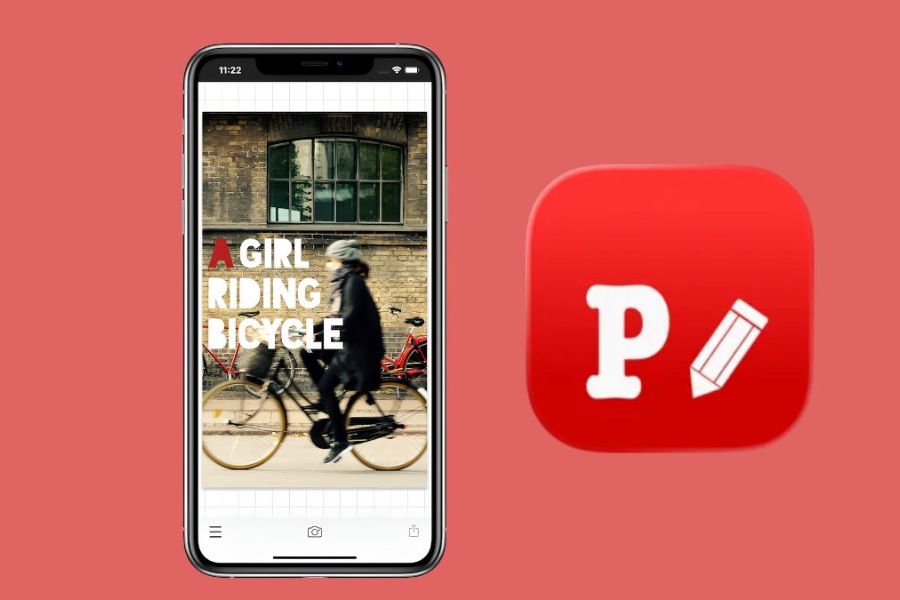
Phonto is a familiar name to those who frequently search for free apps to add beautiful text to photos . What makes this app so popular is its deep focus on creating and customizing text. Users can choose from hundreds of available fonts, then change the text color, size, slant, spacing between characters, or position on the image as desired. Thanks to this, even a simple photo can quickly become a striking design.
Another advantage of Phonto is its support for adding external fonts. This is a very useful feature if you're looking for an app to add calligraphy text to photos or want to use unique fonts for posters, quotes, and greeting cards. Simply find the right font, download it, and add it to the app, and you'll have many more creative options. Phonto is especially suitable for those who prefer to manually adjust every detail rather than relying entirely on pre-made templates.
2. Snapseed
Snapseed is a popular photo editing app from Google, and it also features a Text tool that allows users to insert text directly onto images. The app offers many pre-made fonts and layouts, so you can quickly add a quote, title, or short piece of information to your photos. The interface is relatively intuitive, so even beginners can get used to it in a short time.
Snapseed's standout feature is its ability to combine text overlay and overall photo editing. After adding text, you can still adjust brightness, contrast, color, detail, and many other parameters to create a more harmonious image. Therefore, if you're looking for an app to add text to photos but still need basic photo editing tools, Snapseed is a worthwhile option to try.
3. PicsArt
PicsArt is perfect for those who like to transform ordinary photos into designs with their own unique colors and styles. Besides adding text, the app also boasts a collection of stickers, effects, filters, and many other creative tools. Users can combine multiple layers of content to create eye-catching photos, especially suitable for social media posts.
PicsArt offers a wide variety of fonts and typography styles. You can choose simple fonts for quote images, striking fonts for posters, or combine text with stickers for a youthful feel. When creating content for Facebook, Instagram, or TikTok, PicsArt provides plenty of space to experiment. Just a slight change in color, size, and text placement can significantly alter the overall look of the image.
4. Canva
Canva is a familiar choice for those who frequently design images but don't want to use overly complex professional software. The application offers a rich library of templates for many purposes such as social media posts, posters, greeting cards, advertisements, or thumbnails. You simply choose a suitable template and then change the images and text content to your needs.
Beyond just templates, Canva also boasts a wide variety of fonts, colors, and formatting tools, allowing users to create designs from scratch. Drag-and-drop functionality is also quite simple, making it suitable for beginners. It's one of the most widely used photo text overlay apps on computers and phones, thanks to its ability to synchronize designs across multiple devices. If you need to create images quickly but still want a professional-looking result, Canva is definitely worth trying.
5. Adobe Express
Adobe Express is a suitable choice for those who want to create images with text in a modern style without complicated operations. The application supports a rich library of fonts from Adobe Fonts, giving users more options when designing captions, titles, or promotional content. Text elements can be dragged and dropped, resized, and positioned quite flexibly on the image.
Besides fonts, Adobe Express also allows you to customize colors, shadows, borders, and several effects to make the text stand out more against the image background. You can also combine pre-designed styles to save time. For those who frequently create content for social media, posters, or product images, this app for adding text to images has many noteworthy supporting tools.
6. PixelLab
PixelLab stands out for its ability to create text with a variety of visual effects. Beyond simply adding text, users can create 3D text, add shadows, borders, gradients, or reflection effects to make the text the main focal point of the image. This is why PixelLab is often chosen when designing thumbnails, posters, or images that require a prominent headline.
Another plus point is that PixelLab allows you to upload your own fonts and create multiple text layers on the same design. You can bend the text, change the rotation angle, align each layer, and combine various effects to create your own style. If you're looking for a free app to add text to photos but want more advanced options than basic apps, PixelLab can quite well meet this need.
7. Bazaart
Bazaart is geared towards creative image design enthusiasts, especially when combining text with multiple layers of images. The app boasts a diverse font library and supports custom fonts, making it easy for users to find the right typeface for each theme. Parameters such as size, spacing, curvature, shadows, and borders can also be adjusted to make the text stand out.
Bazaart is also useful when you want to create posters, advertisements, or social media content right on your phone. Its ability to work with multiple layers makes arranging images and text more flexible. Instead of just placing a line of text on an image, you can build a complete layout with many different elements. This is a worthwhile option for both iPhone and Android users.

8. Fotor
Fotor is a convenient photo editing and design app, with a text-adding tool that's simple and easy to use. Users can choose fonts, change the size, color, transparency, and spacing between characters. Thanks to these customizations, you can create short captions on photos or build clear titles for a design.
Fotor also supports curved fonts and pre-made templates, making the design process faster. If you don't have much experience with typography, you can start with a pre-made template and then change the content as you wish. The application is suitable for many needs such as creating images for social media posts, simple posters, or product introduction images without using too many complex tools.
9. Polish
Polish is an app for adding text to photos, geared towards a quick photo editing experience on your phone. Besides familiar photo editing tools, the app allows you to add text in various styles. Users can change the font, color, size, and position of the text to create a layout that suits their message.
Polish's advantage lies in its ability to combine text with filters, effects, and decorative elements. You can edit the photo first, then add a quote or caption to complete the design. For those who frequently post photos on social media and want to edit them directly on their phone, Polish is a fairly accessible option. The operations are not too complicated, so even beginners can quickly get used to it.
10. Add Text
As the name suggests, Add Text focuses on creating and customizing text on images. The application is suitable for those who want to control many details of the text such as font, color, size, transparency, shadow, or position. When designing quote images, advertisements, or thumbnails, you can add multiple layers of text to create a hierarchy between the title and sub-content.
One notable advantage is the ability to combine multiple font styles within a single design. For example, you can use bold fonts for headings, softer fonts for subheadings, and add contrasting colors to highlight important information. For those who prefer to build their own layouts rather than using pre-made templates, Add Text offers a relatively flexible and easy-to-use creative space.
11. Conclusion
A good app for adding text to photos can help you transform simple images into eye-catching products in just minutes. Depending on your needs, you can choose apps specializing in text like Phonto, PixelLab, Add Text, or use versatile platforms like Canva, PicsArt, and Adobe Express to combine with other design tools. The most important thing isn't about using a lot of effects, but finding a way to present text that suits the image. Try a few apps, explore different fonts, colors, and layouts to find your own style. Once you're familiar with the basic tools, creating quotes, posters, thumbnails, or social media content will become much faster and more enjoyable.





















VIP Products








Best Selling Products
Capcut Pro 1 Year
39 USD
Upgrade Genuine Office 365
49 USD
Genuine Adobe Illustrator account
99 USD
Copyright Adobe Lightroom Account
59 USD
MidJourney Account
29 USD
Plugin Retouch4me
69 USD
Autodesk All App Account Copyright
120 USD
ChatGPT Plus Account (GPT-4)
16 USD
Upgrade Duolingo Super
29 USD
Adobe Premiere Pro Account
99 USD
Windows 10 & 11 Pro Key
36 USD
Adobe Photoshop Copyright - Full App
120 USD
Freepik Premium Account
59 USD
Genuine Cheap Canva Pro
39 USD
Upgrade genuine Capture One account
120 USD