Best Selling Products

Adobe Premiere Pro Account
99 USD

Autodesk All App Account Copyright
120 USD

MidJourney Account
29 USD

Copyright Adobe Lightroom Account
59 USD

Freepik Premium Account
59 USD

Upgrade Duolingo Super
29 USD

Upgrade genuine Capture One account
120 USD

ChatGPT Plus Account (GPT-4)
16 USD

Capcut Pro 1 Year
39 USD

Plugin Retouch4me
69 USD

Adobe Photoshop Copyright - Full App
120 USD

Upgrade Genuine Office 365
49 USD

Windows 10 & 11 Pro Key
36 USD

Genuine Adobe Illustrator account
99 USD

Genuine Cheap Canva Pro
39 USD
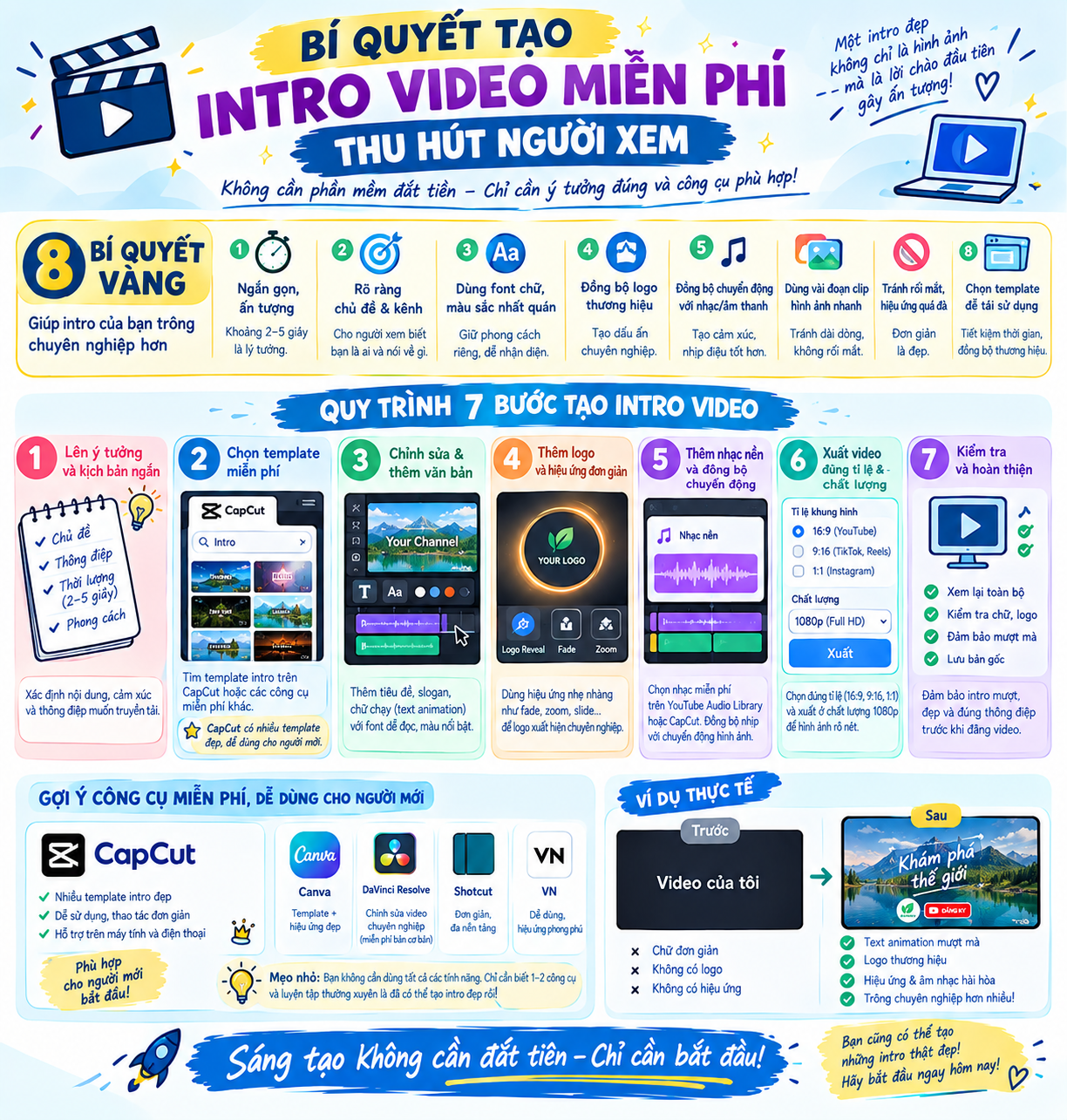
Secrets to creating eye-catching free intros to make your videos look more professional.
Nội dung
- 1. What is an intro? Why should you create an intro for your video?
- 2. What makes a professional free intro?
- 2.1 Choose colors that match the theme.
- 2.2 Use an easy-to-read font.
- 2.3 Emphasis on sound and motion effects
- 3. Suggestions for easy-to-use free intro creation tools.
- 3.1 Canva
- 3.2 CapCut
- 4. Instructions on how to create a free intro using Canva
- Step 1: Access Canva and find an intro template.
- Step 2: Edit content and images
- Step 3: Add sound and adjust effects
- Step 4: Preview and export the video
- 5. How to create a free intro using CapCut on your computer
- Step 1: Create a new project
- Step 2: Add text and animation effects
- Step 3: Synchronize audio and finalize the intro.
- 6. Conclusion
A video with compelling content can still be ignored by viewers if the opening is too monotonous. In the first few seconds, the intro is crucial for making an impression, sparking curiosity, and keeping viewers engaged. Therefore, investing in a visually appealing intro is a simple way to enhance video quality, whether you''re a beginner or experienced video editor. Nowadays, you can easily create intros for free using popular online tools and video editing software.
1. What is an intro? Why should you create an intro for your video?
An intro is the opening sequence of a video, usually appearing in the first few seconds before the main content begins. This section can include the channel name, logo, slogan, transition effects, sound, or a short visual related to the video's topic. Depending on the creator's style, the intro can be youthful, energetic, minimalist, professional, or fun. A well-designed intro will make the video look more polished and create a unique identity for the content creator. When the brand name, logo, or introductory phrase is cleverly integrated, viewers will easily remember the channel and recognize the content on subsequent visits. Especially for videos posted on TikTok, YouTube, Facebook, or Instagram, an engaging opening can help capture attention in the first few seconds.
The benefits of having an eye-catching intro:
-
Increased brand recognition: Channel name, logo, and distinctive colors appear consistently throughout the videos.
-
Create a professional impression: The content has a clear introduction, an attractive layout, and appropriate sound.
-
Capture attention: Moving images, text effects, or opening sounds can pique curiosity.
-
Create your own style: Each channel can have a different intro style, tailored to its content and target audience.
-
Cost savings: Users can take advantage of ready-made templates and free tools instead of hiring a private designer.

2. What makes a professional free intro?
2.1 Choose colors that match the theme.
Color is a factor that directly impacts the viewer's perception. Bright colors are often suitable for entertainment, lifestyle content, or content aimed at young people. Meanwhile, neutral colors, black, white, or dark blue can create a sophisticated and professional feel for technology, education, or business videos.
You should choose two to three main colors to ensure consistency in the intro. If you already have a logo or brand identity, use corresponding colors to create a connection. Avoid combining too many strongly contrasting colors in the same frame, as this can easily make the opening look cluttered.
2.2 Use an easy-to-read font.
The channel name, title, or slogan should be presented in a clear font. Overly ornate fonts might look artistic but are difficult to read when videos play quickly on a phone screen. You should prioritize fonts with easily recognizable strokes, a moderate size, and good contrast against the background.
Additionally, the text appearance effect needs to be carefully chosen. The text can slide from the side, slightly enlarge, gradually appear, or appear character by character. The important thing is that the movement is smooth and doesn't distract the viewer from the main message.
2.3 Emphasis on sound and motion effects
Sound plays a crucial role in creating the emotional impact of an intro. A short piece of music, a light-up sound, a transition sound, or a catchy effect can liven up the opening. However, you should choose sound that matches the visuals and theme of the video, rather than using overly loud or disconnected effects.
Movement in the intro also needs to be restrained. Zoom, rotation, gliding, fading, or transition effects can make the visuals more engaging if used at the right time. Combining too many effects in a short segment can easily make the video feel heavy and lacking in sophistication.
3. Suggestions for easy-to-use free intro creation tools.
3.1 Canva
Canva is a familiar online design tool, suitable for those who want to create intros with beautiful layouts and easy editing. This platform offers many intro video templates in diverse styles, from minimalist and modern to youthful and creative. Users can search for templates using keywords such as "video intro," "YouTube intro," or "logo intro."
Canva's advantage lies in its simple drag-and-drop functionality. You can change the channel name, colors, fonts, images, and sounds to your liking. Some resources require a paid account, but there are still many free templates and features for beginners to create basic intros.
3.2 CapCut
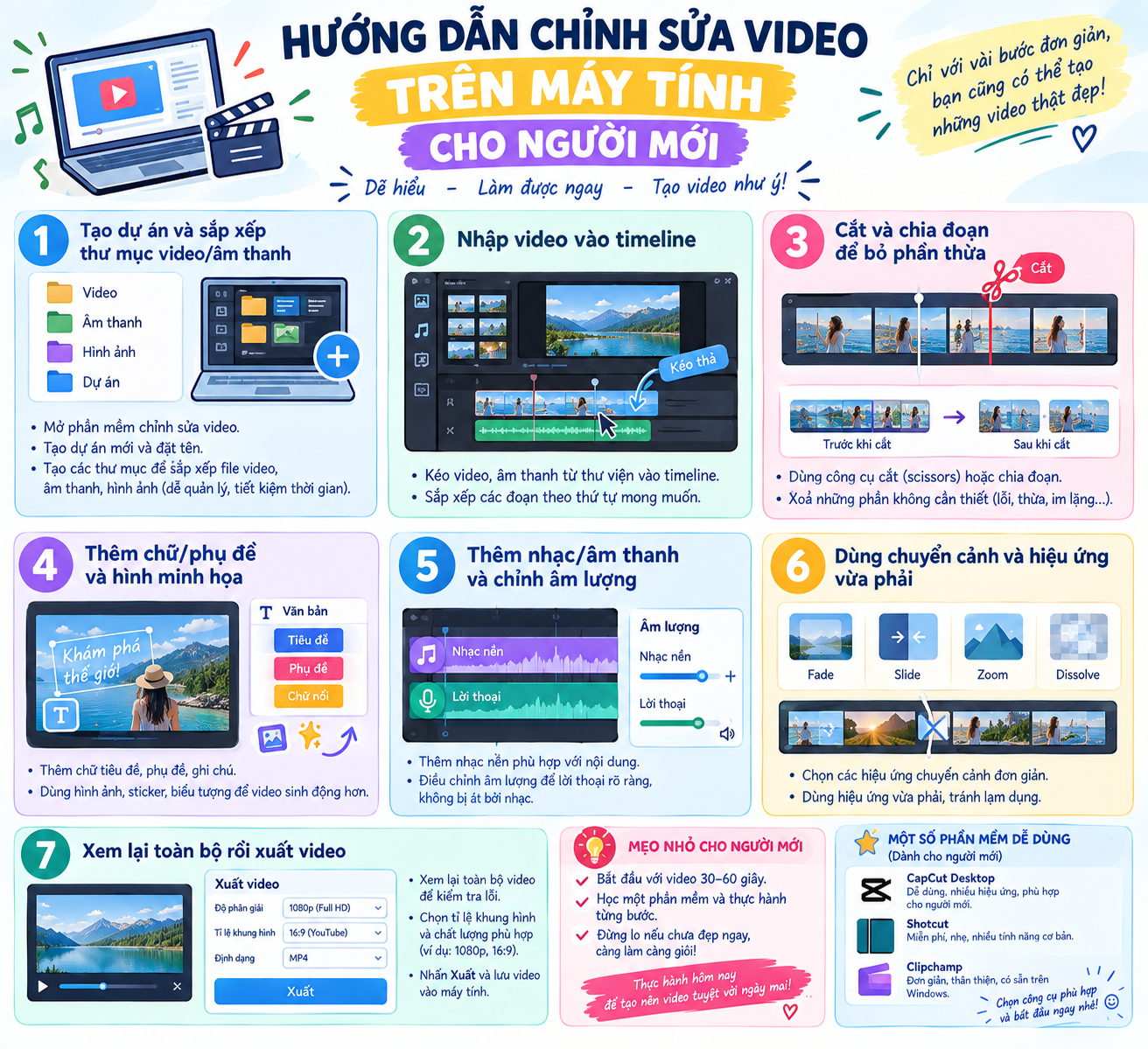
CapCut is a suitable choice for those who want to create intros directly on their phone or computer. This tool supports video editing, adding text, inserting music, creating motion effects, and using pre-made templates. Thanks to its intuitive interface, users can complete a short intro without much experience.
CapCut is also suitable for vertical videos posted on TikTok, Shorts, or Reels. You can adjust the aspect ratio, motion speed, and intro length to suit each platform. However, it's necessary to check for paid effects, templates, and resources with paid icons before exporting your video.
4. Instructions on how to create a free intro using Canva
Step 1: Access Canva and find an intro template.
First, access Canva using your browser or the app on your device. Log in to your personal account, then enter the keywords "Video intro" or "YouTube intro" into the search bar. The system will display many ready-made design templates with different styles.
Take some time to look through several templates before making your choice. You should prioritize designs with easily editable layouts, colors that match the content, and effects that aren't too complicated. If you want to create an intro for a TikTok or Reels video, look for vertical video templates to minimize the need to adjust the frame later.
Step 2: Edit content and images
After selecting a template, you can change the channel name, slogan, or message you want to convey. Click on the text section to edit the content, then choose a suitable font, size, and color. If you have your own logo, you can upload it and replace the existing image in the template.
At this stage, keep the content concise. An intro typically only needs the channel name, brand logo, or a short introductory sentence. Including too much information in the opening will make it difficult for viewers to focus and reduce the clarity of the design.
Step 3: Add sound and adjust effects
Canva allows you to add background music, sound effects, and adjust the duration of elements in your video. You can choose a gentle, upbeat, or modern piece of music depending on the style of your content. When using audio, prioritize using resources that are permitted for your uploading purposes.
Next, check the appearance effects of the text, images, and logo. Simple movements like fading in, gliding, or zooming in will help the intro feel natural. Preview the video a few times to ensure the sound, images, and movements are synchronized.
Step 4: Preview and export the video
Once you've finished designing, press the preview button to check the entire intro. Pay attention to spelling errors, logo placement, text contrast, and the timing of element appearances. If the intro has too much blank space or the effects are too slow, you should adjust them before exporting.
After checking, select the appropriate download option and video format. The MP4 format is usually convenient to use in other video editing software. You can save the intro as a separate file, then insert it at the beginning of subsequent videos to maintain a consistent style.
5. How to create a free intro using CapCut on your computer
Step 1: Create a new project
Open CapCut on your computer, then create a new project. Depending on where you upload the video, you can choose the appropriate aspect ratio. YouTube videos typically use a horizontal frame, while TikTok, Reels, and Shorts usually prefer a vertical frame.
Next, enter the logo, background image, or short video clip you want to use for the intro. If you don't have a background image, you can choose a solid color background or an image that matches the theme. A simple background will help the text and logo stand out more.
Step 2: Add text and animation effects
Choose the text addition tool to enter your channel name, slogan, or short message. You can adjust the font, size, color, and position within the frame. Try a few different arrangements to find a balanced layout, ensuring the text isn't obscured when displayed on a phone.
Next, use the effects options to create movement for the text and images. Appearance, disappearance, or transition effects should be chosen based on the video style. If the content is professional, prioritize smooth movements. For entertainment videos, you can try more dynamic effects, but still need to control the duration.
Step 3: Synchronize audio and finalize the intro.
Add a short piece of music or sound effect to the timeline. You can trim the audio to fit the intro's length, and adjust the volume so the music isn't too loud. If the intro features a logo, consider adding a subtle transition sound to create emphasis.
Once complete, review the entire video and check for consistency between the visuals, text, and audio. An intro lasting a few seconds is usually sufficient to introduce the brand without interrupting the main content. When you feel the design is satisfactory, you can export the video and save it for future edits.

6. Conclusion
Creating a free intro is a simple way to give your video a polished look, increase brand recognition, and make a strong impression on viewers from the very first seconds. With tools like Canva, CapCut, or Adobe Express, you can easily design an intro that suits your personal style without investing too much money. To have an eye-catching intro, focus on layout, color, font, sound, and duration. A concise, easily recognizable design with smooth animation will greatly support the main content. Start with simple templates, experiment with different styles, and gradually build an intro that reflects your channel's unique identity.





















VIP Products








Best Selling Products
Adobe Premiere Pro Account
99 USD
Autodesk All App Account Copyright
120 USD
MidJourney Account
29 USD
Copyright Adobe Lightroom Account
59 USD
Freepik Premium Account
59 USD
Upgrade Duolingo Super
29 USD
Upgrade genuine Capture One account
120 USD
ChatGPT Plus Account (GPT-4)
16 USD
Capcut Pro 1 Year
39 USD
Plugin Retouch4me
69 USD
Adobe Photoshop Copyright - Full App
120 USD
Upgrade Genuine Office 365
49 USD
Windows 10 & 11 Pro Key
36 USD
Genuine Adobe Illustrator account
99 USD
Genuine Cheap Canva Pro
39 USD