Best Selling Products

Windows 10 & 11 Pro Key
36 USD

MidJourney Account
29 USD

Copyright Adobe Lightroom Account
59 USD

Capcut Pro 1 Year
39 USD

Adobe Premiere Pro Account
99 USD

Upgrade genuine Capture One account
120 USD

Freepik Premium Account
59 USD

Plugin Retouch4me
69 USD

Genuine Cheap Canva Pro
39 USD

Adobe Photoshop Copyright - Full App
120 USD

Upgrade Duolingo Super
29 USD

Genuine Adobe Illustrator account
99 USD

Upgrade Genuine Office 365
49 USD

ChatGPT Plus Account (GPT-4)
16 USD

Autodesk All App Account Copyright
120 USD
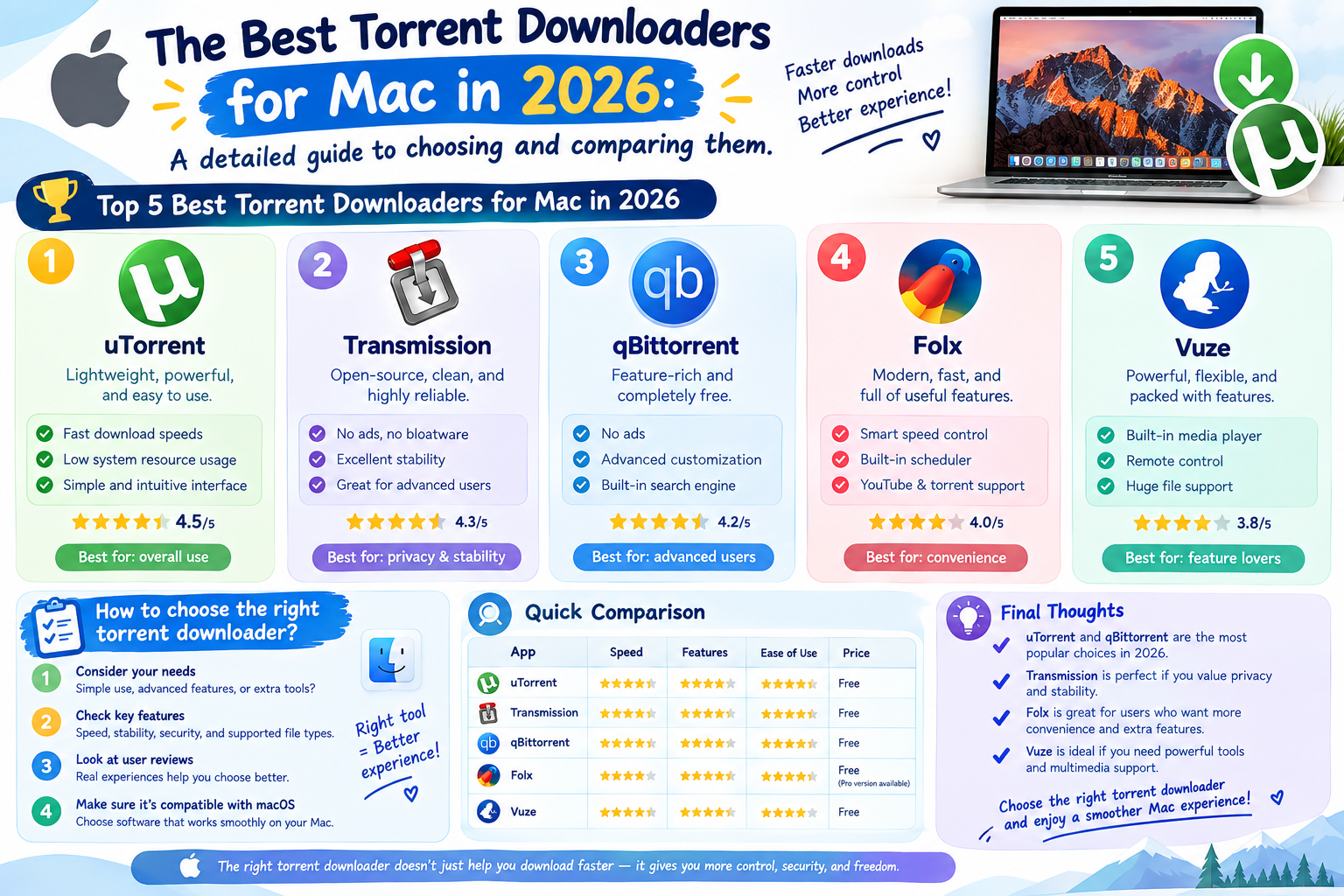
The best torrent downloaders for Mac in 2026: a detailed guide to choosing and comparing them.
Nội dung
- 1. How to choose the right torrent download software for your Mac
- 1.1 When security is your top priority
- 1.2 For Macs with limited resources
- 1.3 When you need advanced features
- 1.4 For seamless integration with Mac
- 2. Overview of torrent download software for Mac
- 3. The uTorrent web application is for downloading regular torrents on a Mac.
- 4. Use Folx for ad-free downloads and enhanced security.
- 5. Transmission - Lightweight and reliable downloads
- 6. qBittorrent is for professional users who need advanced features.
- 7. Deluge is for technical users who want complete control.
- 8. FrostWire: A multimedia download platform with many additional features.
- 9. Make a decision: Which torrent download software is right for you on your Mac?
- 9.1 For different users
- 9.2 Key Determinants
- 10. Frequently Asked Questions
Most torrent downloaders are designed primarily for Windows or Linux, leaving Mac users often with unnatural interfaces, outdated features, or excessive advertising. Meanwhile, the need for torrent downloading on Mac remains legitimate and widespread, from obtaining Linux distribution installers and downloading open-source resources to receiving large files from legitimate content distributors. This article evaluates six of the best torrent downloaders for macOS, analyzing the strengths, limitations, and target audience of each application to help you choose the tool that best suits your workflow.
1. How to choose the right torrent download software for your Mac
There isn't one perfect torrent downloader for everyone. The right choice depends on your priorities: security, performance, features, or seamless integration with the Apple ecosystem. The four criteria below will help you make a decision before delving into specific applications.
1.1 When security is your top priority
Torrents operate on a peer-to-peer model, meaning your IP address can be seen by other devices in the same sharing group. Furthermore, because anyone can upload files, the risk of encountering malware is very real. If you're uploading anything other than verified open-source projects, a downloader with built-in protection will make a significant difference.

Folx stands out in this aspect thanks to its ad-free environment and accompanying security measures. On the free software side, qBittorrent features integration with the VPN network interface, ensuring that downloads and sharing only occur through the VPN tunnel. If the VPN disconnects, the download process stops, preventing your real IP address from being revealed. Transmission also supports block lists to eliminate suspicious partners. Whichever application you choose, combine it with a reliable VPN service and perform regular malware scans on downloaded files.
1.2 For Macs with limited resources
1.3 When you need advanced features
1.4 For seamless integration with Mac
2. Overview of torrent download software for Mac
| Best in this case | Key factor | |
| uTorrent Web | Downloads are infrequent on newer macOS versions. | Runs directly in your browser, compatible with macOS Catalina and later. | |
| Folx | For daily use, security is a priority. | Pure Mac design, no ads. | |
| Transmission | Use gently, only load occasionally. | Resource consumption is very low. | |
| qBittorrent | Advanced users need more features. | Connect with VPN, search plugin, RSS | |
| Deluge | Technical users want complete control. | Extended plugin system, daemon architecture | |
| FrostWire | Download multimedia content | Download from both YouTube and SoundCloud. |
A general piece of advice: be wary of viruses and malware. Because anyone can upload files to torrent sites, malicious files can hide under a seemingly normal guise. Only download from trusted sources, choose software with security checks, and always scan your Mac after downloading.
3. The uTorrent web application is for downloading regular torrents on a Mac.
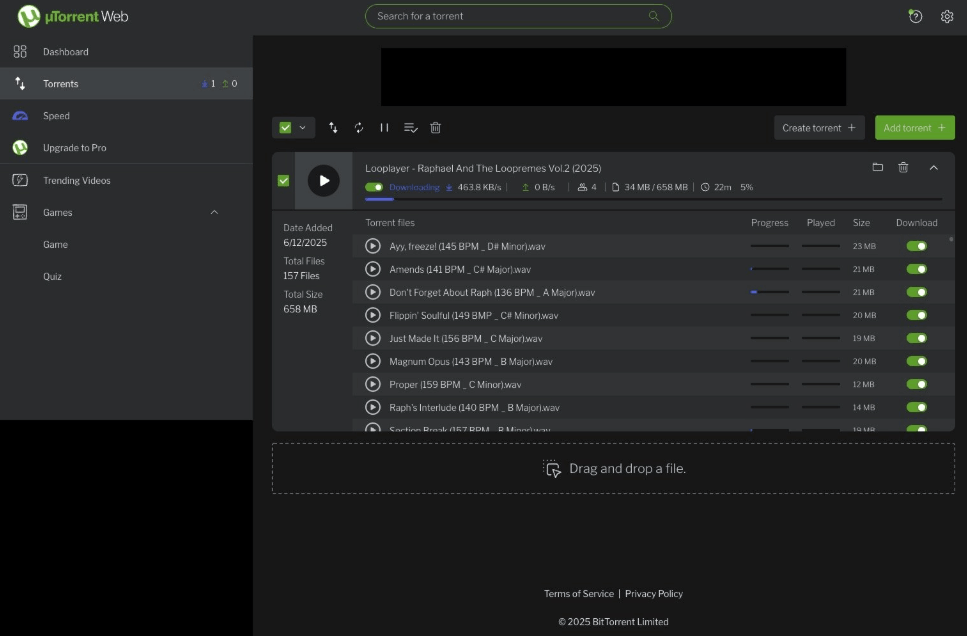
Best suited for: general users on newer Macs who only download occasionally and don't mind working through a browser interface. This could include students needing to download study materials or people who occasionally download a Linux installation.
The problems the application solves are: firstly, compatibility, as uTorrent Web runs on newer macOS versions thanks to its browser-based operation. Secondly, resource consumption is low, as the application uses very little CPU and RAM, allowing you to continue working smoothly. Thirdly, installation is simple; it requires almost no complex configuration—just open your browser and start downloading.
Key features: uTorrent Web has an integrated torrent search engine, saving you the trouble of browsing multiple individual websites. Scheduling allows you to set download tasks to run during off-peak hours when network congestion is low. Remote control enables you to manage the process from your phone or another computer, while advanced features allow users to set custom download rules.
Strengths: The application is very lightweight and doesn't slow down the computer even when downloading large files. The free version includes the basic functions that most users need, and the interface is familiar to anyone who has used BitTorrent downloaders before.
Limitations: The desktop version is not compatible with macOS Catalina or later. The web version displays ads, which can sometimes be annoying, and the installation process may suggest bundled software that you should carefully review before agreeing.
Integration into the workflow: Although web-based, uTorrent Web integrates quite well with macOS. Downloaded files are located in the Downloads folder like any other browser download; Spotlight can find them, and you can use Automator to automatically move completed files to predefined folders. For enhanced security, it's recommended to use a private browser window and enable a VPN during downloads.
Cost: uTorrent Web offers a free version with ads, and paid plans including an ad-free version, a Pro version with malware protection and support, and a Pro version with VPN. Prices vary, so please check the official website for updates.
4. Use Folx for ad-free downloads and enhanced security.
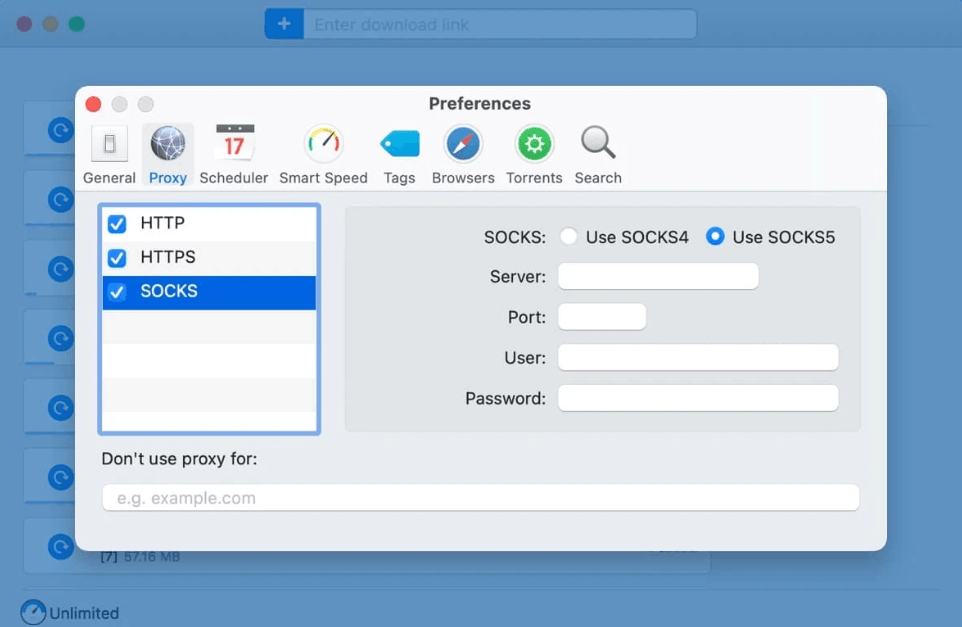
Best suited for: users who frequently download torrents and value privacy, security, and a pure Mac experience. This could include creative professionals who need to download large resource packs, programmers accessing source code repositories, or anyone who is tired of ad-filled interfaces.
The problem the application solves: Folx saves search time by integrating a torrent finder across multiple sources within a single interface. It keeps download lists neater, as you can tag files like Apps or Videos so they're saved to the correct folders. And it eliminates the feeling of being out of place with non-Mac interfaces thanks to its macOS-inspired design.
Key features: Intelligent speed control allocates bandwidth based on your activity, meaning full speed downloads when idle and reduced speed when you're working. Integrated password manager saves login information for websites and FTP servers. File splitting into multiple threads speeds up completion.
Strengths: Ad-free experience for a focused and less distracting experience. Deep integration with macOS, including Spotlight and Quick Look. Built-in search tool helps you avoid browsing risky torrent sites.
Limitations: This is paid software, while there are many good free options. Also, Folx is only available on macOS, so you cannot use it on Windows or Linux.
Cost: Folx offers a free version with limited functionality, and can also be used through a Setapp subscription or purchased separately. Since pricing policies change frequently, you should check the latest information on the publisher's website.
5. Transmission - Lightweight and reliable downloads
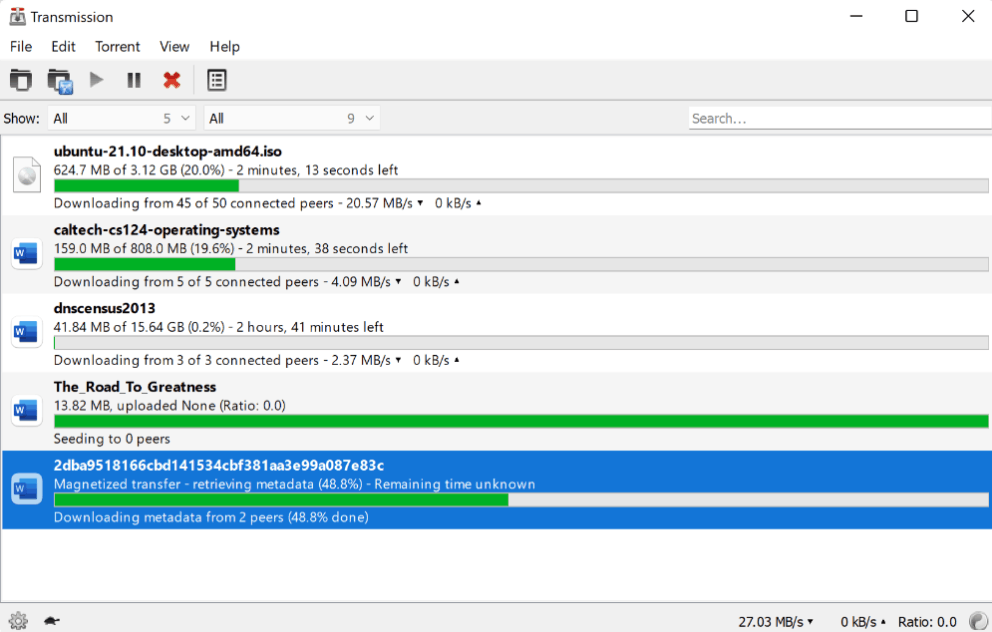
Transmission is often the first choice recommended for beginners. It's free, extremely lightweight, and works reliably right out of the box. Its minimalist interface might seem overly simplistic at first glance, but that's precisely what makes it suitable for those who want to download torrents without worrying about complexity.
Best suited for: users who occasionally download torrents, especially on older Macs or with limited storage. Students, general users downloading open-source software, or anyone who values simplicity over a large number of features will find it suitable.
The problem the application solves: It overcomes the issue of downloaders consuming excessive system resources, with very low RAM consumption even when multiple torrents are running simultaneously. It prevents users from feeling overwhelmed by a multitude of rarely used features thanks to its clean design that only displays what is necessary. And it skips the cumbersome configuration step, as the default settings are already reasonable and ready to use.
Key features: The application allows you to sort downloaded files by label for easy grouping and filtering. The web interface lets you control tasks from any browser on the same network. It supports an automatic blocklist that removes known malicious partners, and its magnet link integration makes Transmission the default handle for quickly adding torrents.
Strengths: Completely free, no ads, no push for upgrades, and no hidden costs. Low memory usage, suitable for older devices. Open-source project that is regularly developed and updated.
Limitations: The interface is intentionally kept minimalist, so it may not meet the needs of users seeking complex integrated search or automation. As open-source software, you may occasionally encounter minor bugs between updates. The application also lacks a built-in torrent finder, so you must find sources elsewhere.
Example workflow: With an older MacBook Air and limited storage, Transmission is a way to download necessary files without slowing down the machine. You can set up download folders so that completed files are gathered in the right place, and use the web interface to add torrents from your phone when you're away from the machine.
Cost: Completely free and open source, with no paid version.
Privacy Note: When downloading torrents, your IP address may be visible to other devices in the group, and many downloaders don't hide this information. Therefore, use a reputable VPN or proxy. VPNs also mask download activity from your internet service provider, thereby reducing the risk of bandwidth throttling.
6. qBittorrent is for professional users who need advanced features.
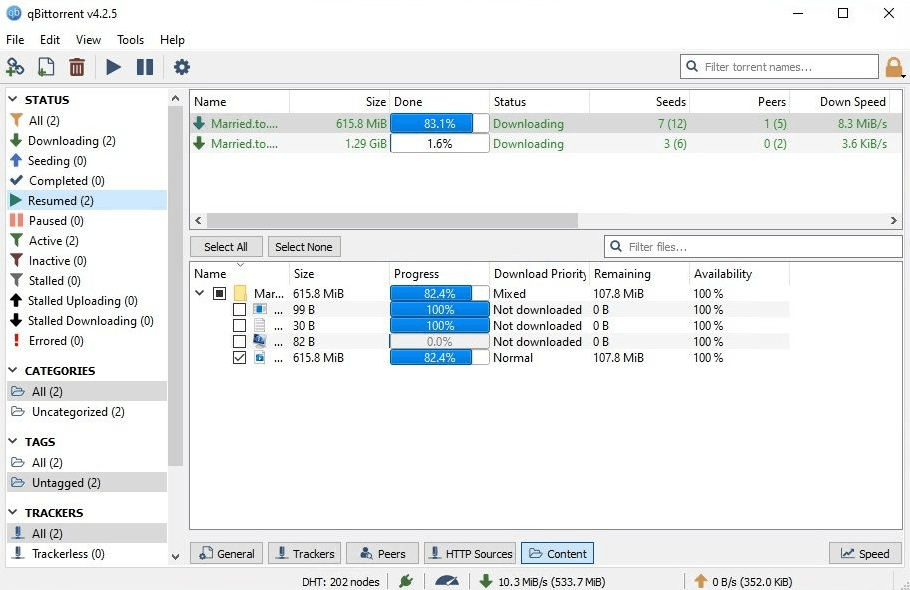
Best suited for: users with technical skills managing large torrent libraries, privacy-conscious users who frequently use VPNs, and those requiring advanced automation, such as data archivists or media server operators.
The problems the application solves are: Firstly, the risk of IP exposure when the VPN loses connection. qBittorrent can directly integrate with the VPN interface, ensuring all downloads and sharing only go through this tunnel. Secondly, the need for manual searching across multiple sites is eliminated, as search plugins allow querying multiple sources directly within the application. Thirdly, managing hundreds of torrents is easier thanks to advanced filtering and categorization capabilities.
Key features: Network integration locks the application to a VPN adapter for robust privacy protection. RSS feeds automatically download torrents matching your criteria. Sequential downloads allow you to preview multimedia files before the download is complete. IP filtering can block entire address ranges or specific regions.
Strengths: Completely free, ad-free, and no paid version. Comprehensive feature set. As a cross-platform software, features are consistent across all operating systems.
Limitations: The interface looks outdated compared to modern Mac applications. The learning curve is steeper for non-technical users. Development based on volunteers may result in slower bug fixes. Additionally, search plugins are often community-contributed, so you need to be cautious about the source and reliability of each plugin.
Integration into workflows: qBittorrent's web API allows for deep integration with automation tools. You can link with Shortcuts, write Python scripts to build your own workflows, or integrate with media servers to manage content automatically. The directory tracking feature will trigger downloads every time you drop a torrent file into a specified directory.
Cost: Free and open source, no paid version.
7. Deluge is for technical users who want complete control.
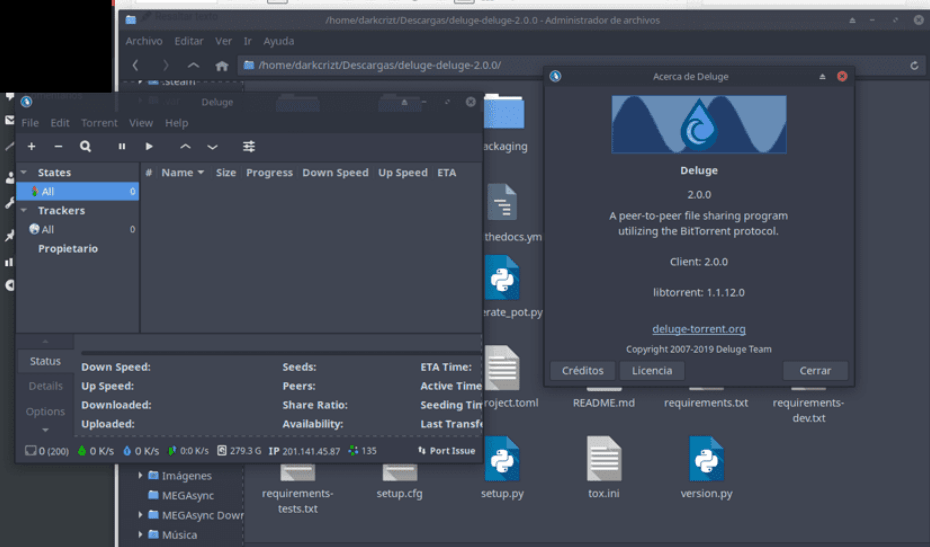
Deluge is an excellent open-source torrent downloader, comparable to many paid options, provided you're willing to invest the time in configuration. It can be likened to the Linux of the torrent world: almost limitless customization and very powerful, but requires technical knowledge to unlock its full potential. It's also worth noting that macOS receives less attention from the development team, so Mac builds are sometimes slower than those for other platforms.
Best suited for: system administrators, programmers, and technical users who want granular control over every aspect of torrent downloading, especially those operating interfaceless servers or managing remotely.
The problem the application solves: For remote management needs, the slim client architecture allows control from anywhere. For those who find other loaders too rigid, the plugin system adds almost every feature. And for simple load tasks that don't require a user interface, the daemon runs in the background with minimal resource cost.
Key features: File prioritization in torrents helps you download the files you need first. A separate UI/daemon architecture allows for flexible deployment. The official plugin ecosystem and community add many functionalities such as bandwidth scheduling, automatic decompression, label organization, event-driven script execution, and automatic RSS downloads. The command-line interface also allows SSH management on the server.
Strengths: Very lightweight core, features added via plugins. Consistent across macOS, Windows, and Linux. Powerful scripting capabilities thanks to plugins.
Limitations: There is no built-in search, so you need to find torrents elsewhere. The learning curve is steeper than applications aimed at the general user. Some unusual aspects of the interface may confuse new users.
Integration into workflows: Plugin architecture opens up many useful workflows on Mac. You can use the Execute plugin to trigger AppleScripts once they've loaded, combine it with Keyboard Maestro for macro automation, or connect to your smart home system via webhook.
Cost: Free and open source, no paid version.
8. FrostWire: A multimedia download platform with many additional features.
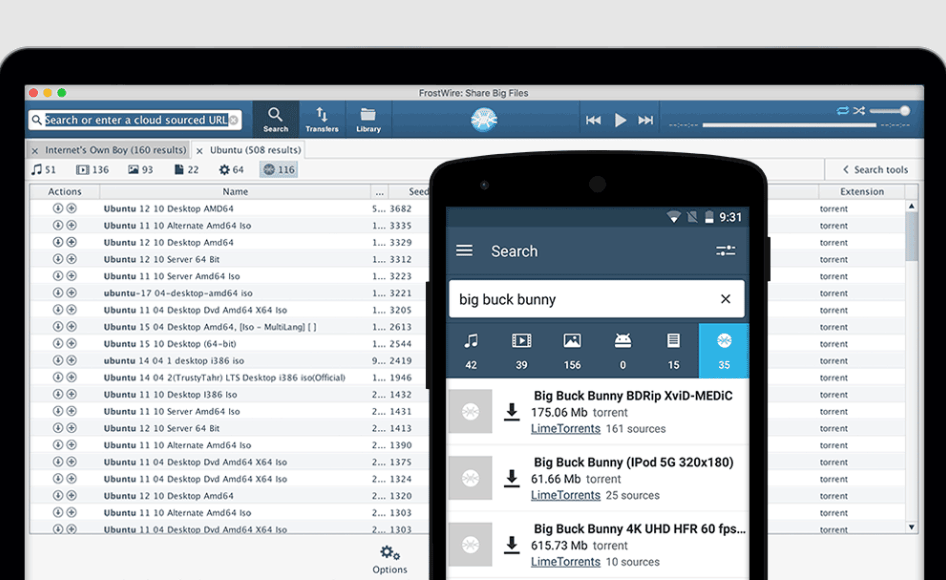
Best suited for: multimedia content collectors who want one app for multiple download types, or those who primarily download audio and video. The app is also suitable for those careful enough to decline bundled software during installation.
The problem the app solves: You don't need multiple separate apps for each type of download, as one tool handles both torrents and content from YouTube and SoundCloud. Searches are also faster thanks to cached results.
Key features: Multimedia download capability that consolidates multiple sources into a single interface. An integrated player allows you to preview content without opening another application. An integrated search engine returns quick results from torrent services and cloud sources, with support for previewing or streaming.
Strengths: Versatile, not limited to torrents. Integrated media library and player. Fast search thanks to active caching.
Limitations: The list of torrent sources for the integrated search is smaller than some competitors. You should carefully check compatibility with your Mac's chip before installing, as there are reports that the application does not yet support Intel-based Macs. Most importantly, there is a copyright issue: downloading content from YouTube or SoundCloud may violate terms of service or copyright law if you do not have the right to use it.
Integration into the workflow: Video creators can use FrostWire to find royalty-free music or reference videos, provided they have carefully checked the licenses. The built-in player allows for previewing content before importing it into Final Cut Pro or other video editing software.
Cost: FrostWire is free and accepts voluntary contributions from users.
9. Make a decision: Which torrent download software is right for you on your Mac?
After considering each application, the final step is to compare it to your personal needs. The two perspectives below will help you make a confident choice.
9.1 For different users
Beginners: Start with Transmission. It's free, lightweight, and very difficult to misconfigure. Once you understand the basics and want more features, you can upgrade to Folx for a pure Mac design and built-in security features.
For general users: If you only download occasionally, uTorrent Web works well on newer Macs. For older machines, or when you want to avoid ads and don't want to rely on a browser, Transmission offers a cleaner experience.
For everyday users: Folx is a worthwhile investment. Its ad-free environment, integrated search engine, and security features are valuable when you download torrents regularly.
Advanced users: qBittorrent offers the most features at no cost. VPN mounting, RSS automation, and a rich search plugin make it ideal for managing large libraries or automated downloads.
For technical users: Deluge gives you maximum control thanks to its plugin system and daemon architecture. It's a suitable choice for interfaceless servers or those who like to fine-tune every detail.
9.2 Key Determinants
Budget: Transmission and qBittorrent offer professional-level features completely free. Only consider paid options if you really need specific things like an ad-free interface or commercial support.
System resources: On older machines or with limited RAM, Transmission's low power consumption makes it the obvious choice. Avoid feature-intensive loaders if they might slow down your machine.
Prioritize security: Folx and qBittorrent are two outstanding options thanks to their built-in protection measures. Whichever app you use, combine it with a reputable VPN service and a malware scanning tool for comprehensive protection.
Feature requirements: If you need integrated search, choose Folx, qBittorrent, or FrostWire. If you want automation, qBittorrent's RSS feed and Deluge's plugin are excellent options.
You should also maintain some basic safety habits regardless of which software you choose. Verify the download source and read reviews before downloading, enable the VPN disconnection feature, consider using a separate user account with limited permissions to download files, scan for malware regularly, and always update your uploader to the latest version to receive security patches.
10. Frequently Asked Questions
Does Mac have a built-in torrent downloader?
macOS doesn't come with a default torrent downloader, but there are many good options to install. Popular names include Folx, qBittorrent, Transmission, and Deluge. These applications all run stably on macOS, with Folx and Transmission being specifically designed for Mac, so they integrate with the system more naturally.
Is uTorrent still usable on Mac?
uTorrent has two versions for Mac: the classic application and uTorrent Web. However, the classic version no longer works on macOS Catalina 10.15 and later. Therefore, if you are using a newer macOS version, you need to switch to uTorrent Web, run it directly in your browser, or choose another downloader such as Transmission, qBittorrent, or Folx.
Is downloading torrents legal?
Downloading torrents is legal in itself, but its legality depends on the content you download. Torrenting is a legitimate file-sharing technology, and many organizations use it to efficiently distribute large files. However, downloading copyrighted content without permission is illegal in many countries. Always ensure that the content you download is not copyrighted or is from legitimate sources.
Is downloading torrents safe?
Torrenting is a useful way to download files, but it also comes with risks such as malware and data leaks. To minimize these risks, you should follow these guidelines. First, use reputable torrent sites with large communities and active moderation teams, as these sites often have mechanisms to flag or remove malicious files. Next, read comments and reviews before downloading, as previous users' experiences can warn you of potential problems. Then, scan your Mac for malware with a specialized tool after each download, especially for software from unknown sources or suspicious multimedia files. Finally, use a VPN to encrypt your connection and mask your IP address, and enable the VPN disconnection feature to avoid unintentional data leaks.





















VIP Products








Best Selling Products
Windows 10 & 11 Pro Key
36 USD
MidJourney Account
29 USD
Copyright Adobe Lightroom Account
59 USD
Capcut Pro 1 Year
39 USD
Adobe Premiere Pro Account
99 USD
Upgrade genuine Capture One account
120 USD
Freepik Premium Account
59 USD
Plugin Retouch4me
69 USD
Genuine Cheap Canva Pro
39 USD
Adobe Photoshop Copyright - Full App
120 USD
Upgrade Duolingo Super
29 USD
Genuine Adobe Illustrator account
99 USD
Upgrade Genuine Office 365
49 USD
ChatGPT Plus Account (GPT-4)
16 USD
Autodesk All App Account Copyright
120 USD