Best Selling Products

Upgrade Duolingo Super
29 USD

ChatGPT Plus Account (GPT-4)
16 USD

Plugin Retouch4me
69 USD

Genuine Cheap Canva Pro
39 USD

Genuine Adobe Illustrator account
99 USD

Upgrade Genuine Office 365
49 USD

Autodesk All App Account Copyright
120 USD

MidJourney Account
29 USD

Windows 10 & 11 Pro Key
36 USD

Adobe Premiere Pro Account
99 USD

Capcut Pro 1 Year
39 USD

Adobe Photoshop Copyright - Full App
120 USD

Upgrade genuine Capture One account
120 USD

Freepik Premium Account
59 USD

Copyright Adobe Lightroom Account
59 USD
Things You Need to Know About 3D Model Design
Nội dung
- 1. What is 3D modeling design?
- 2. The role and applications of 3D modeling design
- 3. Why should you update and design the latest 3D models?
- 3.1 Work faster
- 3.2 Enhance your market access
- 3.3 Stimulating critical thinking and developing professional skills
- 3.4 Enhancing creativity and exploring new ideas
- 4. Basic process in 3D model design
- 4.1 Brainstorming
- 4.2 Sketch
- 4.3 3D Model Design
- 4.4 The final render
- 4.5 Produce test samples
- 5. Several applications make 3D modeling easier and more convenient.
- 5.1 FreeCAD
- 5.2 Daz Studio
- 5.3 OpenSCAD
- 5.4 Wings 3D
- 5.5 AutoCAD
- 6. Conclusion
In today''s rapidly developing technological era, the application of innovative tools has become an inevitable trend. One of the most sought-after fields is 3D modeling, where ideas are brought to life in a vivid, intuitive, and highly practical way.
1. What is 3D modeling design?
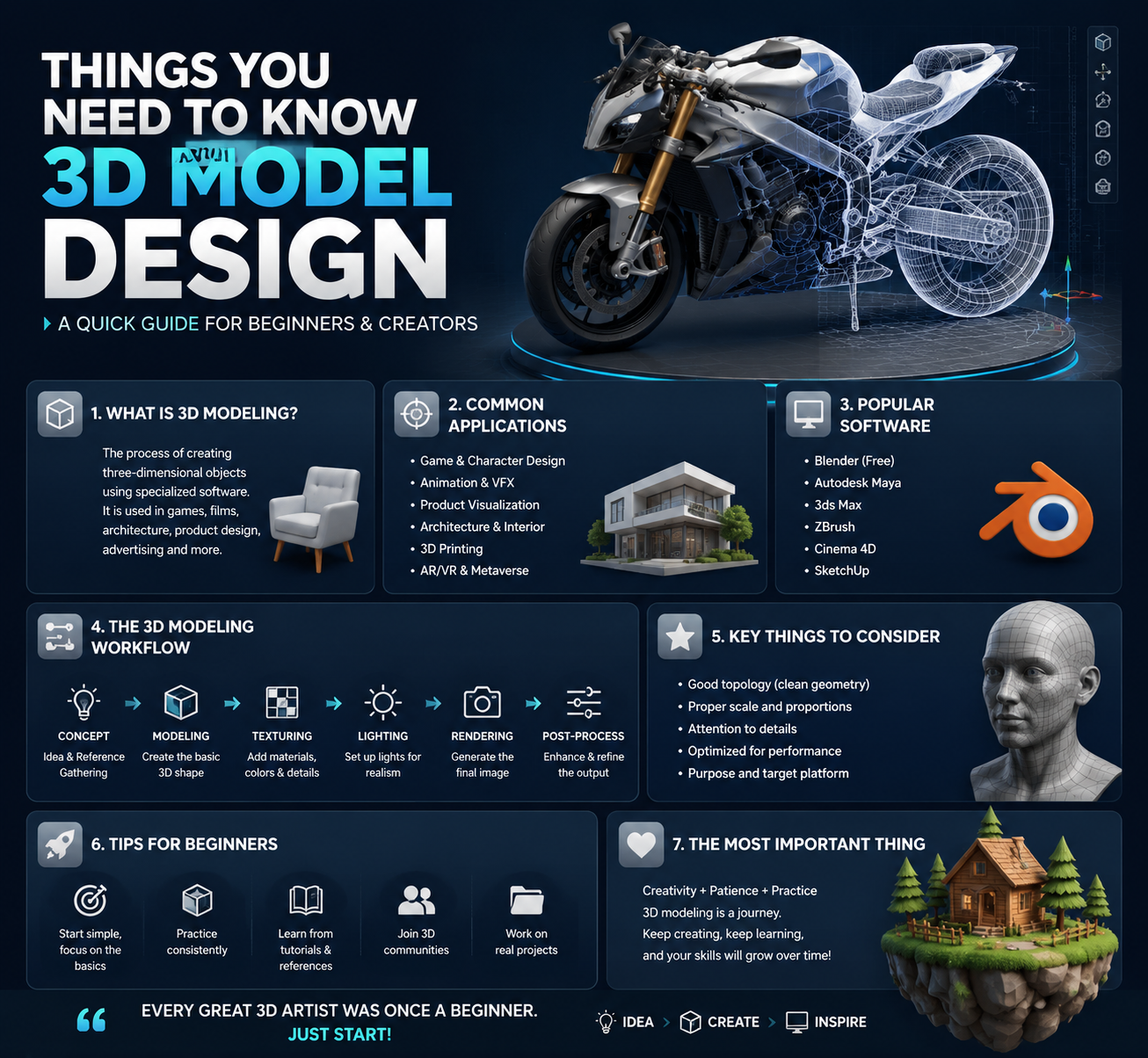
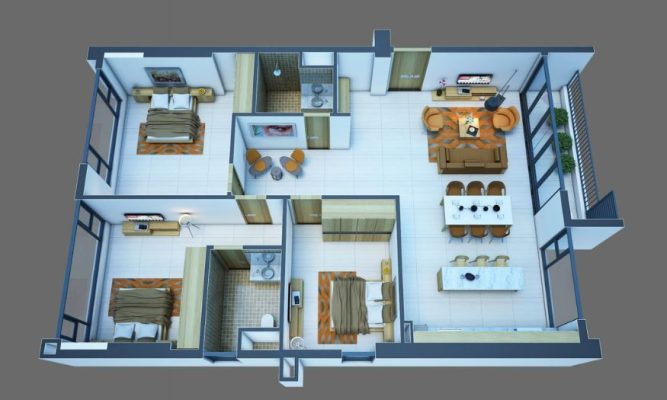
In the modern world, the concept of 3D has become familiar, appearing in films, games, architecture, and art. 3D stands for "Three Dimension," meaning three dimensions—length, width, and depth—making images much more realistic and vivid than conventional 2D images. Therefore, 3D modeling is considered a significant breakthrough, opening up the possibility of recreating any idea in a visual and lifelike form.
Simply put, 3D modeling is the process of using graphic software to create three-dimensional objects that can be rotated, zoomed in, or zoomed out, allowing viewers to observe them from various angles. The special thing about 3D modeling is that it not only provides a visual experience but also facilitates the realization of ideas in many fields such as architecture, manufacturing, advertising, film, and entertainment.
2. The role and applications of 3D modeling design
3D modeling is not simply about creating visually appealing images; it's a crucial foundation in manufacturing and innovation. With its ability to simulate details accurately, 3D data minimizes errors during the manufacturing process and supports processes such as 3D printing, injection molding, CNC machining, and robot programming. In short, 3D modeling is the perfect "digital draft" before a product is actually created.
Beyond its industrial applications, 3D design has a significant impact on modern life. From creating virtual characters in games and visual effects in films to virtual reality (VR) and augmented reality (AR) experiences, 3D models offer realism and appeal. As a result, 3D modeling is increasingly establishing itself as an indispensable tool for designers, engineers, and creators.
3. Why should you update and design the latest 3D models?
3.1 Work faster
When you invest time in learning and updating 3D modeling tools , your productivity will increase significantly. It might be challenging at first to get used to the software, but once you master it, you'll find yourself creating models, fixing errors, and iterating much faster than with hand-drawing or purely 2D methods. Features like prefabs, libraries, and transform operations save time on repetitive design tasks.
Furthermore, 3D design allows you to preview the results such as lighting, materials, proportions, and motion instantly, which reduces unnecessary edits and shortens the client feedback cycle. Fast rendering and real-time preview enable you to make more accurate decisions without having to start over, optimizing project timelines and personal productivity.
3.2 Enhance your market access
The current design market prioritizes those with 3D graphic skills and the ability to transform ideas into physical models. Many industries, such as architecture, manufacturing, advertising, gaming, and e-commerce, are seeking experts who can use 3D to present products more visually. Updating your 3D design skills will make your professional profile stand out, expanding your job opportunities and securing quality freelance contracts.
Furthermore, customers are increasingly demanding visual demos, product simulations, or short animations to convince investors and the market. When you provide services with 3D data, 3D printing, or AR/VR simulation, your ability to negotiate prices and retain customers will be higher, thereby increasing revenue and personal brand value.
3.3 Stimulating critical thinking and developing professional skills
Learning 3D design is a journey that hones spatial thinking and engineering skills, something that 2D sometimes cannot fully provide. When you create 3D models, you must consider proportions, structure, surfaces, and how materials reflect light, thereby enhancing your analytical and problem-solving abilities. This process also helps you gain a deeper understanding of real-world manufacturing workflows, from technical drawings to CNC machining and 3D printing.
Furthermore, learning 3D fosters the ability to combine art and computing: you will apply principles from 2D graphics (such as composition and color) to three-dimensional space, while mastering technical tools such as UV mapping, topology, and rigging. The result is a diverse skill set suitable for both creative and industrial applications.
3.4 Enhancing creativity and exploring new ideas
3D space opens up countless experimental possibilities that are difficult to achieve in 2D: you can "play around" with shapes, structures, and motion to explore new design forms. These spontaneous experiments often generate groundbreaking ideas, from concept products and accessories to game environments and video marketing footage. Therefore, 3D modeling is not just a technical tool, but also your creative laboratory.
Furthermore, the ability to render and showcase products from multiple angles makes it easy to share ideas with colleagues, clients, or the design community, thereby receiving quick feedback and continuously improving. Exploring 3D space in a "playful but purposeful" way sometimes leads to commercial success, so don't be afraid to experiment and enjoy the creative process.
4. Basic process in 3D model design
4.1 Brainstorming
Every successful product begins with a clear and feasible idea . At this stage, the designer needs to identify core elements such as style, materials, functionality, and production methods. The more detailed the sketch of the idea, the higher the chances of realizing the product and minimizing future risks. This is also when the client and designer discuss and clarify their desires, thereby forming a specific development direction.
However, clients often only provide a general idea of the function, while the entire structure, shape, and style depend on the designer's expertise. Therefore, the conceptualization phase requires not only creativity but also logical thinking and practical experience to balance aesthetics and functionality.
4.2 Sketch
After developing an idea, the next step is to sketch the product to concretize what's in your imagination. Sketches help convey the message more visually than just verbal communication, and also help clients visualize and provide timely feedback. This is a crucial step to ensure agreement between both parties before proceeding with the detailed model creation.
Furthermore, sketches help identify inconsistencies or impractical aspects during the production process. Making adjustments at this stage saves significantly more time and cost compared to when the product has already gone through 3D modeling or prototyping. Therefore, sketches become a crucial bridge between the initial idea and the final product.
4.3 3D Model Design
Once the concept and sketches are agreed upon, engineers or 3D artists begin recreating the product using specialized software such as Blender, SketchUp, or 3ds Max. This process is like "building" a digital model: every small detail is meticulously crafted to create the shape, texture, and proportions that are as close as possible to the original idea. This stage requires specialized skills and patience to ensure high accuracy.
A key feature of this stage is the ability to present and share files online. Services like Sketchfab allow clients to visually view 3D models directly on their phones or laptops, enabling quick feedback. The continuous interaction between clients and designers during this phase helps bring the product closer to reality and minimizes discrepancies when it moves to the production stage.
4.4 The final render
Once the 3D model has been built, the next step is rendering to create the most vivid and realistic visual images. Rendering is like "taking a photograph" of the model using real-world lighting, colors, and materials, giving clients a clearer view of the final product. High-quality renders are often used in presentations, marketing, or as reference material before production.
In some cases, designers will use reverse engineering techniques based on 3D scans of existing products. This method accurately replicates the original shape, allowing for easy editing and addition of details while ensuring other parts maintain accuracy. This is an optimal solution when developing new products based on existing foundations.
4.5 Produce test samples
The final step in the process is creating a prototype to test feasibility before mass production. With the rapid advancements in 3D printing technology today, rapid prototyping has become commonplace and almost a default part of product development. These prototypes provide a detailed assessment of the size, materials, and practical functionality of the design.
Prototypes not only aid in testing but also provide a basis for customers to experience the product directly. This allows both designers and customers to make timely adjustments if any errors occur. It is thanks to this prototyping process that the final product achieves a higher level of perfection, minimizing costs and risks during mass production.
5. Several applications make 3D modeling easier and more convenient.
5.1 FreeCAD
FreeCAD is a free, open-source software designed primarily for mechanical and product engineering, but it is also very useful in architecture and construction. With its flexible customization options and user-friendly interface, FreeCAD is an ideal choice for both beginners and professional engineers.
Key features of FreeCAD:
- Supports 3D design in mechanical, architectural, and manufacturing engineering.
- Provides powerful 2D sketching tools for modeling and extracting detailed drawings.
- Compatible with multiple operating systems: Windows, macOS, and Linux.
- The modular interface allows users to extend and customize it according to their needs.
5.2 Daz Studio
Daz Studio is a free, powerful, and feature-rich 3D modeling software, especially suitable for those who love creating lifelike characters or landscapes. Although it may be a bit complex for beginners, once you get the hang of it, you'll have a fantastic tool at your disposal to create incredibly realistic images.
Key features of Daz Studio:
- Supports real-time graphics rendering with GPU acceleration.
- Allows for the creation of characters, landscapes, and animations.
- The resulting images are realistic and suitable for film, game, or advertising design.
- Compatible with Windows and macOS.
5.3 OpenSCAD
Unlike many popular 3D software programs, OpenSCAD focuses more on the technical aspects of CAD rather than the artistic ones. It's an ideal tool for those who want precise control over every detail and parameter of a product through its programming and modeling capabilities.
Key features of OpenSCAD:
- It supports 3D design using command code, allowing for control over every technical detail.
- Particularly suitable for the fields of engineering, mechanics, and product manufacturing.
- Allows for the display of the model directly on the screen with high accuracy.
- Works well on Windows, macOS, Linux, and BSD.
5.4 Wings 3D
Wings 3D is a highly-rated open-source software known for its simplicity and ease of use, making it particularly suitable for beginners in the world of 3D design. Although it doesn't support animation, Wings 3D remains a powerful tool for building detailed models using traditional polygonal modeling techniques.
Key features of Wings 3D:
- It provides a complete set of basic and easy-to-learn 3D design tools.
- AutoUV support is available to create UV maps for convenient rendering.
- The interface is user-friendly and intuitive, suitable for beginners.
- Accurate modeling capabilities, applicable to various 3D software programs.
5.5 AutoCAD
AutoCAD is the world's most popular 2D and 3D design software, widely used in architecture, construction, mechanical engineering, and many other engineering fields. With its diverse toolset and powerful modeling capabilities, AutoCAD is the top choice for professional projects.
Key features of AutoCAD:
- Create realistic 3D models using surfaces, solids, and meshes.
- Intuitive 3D navigation tools: rotate, move, and fly over the model.
- Render photorealistic images with vibrant lighting and materials.
- Supports 3D scanning and data import from laser scanners.
- Create detailed 2D drawings from 3D models, including projections, sections, and perspectives.
- Integrate Print Studio to prepare 3D print files.
6. Conclusion
The above information provides the most basic and useful insights to help you gain a more comprehensive understanding of 3D modeling , a field that is both creative and highly applicable in many different industries. Hopefully, this article has sparked some new ideas and inspired you to step into the exciting world of 3D. Please regularly follow and update our articles to avoid missing out on valuable knowledge, new trends, and useful tips on your design and creative journey.





















VIP Products








Best Selling Products
Upgrade Duolingo Super
29 USD
ChatGPT Plus Account (GPT-4)
16 USD
Plugin Retouch4me
69 USD
Genuine Cheap Canva Pro
39 USD
Genuine Adobe Illustrator account
99 USD
Upgrade Genuine Office 365
49 USD
Autodesk All App Account Copyright
120 USD
MidJourney Account
29 USD
Windows 10 & 11 Pro Key
36 USD
Adobe Premiere Pro Account
99 USD
Capcut Pro 1 Year
39 USD
Adobe Photoshop Copyright - Full App
120 USD
Upgrade genuine Capture One account
120 USD
Freepik Premium Account
59 USD
Copyright Adobe Lightroom Account
59 USD