Best Selling Products

Genuine Adobe Illustrator account
99 USD

Windows 10 & 11 Pro Key
36 USD

Plugin Retouch4me
69 USD

Upgrade genuine Capture One account
120 USD

Copyright Adobe Lightroom Account
59 USD

Genuine Cheap Canva Pro
39 USD

Capcut Pro 1 Year
39 USD

Adobe Photoshop Copyright - Full App
120 USD

MidJourney Account
29 USD

Upgrade Duolingo Super
29 USD

ChatGPT Plus Account (GPT-4)
16 USD

Adobe Premiere Pro Account
99 USD

Upgrade Genuine Office 365
49 USD

Freepik Premium Account
59 USD

Autodesk All App Account Copyright
120 USD
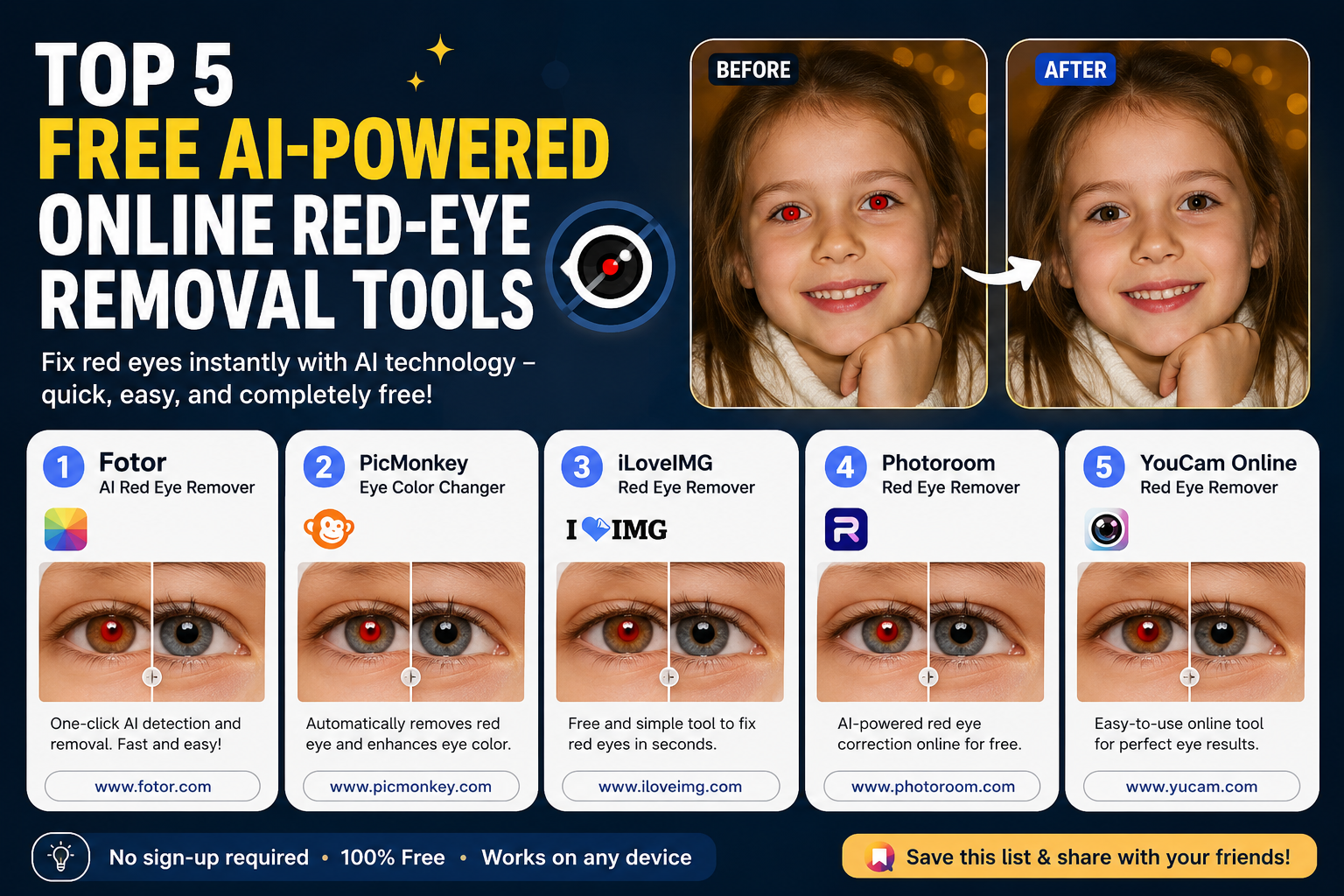
Top 5 Free AI-Powered Online Red-Eye Removal Tools
Nội dung
Red eyes can make even beautiful portraits look unnatural, especially when shot with a flash in low-light conditions.
1. Why do the photos show red eyes?
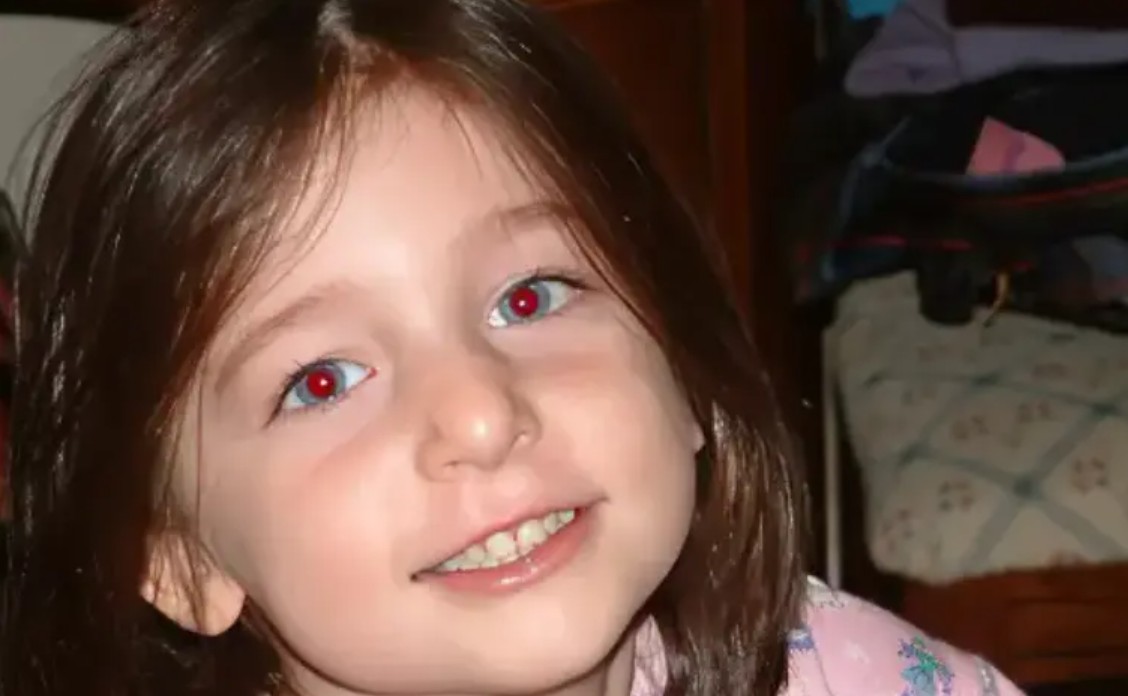
Red eyes in photos are a fairly common phenomenon, where the pupils of the person being photographed appear red instead of their natural color. The main cause is related to the reflection of light from a flash off the back of the eye.
Behind the pupil is the retina, an area with many blood vessels. When a flash shines directly into the eye, light can reflect off the retina back into the camera lens. Due to the large amount of blood in this area, this reflection can cause the pupil to appear red in the photograph.
Low light conditions also increase the likelihood of red eyes. When the surrounding environment is dark, the pupils tend to dilate to receive more light. The larger the pupils, the more light from the flash enters the eye, thus making the retinal reflection more apparent.
This is why photos taken in dark rooms, at dinner parties, or in spaces using direct flash are often prone to red-eye.
Why should you treat red eyes?
Removing red eyes helps restore the natural color of the eyes, making the photo look more realistic and vibrant. Especially in portrait photography, the eyes are one of the most important elements in expressing emotion. Unnaturally red eyes can detract from the naturalness of the expression.
Editing also helps photos look more polished. Family photos, event photos, portraits, or images used for social media can all look more professional after removing red-eye.
Nowadays, users can choose from many free online tools or free packages to perform this task without installing complex software.
2. 5 Online Solutions for Removing Red Eyes
2.1. Dreamina
Dreamina is an AI-powered image creation platform that also provides online photo editing tools. Besides creating image and animation content, Dreamina can be used to address common image issues, including red-eye.
A notable feature is the "AI Image" function , which allows users to use text commands to ask the AI to edit images. Instead of manually manipulating each eye area, you can describe the desired action and have the AI process it.
Dreamina utilizes various AI models for image creation and editing, offering features such as Inpaint , Remove , Expand , and Upscale . These tools can further refine images after red-eye removal.
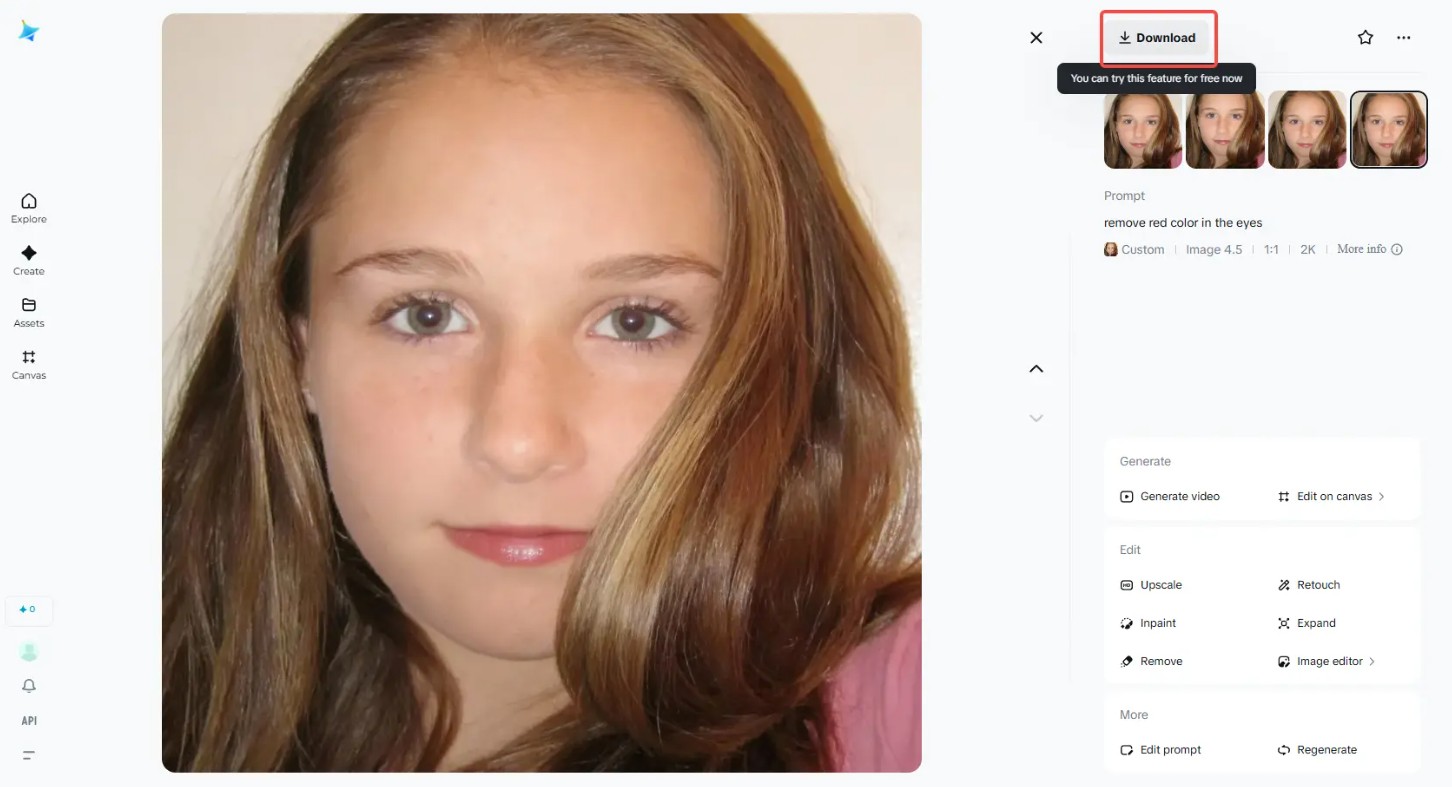
The Retouch feature is also useful when editing portrait photos. The tool can help refine facial features, smooth textures, and retain important eye details, resulting in a more natural red-eye removal effect.
If you only want to edit a specific area, Inpaint can be used to modify the eye area or a minor imperfection without changing the entire photo.
Advantages: Dreamina allows the use of "AI Image" to remove red eyes using text commands and leverages AI models to produce results quickly. The AI Agent and AI Image features simplify the editing process. Retouch supports portrait beautification, while Inpaint is suitable for correcting specific areas.
Disadvantage: Dreamina requires an internet connection to use its online tools.
2.2. Fotor
Fotor is a prominent online photo editing platform with a user-friendly interface and numerous AI-powered features. The tool caters to a wide range of users, from beginners to frequent photo editors.
Fotor provides a solution for quickly addressing common issues such as red-eye, brightness, contrast, and portrait image quality.
The red-eye removal feature is designed to detect the eye area and correct abnormal coloration. Thanks to AI, users don't need to manually create complex selections.
After removing red eyes, you can further adjust brightness , sharpness , and contrast to balance the image. This is especially helpful if the original photo was taken in low light conditions.
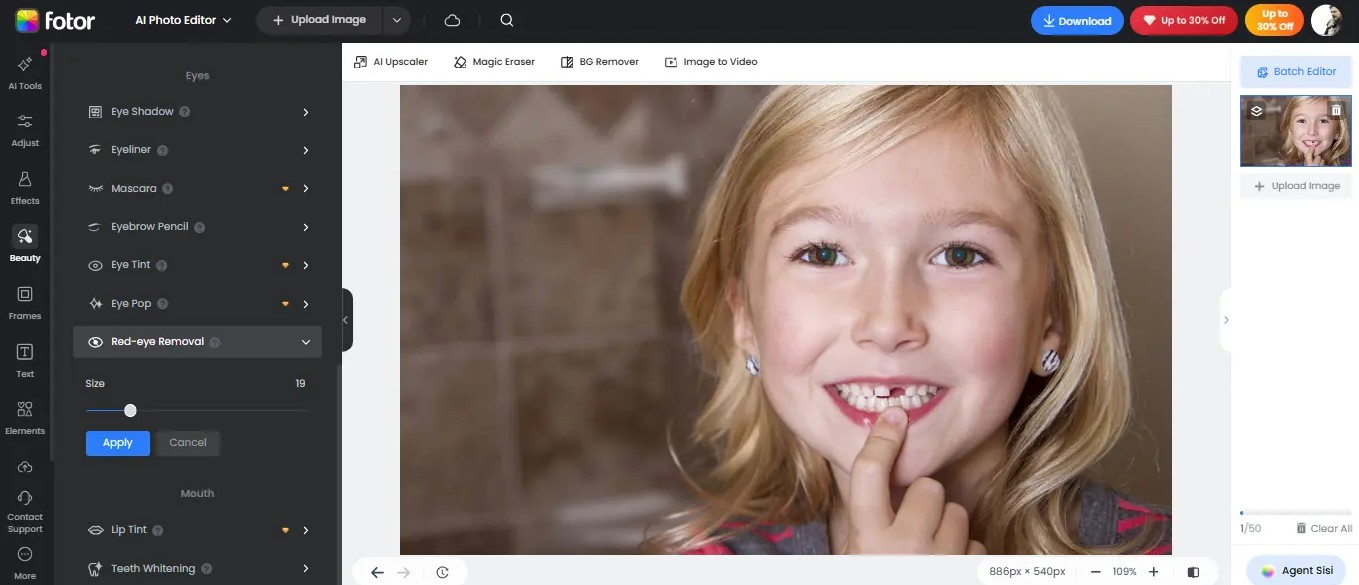
Fotor also supports batch editing, suitable for situations where multiple images need to be processed simultaneously. Instead of editing each image individually, users can apply the necessary operations to multiple images to save time.
Advantages: Fotor has a dedicated red-eye removal tool with intelligent detection capabilities. Additionally, users can adjust brightness, sharpness, and contrast. Batch editing capabilities are also an advantage when processing multiple images.
Disadvantage: Some of Fotor's advanced tools and features require users to subscribe to a paid plan.
2.3. Pixlr
Pixlr is a versatile online photo editing tool suitable for both beginners and experienced designers. The platform offers many AI features to quickly process images, including the ability to remove red eyes.
One of Pixlr's strengths is its layer-based editing system. Users can make complex changes to individual layers without necessarily affecting the original image directly.
In addition to red-eye removal, Pixlr offers many other features such as background removal, AI filters, and real-time editing effects. The platform supports multiple image formats and can be used on both web and mobile devices.
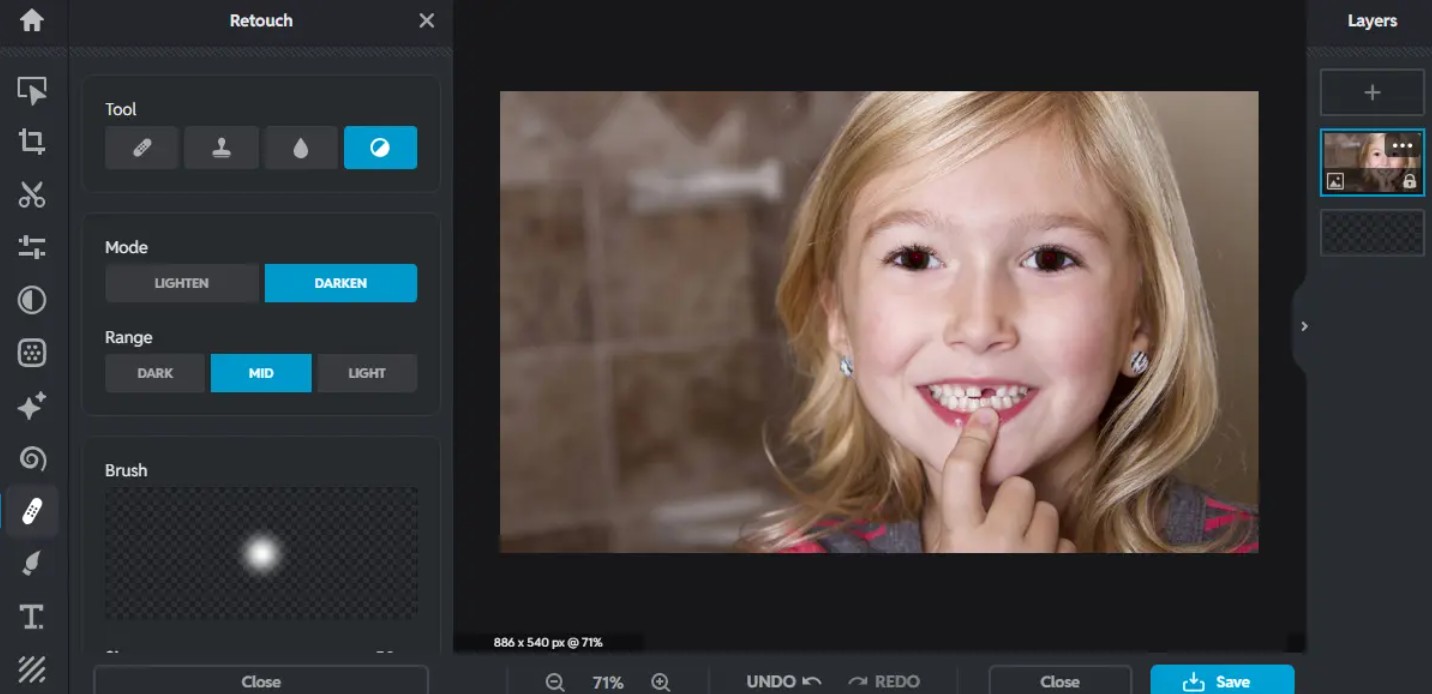
When editing portrait photos, users can combine red-eye removal with other operations such as adjusting color, lighting, and contrast to create a more refined result.
Advantages: Pixlr offers easy-to-use AI editing tools that support red-eye correction and many other image issues. Its layer system allows for flexible editing, and the tool works on both web and mobile devices with a wide range of image formats.
Disadvantage: Some AI-assisted tools may misidentify certain areas in an image and require manual editing by the user.
2.4. BeFunky
BeFunky is an online photo editor focused on simplicity and speed. The platform offers red-eye removal tools along with many portrait editing features, artistic filters, and design elements.
BeFunky's red-eye removal tool is designed for simplicity. Users can address red-eye with just a few taps instead of complex manual adjustments.
After processing, BeFunky also provides a variety of filters and editing tools to improve the overall image. You can use portrait editing features to improve skin texture, facial details, and image quality.
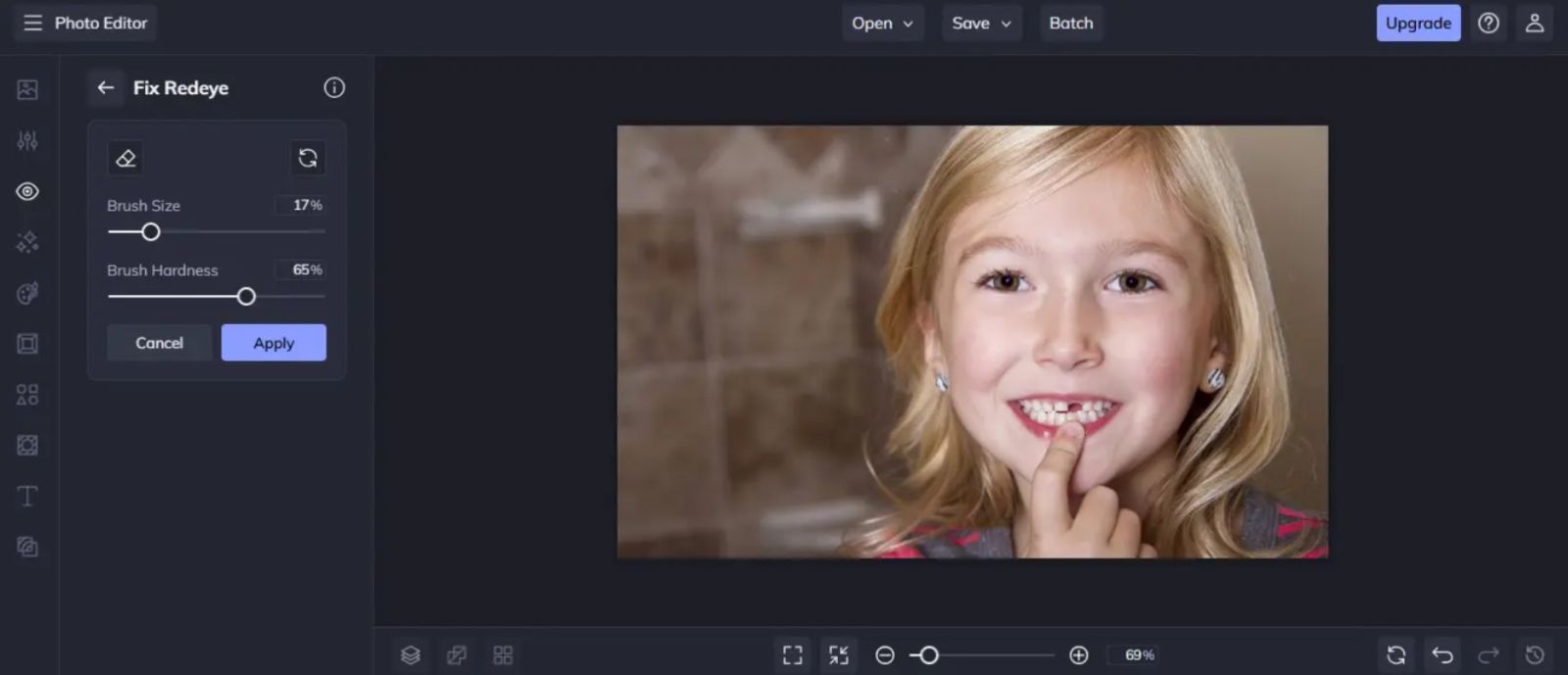
Another notable feature is that BeFunky integrates collage creation tools and design templates for social media. Therefore, users can continue to use their edited photos to create complete content.
Advantages: BeFunky has a dedicated red-eye removal tool that supports fast processing. The platform also has many artistic filters and smart editing tools to enhance portraits.
Disadvantage: BeFunky doesn't focus too much on professional manual editing, so the ability to control every detail may be more limited than with specialized software.
2.5. Cloudinary
Cloudinary differs from typical online photo editing tools in its approach to managing and processing media content. The platform provides AI tools to automatically detect and correct various image issues, including red-eye.
Instead of just editing a single image, Cloudinary focuses on large-scale image processing. This is a significant advantage for websites, online stores, or image libraries with a large amount of content.
Cloudinary automates the editing process through dashboard tools and URL options. Users can apply changes without manually performing each operation on each image.
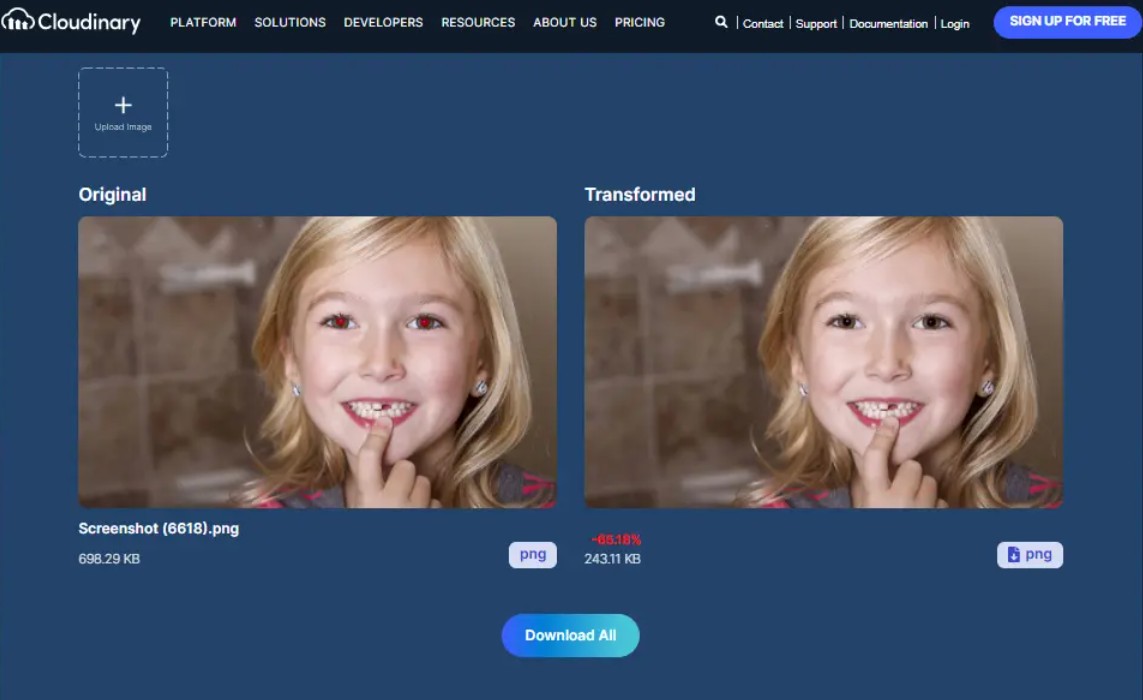
Cloudinary's batch processing capabilities also make it suitable for businesses that need to standardize a large volume of images. After red-eye removal, images can be further optimized for size, quality, and distribution.
Advantages: Cloudinary uses AI to automatically detect and correct red-eye. The platform supports large-scale processing via dashboard or URL options, and is capable of processing multiple images simultaneously.
Disadvantages: The free plan has limitations regarding bandwidth, storage capacity, and other usage options.
3. Tips to avoid red eyes when taking photos
Although online tools can quickly remove red-eye, preventing it from happening during shooting is still a better solution. A few small changes in lighting and flash usage can significantly reduce the risk of red-eye appearing.
Take advantage of ambient light.
Limit your reliance on flash and utilize natural light whenever possible. When the environment is well-lit, the pupils are less dilated, thereby reducing the amount of light reflected from the retina.
Soft, indirect lighting also helps faces look more natural while minimizing harsh highlights in photos.
Adjust the flash angle.
If you need to use a flash, avoid shining the light directly into your eyes. You can adjust the flash angle or use the bounce flash technique so that the light is reflected off another surface before reaching the subject.
This method helps reduce the amount of light reflected directly from the retina into the lens.
Increase the distance from the flash.
The distance between the subject and the light source also affects the red-eye effect. Whenever possible, maintain an appropriate distance between the subject and the flash.
Especially in group photos or portraits, adjusting position and distance can help reduce unwanted reflections in the eyes.
Use Red-Eye Reduction mode.
Many cameras and photographic devices now have a Red-Eye Reduction mode . This feature typically uses one or more flashes of light before taking a picture to help the pupils constrict.
When the pupil is smaller, the amount of light that can be reflected from the retina is reduced, thereby limiting the likelihood of red-eye appearing in the final image.
Edit immediately after shooting.
If red eyes still appear despite applying preventative measures, address the issue immediately after shooting. Early editing helps you quickly finalize the photo before uploading or sharing it.
When combining the right shooting techniques with AI editing tools, portrait photos become more natural, vibrant, and professional, allowing smiles and emotions in each moment to be fully captured





















VIP Products








Best Selling Products
Genuine Adobe Illustrator account
99 USD
Windows 10 & 11 Pro Key
36 USD
Plugin Retouch4me
69 USD
Upgrade genuine Capture One account
120 USD
Copyright Adobe Lightroom Account
59 USD
Genuine Cheap Canva Pro
39 USD
Capcut Pro 1 Year
39 USD
Adobe Photoshop Copyright - Full App
120 USD
MidJourney Account
29 USD
Upgrade Duolingo Super
29 USD
ChatGPT Plus Account (GPT-4)
16 USD
Adobe Premiere Pro Account
99 USD
Upgrade Genuine Office 365
49 USD
Freepik Premium Account
59 USD
Autodesk All App Account Copyright
120 USD