Best Selling Products

Capcut Pro 1 Year
39 USD

ChatGPT Plus Account (GPT-4)
16 USD

Genuine Adobe Illustrator account
99 USD

Freepik Premium Account
59 USD

MidJourney Account
29 USD

Genuine Cheap Canva Pro
39 USD

Upgrade genuine Capture One account
120 USD

Adobe Premiere Pro Account
99 USD

Upgrade Genuine Office 365
49 USD

Windows 10 & 11 Pro Key
36 USD

Plugin Retouch4me
69 USD

Copyright Adobe Lightroom Account
59 USD

Adobe Photoshop Copyright - Full App
120 USD

Autodesk All App Account Copyright
120 USD

Upgrade Duolingo Super
29 USD
Top Free Photo Recovery Software Available Today
Nội dung
- 1. What Makes a Good Free Photo Recovery Software?
- 2. List of the Most Reliable Free Photo Recovery Software
- 2.1 EaseUS Data Recovery
- 2.2 Stellar Data Recovery
- 2.3 Wise Data Recovery
- 2.4 MiniTool Power Data Recovery
- 2.5 IObit Undelete
- 2.6 Disk Drill
- 2.7 DiskDigger
- 2.8 iBoysoft Data Recovery
- 2.9 Puran Data Recovery Software
- 2.10 Undelete 360
- 3. Why You Need Photo Recovery Software
- 4. Conclusion
Perhaps nothing is worse than discovering your precious photos have vanished in an instant. Maybe you accidentally deleted a photo folder, or your memory card suddenly malfunctioned and all your data disappeared. Whatever the cause, the panic of seeing the "file not found" message is always unsettling. Fortunately, the story doesn''t have to end in tears. Nowadays, there are many data recovery software programs that can save the day; with just a few simple clicks, photos and files you thought were lost forever can be recovered.

1. What Makes a Good Free Photo Recovery Software?
A good free photo recovery software is a tool that allows you to retrieve lost or deleted files without paying or subscribing to a package. Almost everyone has experienced the frustration of losing data or accidentally deleting important photos, and it's certainly not a pleasant experience. But the good news is you have many options to recover lost photos without spending a large sum of money.
All the software listed in this article offers a certain level of free data recovery. Some tools are significantly more advanced than others, and some only allow you to recover a limited amount of data before prompting you to upgrade to a paid version. Even so, you still have plenty of free options to consider.
However, it's important to note that free software often comes with certain limitations. Sometimes there's a limit on the amount of data you can recover for free, some tools only support recovering certain file formats, and processing speeds can be significantly slower compared to paid packages.
Therefore, these free tools are usually best suited for small, infrequent restoration needs. If photo restoration is a vital and ongoing part of your workflow, such as for professional photographers, you should consider subscribing to one of the paid programs to receive better service and more extended features.
2. List of the Most Reliable Free Photo Recovery Software
Below is a detailed review of each software, giving you a comprehensive overview before choosing the tool that best suits your needs.
2.1 EaseUS Data Recovery
EaseUS Data Recovery Wizard is photo recovery software that supports approximately one thousand different file formats. This tool helps you recover deleted, reformatted, or lost photos on both Windows and Mac devices, including computer hard drives and portable storage devices.
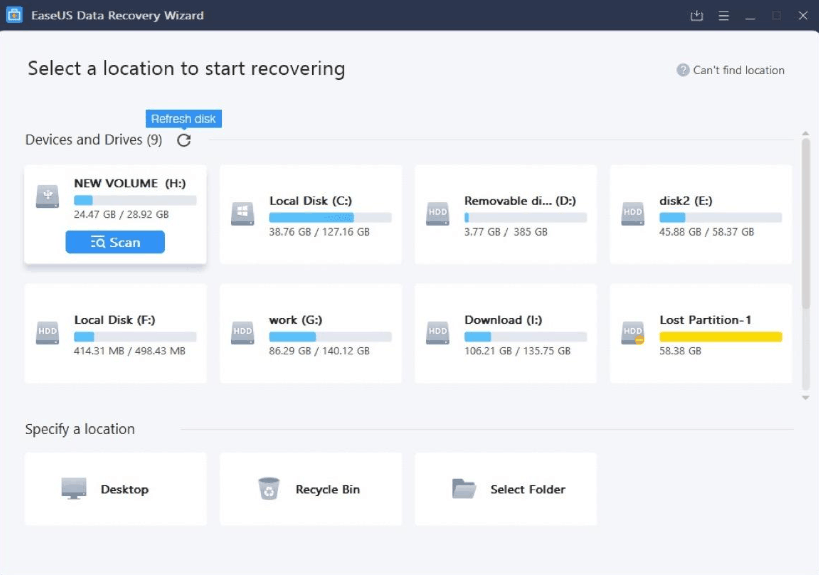
This software's strength lies in its user-friendliness, thanks to its built-in data recovery wizard, which helps you quickly retrieve files in just a few simple steps. EaseUS Data Recovery Wizard allows you to recover up to 2 GB of data for free, and if you need to recover more, the software also offers a Pro version to meet that need.
This tool allows you to filter scanned files by file format and supports previewing content before proceeding with the official recovery. Notably, EaseUS can recover photos along with their original information such as filename, storage path, and creation date, and works well on both SD cards and USB drives. In addition to the PC version, this software also supports data recovery for Android and iOS devices via a computer connection.
2.2 Stellar Data Recovery
Stellar is one of the highly-rated image recovery software programs for both Windows and Mac users. This tool can recover deleted files from solid-state drives, USB devices, and conventional hard drives, and is compatible with many versions of Windows as well as Macs equipped with M1, M2, and T2 chips.
This software can recover various types of data such as photos, emails, audio, and video, with a free limit of up to 1 GB. Additionally, Stellar can recover files from encrypted drives or systems that have experienced serious data loss.
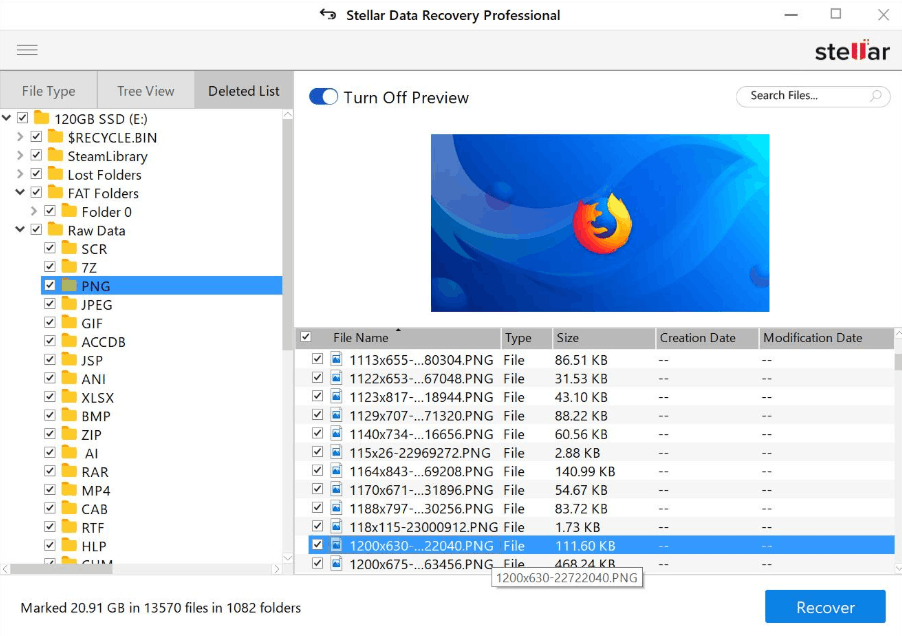
Stellar's interface is designed to be user-friendly and easy to use, with interactive options that make the recovery process smoother. Users can choose from various display modes for scanned files, add file titles to the list of supported formats, or search by specific folders. You can try it for free to experience how the software works, but you need to upgrade to the paid version if you want to actually recover files. The paid version of Stellar also comes with a thirty-day warranty, giving users more peace of mind when deciding to invest.
2.3 Wise Data Recovery
Wise Data Recovery is another reliable free image recovery software for Windows, helping you retrieve deleted files, both accidentally and permanently. This tool allows you to filter the file types before starting the scan, supporting the recovery of photos, videos, documents, emails, and many other formats.
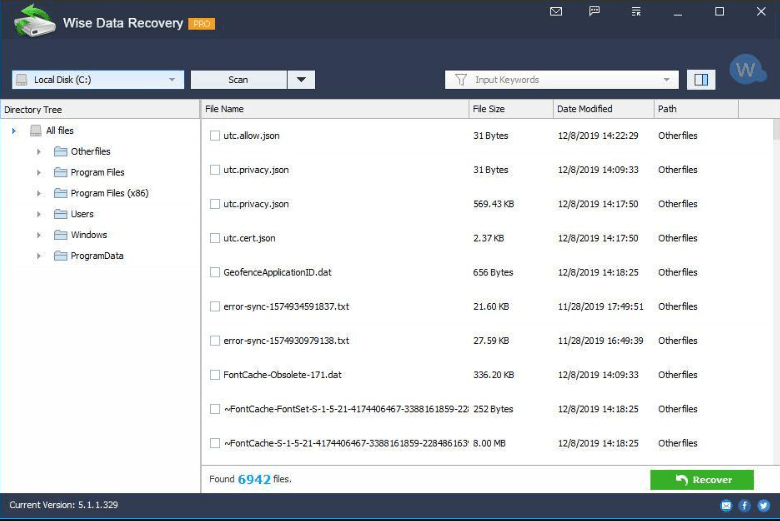
This software supports data recovery from hard drives, external hard drives, memory cards, digital cameras, USB drives, and many other storage devices. A notable advantage is that Wise Data Recovery has a portable version, allowing you to recover files without installing the software on your computer, which is very convenient in emergency situations. The free recovery limit for this tool is 2 GB of data.
It's important to note that WiseCleaner doesn't develop its own application for Mac; their Mac option is actually Stellar Data Recovery for Mac, a product developed through a partnership agreement between the two parties, and it's the same product as the aforementioned Stellar.
2.4 MiniTool Power Data Recovery
MiniTool Power Data Recovery is photo recovery software exclusively for Windows operating systems. Recently, the application has been updated with a completely new interface, making navigation and operation much easier than before.
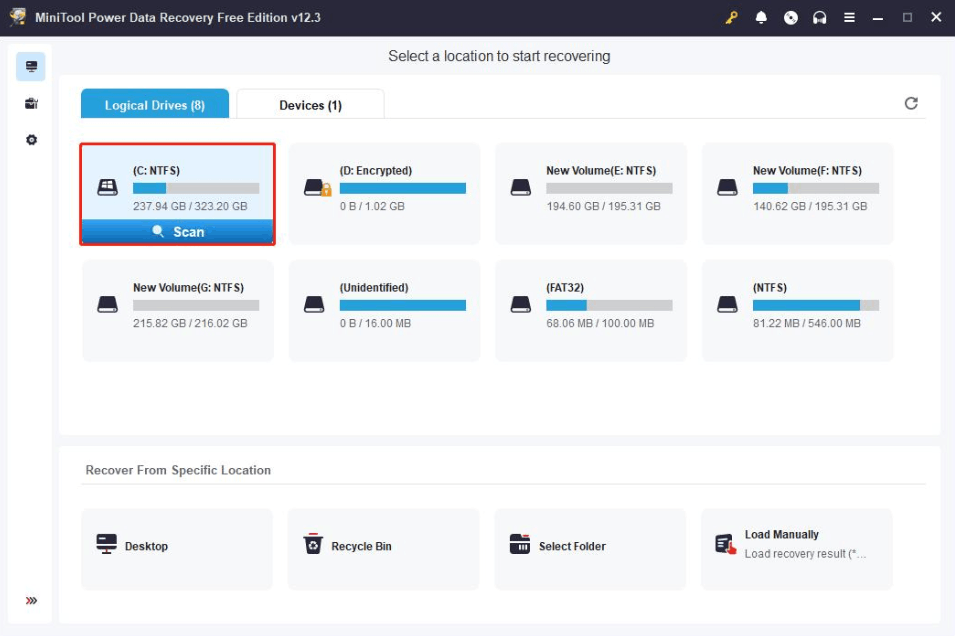
If you lose photos for any reason, this image recovery tool can handle many different causes, from accidental deletion to data loss due to virus attacks. MiniTool can recover deleted photos from external storage devices such as USB drives and hard drives, and it supports most popular multimedia formats.
The free version of this software is not a limited-time trial, but can be used free of charge long-term, however it is limited to 1 GB of data recovery. If you exceed this amount, you will need to switch to the paid version. Similar to Wise Data Recovery, MiniTool no longer develops a separate application for Mac, and their Mac download link now redirects users to Stellar Data Recovery for Mac.
2.5 IObit Undelete
IObit Undelete is one of the highly-rated photo recovery software programs for Windows users, helping to retrieve deleted photos, videos, documents, and music files with just a few simple steps.
This tool allows you to search for deleted files by name, extension, and size, then scan your device and recover data quickly. IObit Undelete also features a deep scan function, helping to find files lost years ago that conventional tools struggle to detect.
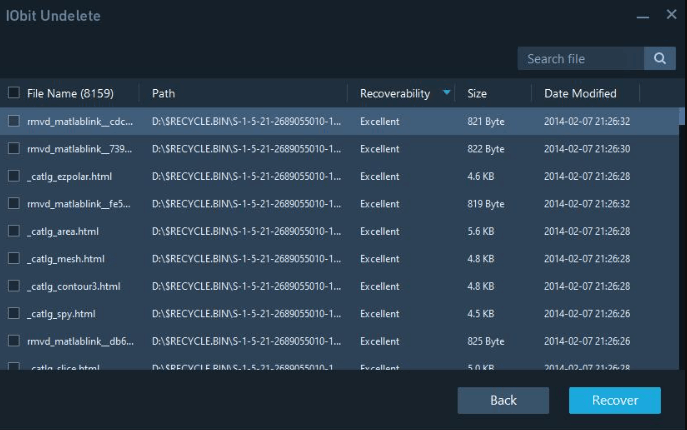
In addition, this software assesses the condition of each file before proceeding with recovery, letting you know whether the file is still recoverable or has been completely overwritten. This is a suitable option for those who prioritize an easy-to-use interface and quick operation.
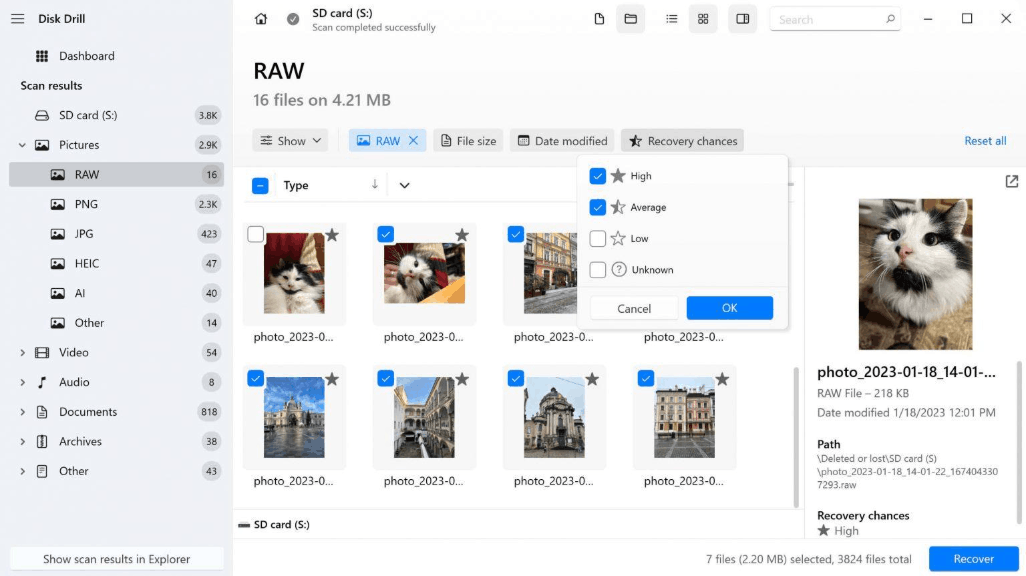
2.6 Disk Drill
Disk Drill, developed by CleverFiles, is an excellent image recovery software suitable for users who value their data while saving time and money. Designed for both Windows and Mac users, Disk Drill can recover approximately one hundred different image, photo, and graphic formats, along with hundreds of video, audio, document, and other file types.
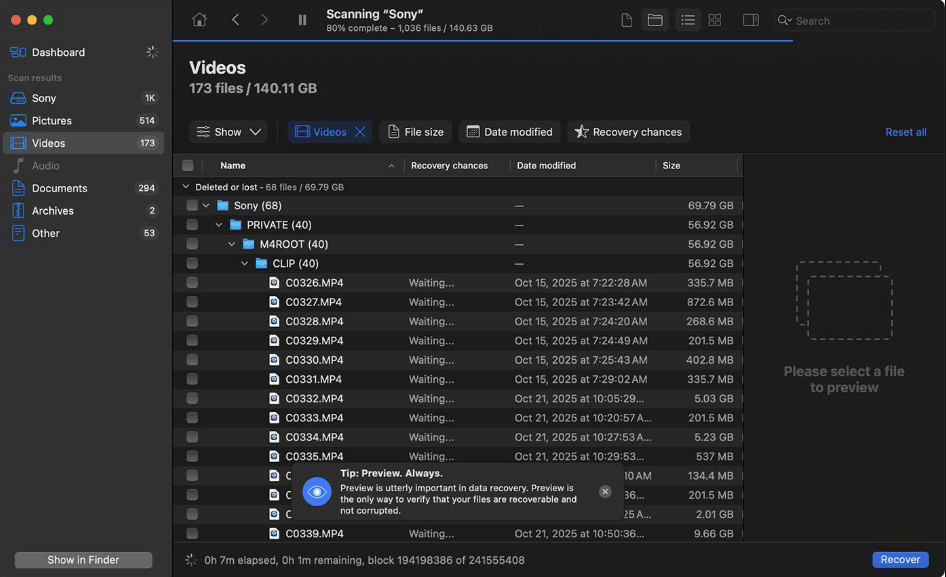
The most outstanding feature of Disk Drill is its incredibly impressive RAW image recovery capability, with near-perfect support for popular formats such as CR2, CR3, CRW, DNG, ERF, GPR, KDC, NEF, PEF, and RAF, making it an ideal choice for photographers.
This software works well with many commonly used storage devices in photography, such as SD, microSD, and CF cards, and can recover photos directly from digital cameras and devices from popular brands like Canon, Nikon, and GoPro. Regardless of whether the file system is corrupted or damaged—whether it's FAT, FAT32, exFAT, NTFS, EXT2/3/4, HFS+, or APFS—Disk Drill can effectively recover data. In addition to recovery, the software integrates many other useful data management and protection tools, and uses a one-time license purchase model instead of recurring subscription fees.
2.7 DiskDigger
DiskDigger is a free file recovery software capable of retrieving lost files from hard drives, memory cards, and USB drives. This tool handles a wide variety of file types well, including photos, videos, documents, and other popular formats such as JPEG, MP3, and ZIP.
Downloading, scanning, and previewing recoverable files is completely free on Windows, while the Linux version is offered entirely free. There's also an Android version of the DiskDigger app, allowing you to recover lost photos and videos directly on your phone.
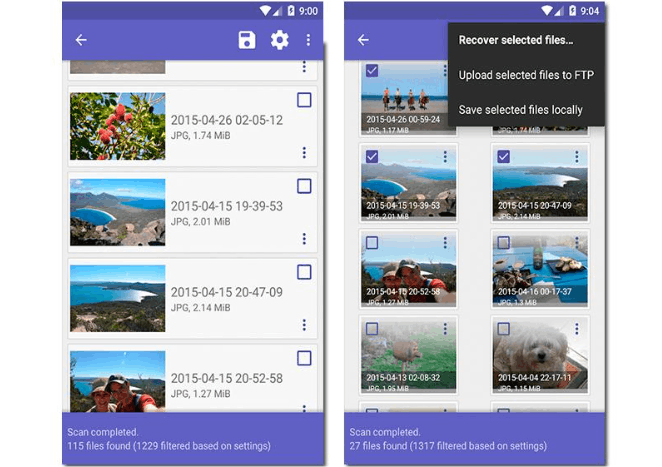
DiskDigger is particularly useful in cases of serious system failures, virus attacks, or hardware malfunctions, as it directly reads raw data from the drive, allowing it to find files that the file system itself no longer recognizes. The software recovers files with their original names and folder structures in cases where such information is still preserved. When saving files, you will be prompted to purchase a personal license; however, this does not hinder the recovery process.
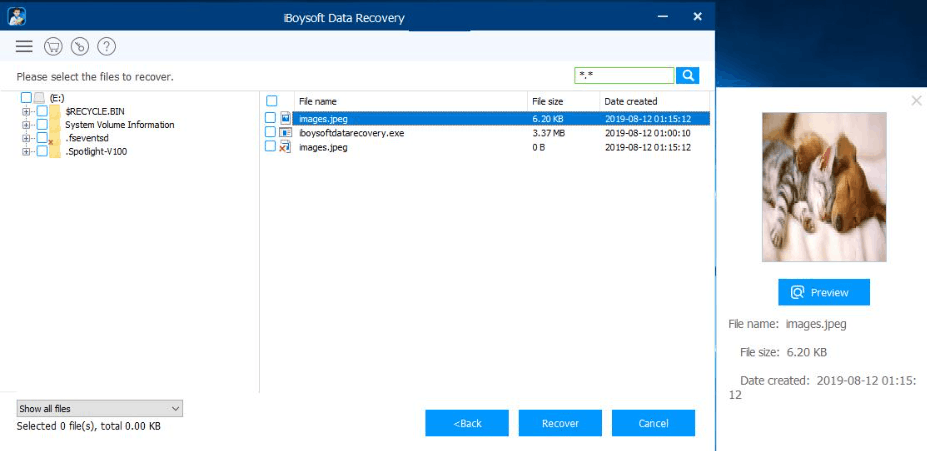
2.8 iBoysoft Data Recovery
iBoysoft Data Recovery Free is data recovery software for both Windows and macOS, allowing you to retrieve lost data from hard drives, SD cards, memory cards, USB drives, or directly on your computer.
This data recovery tool can recover over a thousand different file formats, including photos, office documents, videos, audio, and emails. The software supports data recovery from virus attacks, system crashes, or partition failures, and even works effectively if you are unsure of the cause of the data loss.
The recovery process with iBoysoft involves only three simple steps: selecting the recovery mode, choosing the drive to scan, and finally reviewing and pressing the recover button to retrieve deleted files. The free version allows recovery of up to 1 GB of data, and also supports easy storage location selection, file preview before recovery, and two scan modes (deep scan and quick scan) to suit specific situations.
2.9 Puran Data Recovery Software
Puran File Recovery is an excellent recovery software for Windows, helping you quickly retrieve lost photos, files, and partitions. This program supports hard drives, memory cards, formatted drives, and mobile phones, and also works well with CDs, DVDs, and many other storage devices.
The software boasts a user-friendly interface and a powerful recovery engine capable of recovering over fifty file formats at high processing speeds. Puran File Recovery offers three different recovery methods. The quick scan mode lists deleted files in just seconds. The deep scan mode thoroughly checks the device, detecting more lost or deleted files. The full scan mode can detect deleted or lost partitions and is highly effective at recovering files from reformatted devices.
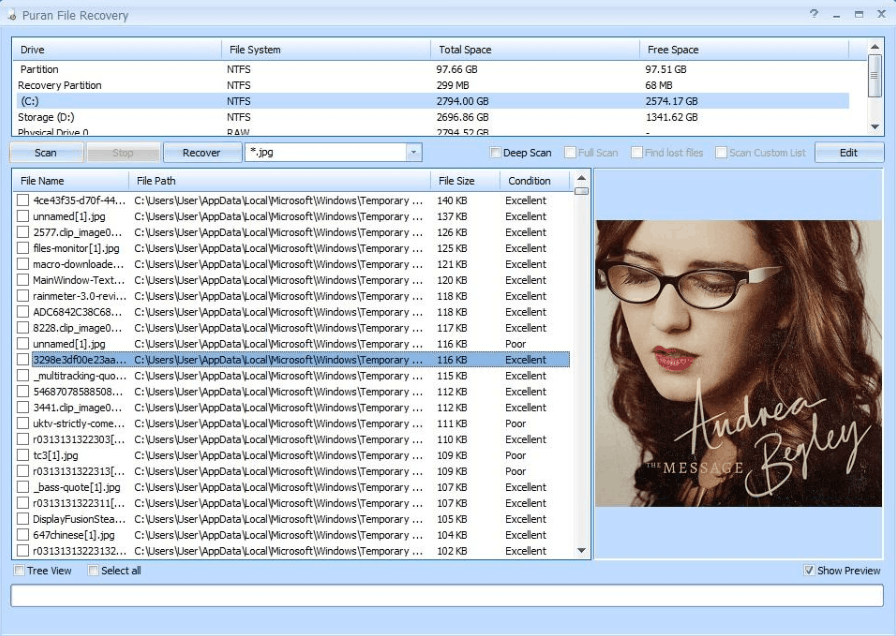
Notably, Puran File Recovery helps recover files along with their original path structure, making it easy to rearrange files exactly as they were before they were deleted. The software also includes a Maintenance Wizard, which helps optimize computer performance, and a batch repair feature to keep the system clean and stable.
2.10 Undelete 360
Undelete 360 is a free data recovery software for Windows users that helps you quickly retrieve lost files. This tool can recover deleted photos from memory cards, smartphones, and USB drives, and is also compatible with floppy disks and traditional computer hard drives.
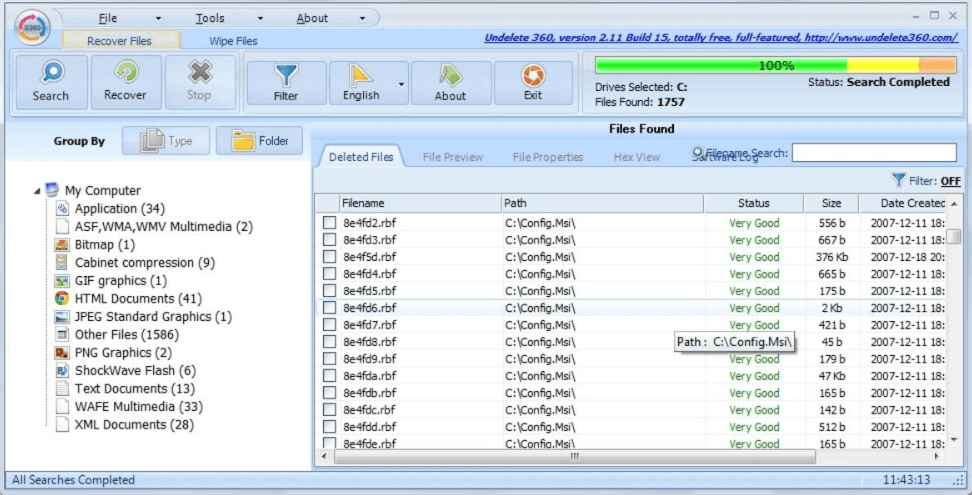
The software operates based on an efficient algorithm, making it easy for users to browse, search, and recover files. Undelete 360 can help you recover photos lost due to virus attacks, unforeseen incidents, software errors, or unexpected computer shutdowns.
This tool allows users to preview files before recovery, displaying scan results categorized by file type and folder type. Additionally, the software features filtering, allowing users to scan only specific files instead of the entire device, significantly saving time.
3. Why You Need Photo Recovery Software
If you work in creative fields, whether as a photographer, videographer, or graphic designer, you're sure to handle a large volume of digital files every day. And the undeniable truth is that any of us are at risk of data loss.
Digital technology is inherently unstable; hardware can malfunction at any time without warning. Sometimes, just a wrong click, an incorrectly plugged-in cable, or even your pet cat accidentally stepping over the keyboard can cause all your important data to disappear in an instant.
Regardless of the reason, losing precious photos is always regrettable. You not only lose time but may also lose priceless memories, and in some serious cases, it can even affect your work.
Accidents are unavoidable in life, but that doesn't mean we have to live in constant anxiety. Thanks to specialized photo recovery software, you can rest assured, as these tools can retrieve lost data, recover deleted photos, and restore files that seemed beyond repair.
4. Conclusion
Photo recovery software is always a reliable lifesaver in many different situations, helping you retrieve important data that you thought you had lost forever.
If, like many others, you own a storage device containing hundreds of photos accumulated over the years, then having reliable recovery software readily available is absolutely essential, in case of unexpected problems.
Hopefully, the list above has helped you find the most suitable free photo recovery software for your needs, so that precious moments in your life are always kept safe.





















VIP Products








Best Selling Products
Capcut Pro 1 Year
39 USD
ChatGPT Plus Account (GPT-4)
16 USD
Genuine Adobe Illustrator account
99 USD
Freepik Premium Account
59 USD
MidJourney Account
29 USD
Genuine Cheap Canva Pro
39 USD
Upgrade genuine Capture One account
120 USD
Adobe Premiere Pro Account
99 USD
Upgrade Genuine Office 365
49 USD
Windows 10 & 11 Pro Key
36 USD
Plugin Retouch4me
69 USD
Copyright Adobe Lightroom Account
59 USD
Adobe Photoshop Copyright - Full App
120 USD
Autodesk All App Account Copyright
120 USD
Upgrade Duolingo Super
29 USD