Best Selling Products

Genuine Cheap Canva Pro
39 USD

Freepik Premium Account
59 USD

Upgrade Duolingo Super
29 USD

Plugin Retouch4me
69 USD

Upgrade Genuine Office 365
49 USD

Copyright Adobe Lightroom Account
59 USD

Windows 10 & 11 Pro Key
36 USD

Adobe Photoshop Copyright - Full App
120 USD

Genuine Adobe Illustrator account
99 USD

Adobe Premiere Pro Account
99 USD

Autodesk All App Account Copyright
120 USD

Capcut Pro 1 Year
39 USD

ChatGPT Plus Account (GPT-4)
16 USD

MidJourney Account
29 USD

Upgrade genuine Capture One account
120 USD
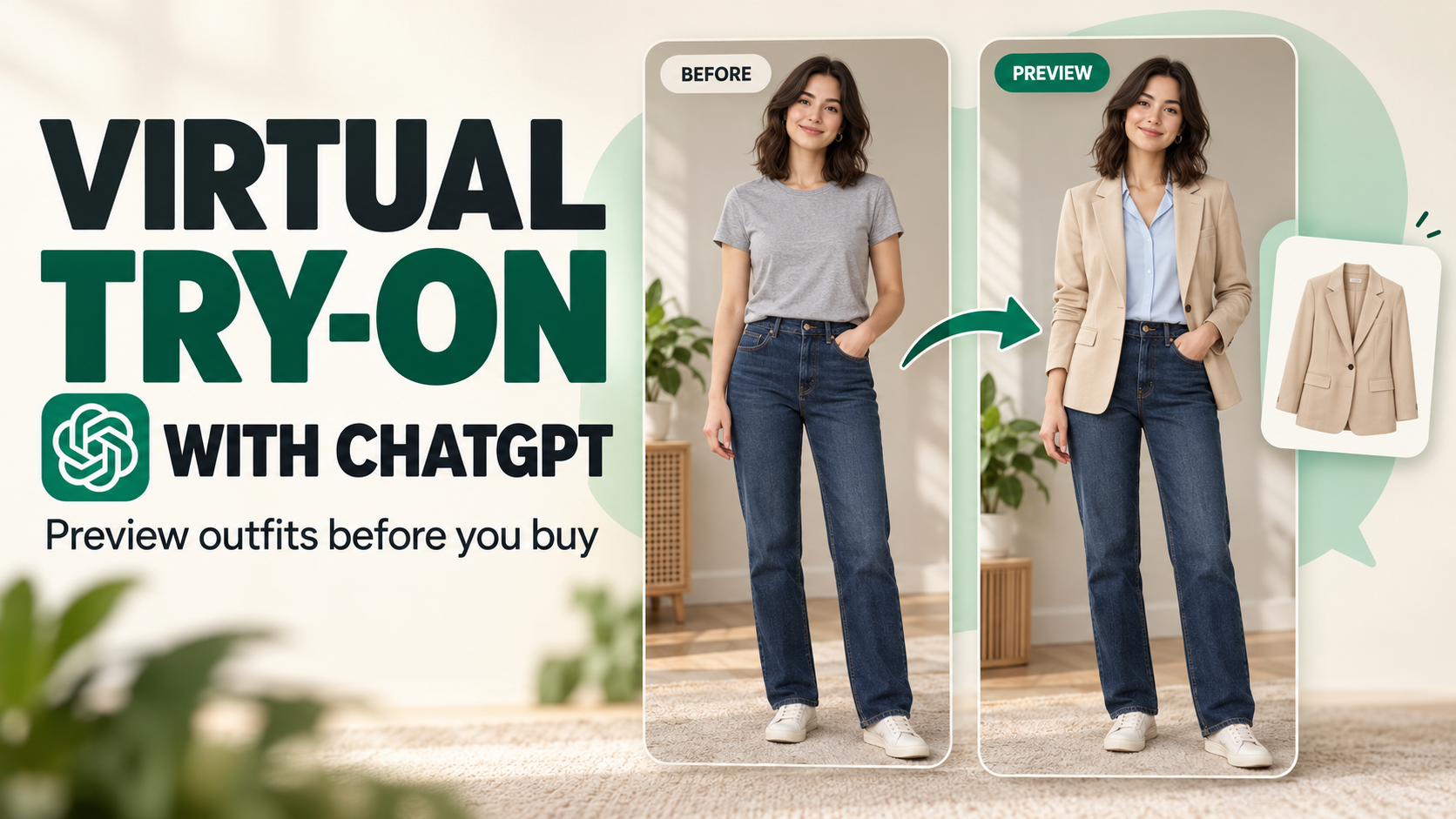
Try on clothes virtually using ChatGPT: A tip for buying clothes online without worrying about choosing the wrong item.
Nội dung
- 1. What is virtual clothing try-on using ChatGPT?
- 2. What do I need to prepare before trying on clothes using ChatGPT?
- 3. Instructions on how to use ChatGPT to try on clothes virtually.
- 3.1. Open ChatGPT and find the product you want to try.
- 3.2. Choose a product and start trying it on.
- 3.3. Upload a selfie or personal photo.
- 3.4. Confirm the image and select a test option now.
- 3.5. View the results and continue editing.
- 4. Tips for trying on clothes using ChatGPT for better and more accurate results.
- 5. Things to keep in mind when trying on clothes virtually using ChatGPT
- 6. Why should you try on clothes virtually before buying them online?
- 7. Conclusion
Buying clothes online is convenient, but there''s a common worry for almost everyone who''s ever shopped online: "I don''t know how it will look on me!" The model photos might look great, the colors eye-catching, but when you receive the item, the style might not match your expectations. Not to mention, everyone has different body shapes, heights, and styles, so the same shirt might look good on someone else, but it might not suit you. Now, ChatGPT can make shopping more intuitive with its virtual try-on feature. Instead of just looking at product photos, you can provide your own image and the AI will simulate how you would look in that outfit. This is a pretty cool way to get a feel for what you''ll look like before you buy, especially for items you''re still undecided about. Let''s explore it with Sadesign!
1. What is virtual clothing try-on using ChatGPT?
Virtual try-on can be simply understood as using AI to create a simulated image of a person wearing a specific outfit. Instead of imagining it from a model's photo, you can upload your own photo and ChatGPT will create a reference image. This makes choosing clothes online more intuitive and easier to visualize. This feature leverages ChatGPT's image processing capabilities to recognize the person in the photo, the outfit, and your requirements. When combined with product images, the system can create a simulated version so you can see the color, style, or overall look of the outfit on your body.
-
Visualize the outfit before buying: It's easier to imagine whether the shirt, pants, or dress will suit you.
-
Save time: No need to try on many different items before knowing if they're suitable.
-
Easy to compare many styles: You can try different colors and designs to find the perfect option.
-
Online shopping support: Especially useful when the product only has a model photo but you want to visualize it on yourself.
-
For styling suggestions: You can ask ChatGPT for additional suggestions on pants, shoes, bags, or accessories to go with your outfit.
2. What do I need to prepare before trying on clothes using ChatGPT?
To make the fitting results look more natural, image preparation is crucial. A clear, well-lit photo that shows the body will provide the AI with more data to process. Conversely, photos that are too dark, obscured, or taken from angles that make identification difficult can lead to unsatisfactory results.
-
Clear personal photos: Prioritize photos with good quality, easily recognizable faces, and unobstructed body parts.
-
Full-body photos: If you want to try on a dress, pants, jacket, or even an entire outfit, a full-body photo is usually more useful than a close-up.
-
Product images: You can use product photos from the website, online store, or screenshots if the images are clear enough.
-
ChatGPT Account: Log in to your account on the website or app to start your experience.
-
Desired description: For a more precise result, please specify the color, style, material, or how you want the outfit to be styled.
Upgrade ChatGPT at a low cost.
3. Instructions on how to use ChatGPT to try on clothes virtually.
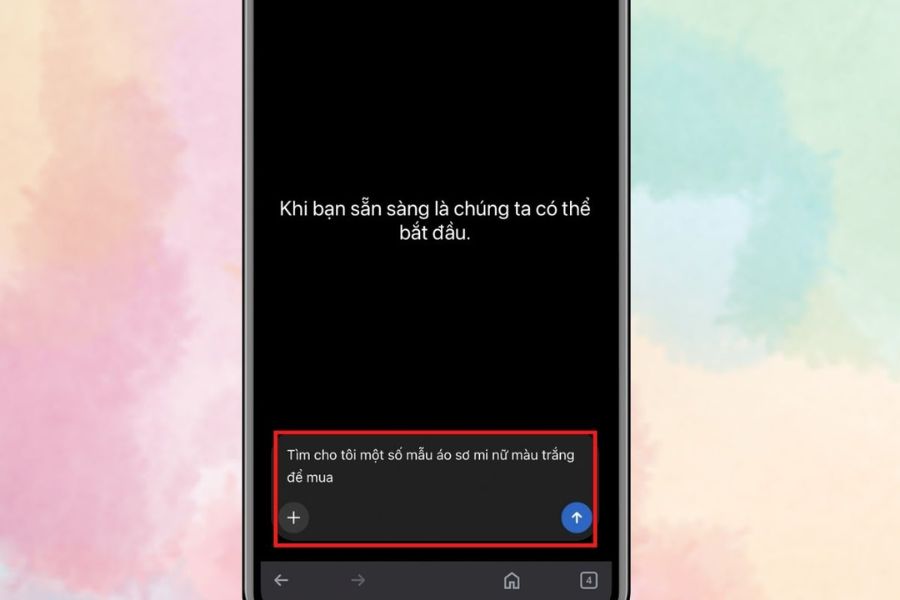
3.1. Open ChatGPT and find the product you want to try.
First, open ChatGPT on your phone or computer and create a new chat. You can enter a request describing the item you're looking for, such as: "Find me some elegant white women's shirts to wear to work." The more specific you are, the more likely the search results will match your needs. You can add more information about color, style, design, or intended use.
For example:
-
A white, elegant women's shirt.
-
A black dress for work.
-
Women's oversized blazer, minimalist style.
-
Light blue straight-leg jeans.
-
A cropped cardigan to pair with a skirt.
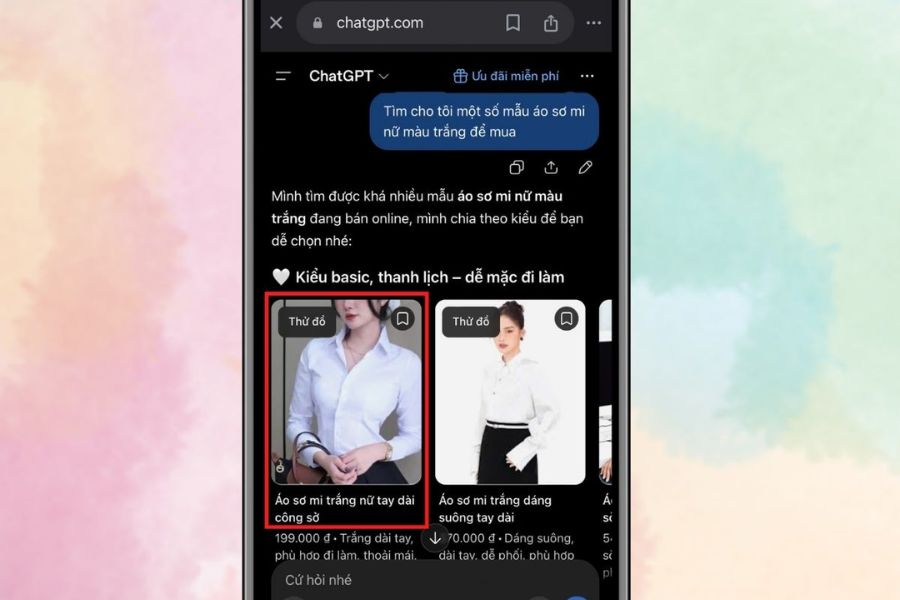
3.2. Choose a product and start trying it on.
Once you've found a product you like, click on it to view its details. If the interface displays the "Try It On" option , select it to begin the fitting process. This step transitions from viewing product images to a live simulation on your own image. If you're undecided between several items, you can try each one on to easily compare. For example, with the same pair of jeans, you can try them on with a white shirt, a t-shirt, or a blazer to see which style suits you better.
3.3. Upload a selfie or personal photo.
Next, ChatGPT may ask you to provide images for the fitting process. You can choose to take a new photo or upload an existing one from your library. For a more visually appealing output image, prioritize images with the following format:
-
There is enough light.
-
No blurring or shaking.
-
The face was not obscured.
-
The body is visible relatively clearly.
-
Not too many people appear in the same photo.
-
The current costume doesn't cover too much of the body that needs to be modeled.
If you're trying on an entire outfit, a full-body photo is usually more convenient. If you're only trying on a shirt or accessory, a portrait or half-body photo might be sufficient for the AI to use as a reference.
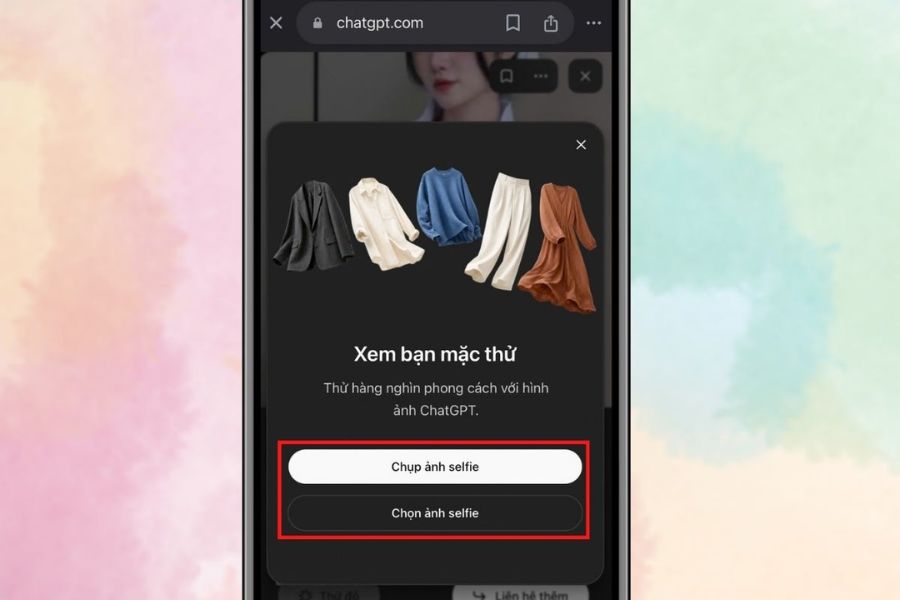
3.4. Confirm the image and select a test option now.
After uploading the image, double-check to make sure you've selected the correct image. If everything is okay, select "Done" and then proceed with the "Try Now" option . ChatGPT will begin processing the image and creating a simulated version of the outfit based on your image. Processing time may vary depending on the image, requirements, and system status. This is also when you should patiently wait for the results instead of repeatedly resubmitting the request. If the first image doesn't meet your expectations, you can describe your requirements in more detail so the AI can make adjustments.
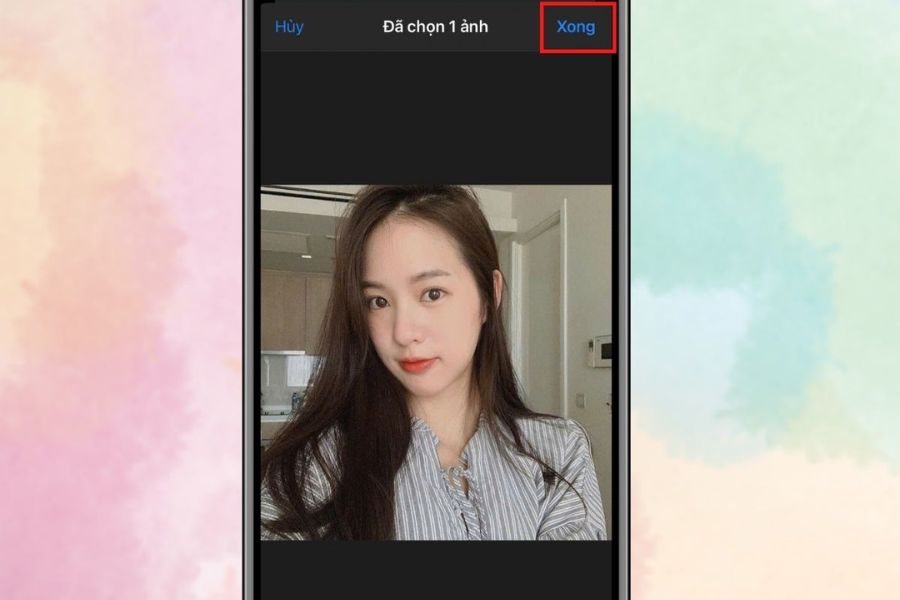
3.5. View the results and continue editing.
After processing is complete, the system will return a simulated image of you wearing your chosen outfit. Focus on the overall look rather than just a small detail. You can check:
-
Does the clothing color match the overall look?
-
Does the design match the original item?
-
Does the clothing proportion to the body look natural?
-
Does the overall style suit its intended purpose?
-
Is the outfit easy to mix and match with the clothes you already own?
If you're still not satisfied, you can continue to request edits. For example: "Keep the face and body shape the same, change the color to beige and pair it with blue jeans." Such specific requests usually make it easier for the AI to understand which parts you want to change.
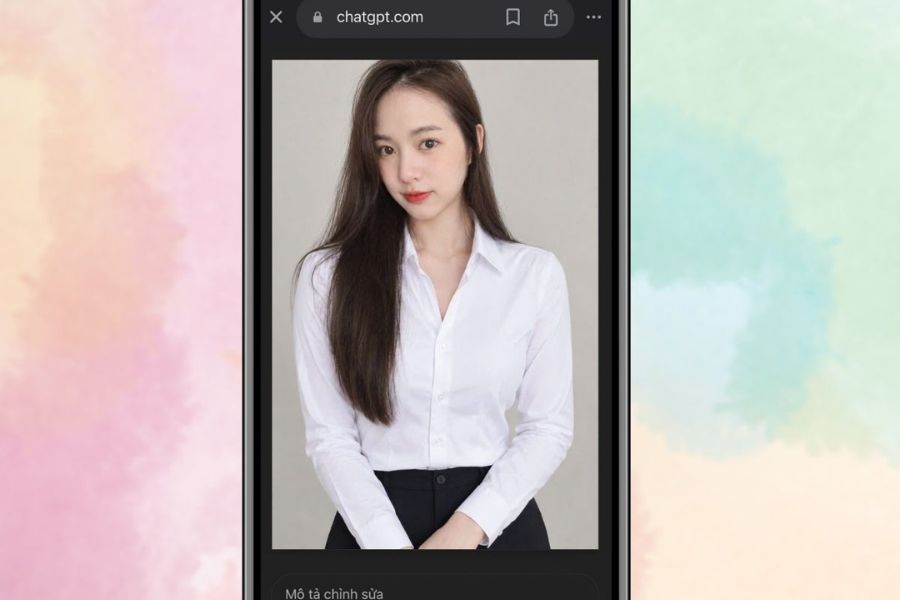
4. Tips for trying on clothes using ChatGPT for better and more accurate results.
Uploading images doesn't guarantee perfect results the first time. To make your fitting photos look more natural, you should pay attention to both the input image and the way you write your instructions. The clearer the command, the better the AI can create the desired result.
-
Choose high-quality images: Clear images help the system better recognize features in the image.
-
Use photos with natural light: Avoid photos that are too dark or where artificial lighting alters skin tone or clothing colors.
-
Provide a detailed description of the item: Don't just write "let me wear this shirt," add the color, style, and design.
-
Preserve key features: You can instruct the AI to retain the face, hairstyle, or body shape in the image.
-
Try multiple options: Don't rush to a decision based on just one image. Try adding other colors or styles to compare.
-
Matching outfit request: If you're unsure what to wear with this product, ask ChatGPT for suggestions on pants, shoes, bags, and accessories.
-
Check the actual product image: The AI-generated image may look better or slightly different from the actual product.
One example of a command you could use is: “Keep my face, figure, and hairstyle the same. Dress me in the dress from the product photo, maintaining the exact color and style, and create a natural look with lighting similar to the original photo.”
If you want to suggest outfit ideas, you can write: "Keep the shirt in the picture, and suggest and create a trial look with 3 different types of pants in an elegant and youthful style." This way, ChatGPT not only helps you preview an item but can also become a small outfit assistant during your shopping process.
Upgrade ChatGPT at a low cost.
5. Things to keep in mind when trying on clothes virtually using ChatGPT
Trying on clothes with AI is convenient, but you shouldn't view the generated images as a perfect replica of the actual product. The technology can simulate colors, styles, and overall look quite convincingly, but it's still possible for some details to be altered. Therefore, before placing an order, combine the AI images with actual information from the seller.
-
AI is not a substitute for a size chart: Try-on images cannot guarantee that a shirt or pair of pants will fit you. Please check your shoulder, chest, waist, hip measurements, length, and the shop's size chart.
-
Color may vary: The color displayed on the screen, the product image, and the actual fabric color may not always be exactly the same.
-
The quality of the material cannot be accurately judged from photos: A shirt may look soft in a picture but actually have a different thickness or drape.
-
Check the garment's fit carefully: Even with the same size, each brand may design the fit differently.
-
Check the return policy: If you're buying an expensive item, prioritize stores with a clear return policy.
-
Protecting personal images: When uploading photos to AI services, consider privacy and options related to data usage.
-
Avoid using sensitive images: Only provide images necessary for the purpose of trying on clothes.
Especially if you're buying an expensive item, you should still carefully read the product description, check reviews from previous buyers, and compare it to the size chart. Try-on photos can help you visualize the item , but your purchase decision should be based on more information.
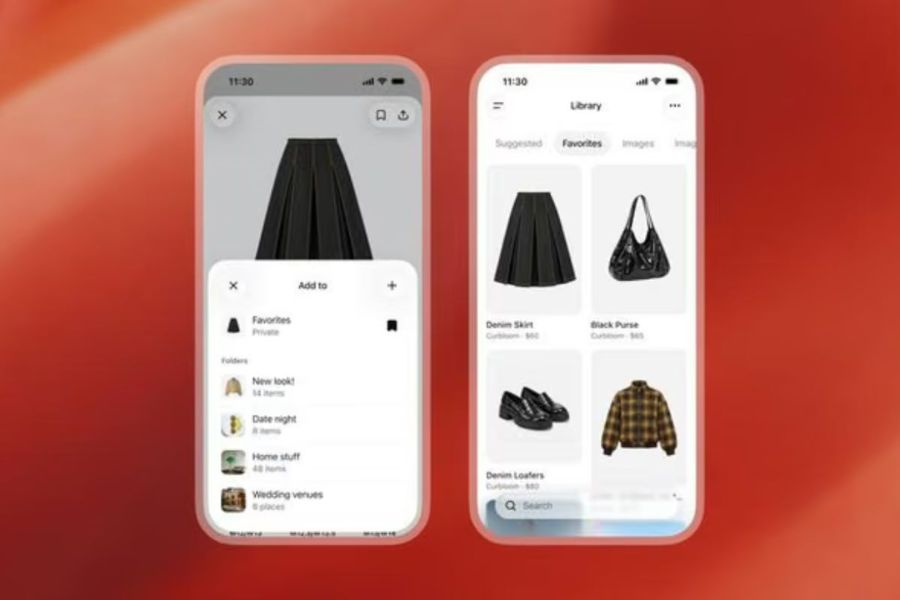
6. Why should you try on clothes virtually before buying them online?
Trying on clothes before buying is a familiar habit when shopping in stores, but with online shopping, this is almost impossible to do in the traditional way. ChatGPT and AI technology are opening up a new approach: bringing the "try-on" experience to the digital environment. The most valuable aspect isn't the AI creating a beautiful photo, but its ability to help buyers reduce uncertainty before making a decision . Instead of looking at a dress on a model and imagining how it would look on you, you have a visual reference.
This method of trying on clothes is especially useful when you:
-
I frequently buy clothes through e-commerce platforms.
-
No time to go to the store to try on clothes.
-
I'm hesitating between several colors or styles.
-
Looking for a new style but don't know where to start.
-
I want to test how well an item of clothing can be paired with my existing wardrobe.
-
I want to avoid buying things that I won't wear because they don't suit my style.
7. Conclusion
AI can't completely replace the experience of trying on clothes in person. Whether a shirt fits well, the fabric is comfortable, and the color looks good in real life still needs to be verified through product information or hands-on experience. However, if used correctly, virtual try-on using ChatGPT is still a very useful tool for those who frequently shop online. With just a few clicks, you can visualize how you'll look in the item you're considering, try different styling options, and make a more confident choice. Previously, every time you ordered online, you had to "gamble" on whether it would suit you, but now AI has made that process much less risky. Prepare a clear photo, choose the right product, and give specific instructions. Who knows, after just a few tries, you might find the perfect style you've been looking for.





















VIP Products








Best Selling Products
Genuine Cheap Canva Pro
39 USD
Freepik Premium Account
59 USD
Upgrade Duolingo Super
29 USD
Plugin Retouch4me
69 USD
Upgrade Genuine Office 365
49 USD
Copyright Adobe Lightroom Account
59 USD
Windows 10 & 11 Pro Key
36 USD
Adobe Photoshop Copyright - Full App
120 USD
Genuine Adobe Illustrator account
99 USD
Adobe Premiere Pro Account
99 USD
Autodesk All App Account Copyright
120 USD
Capcut Pro 1 Year
39 USD
ChatGPT Plus Account (GPT-4)
16 USD
MidJourney Account
29 USD
Upgrade genuine Capture One account
120 USD