Best Selling Products

Windows 10 & 11 Pro Key
36 USD

Freepik Premium Account
59 USD

Genuine Cheap Canva Pro
39 USD

Autodesk All App Account Copyright
120 USD

Genuine Adobe Illustrator account
99 USD

Upgrade Genuine Office 365
49 USD

Adobe Premiere Pro Account
99 USD

MidJourney Account
29 USD

Plugin Retouch4me
69 USD

Adobe Photoshop Copyright - Full App
120 USD

Upgrade genuine Capture One account
120 USD

ChatGPT Plus Account (GPT-4)
16 USD

Capcut Pro 1 Year
39 USD

Upgrade Duolingo Super
29 USD

Copyright Adobe Lightroom Account
59 USD
What Are CMYK And RGB Color Systems? When Should They Be Used
Nội dung
- 1. What is CMYK?
- 2. What is RGB?
- 3. The difference between CMYK and RGB
- 4. Converting back and forth between color systems
- 5. Applications of CMYK and RGB in design
- 6. Notes when converting between CMYK and RGB
- 7. Tools for creating CMYK and RGB color designs
- 7.1 Adobe Color
- 7.2 Coolors
- 7.3 Adobe Illustrator
- 8. Conclusion
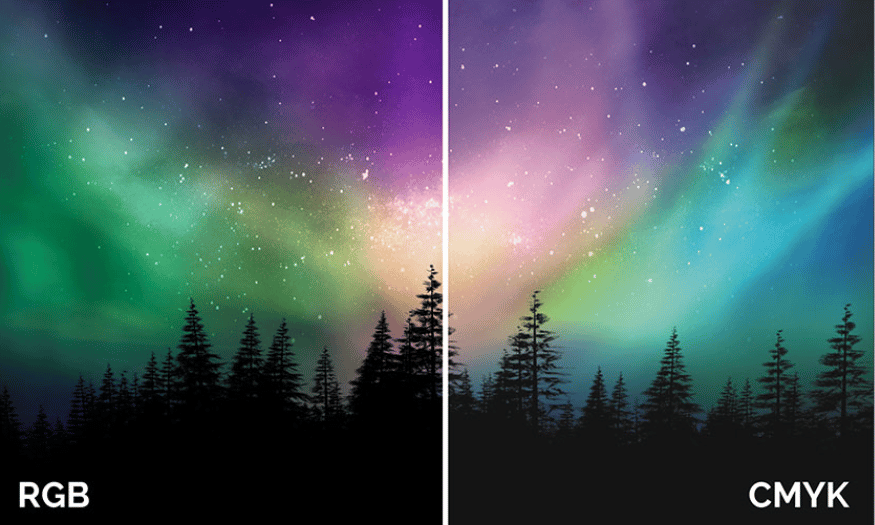
CMYK and RGB color systems are two popular color models in the field of graphic design and printing. CMYK (Cyan, Magenta, Yellow, Key/Black) is the color system mainly used in printing, where colors are created by mixing four different ink colors. In contrast, RGB (Red, Green, Blue) is the color model used in light-emitting devices such as computers, TV screens and mobile phones, in which colors are created by combining three primary colors. Clearly understanding the difference between these two color systems and how to use them correctly will help you achieve the best results in your design projects. Let’s explore with Appvip now!
1. What is CMYK?
CMYK is the English abbreviation of the phrase "Cyan, Magenta, Yellow, Key/Black", a subtractive color system mainly used in the printing industry. This color system works based on the principle of light absorption. In CMYK, each color is created by removing or absorbing light components from white light. This means that the color we see is the part of light that is not absorbed by the printing ink.
Specifically, the CMYK system uses four colors: Cyan (blue), Magenta (pink), Yellow (yellow) and Black (black). Although the first three colors can combine to create many different colors, adding black is necessary to create depth and contrast for printed images. In particular, the character "K" is used to indicate black to avoid confusion with the character "B" of blue. The CMYK system is often applied in designing printed products such as flyers, brochures, name cards, and newspapers.
An important point to note is that when designing for printing, using the CMYK system helps ensure that colors will be reproduced more accurately on paper. This is because printing inks often have different characteristics compared to colors displayed on screens. If you design a product and then print it out, converting from RGB to CMYK can lead to color differences if not done carefully. Therefore, clearly understanding how CMYK works is very important for anyone working in the printing field.
.png)
2. What is RGB?
RGB is the abbreviation of "Red, Green, Blue", an additive color system mainly used in electronic devices such as computer screens, TVs and digital cameras. The operating principle of the RGB system is based on light emission, also known as the additive light model. In this model, three primary colors—red, green and blue—are combined to create many different colors. When the light of all three colors is combined at maximum intensity, they create white.
Unlike the CMYK system, where you start with a white sheet of paper and add colors to it, the RGB system works in the opposite way. When the screen does not emit light, it is dark black; when turned on, it begins to emit light from the three primary colors. This allows electronic devices to display sharp and vivid images. The RGB system is commonly used in digital graphic design, online images and multimedia applications.
A notable point is that when designing for screens, choosing colors according to the RGB system is very important. Colors displayed on screens may differ from printed colors, so converting between these two color systems needs to be done carefully to avoid inconsistent colors. In addition, RGB also allows you to easily adjust the brightness and contrast of images, helping create more attractive visual effects for users.
.png)
3. The difference between CMYK and RGB
CMYK and RGB are two main color systems used in graphic design, but they serve different purposes. The RGB color system (Red, Green, Blue) is an additive light model, in which three primary colors are combined to create different colors. RGB is commonly used for light-emitting devices such as computer screens, TVs and projectors. When light from these sources is emitted, it creates the colors that users see. Therefore, colors on screens are often bright and vivid, suitable for digital applications, web design and online graphics.
In contrast, the CMYK color system (Cyan, Magenta, Yellow, Key/Black) is a subtractive color model, commonly used in printing. CMYK operates based on the principle of light absorption, where colors are created by removing light components from white. This means that printed colors will not be exactly the same as colors displayed on screens, because different printing inks may react differently to light. For this reason, people working in print design need to pay attention to this difference to ensure that printed colors will be close to the desired colors.
Choosing the right color system is important in the design process. If you are working with digital designs such as websites or mobile applications, you should choose RGB colors to ensure that colors display correctly on devices. Conversely, if you design for printing, use the CMYK color system from the beginning. This helps avoid color mismatch between the design and the actual product, ensuring that the final result meets customer expectations.
4. Converting back and forth between color systems
In most graphic design software, you can easily convert between the two color systems CMYK and RGB. This is very necessary when you want to ensure that your design is suitable for the final usage purpose, whether it is printing or display on screen. In Adobe Illustrator, you can perform this conversion by going to the File -> Document Color Mode menu, then selecting CMYK Color or RGB Color depending on your needs. Similarly, in Adobe Photoshop, you can convert by going to the Image -> Mode menu and selecting the color mode you want to use.
However, it should be noted that converting back and forth between these two color systems is not always perfect. Because CMYK is a subtractive color system and RGB is an additive color system, color deviation may occur during conversion. For example, when you convert from RGB to CMYK, colors may become darker or no longer as accurate as the original. The reason is that the way colors are reproduced in these two color systems is different, resulting in some RGB colors not being accurately reproduced in the CMYK system.
After performing the conversion, the color values will not be even integers but may be odd decimal numbers. This can affect the accuracy of colors in your design. Therefore, before printing, always check the colors again and adjust if necessary to ensure that the final product meets the color requirements you set initially. This not only helps improve design quality but also creates customer satisfaction when the product is printed.
5. Applications of CMYK and RGB in design
CMYK and RGB are not only two different color systems but also reflect specific applications in the field of design. Each color system has its own advantages and disadvantages, depending on the purpose of use. In print design, CMYK is the top choice. This color system allows designers to create accurate and consistent colors for printed products such as flyers, posters, books, and packaging. Using CMYK ensures that colors will be accurately reproduced on paper, with appropriate saturation and contrast. This is very important in commercial products, where color can affect brand identity and customer experience.
Moreover, clearly understanding CMYK also helps designers choose the appropriate printing ink. Each type of ink has different characteristics, and choosing the right type will help improve the color quality of printed products. Some printers may use techniques such as offset printing or digital printing, and each of these techniques may require different color adjustments. Therefore, when working with the CMYK color system, mastering the printing process and how colors interact is very necessary to achieve the best results.
Meanwhile, RGB is the ideal color system for digital design. This color system allows designers to create bright, vivid and easily adjustable colors. With RGB, colors can be changed quickly and flexibly, helping designers experiment with many different variations. This is very useful in developing user interfaces for mobile applications and websites, where users often expect an attractive visual experience. The RGB system also allows designers to easily create animation and interaction effects, making the product more appealing.
6. Notes when converting between CMYK and RGB
When working with CMYK and RGB, there are several important notes that designers need to consider to avoid inaccurate colors. First, clearly determining the purpose of the design product from the beginning is very important. If you know that your product will be printed, start designing with the CMYK color system. This helps you avoid unnecessary adjustments later and ensures that colors will be accurately reproduced during the printing process.
Second, when you start with the RGB color system and then convert to CMYK, check the colors again after conversion. Some colors may lose saturation or brightness when converted to the CMYK system. This is especially true for bright and vivid colors, because they may not be accurately reproduced during printing. To fix this problem, you can adjust the colors in the design software before printing. This will help you control the final result and ensure that the printed product meets the desired standards.
Finally, always use standard color samples and color palettes when converting between CMYK and RGB. This will help you get an overview of how colors will appear on screen and on paper. Many current design software programs provide standard color palettes, helping you easily choose and adjust colors without experiencing color deviation. In this way, you will be able to create beautiful and high-quality designs, while ensuring that the colors in the final product meet customer requirements.
7. Tools for creating CMYK and RGB color designs
7.1 Adobe Color
Adobe Color is a powerful online tool that allows users to create and manage color palettes for their designs. With a friendly interface, users can easily choose colors according to the CMYK or RGB system, while exploring complementary and contrasting colors. This tool allows you to create color palettes based on color principles such as analogous, complementary and triadic colors. This helps you gain deeper insight into how to coordinate colors in your design.
In addition, Adobe Color also integrates with other Adobe software such as Photoshop and Illustrator, allowing you to easily store and use the color palettes you have created. You can also share your color palettes with the design community or search for popular color palettes for inspiration. This not only saves time but also enhances creativity in the design process.
7.2 Coolors
Coolors is a very popular online color palette creation tool, helping users easily create harmonious color combinations with just a few clicks. You can start by pressing the "Space" key to generate a random color palette, then adjust the colors as desired or lock a specific color to create color combinations around it. Coolors supports both CMYK and RGB color systems, helping you convert easily according to your design needs.
Besides, Coolors also allows you to export color palettes in HEX, RGB or CMYK color code format, which is very convenient for use in design software. Users can also store their favorite color palettes in their account and share them with the community. With Coolors, searching for and creating perfect color palettes becomes simpler and more enjoyable than ever.
7.3 Adobe Illustrator
Adobe Illustrator is one of the leading graphic design software programs, providing many powerful tools to create color palettes according to the CMYK and RGB systems. With Illustrator, users can easily choose colors from the color palette or create new colors by using sliders to adjust brightness, saturation and hue. This helps you create refined color palettes that suit your design needs.
One of Illustrator’s outstanding features is the ability to store and manage color palettes, allowing you to easily access and reuse them in different projects. You can also use the "Color Guide" tool to create suitable color combinations based on the main color you have selected. With Illustrator, creating and adjusting color palettes becomes quick and simple, helping you focus on creativity and developing your design ideas.
8. Conclusion
In short, choosing between the CMYK and RGB color systems depends on the usage purpose of the design product. If you are working with print projects, CMYK will be the optimal choice to ensure colors are reproduced accurately. Meanwhile, RGB is the ideal choice for digital products, where light and color can be easily adjusted on screen. Clearly understanding and correctly applying these two color systems will help you improve design quality and convey messages more effectively.





















VIP Products








Best Selling Products
Windows 10 & 11 Pro Key
36 USD
Freepik Premium Account
59 USD
Genuine Cheap Canva Pro
39 USD
Autodesk All App Account Copyright
120 USD
Genuine Adobe Illustrator account
99 USD
Upgrade Genuine Office 365
49 USD
Adobe Premiere Pro Account
99 USD
MidJourney Account
29 USD
Plugin Retouch4me
69 USD
Adobe Photoshop Copyright - Full App
120 USD
Upgrade genuine Capture One account
120 USD
ChatGPT Plus Account (GPT-4)
16 USD
Capcut Pro 1 Year
39 USD
Upgrade Duolingo Super
29 USD
Copyright Adobe Lightroom Account
59 USD