Best Selling Products

Windows 10 & 11 Pro Key
36 USD

Upgrade genuine Capture One account
120 USD

Plugin Retouch4me
69 USD

ChatGPT Plus Account (GPT-4)
16 USD

MidJourney Account
29 USD

Genuine Cheap Canva Pro
39 USD

Adobe Premiere Pro Account
99 USD

Autodesk All App Account Copyright
120 USD

Copyright Adobe Lightroom Account
59 USD

Adobe Photoshop Copyright - Full App
120 USD

Capcut Pro 1 Year
39 USD

Upgrade Genuine Office 365
49 USD

Genuine Adobe Illustrator account
99 USD

Upgrade Duolingo Super
29 USD

Freepik Premium Account
59 USD
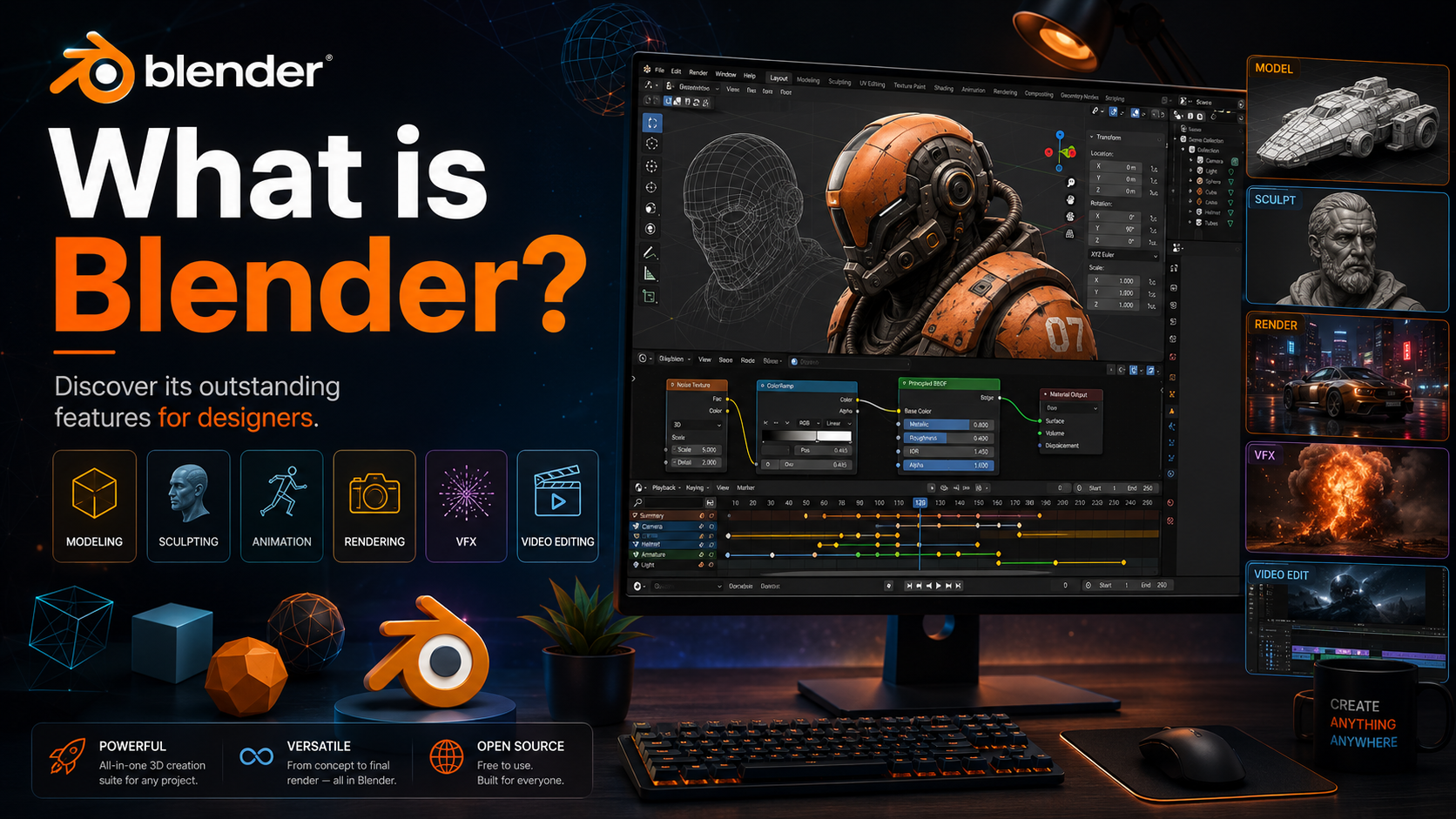
What is Blender? Discover its outstanding features for designers.
Nội dung
Blender is a powerful 3D graphics software that provides almost all the tools needed for creating digital images.
1. Cycles Rendering Tool
One of Blender's key components is Cycles, a rendering engine based on ray tracing. Cycles are designed to create highly realistic images by simulating how light interacts with objects, materials, and the environment in a 3D scene.
A notable feature of Cycles is its ability to create images with depth and natural lighting. When set up correctly, light can interact with the surface of objects, creating shadows, reflections, and visual effects that closely resemble reality. This is why Cycles is used in many projects requiring high image quality.
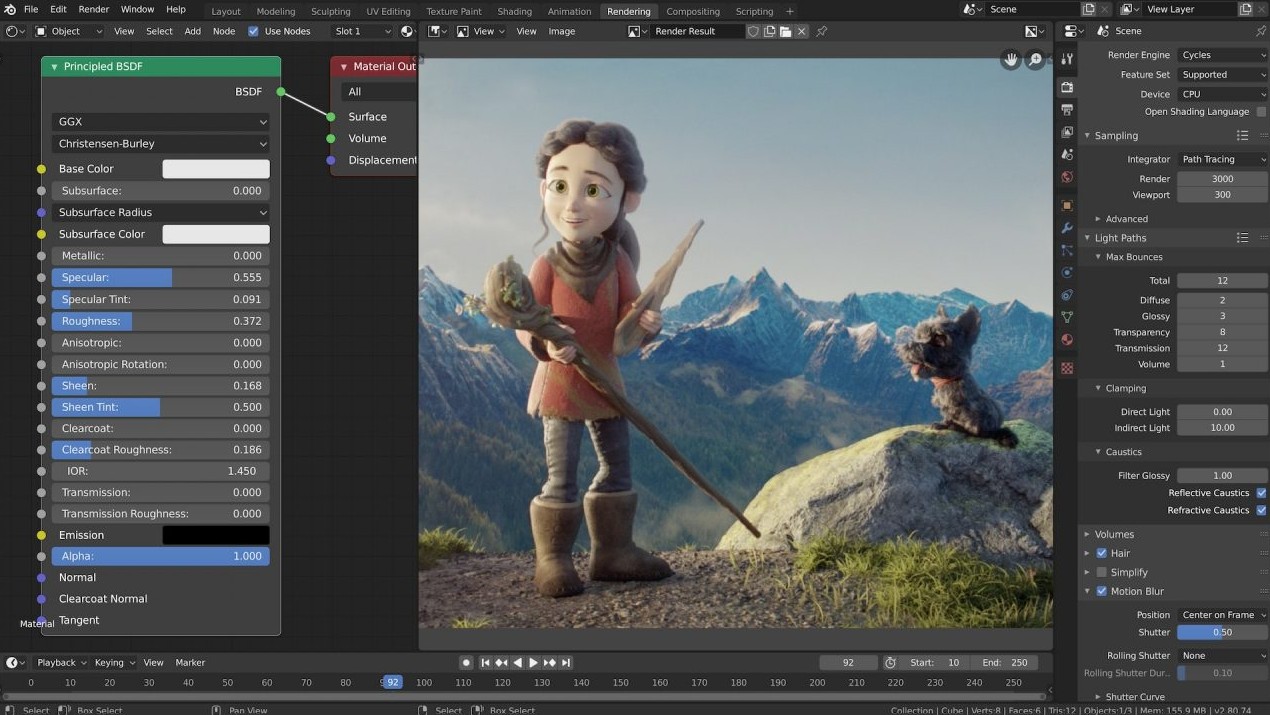
Blender also supports real-time scene previews in the viewport, allowing users to quickly check the layout, lighting, and materials before final rendering. This capability is especially useful when building complex scenes because designers can detect problems early instead of waiting for rendering to complete.
Cycles supports both CPU and GPU, allowing users to leverage hardware compatible with their system. Additionally, the tool supports PBR-based shaders and HDR lighting, providing greater flexibility in building materials and lighting environments.
Blender is also geared towards VR-related workflows. This expands the software's usability from conventional images and videos to interactive spatial experiences.
2. Modeling, sculpting, and UV coating
Modeling is one of the most important foundations of the 3D process. Blender provides a comprehensive set of modeling tools, allowing users to create, transform, and edit objects in a variety of ways.
A notable advantage is that Blender supports N-Gon, giving designers more flexibility when building and editing topology. Besides basic operations, the software also provides many geometric manipulation tools such as edge sliding, nested coloring, mesh creation, bridging, and other mesh editing methods.
For those who want to create characters or models with complex shapes, sculpting is a crucial part of Blender. Sculpting tools and brushes allow users to directly manipulate the model's surface to create shapes similar to the workflow in digital clay.
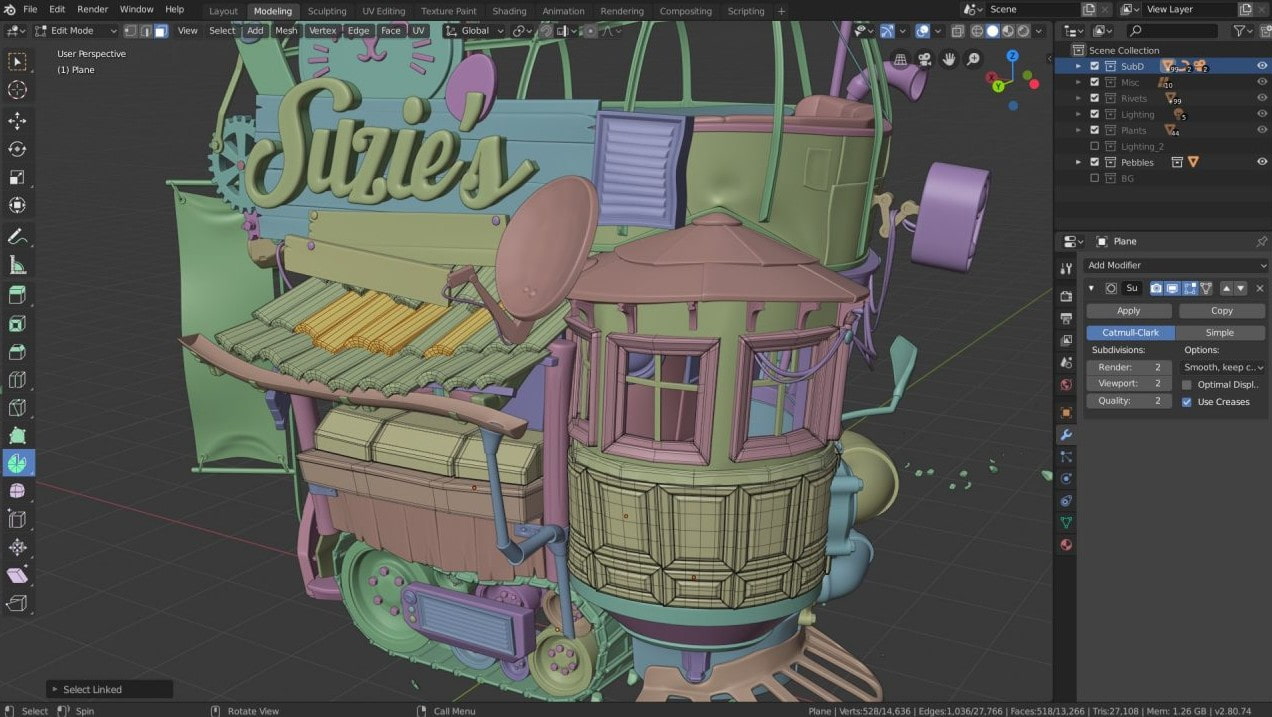
Blender supports multiple resolutions and Dynamic Topology, allowing users to control the level of detail in their models during the sculpting process. When creating fine details, designers can use textured brushes and masks to precisely control the area to be edited.
UV coating is also a crucial step when adding texture to a 3D model. Proper UV application helps to place images or materials onto the model's surface more accurately.
In particular, Blender supports Python scripting. This allows users to build tools or add-ons to suit their specific needs. For repetitive processes, automation capabilities using Python can significantly save time.
3. Visual effects
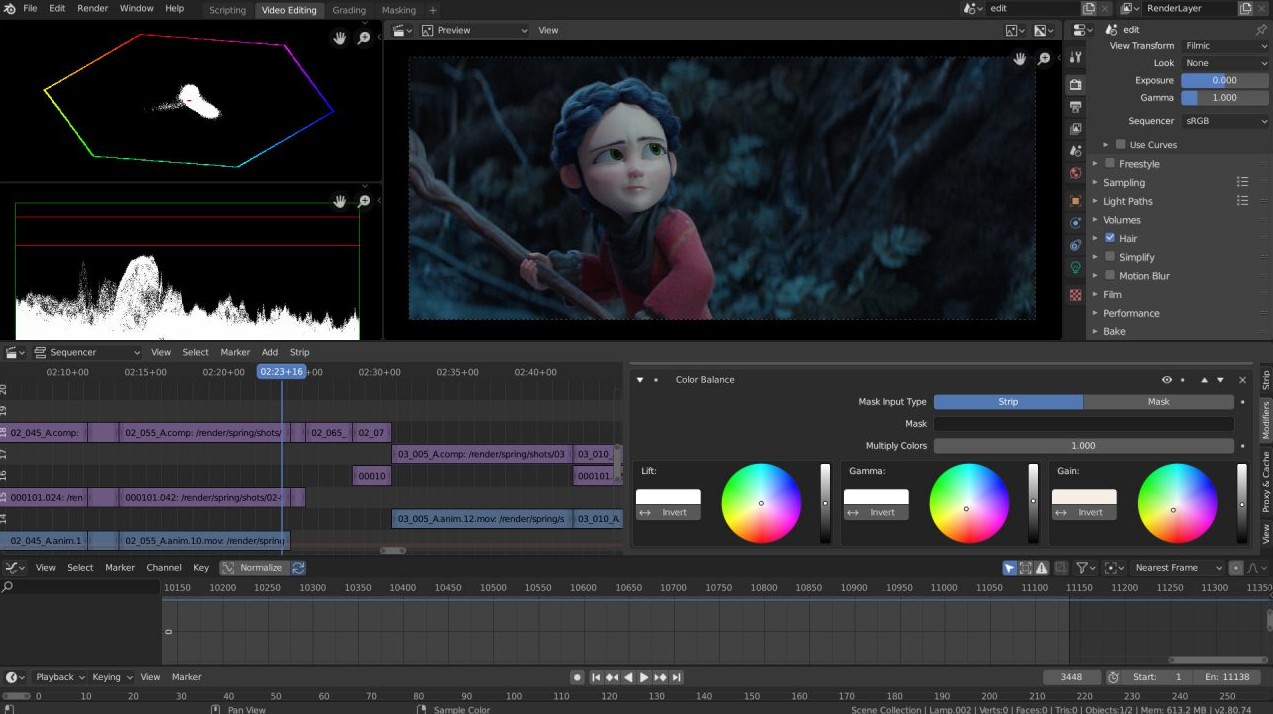
Blender is not just rendering software; it also has the ability to support many processes in VFX. One of its key features is the integrated camera and object tracking system.
Instead of having to transfer footage to another software just to perform camera tracking, users can import footage into Blender, analyze motion, and use tracking data directly within the 3D environment.
The basic process begins by importing raw footage into Blender. Then, users can perform tracking to identify key features within the footage. This data is used to recreate the movement of the camera or object in 3D space.
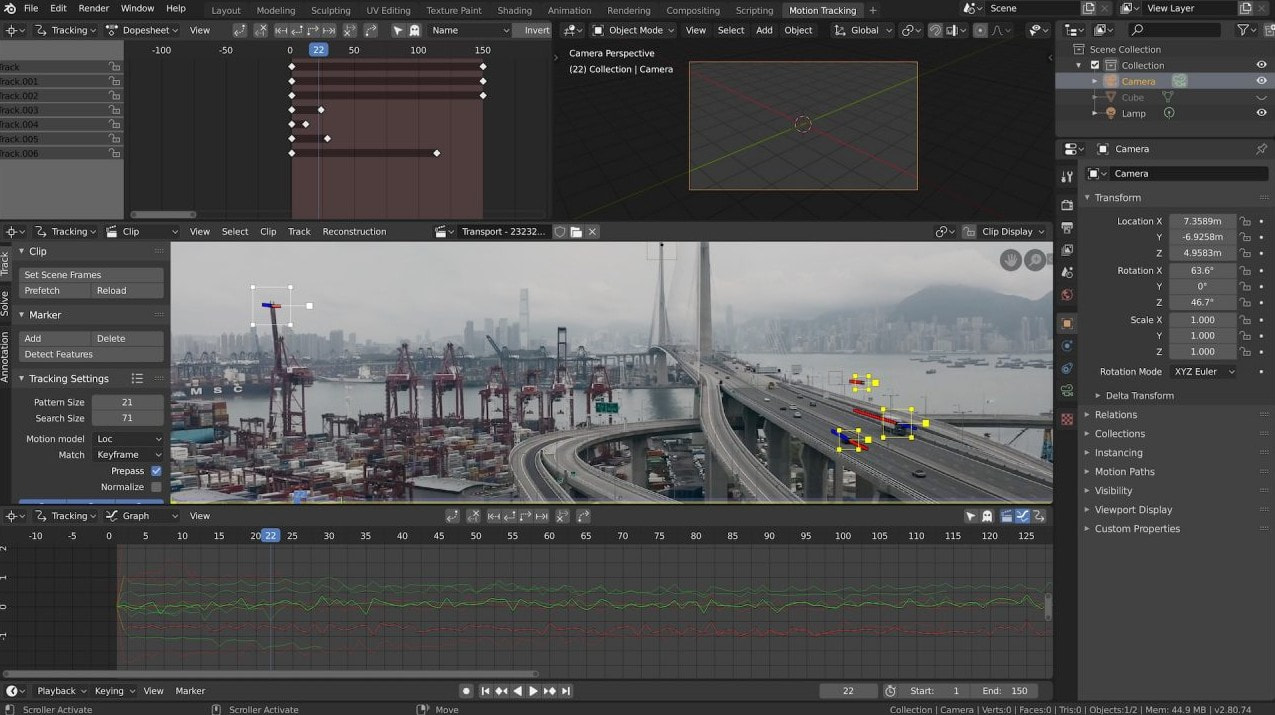
Once the camera is tracked, users can introduce a 3D model into the scene and adjust its position so that the model's movement matches the footage. The ability to preview the tracked footage alongside the 3D scene makes the inspection process more intuitive.
Blender supports both automatic and manual tracking, and provides camera reconstruction tools. Planar tracking and a tripod solver are also supported for situations requiring a more suitable tracking method.
The ability to integrate tracking into a single environment reduces the number of times you need to switch between programs, resulting in a more seamless VFX workflow.
4. Animation and skeletal creation
Blender boasts a powerful animation and rigging system, used to create movement for characters, objects, and many other elements in 3D scenes.
Rigging can be understood as the process of building the internal skeletal and control system of a character. After the model is created, the designer can build armatures to enable the character's movement. Tools for creating frames, skeletons, and overlays make this process easier.
One notable feature is that the skeletal system can utilize B-spline curves for interpolation, providing flexible motion control. Users can also work with the Curve Editor and data sheets to fine-tune the animation.
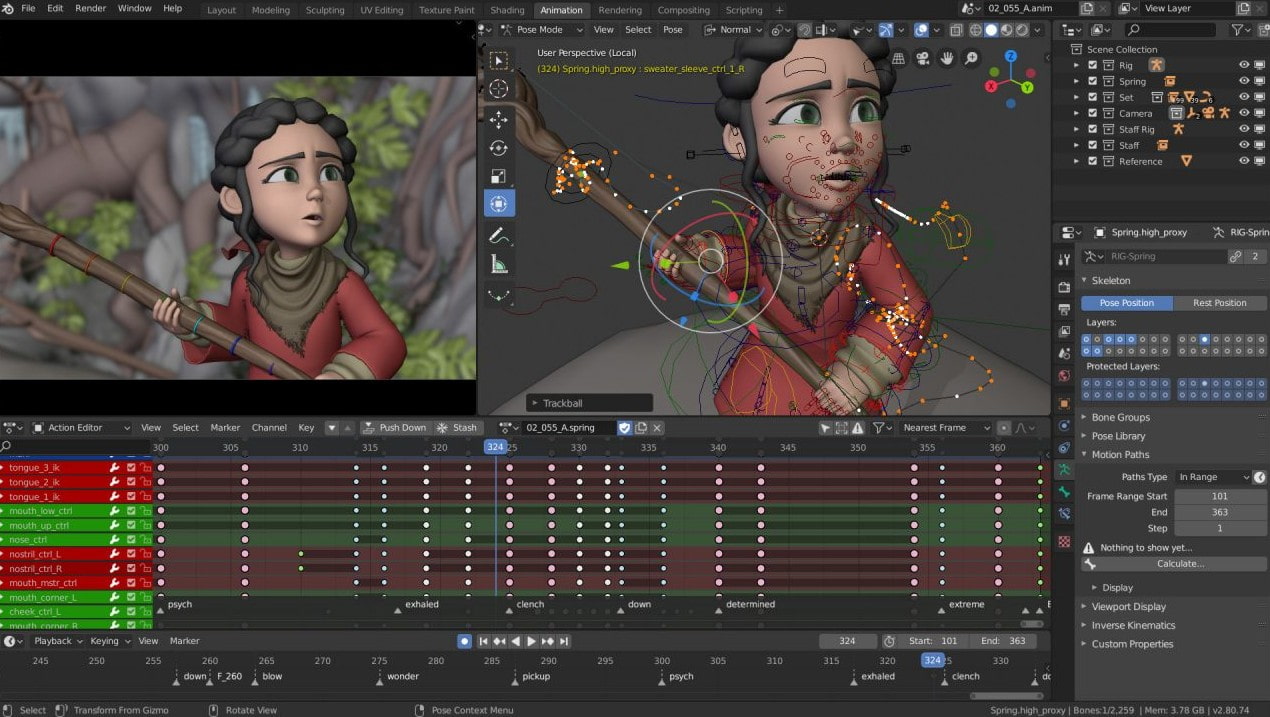
Blender allows for the creation of custom bone shapes to make character control more intuitive. Instead of just seeing simple bone segments, animators can set up control shapes tailored to each body part.
Beyond characters, animation in Blender can also be used for camera, objects, lighting, and many other attributes. Users can create keyframes, adjust motion paths, and fine-tune timing to achieve the desired motion.
The ability to synchronize audio also makes Blender suitable for animation projects that need to align movement with music, dialogue, or sound effects.
5. The art of storytelling and 2D drawing in 3D space.
One of Blender's exciting capabilities is its support for drawing directly within a 3D viewport. This opens up a different workflow for storyboard artists, 2D artists, and anyone wanting to combine two-dimensional imagery with three-dimensional space.
Instead of creating a storyboard entirely using separate 2D software, users can build the drawings directly within the 3D environment. This is especially useful when needing to visualize camera angles, composition, or movement.
Blender supports combining 2D and 3D in the same viewport. Users can create lines, colors, and 2D elements while still working with 3D objects.
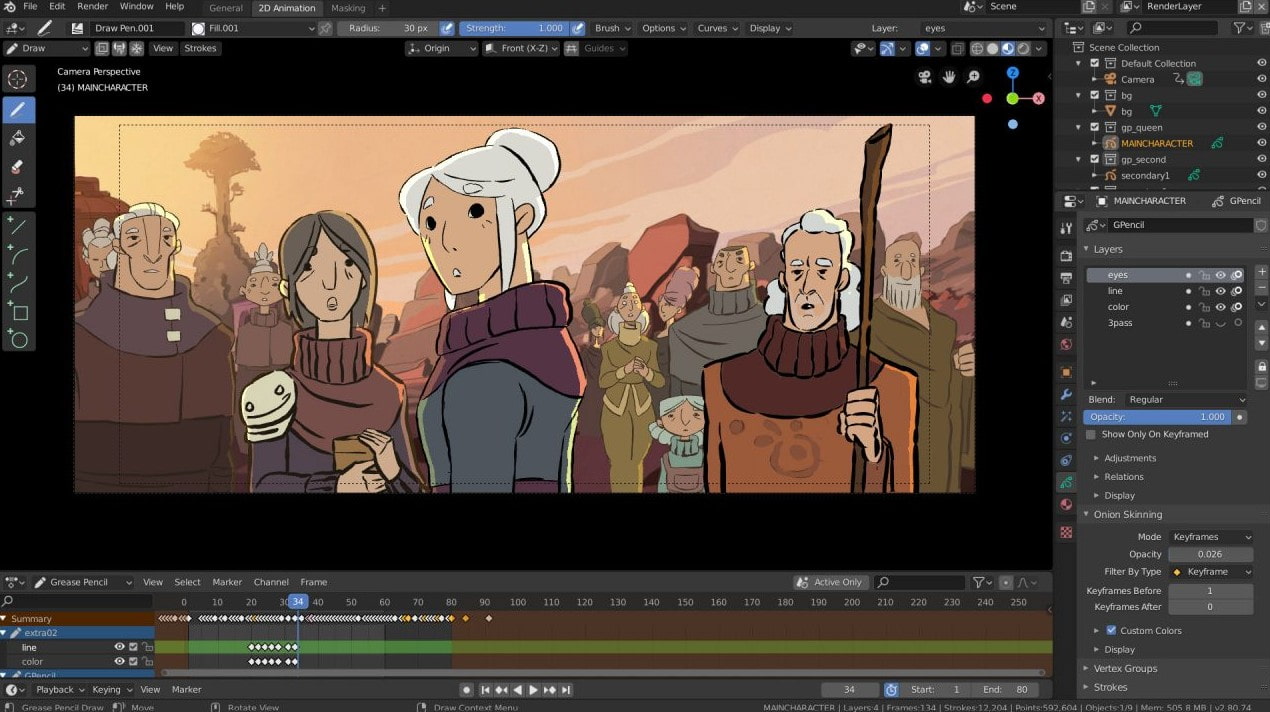
For animation, Onion Skinning allows the artist to observe the frames before and after. This feature helps control movement and creates a sense of continuity between frames.
The layer and color system for outlines and fills also makes it easier for users to manage artwork. Brush strokes can be shaped and linked to 3D objects, opening up possibilities for combining hand-drawn styles with 3D spaces.
This approach is particularly well-suited for storyboards, motion design, hybrid 2D/3D animation, and projects seeking a unique visual style.
6. Make Blender your own personal tool.
One of the things that sets Blender apart is its high degree of customization. Through the Python API, users can deeply intervene in the workflow and create tools tailored to their individual or team needs.
The Blender interface can be customized in terms of layout, color, and many other display elements. This allows users to organize their workspace according to the type of work, such as modeling, animation, VFX, or sculpting.
Blender also supports high-resolution and Retina displays, ensuring a clear interface on devices with high pixel density.
Python's capabilities are particularly useful when automation is needed. Users can write scripts to perform repetitive tasks, create custom tools, or develop add-ons.
The basic process for getting started with Python in Blender is to open the Scripting workspace , create or open a Text Editor, and write a script. The script can then be run directly in Blender to test the results. Once the tool is running smoothly, users can develop it into a long-term utility.
Blender also allows the use of hundreds of community-developed add-ons. These add-ons can extend the software's capabilities in many different areas.
Furthermore, the ability to draw on the OpenGL viewport and connect to the Render API allows for even deeper customization of Blender. This is a significant advantage for studios or users who need to build their own pipeline.
7. Who is Blender suitable for?
With its diverse toolset, Blender can cater to a wide range of users. Beginners can start with basic modeling, material creation, and simple rendering. Once familiar with the interface, they can expand to sculpting, animation, VFX, or scripting.
For designers, Blender offers the ability to build 3D images for posters, advertisements, branding, and digital content. Motion graphics professionals can leverage animation, cameras, and materials to create complex motion sequences.
Animators can focus on rigging, keyframes, and character animation. Meanwhile, VFX artists can leverage camera tracking, object tracking, and 3D systems to combine footage with digital elements.
2D artists can also experiment with drawing in 3D space to expand their storytelling possibilities. For those with programming knowledge, the Python API opens up a completely different approach through automation and tool development.
Blender's greatest strength lies in its ability to combine multiple tools within a single environment. From an initial concept, users can create models, build materials, set up lighting, render, create animation, and handle many related processes without constantly switching between software. This flexibility makes Blender a noteworthy choice for those who want to explore the world of 3D, VFX, animation, and digital art.





















VIP Products








Best Selling Products
Windows 10 & 11 Pro Key
36 USD
Upgrade genuine Capture One account
120 USD
Plugin Retouch4me
69 USD
ChatGPT Plus Account (GPT-4)
16 USD
MidJourney Account
29 USD
Genuine Cheap Canva Pro
39 USD
Adobe Premiere Pro Account
99 USD
Autodesk All App Account Copyright
120 USD
Copyright Adobe Lightroom Account
59 USD
Adobe Photoshop Copyright - Full App
120 USD
Capcut Pro 1 Year
39 USD
Upgrade Genuine Office 365
49 USD
Genuine Adobe Illustrator account
99 USD
Upgrade Duolingo Super
29 USD
Freepik Premium Account
59 USD