Best Selling Products

MidJourney Account
29 USD

Upgrade Duolingo Super
29 USD

Upgrade Genuine Office 365
49 USD

Copyright Adobe Lightroom Account
59 USD

ChatGPT Plus Account (GPT-4)
16 USD

Windows 10 & 11 Pro Key
36 USD

Genuine Adobe Illustrator account
99 USD

Adobe Photoshop Copyright - Full App
120 USD

Adobe Premiere Pro Account
99 USD

Upgrade genuine Capture One account
120 USD

Capcut Pro 1 Year
39 USD

Plugin Retouch4me
69 USD

Genuine Cheap Canva Pro
39 USD

Freepik Premium Account
59 USD

Autodesk All App Account Copyright
120 USD
What is ChatGPT Work? Discover how to apply AI to your work effectively.
Nội dung
In daily work, there are tasks that seem simple but consume a lot of time, such as compiling Excel data, reading numerous documents, writing reports, or preparing presentations. If you had to do each step yourself, you could spend hours and still not finish your to-do list. This is also why artificial intelligence tools are gaining increasing attention. One prominent example is OpenAI''s ChatGPT Work, an intelligent workflow capable of assisting in handling complex tasks in multiple steps. So what is ChatGPT Work, what are its notable features, and how can you effectively utilize this tool? Let''s explore with Sadesign!
1. What is ChatGPT Work?
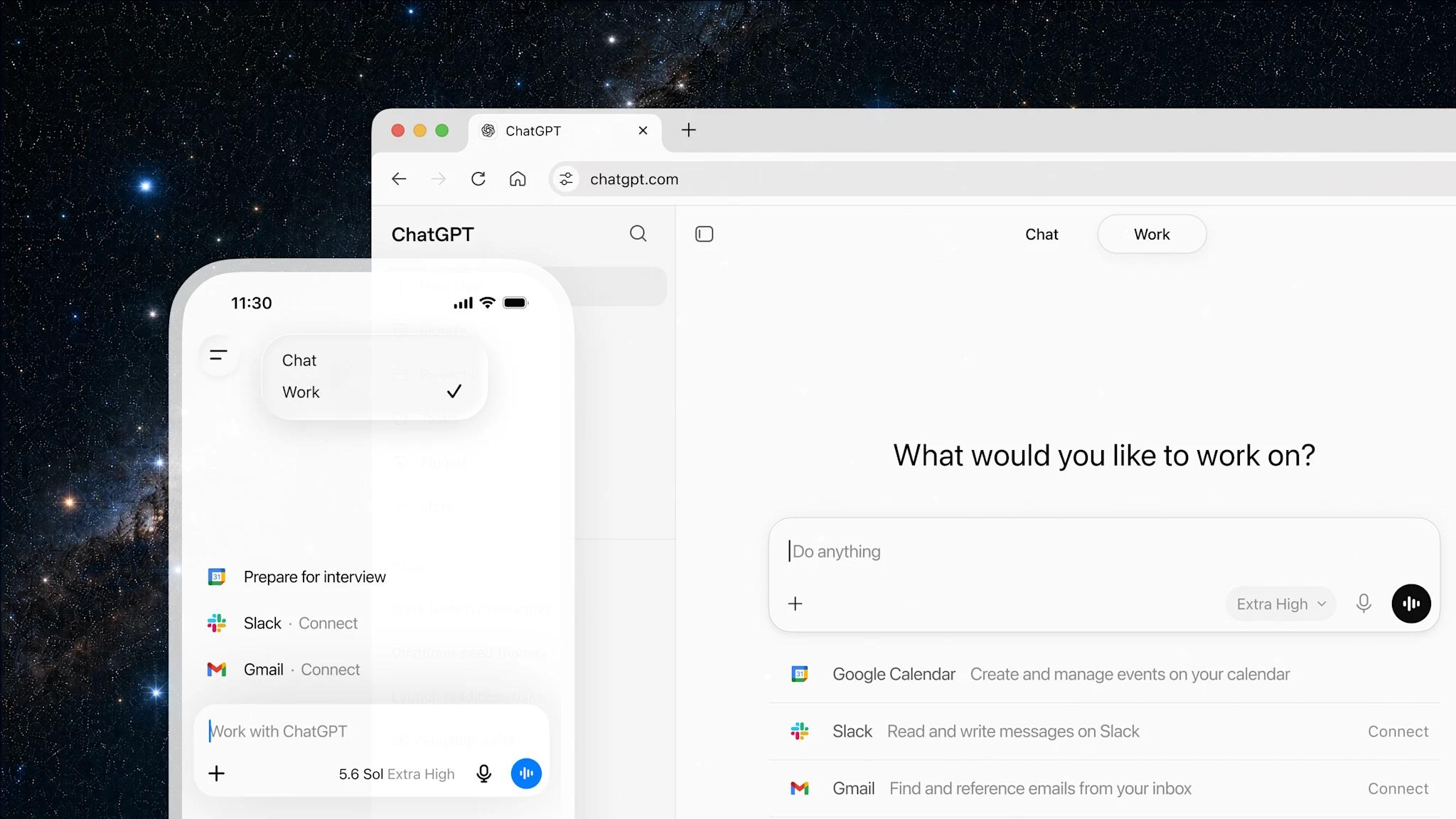
ChatGPT Work is a built-in workflow within ChatGPT, designed to assist users in handling complex tasks rather than just answering questions or creating content. The tool can take on an overall objective, analyze requirements, plan, and coordinate various capabilities to complete the job. Depending on the platform and access rights, ChatGPT Work can research information, read documents, analyze data, work with connected applications, and generate complete files.
The unique feature of ChatGPT Work lies in its ability to proactively manage multiple processes. Users don't need to guide the AI through every small step; they simply describe the desired outcome, provide relevant data, and monitor the process. For example, instead of manually opening each Excel file to compare revenue, you can assign ChatGPT Work the task of reading the spreadsheets, summarizing the data, identifying discrepancies, and presenting them in an easy-to-understand report.
2. How ChatGPT Work works
To complete a complex task, ChatGPT Work combines language processing, reasoning, and tool usage within an authorized work environment. Upon receiving a request, the system analyzes the objective, identifies necessary actions, and selects the appropriate course of action. During this process, the AI can continue to gather information, read data, create files, or adjust the plan based on the results of each step. The operating mechanism of ChatGPT Work can be understood through the following main stages:
-
Request reception: The system analyzes the command to determine the objective, input data, and desired user outcome.
-
Planning: Break down a large task into smaller tasks, prioritize them, and determine the tools needed.
-
Data collection: Reading uploaded documents or retrieving information from connected and authorized applications.
-
Processing and analysis: Comparing data, summarizing content, performing calculations, or researching information as required.
-
Generate results: Complete content, spreadsheets, reports, or other suitable output files.
-
Receiving feedback: Users can request edits, additions, or changes to the results to better meet their specific needs.

3. Key features of ChatGPT Work
More than just a chat tool, ChatGPT Work offers numerous capabilities to support work within a single environment. Users can combine features to handle tasks quickly without constantly switching between different tools. Notable features of ChatGPT Work include:
-
In-depth research: Assisting in searching, analyzing, and synthesizing information from multiple sources to support planning, market research, or report preparation.
-
Data analysis: Processing spreadsheets, comparing data sets, identifying anomalies, and presenting results in an easy-to-follow structure.
-
Complete document creation: Support in building reports, spreadsheets, presentations, and other content for office work.
-
Application connectivity: Can work with supported applications such as Google Drive, Slack, Salesforce, or Jira when the user grants appropriate permissions.
-
Interaction with the computer: In supported scenarios, ChatGPT Work can use the computer environment to manipulate the application interface and perform the necessary steps.
-
Working with the browser: Supports accessing and processing information on websites through the provided browser environment.
4. Applying ChatGPT Work in real-world work situations.
ChatGPT Work can serve many different fields, from office work and business to marketing and project management. Depending on the goal, users can assign suitable tasks to the AI to reduce manual operations and focus more on specialized tasks. Some practical application scenarios include:
-
For office workers: Use ChatGPT Work to read multiple documents, summarize meeting content, create reports, and prepare statistical tables.
-
For marketing staff: Assist in competitor research, advertising campaign analysis, content planning, and summarizing communication results.
-
For business owners: Analyze revenue, compare sales performance, track customer data, and prepare business reports.
-
For project management: Compile progress reports, categorize tasks, prepare meeting agendas, and prioritize tasks.
-
For content creators: Brainstorm ideas, create outlines, research topics, and assist in finalizing communication materials.
-
For students: Compile study materials, analyze information, develop presentation outlines, and organize study plans.

5. Detailed instructions on how to use ChatGPT Work
Using ChatGPT Work is relatively easy to learn, even for those with little tech experience. To get started, you need to prepare the relevant documents, define the tasks you want to perform, and clearly describe the requirements. Below is a step-by-step guide.
Step 1: Access ChatGPT Work
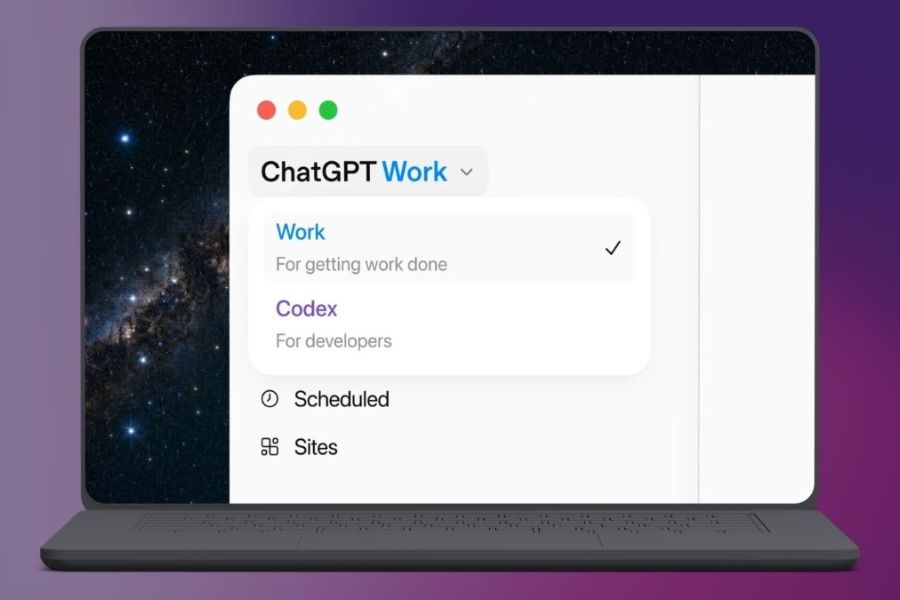
First, open the ChatGPT application on your computer or access the ChatGPT web interface. Log in to your account, then find and select the "Work" mode in the interface if your account is supported. Depending on the platform, the display location and how to access the feature may vary.
Step 2: Add the documents to be processed.
After accessing Work, you need to prepare the data related to the task, such as Excel spreadsheets, Word documents, PDF files, or text content. Select the add file button to upload the document to the chat. If using the desktop application and having the appropriate access permissions, you can also allow ChatGPT to work with specific files or folders on your computer.
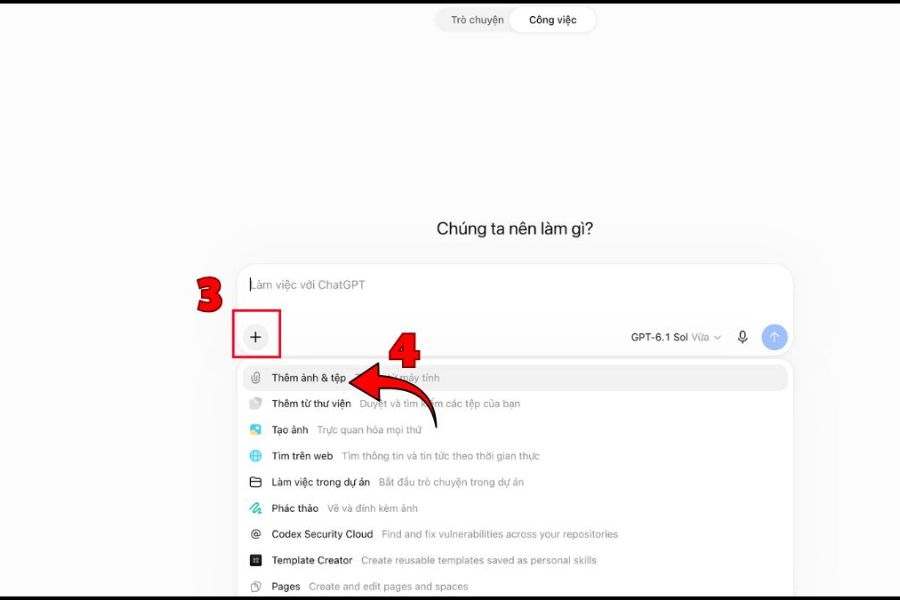
Step 3: Enter the job description command.
Next, enter your request in the chat box. You should clearly state the task, data scope, processing method, and desired result format. For example: "Read three sales reports for Q1, Q2, and Q3, compare growth rates between quarters, identify the highest-selling product, and create a summary table in Vietnamese."
Step 4: Monitor the implementation process.
After submitting your request, ChatGPT Work will analyze the task and implement the necessary steps. You can track progress, add data, or provide further explanations if the system doesn't understand the objective correctly. For actions requiring confirmation permission, please read the content carefully before agreeing to ensure the process proceeds as intended.
Step 5: Check and finalize the results
Once the task is complete, review the returned content, data tables, and generated files. If you find any inaccuracies or inappropriate presentation, you can request further corrections from the AI. In particular, compare important data with the original documents before using the report for work or sending it to clients and partners.
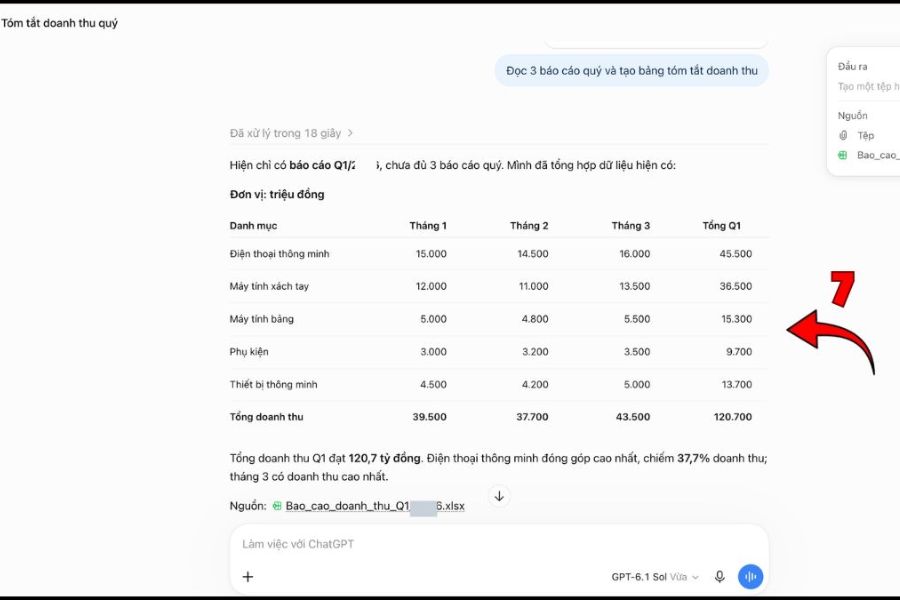
6. Tips for using ChatGPT Work more effectively
To make the most of ChatGPT Work, you need to know how to assign tasks and monitor results instead of just giving short, incomplete commands. The more specific a request is, the better the AI can choose the appropriate course of action. You can apply the following tips:
-
Clearly state your objective: Specify exactly what you want to accomplish, avoiding vague requests that make it difficult for the AI to determine the appropriate course of action.
-
Provide relevant data: Only upload relevant documents so the system can focus on processing only the necessary content.
-
Break down complex tasks: For large projects, ask the AI to handle each stage separately for easier tracking and adjustment.
-
Output format requirements: Specify whether you want a report, spreadsheet, document, or presentation to save editing time.
-
Leverage connected applications: Use applications that fit into your workflow to provide AI with the necessary data and context.
-
Regularly review results: Compare important information, especially financial figures, customer data, and professional content.
7. Is ChatGPT Work free?
The cost of using ChatGPT Work depends on the account plan and access platform. According to OpenAI's deployment scope, this feature is supported on web and mobile devices for eligible paid plans such as Plus, Pro, Business, Enterprise, and Edu. Access to the desktop application is subject to availability and terms and conditions. You can refer to the following account plans:
-
ChatGPT Free: This free plan is for users who need to chat and use basic features. It does not include access to Work on the web or mobile devices.
-
ChatGPT Go: Offers a higher usage limit than the Free plan, but this does not mean all Work features are unlocked.
-
ChatGPT Plus: Suitable for individuals who want to use AI regularly for work, research, and document processing.
-
ChatGPT Pro: Aimed at users who need to use AI intensively and perform complex tasks.
-
ChatGPT Business: Suitable for businesses that need to implement AI in a team-based work environment.
-
ChatGPT Enterprise and Edu: Targeted at organizations, businesses, and educational institutions with customized management and security settings.
8. Conclusion
ChatGPT Work opens up a new approach to applying artificial intelligence to daily work. From information research and data analysis to report building and document processing, the tool can help users complete many complex tasks with a more convenient process. However, to achieve good results, you need to know how to assign requests, select appropriate data, and monitor results before use. Hopefully, this article has helped you understand what ChatGPT Work is and how to utilize this tool to save time and improve work efficiency!





















VIP Products








Best Selling Products
MidJourney Account
29 USD
Upgrade Duolingo Super
29 USD
Upgrade Genuine Office 365
49 USD
Copyright Adobe Lightroom Account
59 USD
ChatGPT Plus Account (GPT-4)
16 USD
Windows 10 & 11 Pro Key
36 USD
Genuine Adobe Illustrator account
99 USD
Adobe Photoshop Copyright - Full App
120 USD
Adobe Premiere Pro Account
99 USD
Upgrade genuine Capture One account
120 USD
Capcut Pro 1 Year
39 USD
Plugin Retouch4me
69 USD
Genuine Cheap Canva Pro
39 USD
Freepik Premium Account
59 USD
Autodesk All App Account Copyright
120 USD