Best Selling Products

Upgrade Genuine Office 365
49 USD

Upgrade genuine Capture One account
120 USD

Genuine Cheap Canva Pro
39 USD

Genuine Adobe Illustrator account
99 USD

Freepik Premium Account
59 USD

Windows 10 & 11 Pro Key
36 USD

Adobe Photoshop Copyright - Full App
120 USD

Capcut Pro 1 Year
39 USD

Adobe Premiere Pro Account
99 USD

Upgrade Duolingo Super
29 USD

ChatGPT Plus Account (GPT-4)
16 USD

Plugin Retouch4me
69 USD

MidJourney Account
29 USD

Autodesk All App Account Copyright
120 USD

Copyright Adobe Lightroom Account
59 USD
What is Figma Design Explore? Discover the comprehensive creative tool for visual thinkers.
Nội dung
- 1. Figma: When creativity is no longer limited by tools.
- 2. AI becomes a companion in the creative process.
- 3. Design, illustration, and movement within the same ecosystem.
- 4. Turn ideas into products with Figma Make and AI Workflow
- 5. Design System: The foundation for consistency and scalability.
- 6. Real-time collaboration and superior productivity.
- 7. Expand your creative power with the plugin ecosystem.
- 8. Conclusion
Figma Design Explore marks a new stage of development for Figma, combining design, artificial intelligence (AI), real-time collaboration, and creative tools in a unified platform.
1. Figma: When creativity is no longer limited by tools.
Figma's biggest difference isn't in having more features than traditional design software, but in how the platform connects the entire creative process into a unified workspace. Instead of constantly switching between applications to perform each step, users can start from idea generation, build wireframes, design interfaces, create prototypes, develop the design system, and hand it over to the programmer all within the same project.
The Infinite Canvas design space allows users to freely implement various solutions without being limited by workspace. This is a particular advantage for product development teams, as the entire process from user research, user experience flow diagrams, interface design to interaction prototypes is stored in a single file.
Furthermore, the cloud-based platform ensures that all data is synchronized in real time. Designers, product managers, developers, and marketing personnel can all access the same project without having to send multiple versions of files back and forth as before. This not only saves time but also significantly reduces errors during collaboration.

2. AI becomes a companion in the creative process.
One of the key highlights of Figma Design Explore is that AI is no longer an add-on feature but has become an integral part of the design process. Instead of acting as a standalone chatbot, AI is directly integrated into the workspace, serving as a creative assistant always ready to support users.
With just a simple command, AI can suggest multiple layout options, generate initial interfaces, suggest ways to improve the user experience, or apply elements from the Design System to the new design. This saves designers a significant amount of time during the idea testing phase and provides them with more options before making a final decision.
What's unique about Figma's AI is that it's not aimed at replacing designers. Instead, the technology is built to handle repetitive tasks such as renaming layers, arranging layouts, batch editing, rewriting content, or translating text. This allows users to focus more on creative thinking, researching user experience, and solving complex design problems.
The AI's ability to understand project structure, component systems, and design system rules also helps to make suggestions more accurate and relevant to specific contexts, rather than just generating generic design templates.
3. Design, illustration, and movement within the same ecosystem.
Previously, creating illustrations or vector designs often required the use of specialized software, but now Figma has expanded its capabilities with Figma Draw. This tool provides a professional set of vector editing features, allowing users to create icons, illustrations, symbols, and graphic elements directly within their projects.

Integrating direct vector drawing capabilities makes the creative process more seamless. Designers don't need to export or import files between multiple applications, thereby reducing the risk of data discrepancies and significantly saving editing time.
In addition, Figma expands the possibilities of experience design through its Motion and Animation tools. Users can build motion effects, simulate interactions, and create prototypes that feel close to the real product. This is especially useful in app or website development projects, where motion plays a crucial role in enhancing the user experience.
Thanks to its ability to combine static design, illustration, and animation on a single platform, Figma makes it easy for creative teams to experiment with different ideas before entering the formal development phase.
4. Turn ideas into products with Figma Make and AI Workflow
One of Figma's most notable advancements is the introduction of Figma Make – a tool that helps transform ideas into workable prototypes. Previously, building an interactive prototype often required hours of design and programming; now, AI can assist in creating prototypes from a simple description in natural language.
Figma Make not only creates interfaces but also helps simulate basic interactions, allowing development teams to test user experiences from the very beginning. This shortens the product development cycle and reduces the cost of rework when problems are detected early.
In parallel, Figma also introduced AI Workflow processes to connect multiple AI models within the same workspace. Users can build visual processing sequences to create images, edit content, process videos, or combine various automation tasks. This development direction shows that Figma is not only focusing on interface design but also expanding into the field of AI-powered content creation.

5. Design System: The foundation for consistency and scalability.
When a product grows with hundreds of screens and multiple teams involved, maintaining consistency becomes a major challenge. Figma addresses this issue through its robust Design System, which allows for the standardization of all interface components.
Components, Variables, Styles, and Shared Libraries help businesses build a unified design library, from colors and fonts to interface elements. Any changes to the library are updated synchronously across the entire project, minimizing errors and significantly saving maintenance time.
Design systems not only benefit designers but also help developers implement interfaces more accurately thanks to standardized components. This creates an effective bridge between design and programming, contributing to improved final product quality.
For businesses developing multiple brands or product lines, the reusability and scalability of a Design System also helps optimize resources and ensure consistency across the entire ecosystem.
6. Real-time collaboration and superior productivity.
One of the factors contributing to Figma's success is its ability to collaborate in real time. Multiple team members can open a project together, edit directly on the same file, and track changes as they happen.
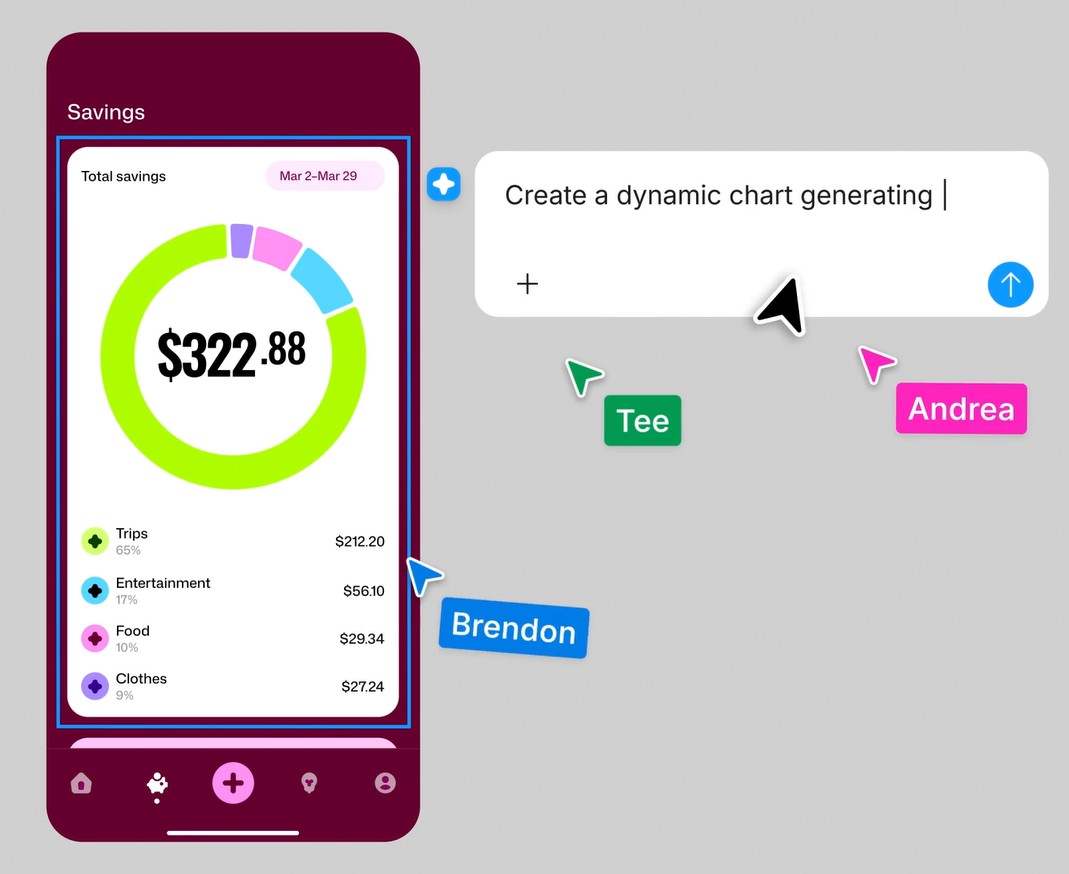
Instead of exchanging emails or sending multiple versions of files, teams can use a commenting system directly within the design to provide precise feedback on every detail. Each member's cursor is also displayed directly on the screen, making the exchange process more intuitive and efficient.
In addition to collaboration capabilities, Figma also supports many productivity-enhancing features such as Auto Layout, Responsive Design, and Multi-edit. Batch editing allows users to update multiple elements simultaneously, significantly reducing processing time for large projects.
The automatically saved version history also provides peace of mind during the workflow. Users can easily review or restore previous versions if needed, and track the changes made by each team member.
7. Expand your creative power with the plugin ecosystem.
Beyond its built-in features, Figma also boasts a rich plugin ecosystem, allowing users to expand the platform's capabilities according to their specific needs.
Thousands of community-developed plugins support a variety of tasks such as creating sample data, optimizing images, checking accessibility, synchronizing designs with content management systems, or connecting with software development tools.
More notably, AI now supports plugin creation from natural commands, allowing users to build utilities tailored to their own workflows without requiring extensive programming knowledge.
The ability to integrate APIs and connect with multiple external platforms also makes Figma a central hub in the digital product development ecosystem, where data flows seamlessly between design, project management, programming, and marketing.

8. Conclusion
Figma is gradually transforming from a UI design tool into a comprehensive creative platform for visual thinkers. Deep integration of AI into the workflow, expanded illustration capabilities with Figma Draw, intelligent prototyping with Figma Make, and the creation of AI workflows have propelled the platform far beyond the scope of traditional design software.
Figma's greatest strength lies in its ability to connect every stage of the product development process within a single workspace. From idea generation, interface design, design system building, animation creation, real-time collaboration, to handover to developers, everything is done seamlessly and consistently.
In the context of AI changing the way people create, Figma not only provides powerful tools but also creates an environment where technology and design thinking can maximize their value. This is why Figma is increasingly seen as an indispensable platform for designers, developers, marketers, and businesses pursuing digital transformation and innovation.





















VIP Products








Best Selling Products
Upgrade Genuine Office 365
49 USD
Upgrade genuine Capture One account
120 USD
Genuine Cheap Canva Pro
39 USD
Genuine Adobe Illustrator account
99 USD
Freepik Premium Account
59 USD
Windows 10 & 11 Pro Key
36 USD
Adobe Photoshop Copyright - Full App
120 USD
Capcut Pro 1 Year
39 USD
Adobe Premiere Pro Account
99 USD
Upgrade Duolingo Super
29 USD
ChatGPT Plus Account (GPT-4)
16 USD
Plugin Retouch4me
69 USD
MidJourney Account
29 USD
Autodesk All App Account Copyright
120 USD
Copyright Adobe Lightroom Account
59 USD