Best Selling Products

Genuine Adobe Illustrator account
99 USD

Freepik Premium Account
59 USD

Upgrade Duolingo Super
29 USD

Upgrade genuine Capture One account
120 USD

Adobe Premiere Pro Account
99 USD

Copyright Adobe Lightroom Account
59 USD

MidJourney Account
29 USD

ChatGPT Plus Account (GPT-4)
16 USD

Upgrade Genuine Office 365
49 USD

Capcut Pro 1 Year
39 USD

Autodesk All App Account Copyright
120 USD

Plugin Retouch4me
69 USD

Windows 10 & 11 Pro Key
36 USD

Genuine Cheap Canva Pro
39 USD

Adobe Photoshop Copyright - Full App
120 USD
What is the difference between DPI and PPI and how does it affect image quality?
Nội dung
In graphic design, photography, and printing, DPI and PPI are two terms that appear so frequently that many people mistakenly consider them the same. In reality, these two concepts describe two completely different aspects of resolution, and confusing them is a common cause of blurry, grainy, or undersized printed images. This article will help you understand the nature of each concept, how to measure them, their relationship to digital images, and how to choose the appropriate setting for each purpose.
1. Definition of DPI
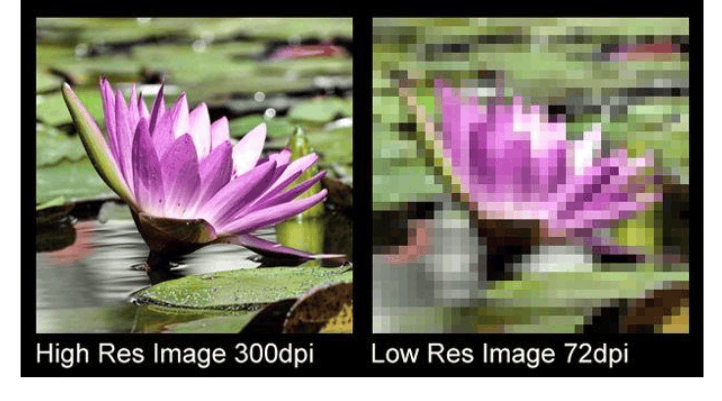
DPI stands for dots per inch, which is a measure of the density of ink dots that a printer or scanner can produce or record in a linear inch. In other words, DPI indicates how many tiny ink dots a device can place on a one-inch stretch of paper.
In printing, the higher the DPI, the denser and smaller the ink dots become, resulting in smoother reproduction of lines, edges, and tonal transitions. A 300 DPI print typically produces significantly sharper and more detailed images compared to a 72 DPI print, because the human eye has difficulty distinguishing individual dots at high density and perceives them as a continuous block of color. This is also why high-quality publications such as magazines, business cards, and artwork are often printed at 300 DPI or higher.
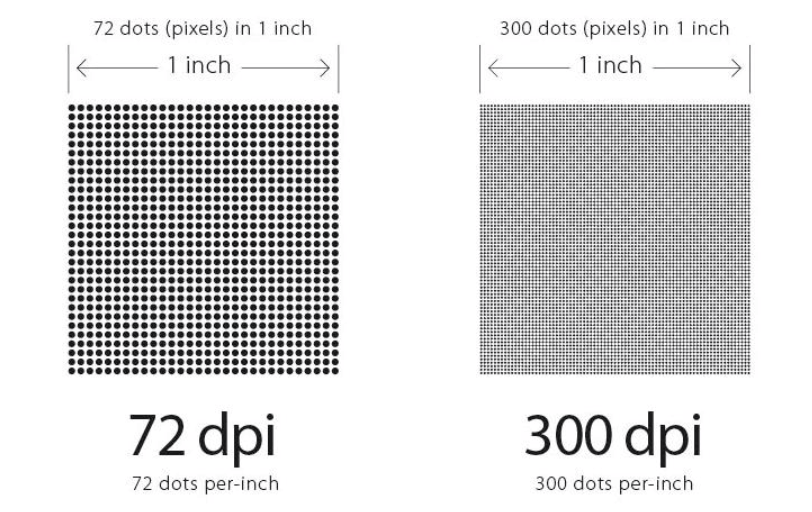
For scanners, DPI indicates the level of detail the device captures from the original. Scanning an image at 600 DPI means that for every inch of the image, the scanner samples 600 points in each direction, so you can enlarge the scan while maintaining clarity.
How to measure DPI
DPI is defined by counting the number of dots that can fit neatly within a one-inch strip. This value is usually a specification published by the printer or scanner manufacturer, for example, 600 DPI, 1200 DPI, or 2400 DPI. It's important to note that a printer's DPI is the device's capability; the actual print quality depends on the type of paper, ink, printing technology, and the quality of the original image file. A printer with a very high DPI may not be able to produce a sharp print from an image file with too few pixels.
2. Definition of PPI
PPI stands for pixels per inch, which means the number of pixels per inch. It's a measure of the pixel density of a screen or a digital image when displayed at a given physical size. Pixels are the smallest units of digital images; each pixel carries a specific color value, and millions of pixels combine to create the complete image you see.
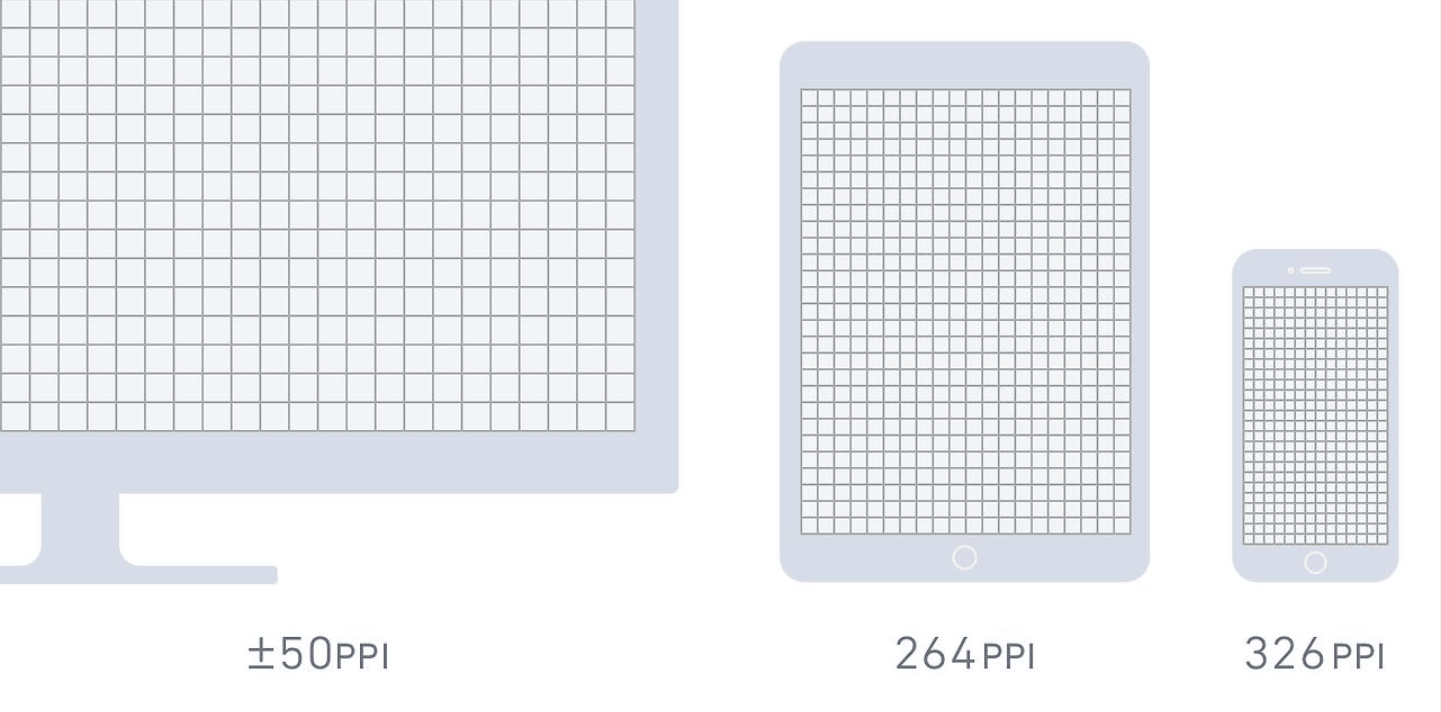
PPI (pixels per inch) plays a particularly important role in smartphones, tablets, computer monitors, and televisions, where the sharpness of text and images directly impacts the user experience. High PPI screens have very small pixels that are difficult to perceive with the naked eye, resulting in smoother text and more detailed images. Conversely, low PPI screens easily reveal pixels, creating a jagged or grainy appearance when viewed up close.
How to measure PPI
To calculate PPI accurately, you need to know the physical dimensions of the screen or image, as PPI is the ratio of the number of pixels to the actual length in inches. For screens, the standard calculation is to divide the diagonal pixel count by the diagonal length of the screen. The diagonal pixel count is calculated as the square root of the sum of the squares of the width and height in pixels.
Let's take a 15-inch screen with a resolution of 1920 x 1080. The diagonal of the screen in pixels is the square root of (1920 squared plus 1080 squared), which is approximately 2203 pixels. Dividing that by 15 inches gives us about 147 PPI. A 6-inch phone with a resolution of 2400 x 1080 has a diagonal of approximately 2632 pixels, corresponding to nearly 439 PPI, much higher than a computer screen, which is why the text on modern phones looks so smooth.
The relationship between PPI, screen size, and resolution needs to be considered together. Two screens with the same resolution but different sizes will have different PPI, because the larger screen has to spread the same number of pixels over a larger area. Therefore, a smaller screen with the same resolution will always have a higher pixel density.
3. Understand the difference between DPI and PPI.
The core difference lies in the object each metric describes. DPI refers to the physical ink dots produced by a printer on paper, while PPI refers to the digital pixels in an image file or on a screen. One belongs to the physical world of ink and paper, the other to the digital world of data and light.
To better understand this, it's necessary to distinguish between image specifications and the actual quality of an image. Specifications such as resolution, color space, and file format indicate the basic attributes of an image. Resolution determines the total number of pixels, which in turn affects size and level of detail. Color space defines the range and accuracy of colors that can be displayed or printed. File format dictates how image data is compressed and stored, ensuring compatibility with various software and devices.
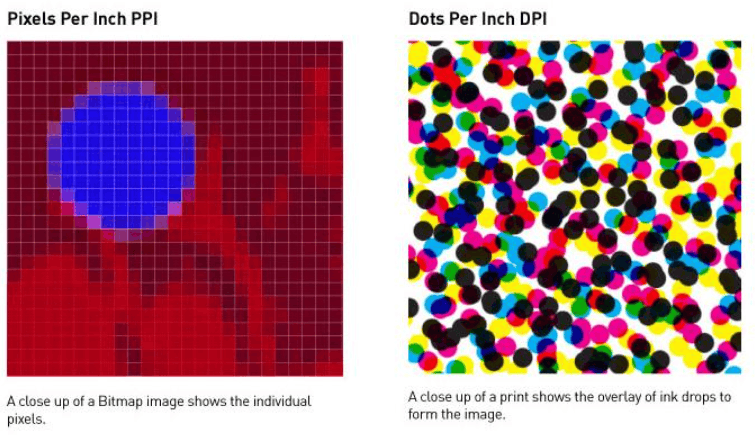
However, these specifications do not guarantee the final image quality. Image quality depends on many other factors. Poor lenses or optics can cause blurring and distortion even with high file specifications. Noise, which is the random variation in brightness or color, creates unwanted grain. Color shift or edge misalignment causes color layers to not match when printed. And pixelation occurs when an image is enlarged beyond its original resolution, resulting in a loss of sharpness and detail.
Photographers, graphic designers, and image processors who understand this boundary will make more accurate decisions, ensuring that the parameters meet requirements while maintaining the highest visual quality.
4. Learn about digital photography.
Digital images are present in everyday life, from photos taken with mobile phones to graphics on websites and social media. Essentially, a digital image is a grid of rows and columns of pixels, each pixel storing a color value. The number of pixels in width and height determines the image resolution, for example, 4000 x 3000 pixels, equivalent to approximately 12 megapixels.
Besides resolution, there are three fundamental factors to understand when working with digital images. First is the file format, such as JPEG, PNG, WEBP, or TIFF, each with its own data compression methods and characteristics. JPEG is suitable for still images due to its small file size, PNG maintains sharpness well for graphics and supports transparent backgrounds, while TIFF is often used when high quality is needed for printing. Second is the color space, for example, sRGB for screens and the web, or CMYK for printing, which determines how colors are represented and reproduced. Third is the compression technique, including lossless and lossy compression, affecting both the file size and the integrity of the image.
Understanding these fundamentals will help you not only appreciate the beauty of digital images but also work more effectively with them, whether you're a photographer, designer, or simply someone who wants to print cherished photos in the best possible quality.
5. The relationship between DPI, PPI, and digital images
Although often confused, DPI and PPI play two different roles in the lifecycle of an image. PPI is tied to the image file and display, representing the pixel density when the image is displayed or intended to be printed at a certain size. DPI is tied to the paper output device, representing the density of ink dots the printer uses to reproduce those pixels.
With displays, PPI (pixels per inch) is the indicator of sharpness, especially when viewed from a close distance. With printing, the printer's DPI (pixels per inch) determines the fineness of detail on the paper, but the final quality is only achieved when the image file has enough pixels for the desired print size. If the image has too few pixels, even the most powerful printer can only reproduce the missing information, resulting in a blurry or grainy print.
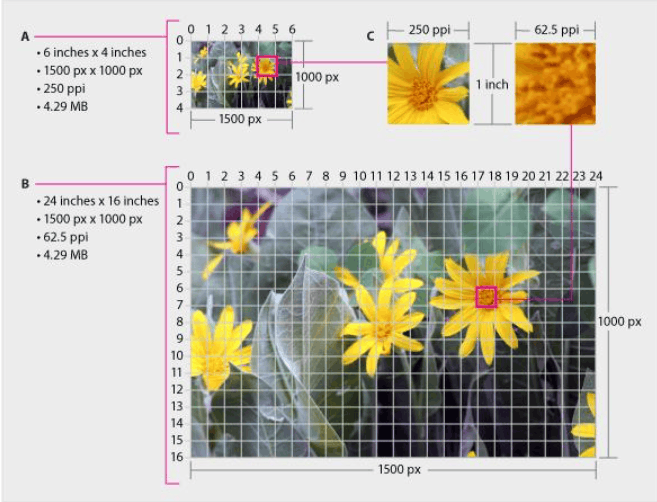
In practice, these two metrics are linked through a simple calculation. The required number of pixels equals the print size in inches multiplied by the desired density. For example, to print a 10-inch wide and 10-inch high photo at 300 PPI, the image file needs to be 3000 x 3000 pixels. To print an A4 size at 300 PPI, you need approximately 2480 x 3508 pixels. This ratio is usually roughly one pixel per ink dot at the basic level, but in reality, many printers use many small ink dots to simulate a pixel, so the printer's DPI is often much higher than the image's PPI.
Therefore, the two terms are not interchangeable. The PPI of an image file can affect the printout, while the DPI of a printer does not change the number of pixels available in the file. Confusing the two concepts can lead to incorrect assumptions about quality and output results.
6. Conclusion
Although DPI and PPI differ by only one letter, they belong to two different worlds. DPI reflects the ability to reproduce detail using ink on paper, while PPI reflects the pixel density on a screen and in a digital image file. Understanding the relationship between them will help you determine the appropriate image file size for each purpose, avoiding grainy prints and maximizing the quality of your display device. Always start with the final intended use, then calculate the required pixel count, and your images will always achieve the desired quality.





















VIP Products








Best Selling Products
Genuine Adobe Illustrator account
99 USD
Freepik Premium Account
59 USD
Upgrade Duolingo Super
29 USD
Upgrade genuine Capture One account
120 USD
Adobe Premiere Pro Account
99 USD
Copyright Adobe Lightroom Account
59 USD
MidJourney Account
29 USD
ChatGPT Plus Account (GPT-4)
16 USD
Upgrade Genuine Office 365
49 USD
Capcut Pro 1 Year
39 USD
Autodesk All App Account Copyright
120 USD
Plugin Retouch4me
69 USD
Windows 10 & 11 Pro Key
36 USD
Genuine Cheap Canva Pro
39 USD
Adobe Photoshop Copyright - Full App
120 USD