Best Selling Products

Plugin Retouch4me
69 USD

Upgrade genuine Capture One account
120 USD

Windows 10 & 11 Pro Key
36 USD

Capcut Pro 1 Year
39 USD

Copyright Adobe Lightroom Account
59 USD

Autodesk All App Account Copyright
120 USD

Upgrade Genuine Office 365
49 USD

Freepik Premium Account
59 USD

MidJourney Account
29 USD

Adobe Photoshop Copyright - Full App
120 USD

Adobe Premiere Pro Account
99 USD

Upgrade Duolingo Super
29 USD

Genuine Cheap Canva Pro
39 USD

Genuine Adobe Illustrator account
99 USD

ChatGPT Plus Account (GPT-4)
16 USD
What Is White Balance in Photography? How to Set It Correctly and Avoid Color Casts
Nội dung
- 1. Understanding Color Temperature and White Balance
- 1.1. What Is Color Temperature?
- 1.2. What Is White Balance?
- 2. White Balance Modes in Cameras
- 2.1. Auto White Balance (AWB)
- 2.2. Tungsten (Incandescent) Mode
- 2.3. Direct Sunlight Mode
- 2.4. Flash Mode
- 2.5. Cloudy Mode
- 2.6. Fluorescent Mode
- 2.7. Shade Mode
- 2.8. Kelvin (K) Mode
- 2.9. Preset (PRE) Mode
- 3. How to Set White Balance in a Camera
- 3.1. Adjusting White Balance Directly on the Camera
- 3.2. Using a Gray Card for Accurate Setup
- 3.3. Step-by-Step Process
- 4. Changing White Balance in Post-Processing Software
- 4.1. Adjusting White Balance in Editing Software
- 4.2. The Difference Between RAW and JPEG Files
- 5. The Importance of White Balance in Photography
- 5.1. Reproducing Accurate Colors
- 5.2. Creating Mood and Atmosphere
- 5.3. Ensuring Consistency
- 5.4. Supporting Efficient Post-Processing
- 5.5. Enhancing Artistic Value
- 6. Practical Applications
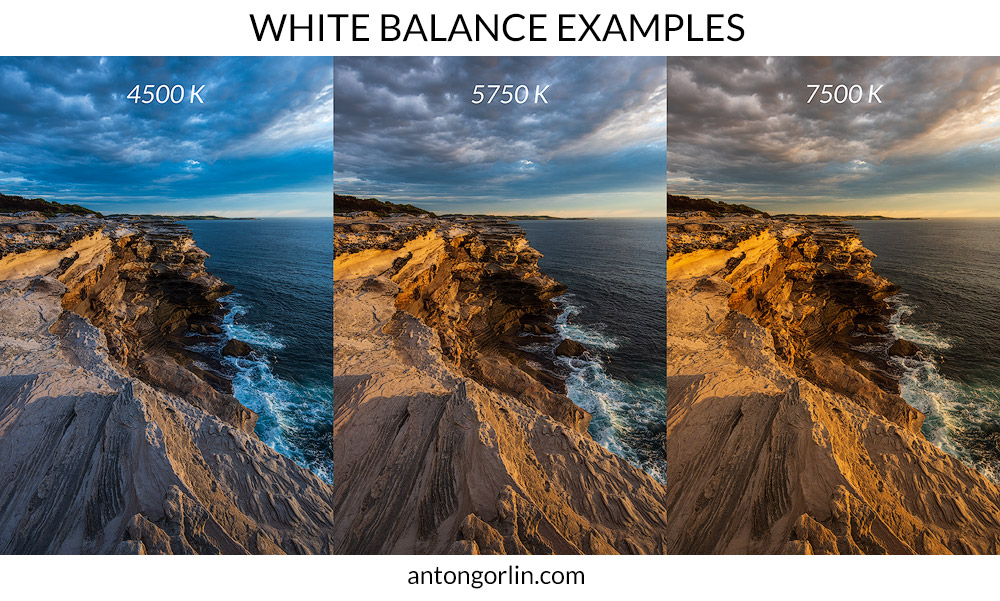
White Balance (WB) is the process of adjusting colors in an image to eliminate color shifts caused by the color temperature of a light source. The goal of white balance is to ensure that white areas appear truly white, thereby making all colors in the image look natural and accurate.
1. Understanding Color Temperature and White Balance
1.1. What Is Color Temperature?
Color temperature is a physical property of light measured in Kelvin (K). This concept describes the color of a light source based on the spectrum of radiation it emits. In photography, color temperature helps determine whether light appears warm or cool, directly influencing the colors in an image.
.jpg)
According to physical principles, when an object is heated, it emits light whose color changes with temperature. At lower temperatures, light tends to appear red or orange; as the temperature increases, the light becomes white and eventually blue. Therefore, on the Kelvin scale, lower temperatures correspond to warm light, while higher temperatures produce cool light.
Some common color temperature values include:
-
Candlelight: approximately 1,500K – 2,000K, with a warm orange tone.
-
Incandescent bulbs: approximately 2,700K – 3,200K, producing a warm yellow tone.
-
Sunrise or sunset light: approximately 3,500K – 4,500K.
-
Daylight: approximately 5,500K – 5,600K, considered neutral.
-
Cloudy skies: approximately 6,000K – 6,500K.
-
Shade: approximately 7,000K – 8,000K, with a cool blue tone.
-
Clear blue sky: approximately 9,000K – 10,000K.
Generally, the light perceived by the human eye as neutral is around 5,500K. This is considered the standard daylight reference and is commonly used as a benchmark in photography and cinematography.
One remarkable aspect of human vision is its ability to automatically adapt to different lighting environments. Thanks to this mechanism, we still perceive a sheet of white paper as white whether indoors or outdoors. Cameras, however, do not possess this adaptive capability unless configured appropriately. This is why white balance is essential for ensuring accurate color reproduction.
1.2. What Is White Balance?
White Balance (WB) is the process of adjusting colors in an image to eliminate color shifts caused by the color temperature of a light source. The objective is to ensure that white areas appear truly white, thereby making all colors in the image natural and accurate.
.jpg)
Light from different sources carries distinct color characteristics. For example, incandescent lighting produces a warm yellow tone, while fluorescent lighting often creates a greenish-blue cast. Without white balance correction, images can appear color-tinted and fail to represent reality accurately.
In principle, white balance works by adding complementary colors to neutralize the color characteristics of the light source. When an image appears too yellow, the camera adds blue; when an image appears too blue, the camera adds yellow or red to restore balance.
Simply put, White Balance in digital photography is the process of adjusting colors so that an image looks as natural and realistic as possible. Correct white balance settings not only improve image quality but also enhance professionalism and visual appeal.
2. White Balance Modes in Cameras
Most modern cameras, from DSLR to mirrorless models, offer multiple white balance modes tailored to different lighting conditions. Understanding the purpose of each mode helps photographers control color more effectively.
.jpg)
2.1. Auto White Balance (AWB)
This is the camera’s default setting. The camera automatically analyzes the ambient light and adjusts colors accordingly. AWB is highly convenient for quick shooting or environments where lighting changes frequently. However, it can struggle in mixed-light situations, such as a combination of tungsten lighting and natural daylight.
2.2. Tungsten (Incandescent) Mode
Tungsten mode is designed for shooting under incandescent lighting. The camera adds cooler tones to reduce excessive yellow or orange color casts, resulting in more natural-looking images. It is an ideal choice for indoor photography at night.
2.3. Direct Sunlight Mode
This mode is used for outdoor photography under direct sunlight. It helps reproduce colors accurately and vividly, making it especially suitable for landscape and daytime portrait photography.
2.4. Flash Mode
When a flash is used as the primary light source, Flash mode adds a warmer tone to compensate for the cooler characteristics of flash illumination. This helps maintain more natural skin tones.
2.5. Cloudy Mode
Under cloudy conditions, light often has a cooler tone. Cloudy mode adds a subtle warm tint to soften colors. It is also commonly used to enhance warmth during sunrise or sunset photography.
2.6. Fluorescent Mode
Fluorescent lighting often introduces a greenish-blue cast. Fluorescent mode neutralizes this color shift, producing brighter and more balanced images.
2.7. Shade Mode
Images captured in shaded areas often appear bluish. Shade mode adds warm orange tones, creating a more pleasant and natural appearance compared to Cloudy mode.
2.8. Kelvin (K) Mode
Kelvin mode allows users to manually set color temperature, typically between 2,500K and 10,000K. It is the preferred choice for professional photographers who require precise color control.
2.9. Preset (PRE) Mode
Preset mode allows the camera to determine a reference white point directly at the shooting location. This is the most accurate method of setting white balance and is especially useful in studios or complex lighting environments.
3. How to Set White Balance in a Camera
Adjusting White Balance on modern cameras is generally simple and fast. Most manufacturers design user-friendly interfaces that make the process easy.
3.1. Adjusting White Balance Directly on the Camera
On DSLR and mirrorless cameras, users can typically adjust white balance using a dedicated “WB” button. For example, on many Nikon cameras, simply holding the WB button and rotating the control dial allows switching between modes such as Incandescent, Fluorescent, and Direct Sunlight.
.jpg)
If the camera does not have a dedicated WB button, users can access the Shooting menu and select White Balance to choose the appropriate setting for the lighting conditions.
3.2. Using a Gray Card for Accurate Setup
The most accurate way to set white balance is by using Preset mode together with an 18% gray card. This is the standard method used by professional photographers to ensure accurate color reproduction.
.jpg)
3.3. Step-by-Step Process
The process of manually setting white balance includes the following steps:
-
Place the gray card in front of the lens.
-
Ensure the card receives the same lighting as the subject.
-
Take a photo of the gray card.
-
Select Preset mode in the White Balance menu.
-
Use the captured image to set white balance.
If a gray card is unavailable, a white sheet of paper can be used instead. However, the accuracy will not be as high as with dedicated equipment.
It is important to remember that this setup is not permanent. Whenever lighting conditions change, the process should be repeated to maintain accurate color reproduction.
4. Changing White Balance in Post-Processing Software
In many situations, adjusting white balance at the time of capture may not be practical. In such cases, post-processing becomes an effective solution for refining the image.
4.1. Adjusting White Balance in Editing Software
Programs such as Adobe Lightroom and Photoshop provide powerful tools for adjusting white balance. Users can modify color temperature using the Temperature slider or fine-tune green and magenta tones with the Tint slider.
.jpg)
Additionally, the Eyedropper tool allows users to select a neutral area within an image to quickly and accurately set white balance.
.jpg)
4.2. The Difference Between RAW and JPEG Files
Image format plays a significant role in white balance adjustment capabilities.
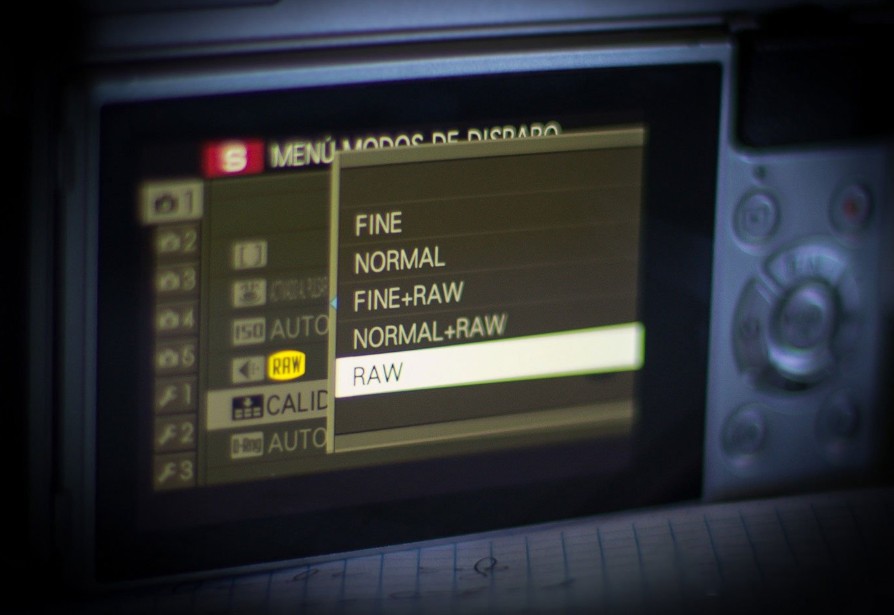
RAW files store all data captured by the sensor, allowing color temperature adjustments without degrading image quality. This makes RAW the preferred choice for professional photographers.
JPEG files, on the other hand, are already processed and compressed within the camera. Adjusting white balance afterward can reduce image quality and introduce color inaccuracies.
Therefore, shooting in RAW provides maximum flexibility during post-processing and ensures optimal results.
5. The Importance of White Balance in Photography
White balance is not just a technical setting; it is a key factor that influences both image quality and emotional impact.
5.1. Reproducing Accurate Colors
Correct white balance ensures that colors accurately represent the subject, which is particularly important in product, fashion, and advertising photography.
5.2. Creating Mood and Atmosphere
Warm tones evoke feelings of intimacy and romance, while cool tones suggest modernity and calmness. Through white balance, photographers can influence the emotional response of viewers.
5.3. Ensuring Consistency
In professional photo collections, color consistency is crucial. Accurate white balance helps maintain a cohesive visual style and brand identity.
5.4. Supporting Efficient Post-Processing
Getting white balance right from the start saves editing time and minimizes errors during post-production.
5.5. Enhancing Artistic Value
White Balance not only helps reproduce reality but also opens creative possibilities for photographers to develop their unique visual style.
6. Practical Applications
In real-world photography, white balance is applied differently depending on the genre. Portrait photography requires natural skin tones; landscape photography aims to reproduce the authentic colors of nature; product photography demands absolute color accuracy; while food photography often favors warm tones to enhance visual appeal.
In addition, beginners frequently make mistakes such as relying entirely on Auto White Balance, forgetting to change settings when lighting conditions change, or not shooting in RAW format. Regular practice, a solid understanding of lighting environments, and the use of tools such as gray cards can significantly improve white balance control skills.
In summary, white balance is an indispensable element of photography. Understanding color temperature, mastering the various white balance modes, and applying them correctly in different situations will help photographers create images with accurate colors, professional quality, and strong emotional impact.





















VIP Products








Best Selling Products
Plugin Retouch4me
69 USD
Upgrade genuine Capture One account
120 USD
Windows 10 & 11 Pro Key
36 USD
Capcut Pro 1 Year
39 USD
Copyright Adobe Lightroom Account
59 USD
Autodesk All App Account Copyright
120 USD
Upgrade Genuine Office 365
49 USD
Freepik Premium Account
59 USD
MidJourney Account
29 USD
Adobe Photoshop Copyright - Full App
120 USD
Adobe Premiere Pro Account
99 USD
Upgrade Duolingo Super
29 USD
Genuine Cheap Canva Pro
39 USD
Genuine Adobe Illustrator account
99 USD
ChatGPT Plus Account (GPT-4)
16 USD