Best Selling Products

Upgrade genuine Capture One account
120 USD

Upgrade Duolingo Super
29 USD

MidJourney Account
29 USD

Genuine Cheap Canva Pro
39 USD

Upgrade Genuine Office 365
49 USD

Freepik Premium Account
59 USD

Plugin Retouch4me
69 USD

Genuine Adobe Illustrator account
99 USD

Windows 10 & 11 Pro Key
36 USD

Copyright Adobe Lightroom Account
59 USD

ChatGPT Plus Account (GPT-4)
16 USD

Autodesk All App Account Copyright
120 USD

Adobe Premiere Pro Account
99 USD

Adobe Photoshop Copyright - Full App
120 USD

Capcut Pro 1 Year
39 USD
What makes Microsoft Teams free that so many people are using it?
Nội dung
- 1. Learn about Microsoft Teams for free.
- 2. Cloud storage capacity: 5 GB
- 3. Group calls are limited to a maximum of 60 minutes.
- 4. Connect up to 100 people.
- 5. Unlimited chat
- 6. Plan with tasks
- 7. Quick survey
- 8. Support collaboration in a shared space.
- 9. Data encryption and protection
- 10. How to effectively utilize Teams for free
Microsoft Teams is Microsoft''s communication and collaboration platform, allowing users to chat, make calls, hold online meetings, and share content in a unified space.
1. Learn about Microsoft Teams for free.
Microsoft Teams is Microsoft's communication and collaboration platform, allowing users to chat, make calls, hold online meetings, and share content in a unified space.
With the free version, individual users can access essential features without needing to set up a complex working system. This is a suitable option when the main needs revolve around connecting with friends, family, or a small group.
Notably, the free version is designed for single users , meaning each individual can use their account to connect and collaborate with others.
2. Cloud storage capacity: 5 GB
One of the notable benefits of the free Microsoft Teams is 5 GB of cloud storage .

This storage capacity can be used to store necessary content during service usage. For individual users, 5 GB can meet basic storage needs such as documents, images, or files shared during collaboration.
Cloud storage also helps reduce reliance on a single device. Instead of just storing files on a personal computer, users can store data in the cloud and continue accessing it using a compatible device.
This is especially useful for people who frequently switch between computers and mobile devices. When documents are stored online, it becomes more convenient to resume a conversation or access work-related files.
However, users should proactively manage their storage space, especially if they frequently share images or large files. Regularly checking and organizing data helps prevent inefficient use of storage.
3. Group calls are limited to a maximum of 60 minutes.
Microsoft Teams, which is free, supports group calls for up to 60 minutes . This feature is suitable for online conversations that aren't too long, such as chatting with family, meeting up with friends, or coordinating a small task.
Instead of meeting in person, members can participate in the same call from different locations. This saves travel time and facilitates maintaining connections when people are not in the same place.

The 60-minute limit is suitable for meetings or calls with relatively focused content. For longer discussions, users may need to consider how to organize the content to ensure the call is effective and doesn't drag on unnecessarily.
Another important point is that the free version supports up to 100 participants in a group call. With this number, Teams can serve not only small groups but also larger online meetings.
4. Connect up to 100 people.
The ability to support 100 participants gives the free Microsoft Teams a wider range of uses compared to a tool designed only for two-person chat.
Within a family setting, Teams can be used to organize a call with multiple members in different locations. In academic settings, the tool can support groups in exchanging information or coordinating a small project.
For community groups or work teams that don't require advanced business management features, the ability to connect multiple people in a single call also offers significant convenience.
However, a large number of participants doesn't necessarily mean the call will always be effective. When there are many members, agreeing on the topic, duration, and style of exchange is still crucial to prevent the conversation from becoming uncontrollable.
5. Unlimited chat
Another important advantage of the free Microsoft Teams is the ability to chat unlimitedly with friends and family .
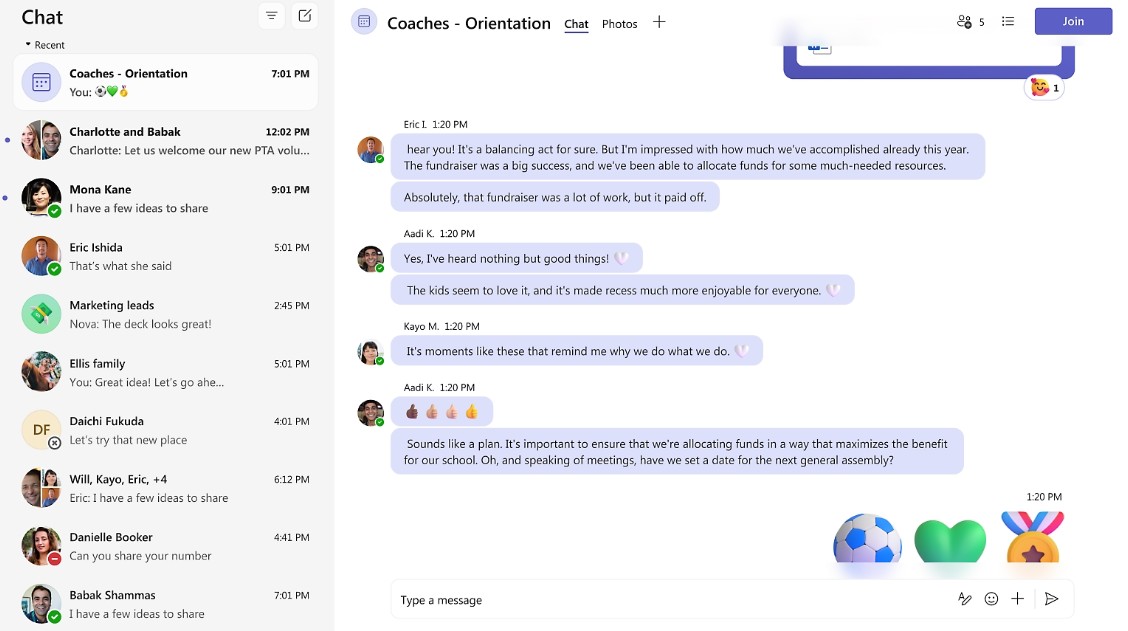
Instead of just using online calls, users can exchange information via text messages throughout the connection. This is a suitable form of communication when immediate response isn't needed or when you want to save the content to view later.
For example, a family could use the chat function to share plans for a trip. Members could discuss locations, times, and necessary preparations without needing to make a separate call for each topic.
Similarly, a group of friends can maintain a shared conversation to exchange plans or necessary information.
Combining chat and calls on the same platform gives users the flexibility to choose their communication method depending on the situation.
6. Plan with tasks
Microsoft Teams, free of charge, focuses not only on communication but also supports collaborative planning for tasks .
This is a useful feature when a team needs to coordinate to achieve a common goal. Instead of just messaging about what needs to be done, members can organize the work into clearer tasks.
For example, when a group of friends plans an event, everyone can break down the work into smaller tasks such as preparing content, contacting venues, or checking the necessary lists. Dividing tasks helps each member understand their part and reduces the risk of overlooking anything.
For smaller projects, this management approach can help transform a simple conversation into a more organized collaborative process.
7. Quick survey
When many people are involved in a plan, reaching a consensus can sometimes be time-consuming. Microsoft Teams, a free tool, offers polling capabilities , allowing teams to quickly gather opinions from members.
Instead of asking each person individually and compiling the answers themselves, the organizer can offer several options for everyone to choose from.
For example, a group might create a poll to choose a time, location, or method for an activity. When people make choices, the results will provide the group with a basis for making a decision.

This is a simple but useful feature in situations where quick agreement is needed among multiple people.
8. Support collaboration in a shared space.
By combining chat, calls, tasks, and polls, the free Microsoft Teams creates a relatively comprehensive space for personal communication needs.
Users don't necessarily have to switch between multiple apps just for messaging, group calls, and planning. These activities can all be done within the same Teams ecosystem.
This is especially valuable for groups that frequently discuss a common topic. Information is maintained within a familiar communication space, making it easy for members to return to previous content when needed.
9. Data encryption and protection
Besides communication features, security is a crucial factor when choosing an online platform.
Microsoft Teams, free of charge, provides data encryption for meetings, chats, calls, and files . This mechanism helps protect information while users are using the platform.
For individual users, data security is especially important when conversations may contain private information or files shared among multiple people.
Using a platform with data protection mechanisms gives users greater peace of mind when communicating online. However, security doesn't just depend on the platform. Users should also protect their accounts, use appropriate passwords, and be cautious when sharing information.
10. How to effectively utilize Teams for free
To use Microsoft Teams effectively for free, users should first clearly define their purpose. If the main need is to chat, organize chats into groups or by topic. If the need is to coordinate a plan, leverage tasks and gather feedback instead of just exchanging messages.

For group calls, it's advisable to prepare the content beforehand to make the most of the 60-minute time limit. When multiple people are involved, defining the call's objectives also helps keep the conversation more focused.
With 5 GB of storage space, regularly check your saved files and organize them efficiently. Files that are no longer needed can be managed or removed to use space more effectively.
Most importantly, use Teams as a unified connection space rather than just a messaging app.
If your needs are primarily focused on connecting with friends, family, or small groups, the free Microsoft Teams is a worthwhile option. As needs grow to a business scale and require more advanced management, collaboration, or security tools, users may want to explore more suitable Microsoft 365 packages.





















VIP Products








Best Selling Products
Upgrade genuine Capture One account
120 USD
Upgrade Duolingo Super
29 USD
MidJourney Account
29 USD
Genuine Cheap Canva Pro
39 USD
Upgrade Genuine Office 365
49 USD
Freepik Premium Account
59 USD
Plugin Retouch4me
69 USD
Genuine Adobe Illustrator account
99 USD
Windows 10 & 11 Pro Key
36 USD
Copyright Adobe Lightroom Account
59 USD
ChatGPT Plus Account (GPT-4)
16 USD
Autodesk All App Account Copyright
120 USD
Adobe Premiere Pro Account
99 USD
Adobe Photoshop Copyright - Full App
120 USD
Capcut Pro 1 Year
39 USD